
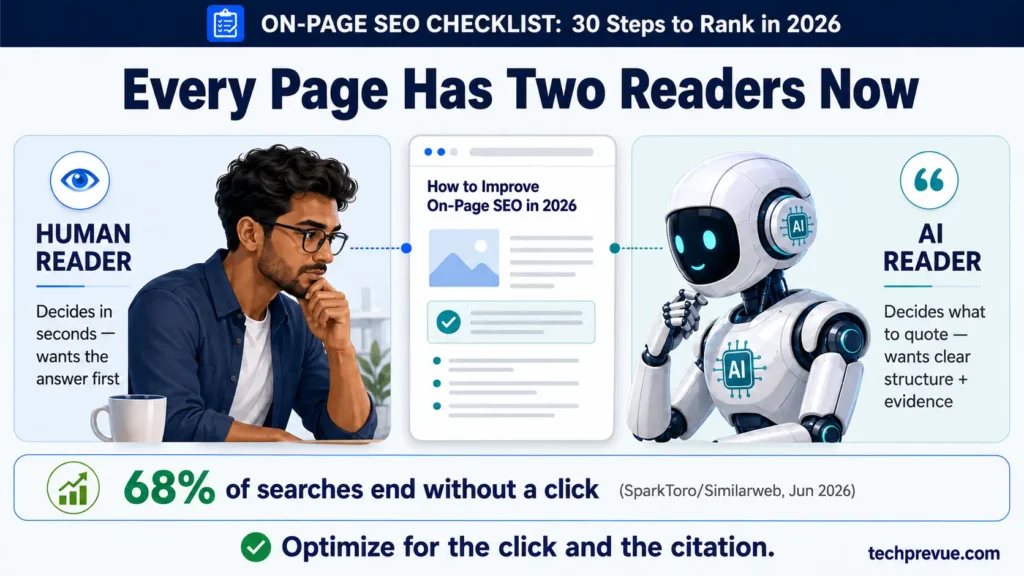
68% of Google searches now end without a single click. When an AI Overview appears, click-through rates fall by nearly 60% (SparkToro/Similarweb clickstream study, June 2026).
Numbers like that make many site owners want to give up on optimization entirely.
That’s exactly the wrong response. The pages that survive this shift — the ones that still earn clicks and get quoted inside AI answers — share one trait: disciplined on-page work. The same clear structure that wins a featured snippet is the structure Google’s AI Overviews, ChatGPT, and Perplexity pull answers from.
Quick Answer: An on-page SEO checklist is a step-by-step list of optimizations applied to a single page — keyword targeting, content quality, title tags, headings, links, images, schema, and page experience — so the page ranks higher in search results and gets cited in AI-generated answers.
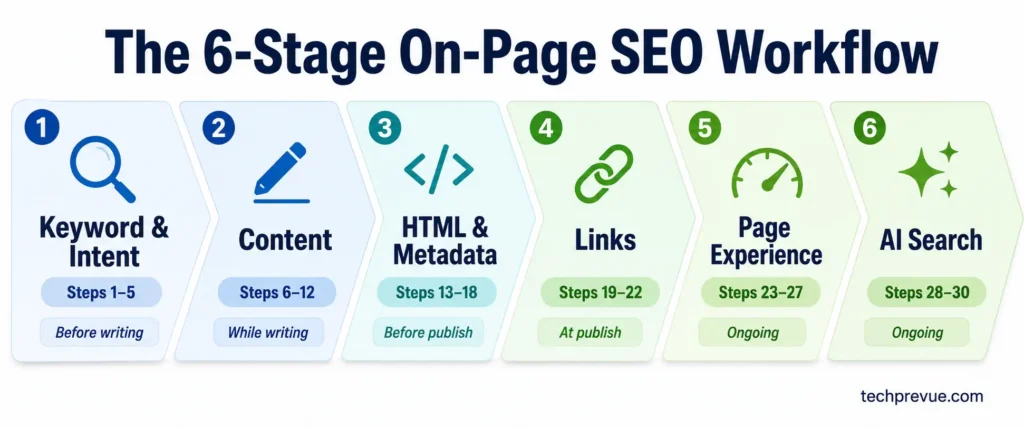
This SEO checklist covers 30 on-page steps, arranged in the order you actually do the work: before writing, while writing, before publishing, and after publishing. Every step includes a way to verify it’s done, because “I think I optimized it” is how rankings quietly slip away.
Bookmark it. Run it on every page you publish or update.
- What Does On-Page SEO Cover in 2026?
- The Complete On-Page SEO Checklist Sheet (Copy This)
- How to Use This On-Page SEO Checklist
- Stage 1: Keyword and Intent Checks (Before You Write)
- Stage 2: Content Optimization Checks
- Stage 3: HTML and Metadata Checks
- Stage 4: Internal and External Link Checks
- Stage 5: Page Experience Checks
- Stage 6: AI Search Optimization Checks
- Basic On-Page SEO Checklist for Beginners
- Common On-Page SEO Mistakes to Avoid
- On-Page SEO Checklist – FAQs
- Ship Pages That Deserve Both the Click and the Citation
What Does On-Page SEO Cover in 2026?
On-page SEO is everything you optimize directly on a web page: content, keywords, HTML tags, internal links, images, structured data, and user experience. It differs from technical SEO (site-wide crawling and performance) and off-page SEO (backlinks and brand signals earned elsewhere).
Here’s where the boundaries sit:
| Type | Where it happens | Examples | Who controls it |
|---|---|---|---|
| On-page SEO | On a single page | Title tags, content, headings, internal links, images, schema | You, fully |
| Technical SEO | Across the whole site | Crawling, indexing, sitemaps, robots.txt, site speed architecture | You, with dev help |
| Off-page SEO | Outside your site | Backlinks, mentions, reviews, brand searches | Only partially you |
One thing has changed since older guides were written. Your page now has two readers:
- People, who decide in seconds whether to stay.
- Machines, which decide whether your page is clear enough to quote in an AI answer.
A modern seo on-page optimization checklist has to serve both. The good news: they reward the same things — direct answers, clean structure, and evidence.
The Complete On-Page SEO Checklist Sheet (Copy This)
This is the full 30-point sheet, grouped into 6 stages. Copy it into Google Sheets or Notion and it doubles as a reusable on-page SEO checklist template for every page you publish.
Three columns make this different from the lists you’ve seen elsewhere. Priority tells you what moves rankings fastest. When tells you where each check falls in your production workflow — before writing, while writing, or after publish. And Tool tells you exactly how to verify it, so “I think I optimized it” never has to be the answer.
| # | Stage | Task | Priority | When | Tool |
|---|---|---|---|---|---|
| 1 | Keyword & Intent | One primary keyword chosen per page | Critical | Before writing | Draft outline |
| 2 | Keyword & Intent | Search intent confirmed against the SERP | Critical | Before writing | Google SERP scan |
| 3 | Keyword & Intent | Top-10 format and content gaps mapped | High | Before writing | SERP notes |
| 4 | Keyword & Intent | Secondary and long-tail keywords mapped to sections | High | Before writing | Outline + PAA |
| 5 | Keyword & Intent | No keyword cannibalization with existing pages | High | Before writing | site: search + GSC |
| 6 | Content | Direct answer given in the first 100 words | Critical | While writing | Read-aloud test |
| 7 | Content | Primary keyword placed in the opening section | High | While writing | Ctrl+F intro |
| 8 | Content | Related entities and subtopics covered | High | While writing | Competitor headings |
| 9 | Content | Keyword density kept under control | Critical | While writing | RankMath / Yoast |
| 10 | Content | Original value added that competitors don’t have | Critical | While writing | Gap notes |
| 11 | Content | First-hand experience and E-E-A-T shown | High | While writing | Manual review |
| 12 | Content | Content broken into scannable chunks | High | While writing | Zoom-out test |
| 13 | HTML & Metadata | Title tag front-loaded, 50–60 characters | Critical | Before publish | SERP preview tool |
| 14 | HTML & Metadata | Meta description written with a reason to click | High | Before publish | SERP preview tool |
| 15 | HTML & Metadata | URL slug short and keyword-rich | High | Before publish | Manual review |
| 16 | HTML & Metadata | Exactly one H1 on the page | Critical | Before publish | Browser console |
| 17 | HTML & Metadata | Logical H2/H3 hierarchy, no skipped levels | High | Before publish | Headings-only read |
| 18 | HTML & Metadata | Images optimized: alt text, filenames, format, size | Medium | Before publish | View source |
| 19 | HTML & Metadata | Article schema added, HowTo excluded | Medium | Before publish | Rich Results Test |
| 20 | Links | 3–5 internal links out with descriptive anchors | High | At publish | Manual count |
| 21 | Links | Internal links added in from older related pages | High | Within 1 week | Search Console Links |
| 22 | Links | Authoritative external sources cited | Medium | At publish | Manual review |
| 23 | Links | Broken links and redirect chains fixed | High | Quarterly | Screaming Frog |
| 24 | Page Experience | Core Web Vitals pass on mobile field data | High | Monthly | PageSpeed Insights |
| 25 | Page Experience | Page designed mobile-first | High | Quarterly | Real device test |
| 26 | Page Experience | No intrusive popups or heavy embeds | Medium | Quarterly | Incognito mobile test |
| 27 | Page Experience | Table of contents added for long pages | Medium | Before publish | Manual click-test |
| 28 | AI Search | Quotable 40–50 word answer blocks under headings | Critical | Before publish | Isolate-paragraph test |
| 29 | AI Search | Entities named clearly, vague pronouns removed | High | Before publish | Isolate-paragraph test |
| 30 | AI Search | Freshness review scheduled | Medium | Every 3–6 months | GSC + schema check |
Prefer to check on-page SEO items as you go instead of copying a sheet? Use the free interactive tracker — same 30 points, with a progress ring and priority filters, saved right in your browser.
How to Use This On-Page SEO Checklist
Work through the six stages in order for new pages. For existing pages, jump to the stage where your page is weakest — usually metadata (Stage 3) or AI readiness (Stage 6), because most older content predates both current title-length norms and AI search.
- Beginners: Start with the basic version below, then graduate to the full 30 steps.
- Professionals: Use the verification steps as your audit protocol. They turn this from a reading exercise into an on-page seo activities list you can assign, track, and sign off.
A realistic pace: a full pass of this SEO checklist on one existing page takes 60–90 minutes. That’s the entire investment. Compare it to the months a page can sit on page two because of a truncated title or a missing answer block.
Stage 1: Keyword and Intent Checks (Before You Write)
Most on-page failures happen before a single word is written. Fix targeting first, and every later step gets easier.
1. Pick one primary keyword per page
Every page needs exactly one primary keyword — the phrase whose search results page you’re trying to appear on. Not three. Not “whatever sticks.”
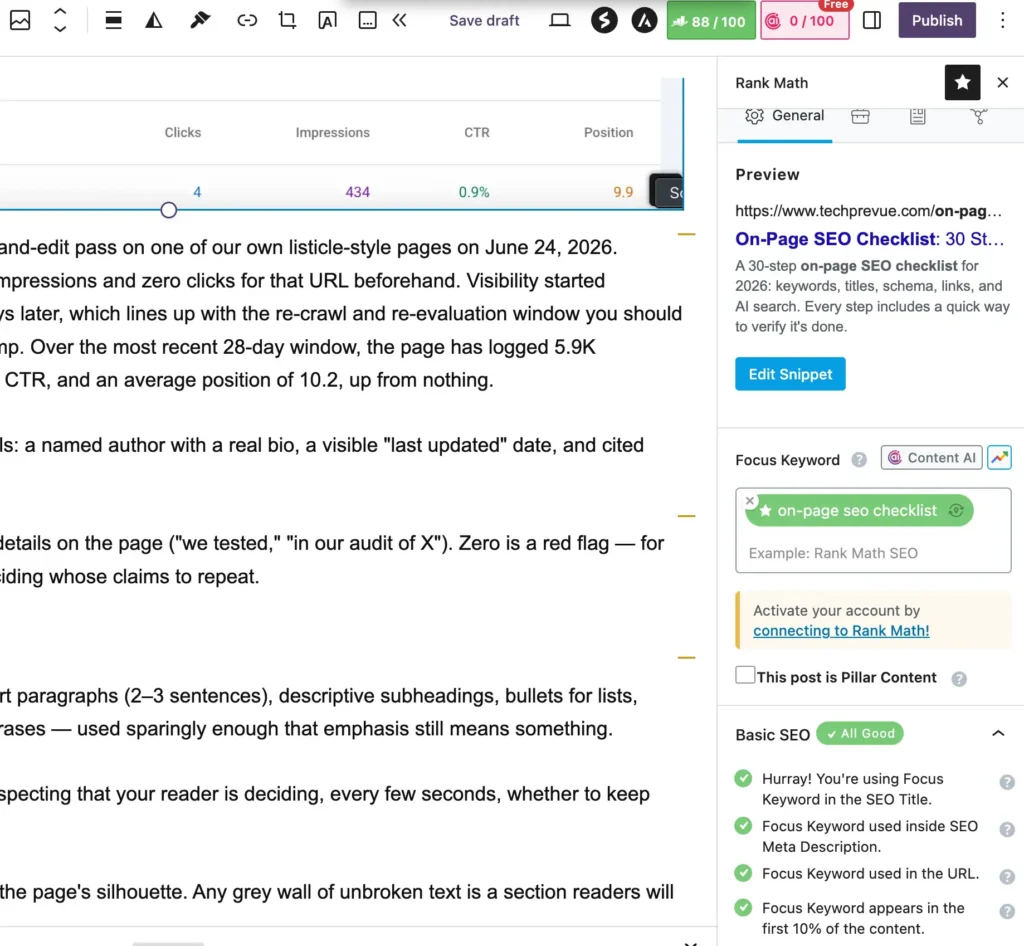
Secondary phrases come later (step 4). The primary keyword decides your title, your H1, your URL, and your angle.
Verify it: Write the keyword at the top of your draft document. If you can’t state it in one line, you don’t have a page topic yet — you have a category.
2. Confirm the search intent behind Keyword
Search intent is the why behind a query: informational (learn), commercial (compare), transactional (buy), or navigational (reach a specific site). Google’s entire ranking system is built around matching it. A beautifully optimized page with the wrong intent doesn’t rank slowly — it doesn’t rank at all.
The keyword’s wording usually tells you. “Best mirrorless camera under $1,000” and “best mirrorless camera under ₹80,000” are both commercial comparison queries; a product page targeting them will lose to comparison articles every time.
Verify it: Google the keyword. If eight of the top ten results are listicles and yours is a service page, change the page — the SERP won’t change for you.
3. Check the SERP for format and angle
Beyond intent, the results page tells you the expected format: guide, checklist, comparison table, video, tool. It also shows which SERP features are in play — featured snippet, People Also Ask, AI Overview — each one a slot you can target.
Note what the top three results share, and note what they all miss. That gap is your opening (step 10).
Verify it: Keep a two-column note: “What every top result includes” and “What none of them include.” If the second column is empty, keep digging before you write.
4. Map secondary and long-tail keywords
Pull related phrases from Google Autocomplete, the People Also Ask box, “related searches,” and competitor headings. Group them under the subheadings where they naturally belong.
This isn’t about sprinkling extra phrases in. Each secondary keyword should earn its own paragraph, H3, or FAQ entry — or be cut.
Verify it: Every secondary keyword on your list maps to a specific section of your outline. Orphan keywords mean either a missing section or an unnecessary keyword.
5. Check for keyword cannibalization
Cannibalization happens when two of your own pages target the same query and split their ranking signals. It’s one of the most common problems on sites that publish frequently — and one of the easiest to prevent at the planning stage.
Verify it: Search site:yourdomain.com "your keyword" before writing. In Google Search Console, check whether an existing URL already gets impressions for the query. If yes, update that page instead of publishing a rival to it.
Stage 2: Content Optimization Checks
Content quality carries more ranking weight than every tag on this list combined. Google’s own guidance on creating helpful, people-first content is explicit about it.
6. Answer the query in the first 100 words
Give the direct answer immediately, then spend the rest of the page earning trust in that answer. This “answer-first” structure does three jobs at once: it satisfies impatient readers, it targets the featured snippet, and it hands AI engines a clean block to quote.
You saw it at the top of this page — a bolded 40-word definition before any storytelling.
Verify it: Read only your first 100 words. Could someone stop there and still walk away with the core answer? If not, restructure.
7. Place the primary keyword early
Use the exact primary keyword once in your opening section, ideally in the first sentence or two. Early placement confirms topical focus for search engines and reassures readers they’ve landed in the right place.
Treat this as an editorial diagnostic, not a magic trick: if the keyword won’t fit naturally in your opening, the opening probably isn’t about the topic yet.
Verify it: Ctrl+F the exact phrase within your intro. Present once, reads naturally — done.
8. Cover related entities and subtopics
Google evaluates topics, not strings. A page about espresso machines that never mentions pressure, grind size, or portafilters reads as thin regardless of length. These related terms — call them entities, semantic keywords, or LSI keywords — are how relevance is actually measured now.
Harvest them from the top results’ subheadings, PAA questions, and the bolded terms in Google’s snippets.
Verify it: List 10–15 terms an expert would expect on this topic. Check each appears where it genuinely helps. Coverage, not count.
9. Keep keyword density under control
Repeat the primary keyword only where it reads naturally — for most long-form pages that lands under 1% density. Stuffing doesn’t just fail; it backfires measurably. The GEO research presented at KDD 2024 (Aggarwal et al.) found keyword stuffing performed roughly 10% worse than an unoptimized baseline in generative engine visibility.
In other words: the tactic that once gamed rankings now actively removes you from AI answers.
Verify it: Count occurrences (RankMath and Yoast both display this, or use Ctrl+F). If any single phrase appears more than once per ~150 words, rewrite with synonyms and pronouns where they stay clear (see step 29 for the AI-search limit on pronouns).
10. Add something no competitor has
Google’s ranking systems reward “information gain” — content that adds to what’s already in the results, instead of remixing it. If your page could be assembled from the current top ten, there’s no reason for it to join them.
Your options, roughly in order of effort: original data or a small test, a first-hand case study, a verified correction of a myth competitors repeat, a genuinely better framework, or expert commentary nobody else has.
Verify it: Complete this sentence honestly: “This page is the only result that ______.” If you can’t, return to your gap notes from step 3.
11. Show first-hand experience
E-E-A-T — Experience, Expertise, Authoritativeness, Trustworthiness — is how Google’s quality rater guidelines describe trustworthy content, and the first E is the hardest to fake. Screenshots of your own dashboard, version numbers, testing dates, what went wrong: these details separate practitioner content from paraphrase.
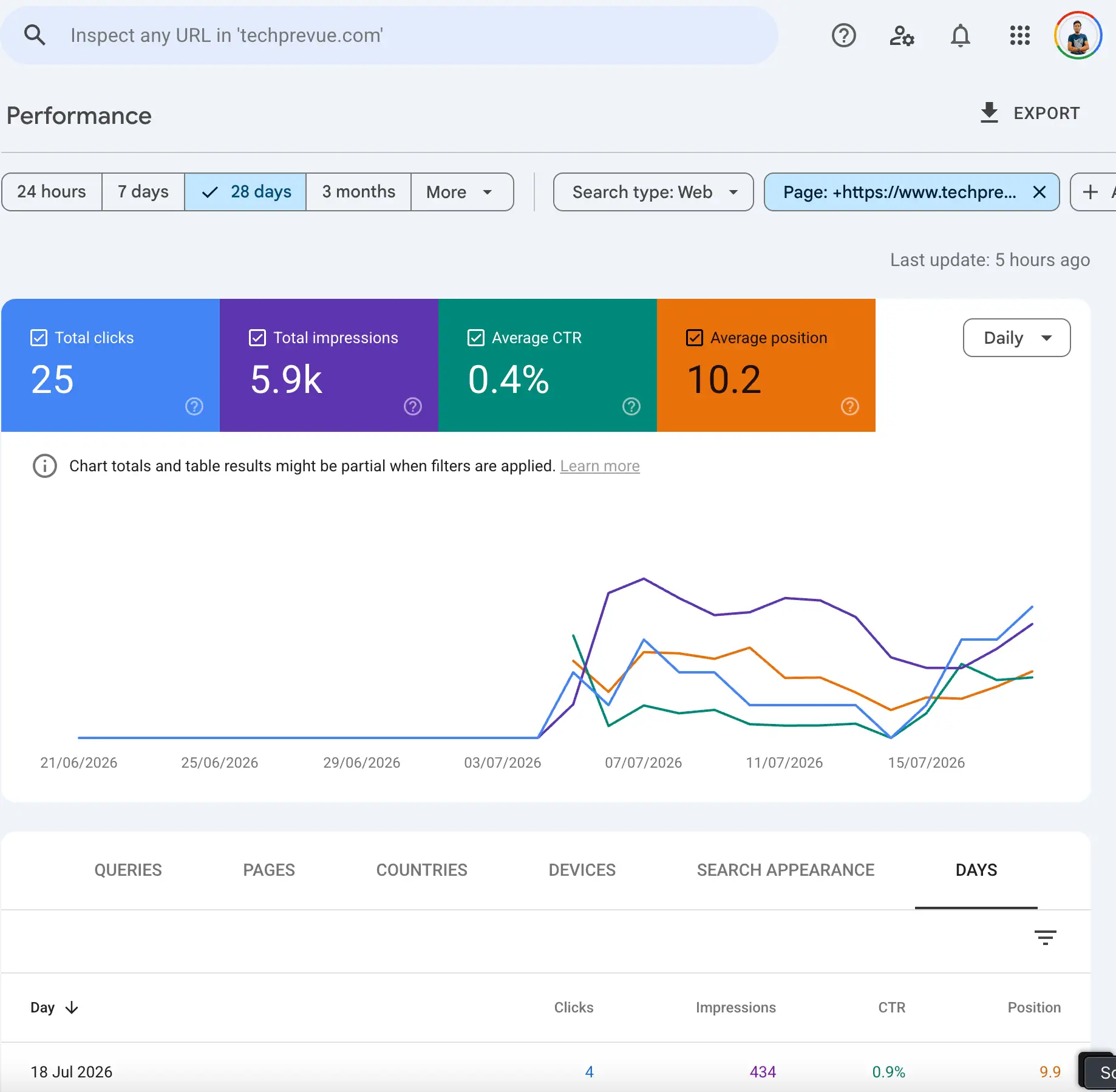
Case in point: we ran this exact audit-and-edit pass on one of our own listicle-style pages on June 24, 2026. Google Search Console showed zero impressions and zero clicks for that URL beforehand. Visibility started climbing around July 4 — about ten days later, which lines up with the re-crawl and re-evaluation window you should realistically expect, not an overnight jump. Over the most recent 28-day window, the page has logged 5.9K impressions, 25 clicks, a 0.4% average CTR, and an average position of 10.2, up from nothing.
Pair them with the structural trust signals: a named author with a real bio, a visible “last updated” date, and cited sources for every statistic.
Verify it: Count first-person, verifiable details on the page (“we tested,” “in our audit of X”). Zero is a red flag — for readers, raters, and the AI systems deciding whose claims to repeat.
12. Make your Content scannable
Readers scan before they commit. Short paragraphs (2–3 sentences), descriptive subheadings, bullets for lists, tables for comparisons, bold for key phrases — used sparingly enough that emphasis still means something.
Scannability isn’t dumbing down. It’s respecting that your reader is deciding, every few seconds, whether to keep going.
Verify it: Zoom out to 50% and look at the page’s silhouette. Any grey wall of unbroken text is a section readers will skip — break it up.
Stage 3: HTML and Metadata Checks
Metadata is your listing in the world’s most competitive marketplace. These tags do less to rank the page and more to decide whether anyone clicks it once it ranks.
13. Front-load the title tag (50–60 characters)
Put the primary keyword at or near the start of the title, keep it under ~60 characters so it doesn’t truncate, and add one specific reason to click: a number, the year, or an outcome. Google’s title link documentation confirms it rewrites vague or overlong titles — write one it doesn’t need to fix.
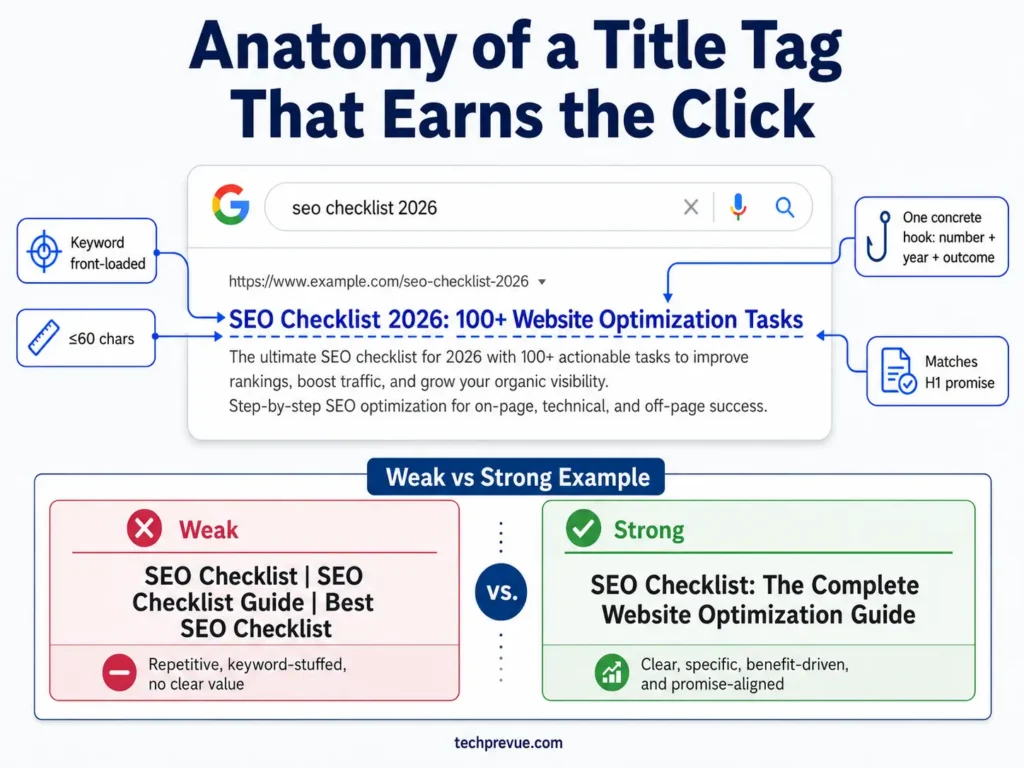
Weak: “Tips and Tricks for Better Website Optimization | BrandName” Strong: “On-Page SEO Checklist: 30 Steps That Still Move Rankings in 2026”
Verify it: Paste the title into any SERP preview tool (RankMath and Yoast both show one inline). No truncation, keyword visible, one concrete hook.
14. Write a meta description that earns the click
The meta description isn’t a ranking factor — it’s your ad copy. In 150–160 characters, state what the reader gets and why this page over the nine around it. Include the keyword; Google bolds matched terms, which draws the eye.
Google rewrites descriptions it finds unhelpful, so specificity is your best defense.
Verify it: Read your description next to the live competition for your keyword. If it could sit under any of their URLs unchanged, it’s not doing its job.
15. Keep the URL slug short
Use a short, readable slug containing the primary keyword: /on-page-seo-checklist/ — not /blog/2026/01/the-complete-guide-to-on-page-seo-checklists/. Backlinko’s analysis of 11.8 million search results found shorter URLs tend to outrank longer ones, and short slugs survive future content updates without dating themselves.
Never include years or dates in slugs. You’ll update the content; the URL should live forever.
Verify it: 3–5 words, hyphens only, no stop words, no dates. If the page is already live, do not change the slug without a 301 redirect — usually, don’t change it at all.
16. Use exactly one H1
One H1 per page, containing the primary keyword, describing the whole page. Multiple H1s dilute the topical signal and usually indicate a theme or page-builder problem rather than an editorial choice.
The H1 and title tag can differ slightly — the title sells the click, the H1 confirms the arrival — but they must promise the same thing.
Verify it: On the live page, run document.querySelectorAll('h1').length in the browser console. The answer must be 1.
17. Build a logical H2/H3 hierarchy
Headings are your page’s table of contents for both readers and machines. H2s mark major sections; H3s nest inside them; levels never skip. Write headings that state what the section says, not clever labels that hide it — “How Long Does On-Page SEO Take?” beats “The Waiting Game.”
Descriptive headings are also the primary way AI engines locate the passage worth quoting.
Verify it: Read only your headings, top to bottom. If they work as a standalone summary of the page, the hierarchy is right.
18. Optimize images: filenames, alt text, format, dimensions
Four checks per image: a descriptive filename (title-tag-anatomy.webp, not IMG_2041.png), alt text that describes the image for screen-reader users (with the keyword only when it’s genuinely accurate), a modern format (WebP/AVIF — typically 50–70% smaller than JPEG/PNG), and explicit width/height attributes so the layout doesn’t shift while loading.
Image search remains an underused traffic source, especially for tutorial and comparison content.
Verify it: View source and check the first three <img> tags for all four attributes. Sitewide, an auditor like Screaming Frog lists every image missing alt text.
19. Add Article schema — and skip the deprecated types
Add Article structured data with headline, author, publish date, and modified date. It helps search engines and AI systems attribute your content correctly.
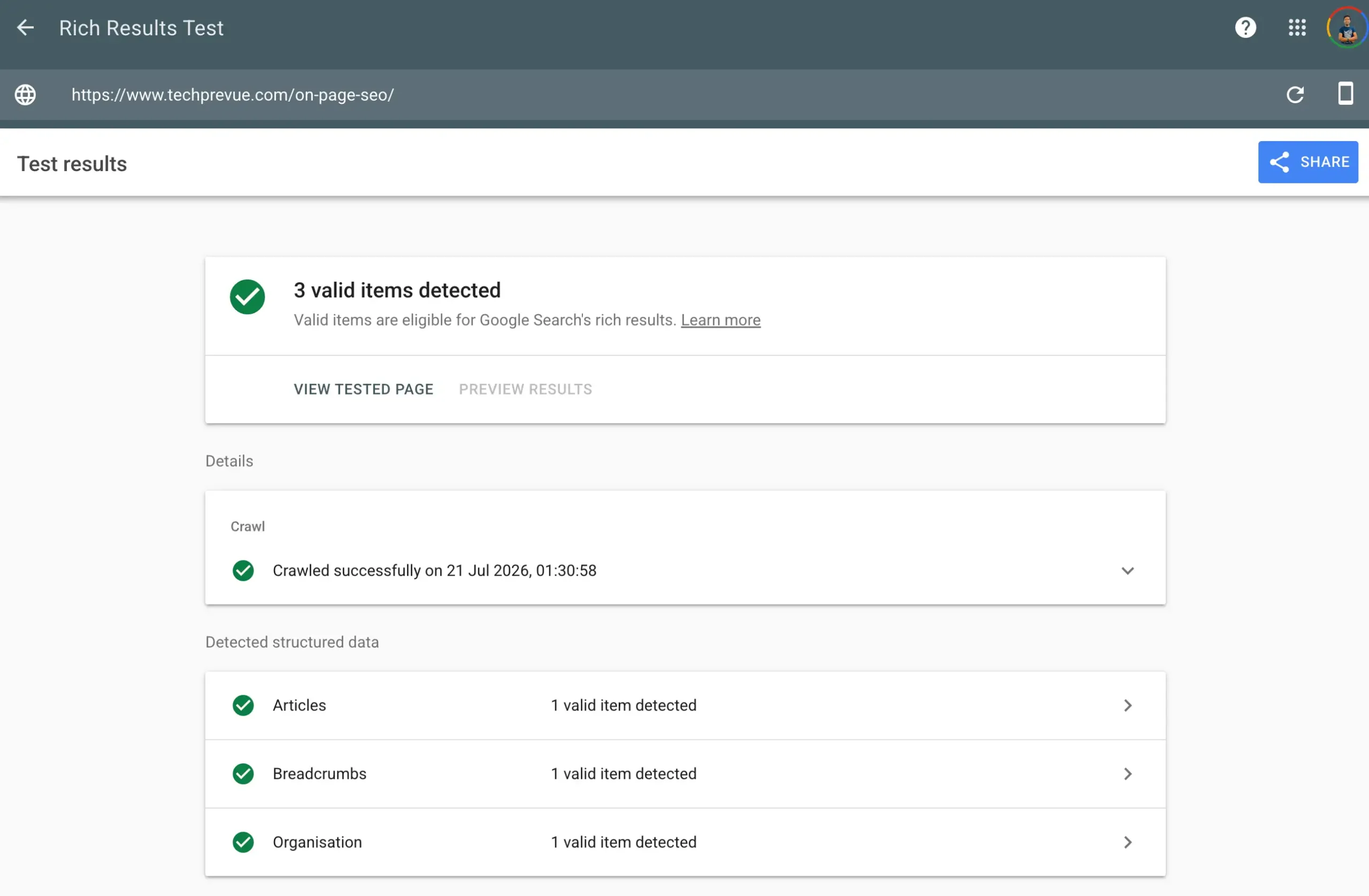
Two warnings most checklists still get wrong. HowTo schema was deprecated by Google in September 2023 — remove it from your templates; it does nothing. And FAQ rich results have been restricted since 2023 and no longer appear for regular sites following Google’s 2026 updates, so add FAQPage markup only as a clean machine-readable summary, not in expectation of expanded SERP listings.
Verify it: Run the page through Google’s Rich Results Test. Valid Article markup, zero errors, no deprecated types.
Stage 4: Internal and External Link Checks
Links are how authority flows into a page and how context flows out of it. Most publishers under-link internally and over-link externally — the reverse of what works.
20. Add 3–5 internal links with descriptive anchors
Link from your new page to your most relevant existing pages, using anchor text that describes the destination — “technical SEO guide,” never “click here.” Internal links pass authority, guide readers deeper, and teach search engines your site’s structure.
Prioritize links to your pillar pages and to pages targeting neighboring keywords.
Verify it: Count the in-content internal links (navigation doesn’t count). 3–5 minimum for a long-form page, each with a descriptive anchor.
21. Link back from older related pages
The step almost everyone skips. A new page with zero internal links pointing to it is invisible in your site’s link graph — crawlers find it slowly and it inherits no authority.
Right after publishing, open 2–3 of your strongest related pages and add a contextual link to the new one.
Verify it: Search site:yourdomain.com "phrase from the new page's topic" to find candidate pages. After a crawl, Search Console’s Links report should show internal links pointing at the new URL.
22. Cite authoritative external sources
Every statistic, study, and factual claim gets a link to its original source — official documentation, research papers, government data, or primary studies. Outbound citations aren’t “leaking authority”; they’re the evidence layer readers, quality raters, and AI systems check.
One policy worth adopting: link the original source, not the blog post that summarized it.
Verify it: Scan the page for numbers and claims. Each one either links to a source or gets cut. Unsupported statistics are a trust liability everywhere your page is read — including inside AI answers.
23. Fix broken links and redirect chains on the page
Broken outbound links and internal links that bounce through redirect chains waste crawl efficiency and quietly tell readers the page is unmaintained. On older pages this is the fastest fix on the entire list.
Verify it: Run the URL through a link checker (Screaming Frog, Ahrefs’ free broken-link checker, or Dr. Link Check). Zero 404s, and internal links point at final destinations — not through a redirect.
Stage 5: Page Experience Checks
Google’s page experience signals won’t rescue thin content, but they routinely decide close contests — and they decide whether the reader you earned actually stays.
24. Pass Core Web Vitals on mobile
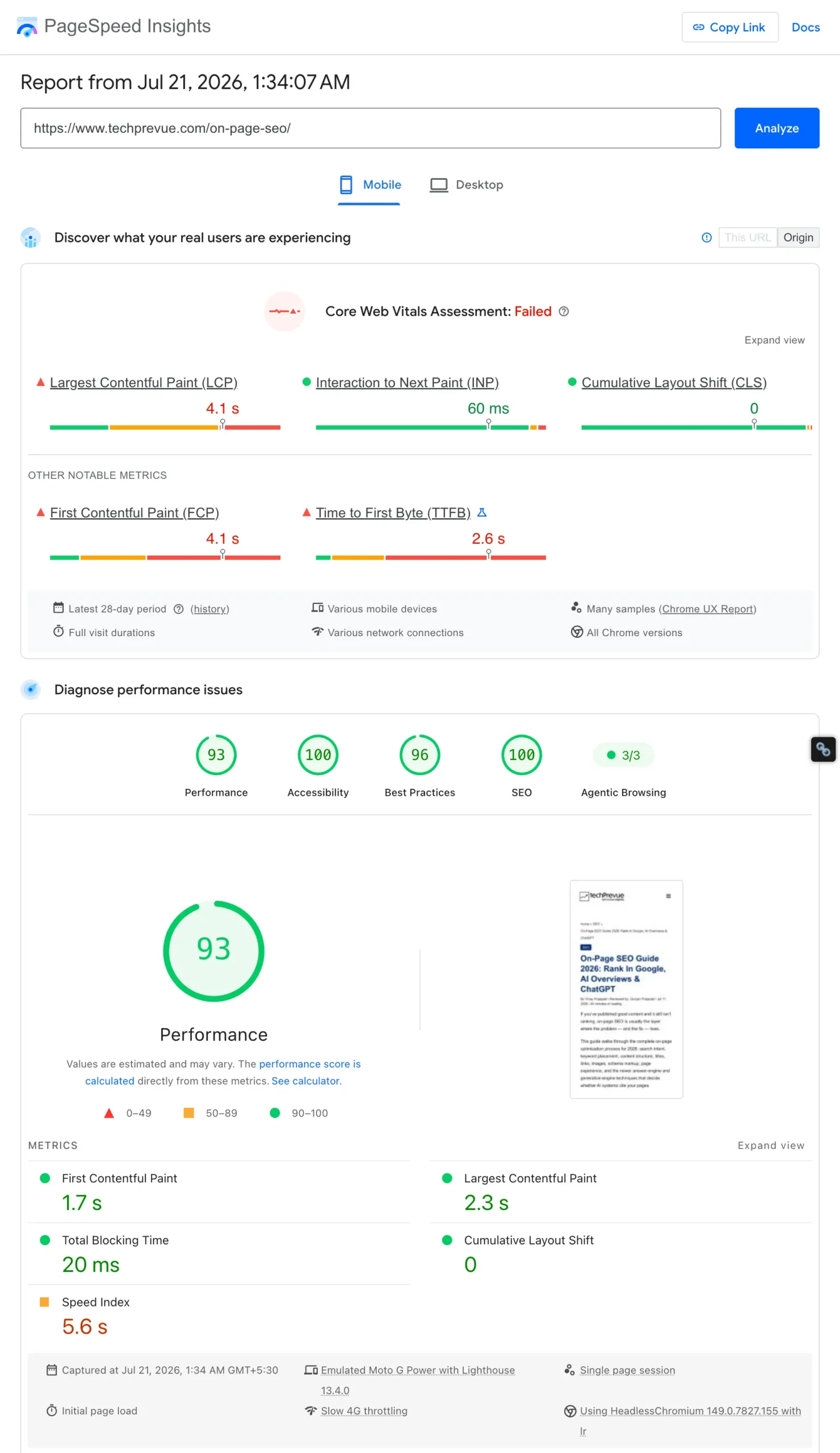
Three thresholds, measured on real users: LCP under 2.5 seconds (loading), INP under 200 milliseconds (responsiveness), CLS under 0.1 (visual stability). The definitions and debugging guides live on web.dev.
Measure on mobile, not your office desktop. This matters double for Indian traffic, where most sessions arrive on mid-range Android devices over variable networks — a page that feels fine on fiber can be unusable at the median.
Verify it: PageSpeed Insights → the “field data” section (real Chrome users), not just the lab score. All three metrics green on mobile.
25. Design for small screens first
Google indexes the mobile version of your page, full stop. Check tap targets are spaced, font size is readable without zooming, tables scroll rather than overflow, and nothing that exists on desktop is hidden on mobile.
Verify it: Open the page on an actual phone — not just DevTools emulation — and complete the page’s main task (read the checklist, use the table, tap a link). Friction you feel, your readers feel worse.
26. Remove intrusive popups and heavy embeds
Intrusive interstitials that block content on entry are a documented negative signal in Google’s page experience guidance, and the top reason mobile users bounce in the first five seconds. Auto-playing video, oversized ad slots, and third-party embeds also drag your Core Web Vitals down.
If you need email capture, use an inline form or a small banner — not a screen-covering modal on arrival.
Verify it: Load the page in an incognito mobile session. Count the taps needed before you can read the first paragraph. The right answer is zero.
27. Add navigation aids for long pages
Any page over ~2,000 words needs a linked table of contents at the top. Jump links help readers reach the section they came for, generate sitelink-style anchors in search results, and give AI engines clean section boundaries to work with.
Verify it: Every TOC entry scrolls to the right heading, and heading anchors are human-readable (#stage-3-html-and-metadata-checks, not #section-7b).
Stage 6: AI Search Optimization Checks
This is the stage that separates a 2026 on-page checklist from a 2020 one, and the stage where those opening statistics stop being scary. If most searches end on the results page, the goal expands: rank the page and make it the source the answer engine quotes.
28. Write quotable answer blocks under key headings
Under every heading that maps to a real question, open with a 40–50 word direct answer before expanding. These self-contained blocks are exactly what featured snippets extract and what AI Overviews, ChatGPT, and Perplexity lift into responses — with your site as the citation.
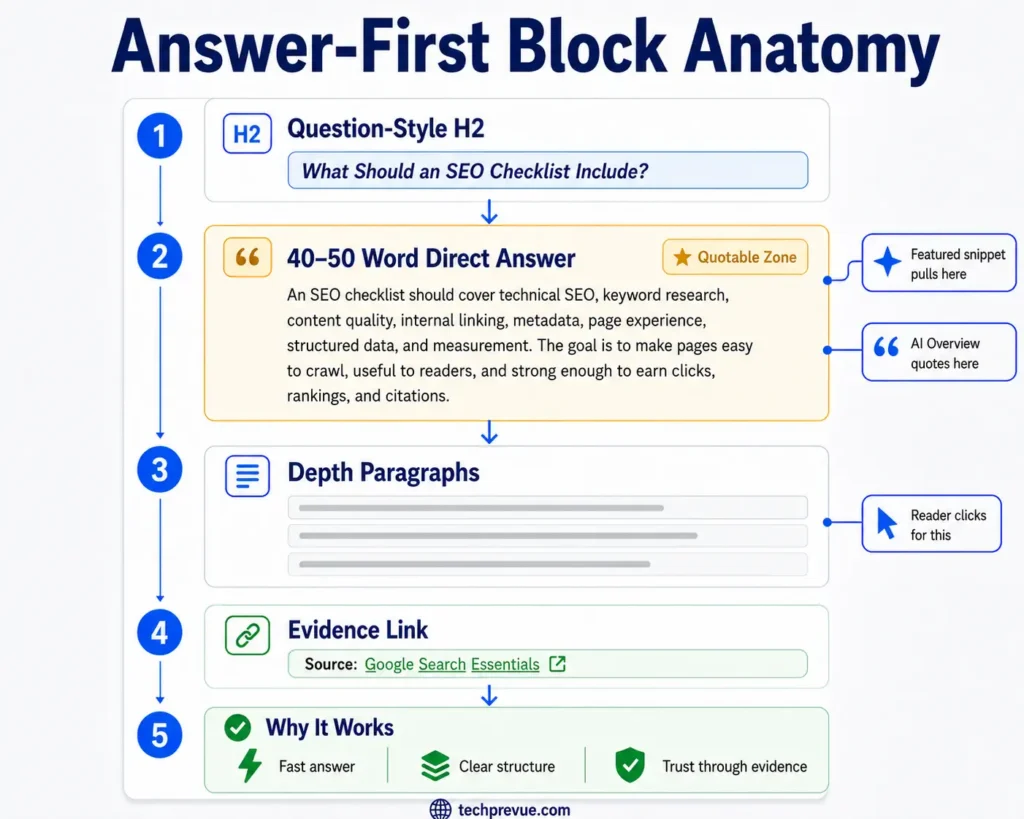
Then go deeper. The block wins the quote; the depth wins the click from readers who want more than the summary.
Verify it: For each question-style H2, read its first paragraph in isolation. If it answers the question completely without the surrounding text, it’s quotable.
29. Name entities clearly — avoid vague pronouns
AI systems extract passages out of context. A paragraph that says “it improves this significantly” is unquotable, because outside your page nobody knows what “it” is. Repeat the actual noun — “answer-first structure improves snippet eligibility” — at least once per paragraph in key sections.
The same applies to your brand, product names, and comparisons: name them explicitly so a lifted passage still attributes correctly.
Verify it: Pull any paragraph out of the page and read it alone. If a stranger can’t tell what the subject is, the pronouns won.
30. Keep the page fresh and re-crawlable
AI answer engines and Google both favor recently confirmed information for evolving topics. Schedule a review of important pages every 3–6 months: update statistics, replace dead links, refresh screenshots, and update the visible “last updated” date and dateModified in your schema only when the content genuinely changed.
Faking the date without changes is a trust signal in the wrong direction — Google compares the claim against the content.
Verify it: The visible date, the schema dateModified, and an actual meaningful edit all agree. Then request re-indexing in Search Console.
Basic On-Page SEO Checklist for Beginners
New to this? Run these ten checks before worrying about the rest. This basic on-page SEO checklist covers the changes with the highest impact-to-effort ratio:
| # | Check | Done when… |
|---|---|---|
| 1 | One primary keyword chosen | You can state it in one line |
| 2 | Intent matches page format | Your format matches the top 10 results |
| 3 | Keyword in the title tag, near the front | Title under 60 characters |
| 4 | Keyword in the H1 and first 100 words | Reads naturally, no forcing |
| 5 | Direct answer in the opening | First 100 words resolve the query |
| 6 | Short paragraphs and clear H2s | No text block over 3 sentences |
| 7 | 3+ internal links, descriptive anchors | No “click here” |
| 8 | Images compressed, alt text written | WebP format, descriptive filenames |
| 9 | Short URL slug with the keyword | No dates, no stop words |
| 10 | Page loads fast on your own phone | Under ~3 seconds on mobile data |
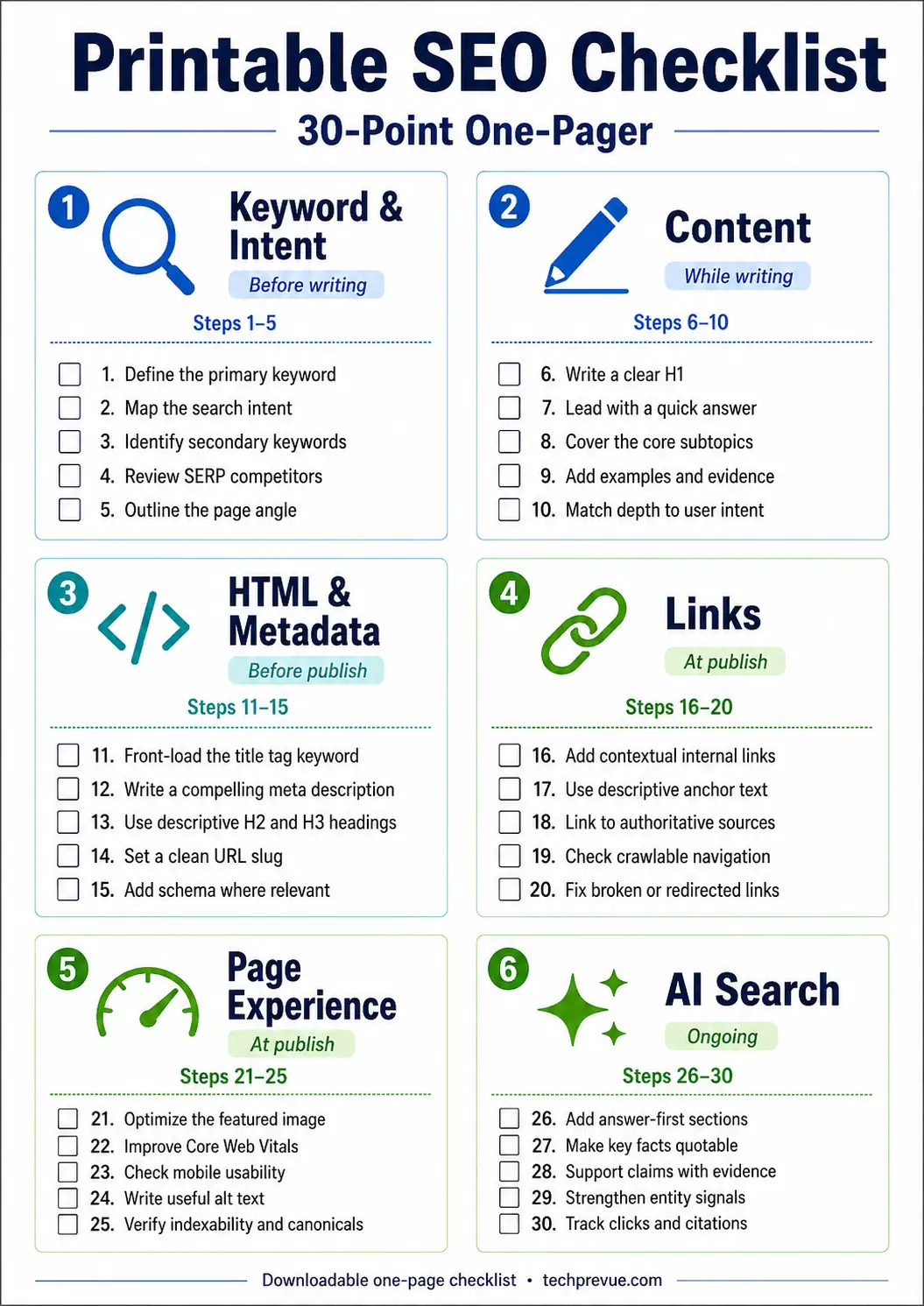
Master these, then work through the full 30 steps stage by stage.
Common On-Page SEO Mistakes to Avoid
The most expensive mistakes we see in audits, in rough order of damage:
- Optimizing before checking intent. Perfect tags on the wrong page format. Nothing downstream can fix this.
- Two pages chasing one keyword. Cannibalization splits signals; both pages settle for page two.
- Stuffing the keyword. Worse than useless — the KDD 2024 GEO findings put stuffed content ~10% below an unoptimized baseline in generative engines.
- Titles written for the writer. Clever beats clear in headlines only when you’re already famous.
- Publishing with zero inbound internal links. The new page floats outside your site’s authority graph.
- Keeping HowTo schema in templates. Deprecated since 2023. It’s dead code.
- Treating “last updated” as a growth hack. Date changes without content changes erode trust.
- Desktop-only QA. Your audience is on phones; your bugs are on phones.
On-Page SEO Checklist – FAQs
What is an on-page SEO checklist?
An on-page SEO checklist is a repeatable list of optimization steps applied to individual pages — covering keywords, content, HTML tags, links, images, structured data, and user experience — so every published page meets the same ranking standard without relying on memory.
What is the difference between on-page and off-page SEO?
On-page SEO covers everything you control on the page itself: content, tags, links, images, and structure. Off-page SEO covers signals earned elsewhere — backlinks, brand mentions, and reviews. On-page work is fully in your hands; off-page work has to be earned.
How many times should I use my keyword on a page?
There’s no magic number. Use the exact keyword in the title, H1, opening section, and once or twice more where it reads naturally — typically under 1% of total words. Beyond that, cover the topic with related terms instead of repetition.
Is on-page SEO still worth it with AI Overviews taking clicks?
Yes — arguably more than before. AI Overviews and answer engines quote pages with clear structure, direct answers, and cited evidence: exactly what on-page optimization produces. Pages that skip this work lose both the traditional rankings and the AI citations.
How long does on-page SEO take to show results?
Individual fixes (a better title, a corrected intent match) can move rankings within days to weeks of re-crawling — in our own case study in Step 11, it took about ten days. Full effects on competitive keywords typically take 2–6 months, because engagement signals and re-evaluation accumulate over time. Track progress in Google Search Console, not by ego-searching.
Do I need a plugin like RankMath or Yoast for this?
No, but they help. Plugins automate the mechanical checks — title length, meta fields, schema output, keyword presence. They cannot judge intent, information gain, or experience signals. Use a plugin for the mechanics and this checklist for the judgment calls.
How often should I re-run this checklist on existing pages?
Every 3–6 months for pages that earn revenue or rankings, and immediately after any major Google update. Prioritize pages sitting at positions 4–15 in Search Console — they have the most to gain from an on-page pass.
What are the most important on-page SEO factors?
In order of impact: matching search intent, content quality with real information gain, a clear title tag, heading structure with answer-first blocks, and internal linking. Everything else on the checklist supports these five.
Ship Pages That Deserve Both the Click and the Citation
Search didn’t get harder in 2026 — it got less forgiving of sloppy pages. Every step in this checklist exists because skipping it now costs you twice: once in the rankings, and again in the AI answers built on top of them.
You don’t need to hold all 30 steps in your head. That’s the point of an SEO checklist. Run the six stages on your next page, time yourself, and watch the second pass take half as long.
Then go open your most important underperforming page and start at Stage 1.
