
You can write the best content in your industry and still get zero traffic. If search engines can’t find your pages, load them quickly, or make sense of your code, your work stays invisible. That single, frustrating problem is the reason this discipline exists.
So, what is technical SEO, exactly?
Quick answer: Technical SEO is the process of optimizing your website’s infrastructure — crawling, rendering, indexing, speed, security, and structured data — so that search engines and AI systems can find, understand, and confidently rank your content. It fixes the invisible problems that stop great pages from appearing in search results.
That’s the short version. The rest of this guide is the long one: a complete, beginner-to-advanced walkthrough written for learners. You’ll see how search engines actually process a website, the ten core elements you must get right, how to fix the most common failures, and — because search has changed — how to make your site visible to AI crawlers like GPTBot and ClaudeBot, not just Googlebot.
No developer background needed. Every concept is explained in plain English, with real code samples, worked examples, and a 30-day practice plan at the end.
Let’s start with the foundation.
- What Is Technical SEO in Simple Terms?
- Why Technical SEO Matters More Than Ever
- How Search Engines Process Your Website (The Pipeline)
- The 10 Core Elements of Technical SEO
- Technical SEO for AI Search: The New Frontier
- 7 Common Technical SEO Issues (Diagnose → Fix)
- Technical SEO and Content: The Secret to Building Authority
- How to Do Your First Technical SEO Audit (Free, Step by Step)
- Advanced Technical SEO Techniques
- How to Measure Technical SEO Success
- Technical SEO Tools: Official and Third-Party
- Your 30-Day Technical SEO Learning Path
- Technical SEO Checklist (Condensed)
- Technical SEO Glossary for Quick Revision
- FAQs About Technical SEO
- Final Word: The Foundation Comes First
What Is Technical SEO in Simple Terms?
Technical SEO is everything you do behind the scenes so machines can read your website as easily as humans can.
Think of your website as a house. Your content is the rooms people live in. Your backlinks are your reputation in the neighborhood. Technical SEO is the foundation, the wiring, and the plumbing. Nobody compliments a house on its plumbing. But when the plumbing fails, nothing else about the house matters.
The same logic applies online. A page can only rank if a search engine can complete four jobs:
- Find it (crawling)
- Load it fully (rendering)
- Store and understand it (indexing)
- Judge it worth showing (ranking)
Technical SEO is the practice of removing every obstacle between your content and those four jobs. It covers site speed, mobile experience, security, site structure, duplicate content, structured data, and — increasingly — how AI systems access your pages.
One more thing worth saying early. This discipline is not a bag of random tricks. It’s a system. Each part supports the others, and a failure in one area quietly weakens the rest. That’s why this guide teaches the why behind every fix, not just the fix itself.
What Technical SEO Is Not
Learners often confuse three related disciplines, so let’s separate them cleanly.
| Type | What it optimizes | Typical tasks | Who usually does it |
|---|---|---|---|
| Technical SEO | The site’s infrastructure | Crawlability, speed, indexing, schema, security, architecture | Technical SEO specialists, developers |
| On-page SEO | The content on each page | Keywords, titles, headings, internal links, images | Content strategists, writers |
| Off-page SEO | Signals outside your site | Backlinks, brand mentions, digital PR | Outreach and PR teams |
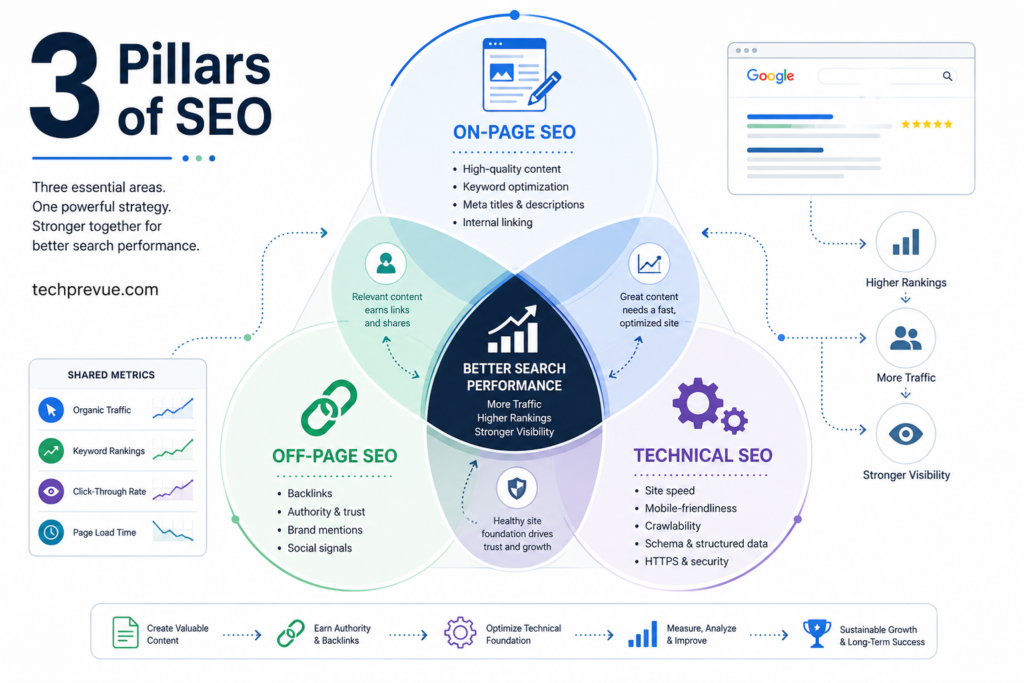
Here’s the relationship in one sentence: on-page SEO makes your pages relevant, off-page SEO makes them trusted, and technical SEO makes them reachable. You need all three. But only the technical layer decides whether your content gets seen at all — which is why serious SEO work starts here.
A 60-Second History (and Why the Definition Just Expanded)
For most of its life, this discipline meant one thing: make Googlebot happy. Fast pages, clean sitemaps, correct tags.
That definition has expanded. People now discover content through Google’s AI Overviews, ChatGPT, Perplexity, Gemini, and Claude — and every one of those systems depends on crawlable, well-structured, machine-readable pages. The skills are the same. The audience of machines reading your site got bigger.
So a modern answer to “what is technical SEO” has to include both worlds: classic search engine optimization and readiness for AI crawlers. This guide covers both, and the AI section later is where you’ll find the biggest opportunities your competitors are still ignoring.
Why Technical SEO Matters More Than Ever
If this work has always mattered, why is it suddenly urgent? Five shifts changed the stakes — and each bullet below previews a concrete concept you’ll master later in this guide.
1. AI Systems Only Cite Pages They Can Read
AI search assistants build answers from source pages. If their crawlers can’t access and parse your site, you don’t exist in the answer — there’s no partial credit. In practice:
- Crawler access decides everything. A single robots.txt line or CDN bot rule can erase you from ChatGPT, Perplexity, and Gemini answers.
- Most AI crawlers don’t execute JavaScript. Content that only appears after client-side rendering is invisible to them.
- Extraction favors structure. Clean heading hierarchies, comparison tables, and answer-first paragraphs are what answer engines actually quote.
- Structured data supplies hard facts. JSON-LD tells machines who wrote a page, what it covers, and when it changed.
And AI visibility doesn’t perfectly mirror rankings. An Ahrefs study published in March 2026 found that only 38% of pages cited in Google’s AI Overviews rank in the traditional top 10 for the same query. Technically clean, clearly structured pages can win AI citations without a #1 ranking — a genuine opening for smaller sites.
2. Machine-Learning Ranking Systems Judge Delivery, Not Just Words
Google’s ranking systems lean heavily on machine learning to understand content — and they can only evaluate what your technical setup actually delivers to them:
- Structured data gives algorithms the context they need for entity recognition — connecting your content to known people, products, places, and topics.
- Clean information architecture helps machine-learning systems categorize your content correctly.
- Indexing and rendering are prerequisites. A page that isn’t indexed never enters the relevance race; a page that renders incompletely is judged on the fragment that survived.
- Quality systems filter early. Thin, duplicate-heavy, or broken sites are screened out before the familiar ranking competition even begins.
3. JavaScript Dependency Creates New Barriers
Modern websites lean on JavaScript for functionality — and that convenience carries real indexing risk:
- Single Page Application (SPA) frameworks like React, Vue, and Angular often ship nearly empty initial HTML.
- Client-side rendering forces crawlers to download and execute code before seeing any content — extra cost, extra failure points.
- Dynamic content loading (infinite scroll, tabs, lazily loaded modules) can hide text and links from bots entirely.
- Rendering delays compound. Google’s render queue can postpone full indexing; most AI crawlers never render at all.
4. Mobile-First Is Effectively Mobile-Only
Google predominantly uses the mobile version of your pages for indexing and ranking — a system called mobile-first indexing. In mobile-first markets across Asia, Africa, and Latin America, where most users browse on budget Android phones over inconsistent networks, this is the whole game. Concretely:
- The mobile version is the indexed version. Content hidden on mobile is hidden from search.
- Mobile page speed influences rankings on every device, not just phones.
- Touch-target size, viewport configuration, and text readability are measurable experience factors, not design preferences.
- Intrusive interstitials — full-screen pop-ups that bury content — have carried ranking consequences since 2017.
5. Page Experience Became Measurable
Google’s Core Web Vitals turned “the site feels slow” into three hard numbers you can’t hide from:
- LCP (loading), INP (responsiveness), and CLS (visual stability) — each with public pass/fail thresholds.
- Scores come from field data: real Chrome users on real devices and networks, not lab simulations.
- The numbers are public. Anyone with a free testing tool can see whether you pass — including your competitors.
Put those five together and the conclusion is simple. The technical layer stopped being maintenance work. It’s now the entry ticket to both traditional search and AI-driven discovery.
How Search Engines Process Your Website (The Pipeline)
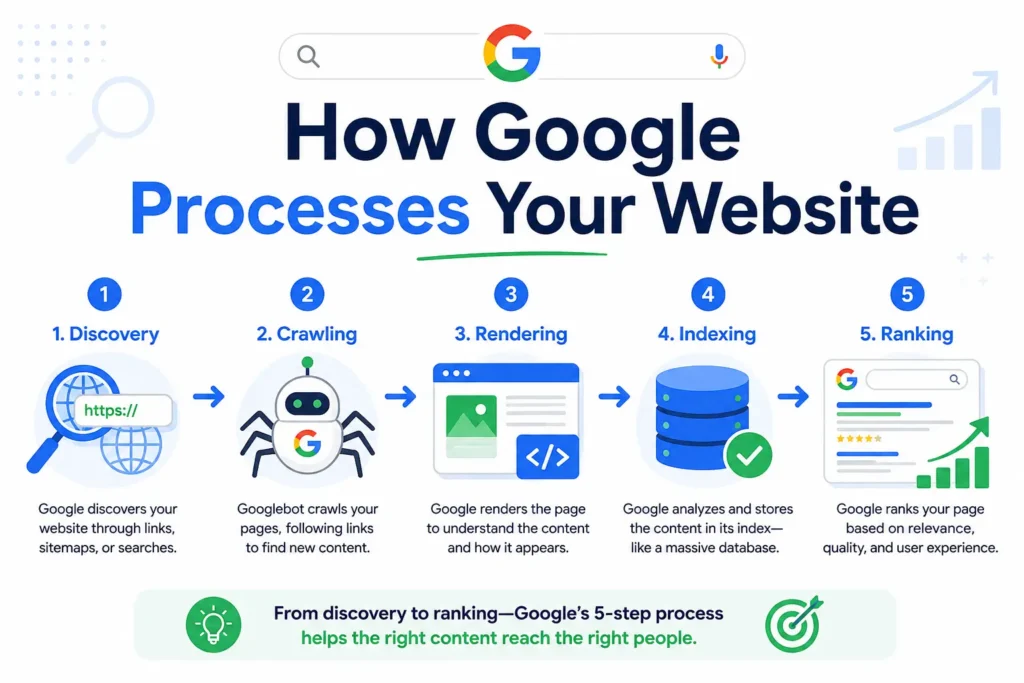
Before you can fix technical problems, you need the mental model behind them. Every page on your site must survive a five-stage pipeline before it can rank. Memorize these five stages — every issue in this guide maps back to one of them.
Quick answer: Search engines process websites in five stages: discovery (finding the URL), crawling (fetching the page), rendering (executing code to build the full page), indexing (storing and understanding the content), and ranking (choosing which indexed pages to show for a query). A failure at any stage blocks all the stages after it.
Stage 1: Discovery
Google can’t crawl a URL it doesn’t know exists. It discovers URLs through internal links on pages it already knows, XML sitemaps you submit, backlinks from other sites, and manual submissions in Google Search Console.
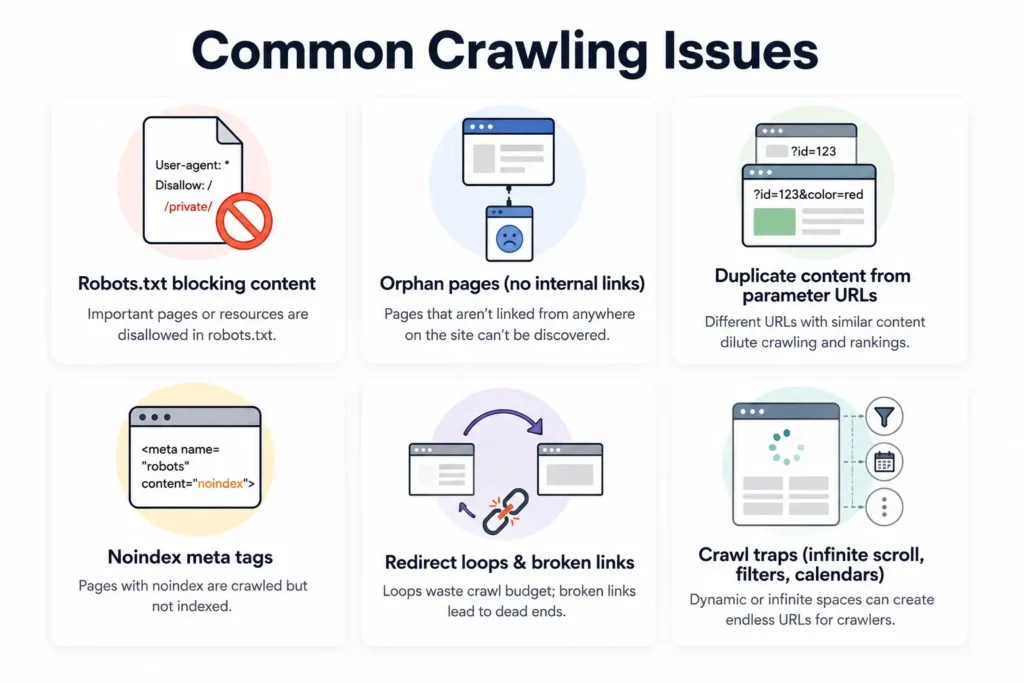
What can go wrong: a page with no internal links pointing to it (an orphan page) and no sitemap entry may never be discovered at all. Publishing a page is not the same as announcing it.
Stage 2: Crawling
Crawling is when Googlebot (or another bot) actually requests your page and reads the raw HTML. Crawlers follow the links they find, building a map of your site as they go.
What can go wrong: your robots.txt file blocks the page, your server returns errors, or the crawler wastes its limited attention on thousands of useless URLs instead of your important ones (a crawl budget problem — more on that soon).
Stage 3: Rendering
Modern websites build much of their content with JavaScript. Rendering is the stage where the search engine executes that JavaScript to see the page the way a human browser would. Google can render JavaScript, but it costs extra resources and can be delayed.
What can go wrong: if your main content only appears after JavaScript runs, and rendering fails or times out, Google indexes a half-empty page. Most AI crawlers are worse off — many don’t execute JavaScript at all, which we’ll return to in the AI section.
Stage 4: Indexing
Indexing is selection, not just storage. Google decides whether your crawled page deserves a spot in its database, which version of a duplicated page is the “real” one (canonicalization), and what the page is actually about.
What can go wrong: a stray noindex tag, a canonical tag pointing at the wrong URL, or content so thin or duplicated that Google simply declines to store it. Crawled does not mean indexed. This distinction confuses more beginners than any other.
Stage 5: Ranking
Only now does the familiar competition begin — relevance, quality, links, freshness. The technical layer’s job was to get your page here intact. A page that arrives at this stage slowly, partially rendered, or misunderstood competes with one hand tied behind its back.
The takeaway for learners: when a page underperforms, diagnose in pipeline order. Was it discovered? Crawled? Rendered? Indexed? Only then worry about ranking factors. Working backwards from “why don’t I rank?” wastes weeks. Working forward from discovery finds the real blocker in minutes.
The 10 Core Elements of Technical SEO
Now the heart of the guide. These ten elements cover roughly 95% of the technical work on any website. We’ll take them one at a time, in the order a real audit would.
1. Crawlability: Can Search Engines Reach Your Pages?
Crawlability determines whether bots can access your content. It’s the first checkpoint, and the most unforgiving — an uncrawlable page has no SEO at all.
The robots.txt file, line by line
Your robots.txt file lives at yourdomain.com/robots.txt and tells crawlers where they may and may not go. Here’s a healthy example for a typical content site, explained line by line:
User-agent: *
Disallow: /wp-admin/
Allow: /wp-admin/admin-ajax.php
Disallow: /search/
Disallow: /*?ref=

Sitemap: https://www.example.com/sitemap.xml
User-agent: *— the rules below apply to all crawlers.Disallow: /wp-admin/— keep bots out of the admin area. They don’t need it.Allow: /wp-admin/admin-ajax.php— an exception: this file powers front-end features, so bots may fetch it.Disallow: /search/— internal search result pages create infinite low-value URLs. Block them.Disallow: /*?ref=— blocks URLs carrying a tracking parameter, which would otherwise create duplicates.Sitemap:— points crawlers straight to your sitemap.
Two warnings every learner should tattoo somewhere visible. First, robots.txt blocks crawling, not indexing — a blocked URL can still appear in results if other sites link to it, per Google’s own documentation. Use noindex to keep pages out of results. Second, one careless line (Disallow: /) can de-facto remove your entire site from search. Check this file after every migration.
XML sitemaps done right
Your XML sitemap is a machine-readable list of the URLs you want indexed. The rules that matter:
- Include only indexable, canonical, 200-status URLs. A sitemap full of redirects, 404s, and noindexed pages teaches Google to distrust it.
- Keep it current. Your CMS should regenerate it automatically when you publish.
- Submit it once in Google Search Console (Indexing → Sitemaps), then monitor.
- Large site? Split sitemaps by section (posts, products, categories) so you can see exactly which section has indexing trouble.
Crawl budget: Google’s attention is finite
Crawl budget is how many URLs Google will fetch from your site in a given period. Small sites rarely hit the limit. But the moment your URL count balloons — faceted filters, calendars, tag archives, session IDs — bots can drown in junk URLs while your new article waits days to be crawled. Google’s crawl budget guidance confirms that wasting server resources on unimportant pages delays discovery of the pages you care about.
Classic crawl traps to hunt down:
- Faceted navigation: filter combinations like
?color=red&size=m&sort=pricemultiply into millions of URLs. - Calendar widgets: a “next month” link that goes on forever gives crawlers an infinite path.
- Internal search results exposed to crawling.
- Tag archives with one post each — thin pages that eat crawl attention.
- Tracking parameters appended to every internal link.
The fixes, in order of preference: remove the links, block the patterns in robots.txt, canonicalize variants to the main version, and keep your sitemap clean so it acts as a priority list.
Orphan pages
An orphan page has zero internal links pointing to it. Crawlers rarely find these, and even when they do, the page receives no authority from the rest of your site. Every important page needs at least one crawlable internal link — ideally several, from relevant pages. A simple habit prevents most orphans: every time you publish, add links to the new page from two or three older, related pages.
HTTP status codes: the server’s side of the conversation
Every time a crawler requests a URL, your server answers with a three-digit status code. Learning to read them turns confusing crawl reports into plain English. The six that matter:
| Code | Meaning | What a crawler does with it |
|---|---|---|
| 200 | OK — the page exists and loaded | Crawls, and may index it |
| 301 | Moved permanently | Follows to the new URL and transfers signals there |
| 302 | Moved temporarily | Follows, but keeps signals on the old URL longer |
| 404 | Not found | Drops the URL from the index over time |
| 410 | Gone (deliberately removed) | Drops the URL faster than a 404 |
| 5xx | Server error | Retries later; repeated errors slow crawling of the whole site |
Three practical rules fall out of this table. Use a 301 for every permanent move — a 302 left in place for months delays signal consolidation. Let genuinely dead pages return 404 or 410 rather than redirecting everything to the homepage; irrelevant mass redirects get treated as soft errors. And take 5xx spikes seriously: when crawlers see signs of server stress, they back off, which means fewer of your pages get fetched. A cheap hosting plan that buckles under bot traffic is quietly rationing your visibility.
2. Indexability: Will Google Actually Store Your Pages?
Crawling is discovery; indexing is selection. A page can be crawled daily and still never enter the index. Understanding why is one of the highest-value skills in this field.
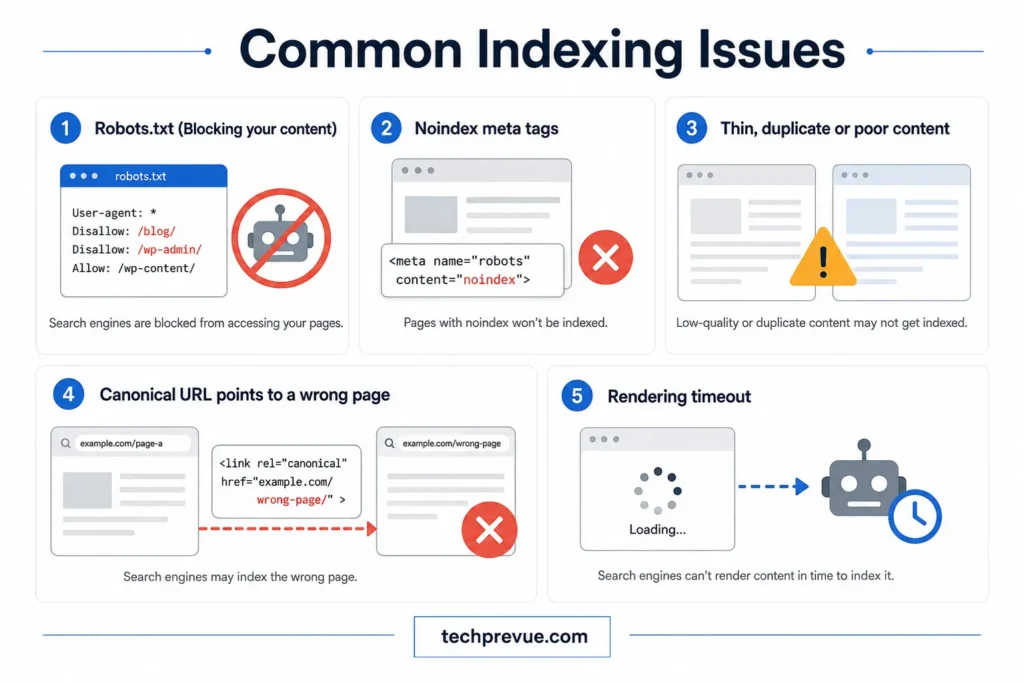
The controls you own
Meta robots tag — placed in the page’s <head>:
<meta name="robots" content="index, follow">
index, follow— store this page, follow its links (the default; you don’t need to declare it).noindex, follow— don’t show this page in results, but do follow its links. Right choice for internal search pages, thin tag archives, and thank-you pages.noindex, nofollow— don’t store it, don’t follow links. For private or utility pages.
The X-Robots-Tag HTTP header does the same job for non-HTML files like PDFs.
Why pages silently fail to get indexed
When a valuable page won’t index, the cause is almost always on this list:
- A
noindextag left over from staging or development. - A canonical tag pointing at a different URL, telling Google “index that one instead.”
- Content Google judges thin, duplicated, or too similar to existing pages.
- The page is orphaned, so it never builds enough signals to justify indexing.
- Rendering failure — the crawler saw an empty shell.
- Server errors or timeouts during crawl attempts.
A real-world pattern worth knowing: a team migrates a site, the developer copies the staging configuration to production, and the entire /blog/ directory carries noindex for months. Nobody notices because the pages “look fine” in the browser. Traffic quietly dies. The lesson — verify indexing directives after every launch, migration, and CMS update. It takes five minutes and prevents disasters.
Your diagnostic tool: URL Inspection
Google Search Console’s URL Inspection tool shows you a page’s exact status: whether it’s indexed, when it was last crawled, which URL Google chose as canonical, and whether the rendered page matches what you expect. When in doubt, inspect. It’s the single most useful habit a beginner can build.
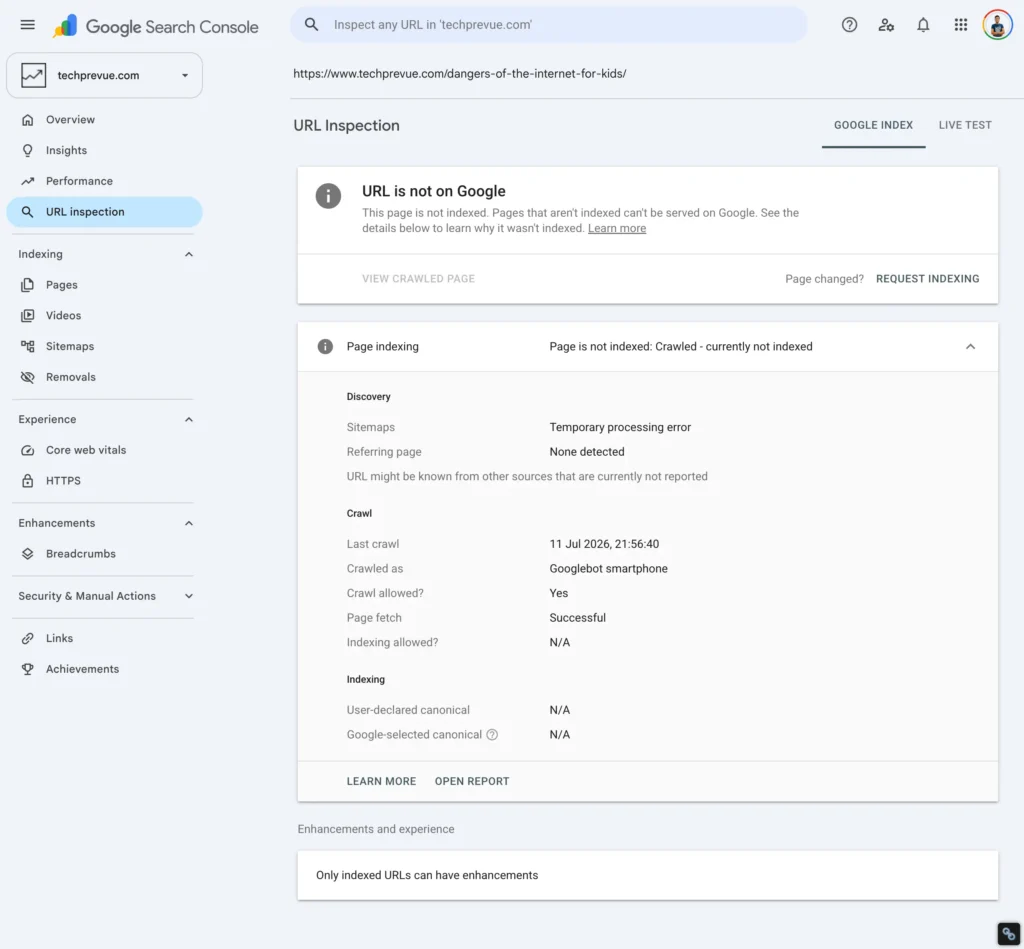
Also learn the Pages report (Indexing → Pages). The “why pages aren’t indexed” section names each exclusion reason. Two deserve special attention:
- Discovered – currently not indexed: Google knows the URL but hasn’t bothered crawling it. Often a crawl budget or internal linking signal problem.
- Crawled – currently not indexed: Google fetched it and declined to store it. Usually a content quality or duplication signal.
Different causes, different fixes — and now you can tell them apart.
When directives conflict: the silent indexing killer
Crawling and indexing controls live in five places at once — robots.txt, meta robots tags, X-Robots-Tag headers, canonical tags, and your XML sitemap. When they disagree, machines resolve the conflict in ways beginners don’t expect:
- robots.txt block + noindex tag = the noindex is never seen. Google can’t read a meta tag on a page it isn’t allowed to fetch — so the blocked URL can still appear in results from link signals alone. To deindex a page: allow crawling, apply noindex, and only block crawling after it drops out.
- noindex + canonical on the same page sends contradictory hints. The canonical says “consolidate signals here”; the noindex says “this page doesn’t count.” Google may honor either — or neither. One instruction per page.
- A sitemap listing noindexed or blocked URLs says “index this” and “don’t index this” simultaneously. It also teaches Google to distrust your sitemap.
- Meta robots vs. X-Robots-Tag mismatches (the page says index, the server header says noindex) usually resolve to the most restrictive rule — often not the one you intended.
- A canonical pointing at a redirected or blocked URL asks Google to consolidate signals onto a page it can’t use — so it elects its own canonical and ignores yours.
The audit habit that catches all of these: for any page behaving strangely, list every directive touching it from all five sources, and make them tell one story.
3. Site Architecture: The Blueprint Everything Else Sits On
Site architecture is how your pages are organized and connected. It decides three things at once: how easily crawlers discover content, how ranking authority flows between pages, and whether humans can find what they came for.
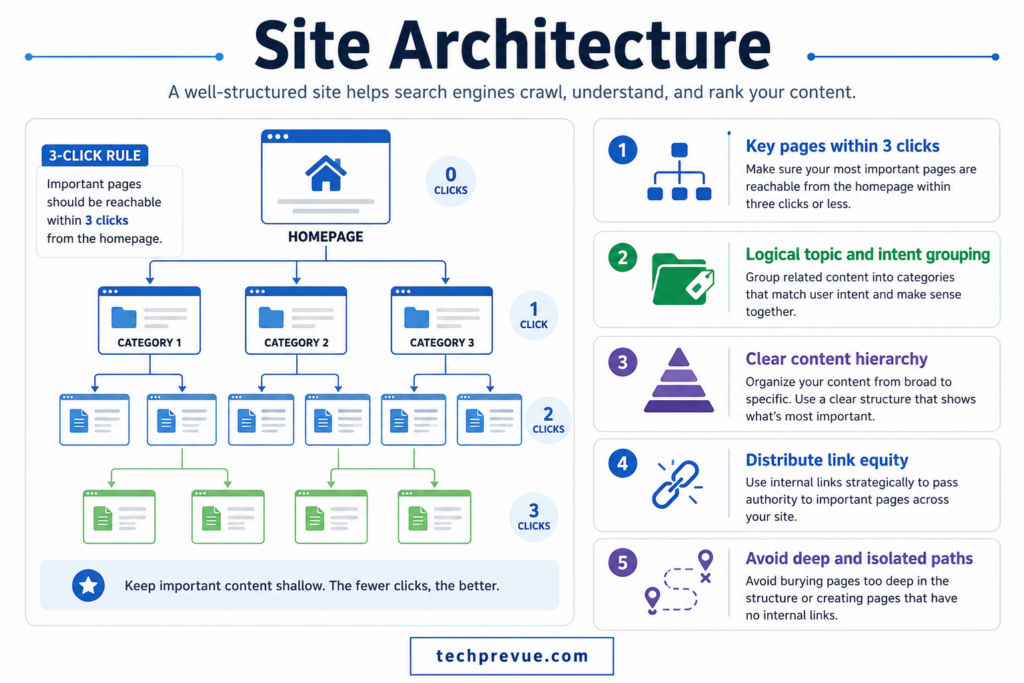
The rules of strong architecture
- Keep important pages within three clicks of the homepage. Depth signals unimportance. A money page buried six clicks deep gets crawled less and ranks worse.
- Build a logical hierarchy: Homepage → Category → Subcategory → Page. Every level should make sense to a stranger.
- Group content into topic clusters. One pillar page covers a broad topic; spoke articles cover subtopics; everything interlinks. This is exactly how this guide relates to an in-depth SEO guide — the pillar-and-spoke model in action.
- Avoid isolated islands. Sections of a site that only link within themselves trap both crawlers and authority.
Silo structure: architecture for multi-topic sites
A silo is a deliberately organized content section: every page about one topic lives in one folder, interlinks heavily within the group, and links sparingly outside it. Ecommerce and multi-service sites use silos to build unmistakable topical relevance per category:
- Physical silo: the URL folder carries the theme —
/running-shoes/contains every running-shoe page,/hiking-boots/every hiking-boot page. - Virtual silo: internal links create the grouping even where URL folders don’t.
- Hub pages anchor each silo. The category pillar links down to every page in its group, and every page links back up to the hub.
- Cross-linking is controlled, not forbidden. Hard silos restrict cross-links to hub-to-hub; softer implementations allow any genuinely relevant cross-link.
Silos and topic clusters are cousins. The modern middle path wins for most sites: organize in silo-like folders with strong hubs, but never suppress a helpful cross-link just to keep a silo “pure.” Relevance is the goal; the wall is only a means.
Internal linking: your site’s own ranking lever
Internal links are the most underrated tool in all of SEO, and you control 100% of them. Three practices deliver most of the value:
- Link from your strongest pages to the pages that need help. Authority flows through links. Your homepage and top articles are batteries; wire them to pages you want to lift.
- Use descriptive anchor text. “Read our crawl budget guide” beats “click here” — the anchor tells both users and machines what the destination is about.
- Add contextual links inside body text, not just menus and footers. A link surrounded by relevant sentences carries stronger topical meaning.
Breadcrumbs
Breadcrumb navigation (Home > SEO > Technical SEO) shows visitors where they are, gives crawlers an extra layer of internal links, and — with BreadcrumbList structured data — can enhance how your URL appears in results. Cheap to implement, quietly effective, and included in the schema block at the end of this guide.
Semantic HTML: structure inside the page
Architecture doesn’t stop at the site level — each page has an internal structure too, and machines read it through your HTML tags. Semantic HTML means using elements that describe their own role: <header>, <nav>, <main>, <article>, <section>, <footer>, and a clean heading hierarchy, instead of anonymous <div> blocks for everything.
Why bother? Three returns for one habit:
- Cleaner machine comprehension. A crawler that finds your content inside
<main>and<article>doesn’t have to guess what’s navigation, what’s a sidebar, and what’s the actual substance. Guessing is where extraction errors happen — in classic search and in AI answers alike. - Correct heading order. One
<h1>per page, followed by<h2>sections and<h3>subsections, with no skipped levels. Headings are the outline machines use to summarize your page. A jumbled outline produces jumbled summaries. - Accessibility for free. Screen readers navigate by the same landmarks. The same markup that helps Googlebot helps a visually impaired reader — one fix, two audiences.
You can check any page in seconds: open the browser’s developer tools, or run a Lighthouse audit and read the Accessibility findings. If your page is a soup of nested <div> tags, tidying the template is a one-time fix that upgrades every page built on it.
4. URL Structure: Small Detail, Compounding Returns
Your URLs are read by users in search results, by crawlers mapping your site, and by other sites deciding how to link to you. Good ones share four traits:
- Short and descriptive:
example.com/technical-seo/beatsexample.com/index.php?id=4827&cat=2. - Hyphenated lowercase words: hyphens separate words; underscores don’t. Mixed case creates duplicate-URL risk on some servers.
- Logical folders that mirror your hierarchy:
/seo/technical-seo/tells everyone where the page lives. - Stable. Every URL change requires a 301 redirect, and every redirect leaks a little speed and clarity. Choose URLs you can live with for years, and never encode dates or years into slugs for evergreen content.
One structural decision trips up many site owners: www vs non-www, and trailing slash vs none. The answer matters less than consistency. Pick one canonical format, redirect every variant to it, and use that format everywhere — internal links, sitemap, canonical tags.
5. Page Speed and Core Web Vitals: Performance Is a Ranking Signal
Speed is where the technical layer and user experience become the same job. Google measures it through Core Web Vitals — three metrics with public thresholds, gathered from real Chrome users.
| Metric | What it measures | Good | Needs improvement | Poor |
|---|---|---|---|---|
| LCP (Largest Contentful Paint) | How fast the main content loads | ≤ 2.5s | 2.5–4.0s | > 4.0s |
| INP (Interaction to Next Paint) | How fast the page responds to taps, clicks, and keys | ≤ 200ms | 200–500ms | > 500ms |
| CLS (Cumulative Layout Shift) | How much the layout jumps around while loading | ≤ 0.1 | 0.1–0.25 | > 0.25 |
An accuracy note that instantly puts you ahead of much of the internet: INP replaced First Input Delay (FID) in March 2024, per Google’s announcement. Any guide still teaching FID as a Core Web Vital is out of date. INP is stricter — it measures the responsiveness of every interaction across the page’s life, not just the first one.
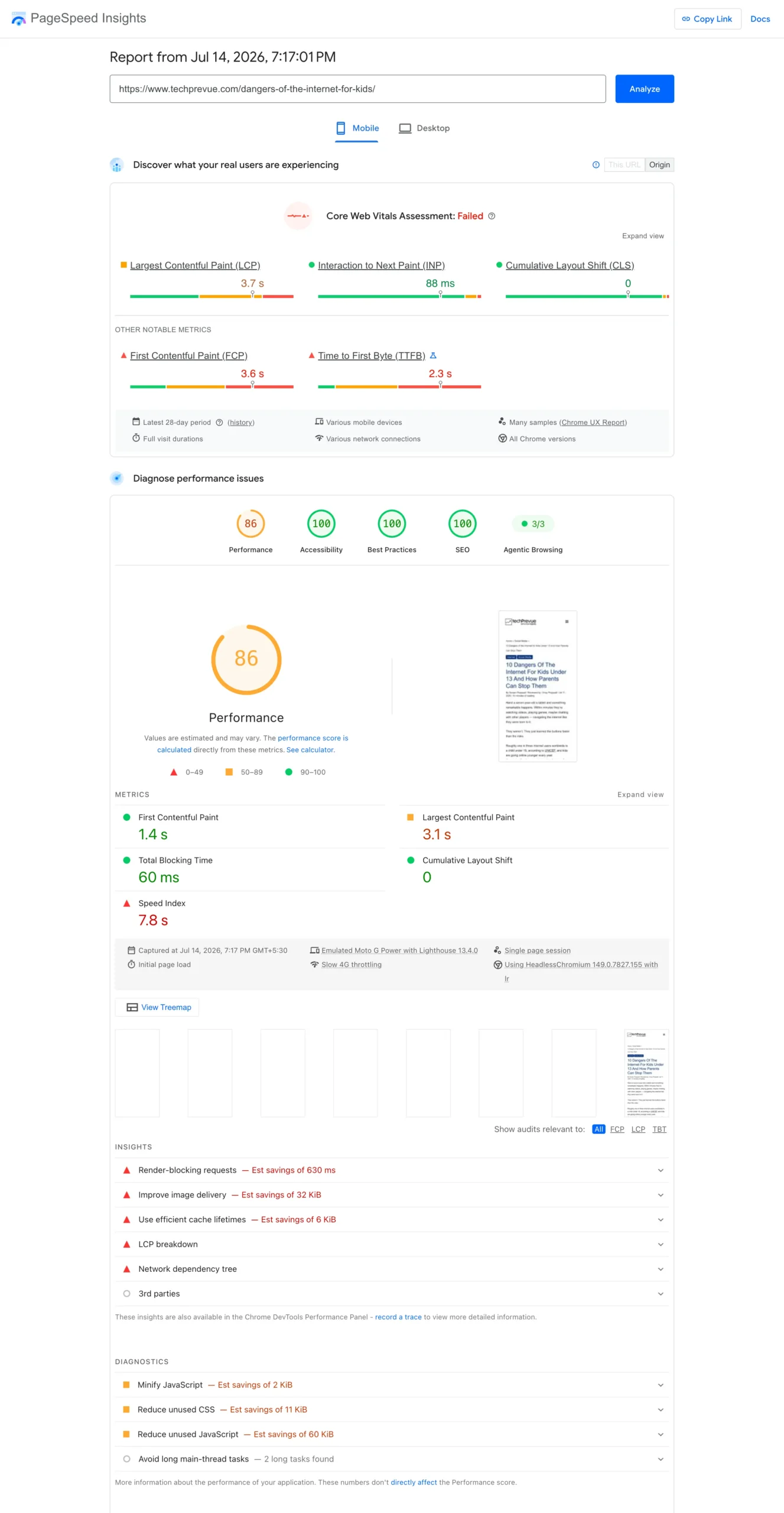
How to improve each metric
For LCP (loading):
- Compress images and serve modern formats (WebP or AVIF) — routinely 40–80% smaller than JPEG/PNG.
- Size your hero image correctly and never lazy-load it. Lazy-load everything below the fold instead.
- Cut server response time: better hosting, caching, and a CDN to serve files from a location near the visitor.
- Inline the critical CSS needed for above-the-fold content so the browser can paint immediately.
For INP (responsiveness):
- Break long JavaScript tasks into chunks under 50 milliseconds so the browser can respond between them.
- Defer or async-load every script that isn’t needed immediately — analytics, chat widgets, social embeds are the usual suspects.
- Audit third-party scripts ruthlessly. Each one is code you don’t control running on your page.
For CLS (stability):
- Declare width and height on every image and video so the browser reserves space before loading.
- Reserve fixed space for ads and embeds — the #1 cause of layout jumps.
- Load fonts with
font-display: swapso text renders immediately in a fallback font.
Test with PageSpeed Insights for the diagnosis and real-user field data, and Chrome DevTools’ Performance panel when you need to see exactly which script is blocking the main thread.
6. Mobile Optimization: Your Real Site Is the Phone Version
Because of mobile-first indexing, the mobile version of your site is your site as far as Google is concerned. Mobile optimization splits into two levels — and most guides only teach the first.
Level one: mobile-friendly basics
- Responsive design that adapts fluidly to any screen width — no fixed-width layouts, no horizontal scrolling.
- A correct viewport declaration:
<meta name="viewport" content="width=device-width, initial-scale=1">. - Body text at 16px or larger so nobody pinch-zooms to read.
- Touch targets at least 44×44 pixels with breathing room, so thumbs don’t hit the wrong link.
- No intrusive interstitials. Pop-ups that bury the content on arrival have carried ranking consequences since 2017, and the rules haven’t softened.
- Identical content on mobile and desktop. Hiding sections on mobile means hiding them from indexing.
Level two: designing for low-end devices and slow networks
Here’s what many guides written for fast-connection audiences miss. In most of the world’s fastest-growing internet markets — across South Asia, Southeast Asia, Africa, and Latin America — a large share of your audience browses on entry-level Android phones with limited memory, over congested 4G or patchy connections. A page that feels instant on a flagship phone over fiber can be functionally broken on a $100 handset riding a crowded commuter network — whether that commuter is in Mumbai, Jakarta, Lagos, or São Paulo.
Optimizing for this reality is both a rankings play and a conversion play:
- Set a performance budget. Decide a page-weight ceiling (say, under 1 MB for key templates) and enforce it in reviews.
- Ship less JavaScript. Low-end CPUs take several times longer to parse the same script. Every kilobyte of JS costs more on cheap hardware than any image does.
- Test under throttling. Chrome DevTools can simulate slow 4G and a 4× CPU slowdown. Make that test part of your release routine — or better, keep one real budget Android phone on your desk.
- Use system fonts or a single subsetted webfont. Font files are silent page-weight killers.
- Prefer server-rendered HTML. It becomes readable text even while everything else is still downloading.
Sites that respect slow networks don’t just rank better in these markets. They convert visitors that competitors’ bloated pages lose before the first paint.
7. HTTPS and Site Security: The Trust Layer
HTTPS encrypts traffic between the visitor and your server. It has been a confirmed Google ranking signal since 2014, browsers brand plain HTTP pages “Not secure,” and no visitor should ever see that label on your site. Most hosts now issue free SSL/TLS certificates (Let’s Encrypt made this universal), so cost is no excuse.
Implementation checklist:
- Certificate installed and auto-renewing.
- Every HTTP URL 301-redirects to its HTTPS version — in a single hop, not a chain.
- No mixed content: an HTTPS page must not load images, scripts, or styles over HTTP. Browsers block or flag these, and they break the padlock.
- Canonical tags, sitemap entries, and internal links all use the HTTPS URLs.
- For extra credit, add security headers —
Strict-Transport-Security,Content-Security-Policy,X-Content-Type-Options. They aren’t ranking signals, but they harden the trust and safety posture that everything else stands on.
Security failures also carry a brutal indirect SEO cost: a hacked site can be flagged, de-ranked, or filled with spam pages that destroy crawl budget and reputation. Keep your CMS, plugins, and PHP versions updated. Boring advice; expensive to ignore.
8. Structured Data: Teaching Machines What Your Content Means
Structured data (schema markup) is code — almost always JSON-LD — that labels your content in a vocabulary machines understand. It tells search engines “this number is a price,” “this block is a recipe,” “this person is the author.” Google uses it to understand pages and, for supported types, to display rich results: enhanced listings with stars, images, prices, or event dates.
A basic Article schema looks like this:
<script type="application/ld+json">
{
  "@context": "https://schema.org",
  "@type": "Article",
  "headline": "What Is Technical SEO? A Complete Guide for the AI Era",
  "description": "A complete learner's guide for the AI search era.",
  "author": { "@type": "Person", "name": "Author Name" },
  "publisher": { "@type": "Organization", "name": "Site Name" },
  "datePublished": "2026-07-20",
  "dateModified": "2026-07-20"
}
</script>
The 2026 reality check every guide should include (and most don’t)
Structured data types come and go, and building a strategy on a rich result Google later retires is a real risk. Two retirements define the current landscape:
- HowTo rich results were deprecated in September 2023. Don’t invest in HowTo markup expecting search features.
- FAQ rich results ended on May 7, 2026. Google’s documentation now states the FAQ rich result no longer appears in Search, with the Search Console FAQ report and Rich Results Test support removed in June 2026 and API support ending in August 2026. The remaining eligibility that government and health sites held is gone too.
Does that mean FAQ content is dead? No — and this distinction matters. FAQPage remains a valid schema.org type, Google has said leftover markup causes no harm, and question-and-answer content remains one of the easiest formats for AI systems to extract and cite. The SERP display feature died; the comprehension value of clear Q&A content did not. Practical policy: keep writing genuinely useful FAQ sections in plain HTML; treat FAQPage markup as optional; never promise anyone a rich result from it.
Where structured data still earns visible results
Focus your markup effort on types Google actively supports in its search gallery: Article, BreadcrumbList, Product, Review, Recipe, Event, LocalBusiness, JobPosting, and VideoObject, among others. Two rules keep you safe:
- Only mark up content that’s visible on the page. Schema describing invisible or exaggerated content violates Google’s guidelines and can draw a manual action.
- Validate everything with the Rich Results Test (Google’s eligibility view) and the Schema Markup Validator (pure syntax view).
And a forward-looking reason to care even where rich results don’t exist: structured data gives AI systems clean, unambiguous statements about entities — who wrote this, what it covers, when it changed. As answer engines mature, explicit machine-readable context is an asset that costs almost nothing to maintain.
9. Duplicate Content and Canonicalization: Stop Competing With Yourself
Duplicate content is rarely plagiarism. It’s usually your own site serving the same page at multiple URLs without realizing it:
http://example.com/pageandhttps://example.com/pageexample.com/pageandwww.example.com/page/pageand/page/and/page?utm_source=newsletter- A product listed in three categories at three URLs
- A print-friendly version indexed alongside the original
Each variant splits your ranking signals into fragments. Ten links pointing at four versions of one page make every version weaker than one page with ten links.
Canonicalization is the fix: declaring which URL is the “true” version so signals consolidate. The main tool is the canonical tag in the page <head>:
<link rel="canonical" href="https://www.example.com/technical-seo/">
The rules that prevent 90% of canonical disasters:
- Every indexable page carries a self-referencing canonical. The page points to itself as the master version. This one habit neutralizes parameter and duplicate-path problems automatically.
- Use absolute HTTPS URLs, never relative paths.
- Never canonicalize to a redirect or a 404. The target must be a live, indexable, 200-status page.
- Don’t send conflicting signals. If the canonical says page A but your sitemap lists page B and internal links point at page C, Google will pick its own winner — remember, canonical tags are hints, not commands.
- Reserve cross-page canonicals for true duplicates. Pointing every product variant at one parent page hides the variants from search; only do it when the pages are genuinely interchangeable.
For permanent moves, a 301 redirect is stronger than a canonical — it physically takes users and bots to the surviving URL and consolidates signals there.
10. Hreflang and International SEO: Serving the Right Language to the Right User
If your site publishes the same content in multiple languages or targets multiple countries, hreflang tags tell search engines which version belongs to which audience — so a Spanish-speaking reader in Mexico City lands on the Spanish page, a German reader on the German one, and a Hindi reader in Delhi on the Hindi one.
A worked example for a site serving global English, British English, Spanish, and Hindi:
<link rel="alternate" hreflang="en" href="https://example.com/guide/" />
<link rel="alternate" hreflang="en-gb" href="https://example.com/uk/guide/" />
<link rel="alternate" hreflang="es" href="https://example.com/es/guia/" />
<link rel="alternate" hreflang="hi-in" href="https://example.com/hi/guide/" />
<link rel="alternate" hreflang="x-default" href="https://example.com/guide/" />
Reading it: en is generic English, en-gb targets the United Kingdom, es is generic Spanish, hi-in is Hindi for India, and x-default is the fallback for everyone else. The same pattern extends to any language-region pair — pt-br for Brazilian Portuguese, fr-ca for Canadian French, de-de for Germany, or regional languages like ta-in (Tamil) and bn-in (Bengali) as regional-language search keeps growing.
Three implementation rules, because hreflang is famously easy to get wrong:
- Tags must be reciprocal. If the English page references the Spanish page, the Spanish page must reference the English page back. One-way tags get ignored.
- Every version includes a self-reference in its own hreflang set.
- Use exact ISO codes — language first, then optional region (
hi-in, notin-hiorhindi).
One thing hreflang does not do: it doesn’t translate anything, and it doesn’t excuse duplicate content in the same language across regional folders. Each version should genuinely serve its audience — currency, examples, spelling, cultural context — or consolidate instead.
Technical SEO for AI Search: The New Frontier
This is the section that separates a current guide from a stale one. Search engines are no longer the only machines reading your website. AI assistants crawl the web to train models and to fetch live answers — and making your site legible to them is now part of the job description.
Quick answer: Technical SEO for AI search means letting reputable AI crawlers access your content, serving your main content in plain HTML rather than JavaScript, keeping your structure and headings extraction-friendly, and monitoring AI-driven traffic — so systems like ChatGPT, Perplexity, Gemini, and Claude can find, understand, and cite your pages.
Meet the AI Crawlers
Each major AI platform operates its own bots, identified by user-agent, and generally controllable through robots.txt. The names to know:
| Crawler | Operator | What it does |
|---|---|---|
| GPTBot | OpenAI | Collects content for model training |
| OAI-SearchBot / ChatGPT-User | OpenAI | Powers search features and live user-requested fetches |
| ClaudeBot | Anthropic | Collects content for Claude |
| PerplexityBot | Perplexity | Indexes content for its answer engine |
| Google-Extended | Controls use of your content for Gemini training (separate from Googlebot — blocking it does not affect Google Search rankings) | |
| Bingbot | Microsoft | Feeds both Bing search and Copilot |
To Allow or to Block? Make It a Decision, Not an Accident
You can disallow any of these in robots.txt:
User-agent: GPTBot
Disallow: /
Should you? That’s a business decision with a real trade-off. Blocking AI crawlers protects your content from training use — but it also removes you from AI-generated answers, a discovery channel that keeps growing. For most publishers whose goal is visibility, allowing reputable AI crawlers is the traffic-positive choice.
The trap to avoid is blocking them by accident. Some CDN and bot-protection services have shipped features that block AI crawlers by default — Cloudflare, notably, introduced controls that stop AI scrapers unless you opt otherwise. If AI visibility matters to you, audit your CDN settings, firewall rules, and robots.txt today. Many sites are invisible to AI systems and don’t know it.
Most AI Crawlers Don’t Render JavaScript
Googlebot renders JavaScript. Most AI crawlers don’t — they read the raw HTML response and move on. If your article’s text only exists after a JavaScript framework builds the page in the browser, an AI crawler sees an empty shell where your expertise should be.
The fix is architectural: server-side rendering (SSR) or static site generation (SSG), where the server sends complete HTML with all content present. Frameworks like Next.js and Nuxt exist largely to deliver this. The rule of thumb for the AI era is blunt: any content you want cited must exist in the initial HTML.
This also quietly resolves the old dynamic-rendering debate. Serving bots a special pre-rendered version was always a workaround; Google itself steers sites toward proper server-side rendering. Build pages that arrive complete, and every machine — Googlebot, GPTBot, screen readers — wins simultaneously.
The LLMs.txt Reality Check
You may have seen LLMs.txt promoted as “robots.txt for AI” — a proposed file that gives language models a curated, markdown summary of your site. Honest status report: it’s a voluntary proposal, major AI platforms haven’t committed to using it, and there’s no solid evidence yet that it improves AI retrieval or traffic. Adding one is harmless and takes an hour; just don’t mistake it for a strategy. Your energy is better spent on the fundamentals above, which demonstrably determine whether AI systems can read you at all.
Redirect Hallucinated URLs
Here’s a genuinely new maintenance task the AI era created. AI assistants sometimes cite URLs on your domain that have never existed — plausible-sounding paths the model invented. Users click them and hit your 404 page.
Turn that leak into traffic: review your 404 logs (or analytics filtered to AI referral sources) for repeated hits on non-existent paths, then 301-redirect each hallucinated URL to the most relevant real page. Five minutes of redirect work per URL, recovered visitors forever after.
Structure for Extraction
AI systems assemble answers from fragments of pages. Pages built from clean, self-contained fragments get quoted; sprawling walls of text get skipped. The extraction-friendly habits:
- Open each major section with a direct one-or-two-sentence answer, then elaborate (exactly the pattern this guide uses).
- Use descriptive, question-style headings that mirror how people ask.
- Prefer tables for comparisons and thresholds — machines parse them beautifully.
- Keep facts, definitions, and numbers in crisp standalone sentences rather than buried mid-paragraph.
- Maintain accurate dates and update stale claims; answer engines weigh freshness when choosing sources.
Notice something? Every one of these also helps human readers and classic featured snippets. Optimizing for AI extraction is not a separate discipline — it’s clarity, enforced.
Measure Your AI Visibility
You can’t manage what you don’t measure. Three practical checks:
- Server logs: filter for AI user-agents (GPTBot, ClaudeBot, PerplexityBot) to see whether and how often they crawl you.
- Referral traffic: create an analytics segment for visits from chatgpt.com, perplexity.ai, gemini.google.com, and copilot.microsoft.com.
- Manual prompt testing: monthly, ask the major assistants the questions your content answers. Note whether you’re cited, how you’re described, and who’s cited instead. It’s the AI-era equivalent of checking your rankings.
7 Common Technical SEO Issues (Diagnose → Fix)
Theory learned; now the field manual. These seven problems account for the vast majority of real-world technical damage. Each follows the same scannable format: symptoms, common causes, how to diagnose, how to fix.
Issue 1: Pages Aren’t Getting Indexed
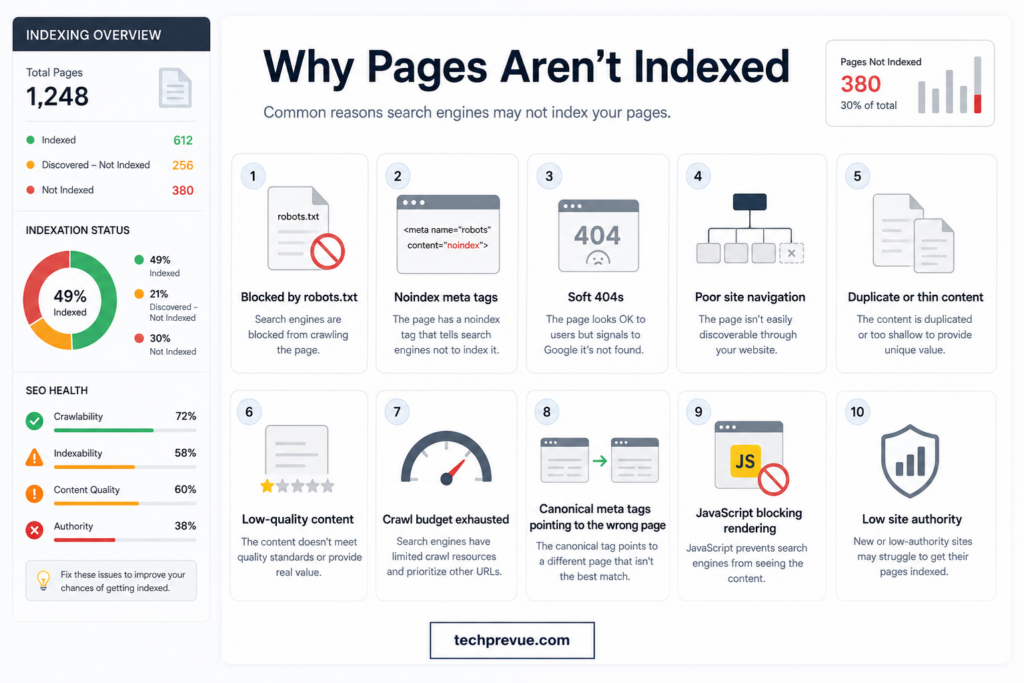
Symptoms: you publish good content and it never appears in Google, or a site:example.com/your-url search returns nothing weeks later.
Common causes:
- A stray
noindextag or robots.txt block left over from staging or development - The page is orphaned — no internal links point to it — or it’s missing from the XML sitemap
- A canonical tag points at a different URL, handing the indexing decision elsewhere
- Content is thin, duplicated, or too similar to existing pages, so Google declines to store it
- Client-side rendering served the crawler an empty shell
- Server errors or timeouts during crawl attempts
- Crawl budget waste delaying discovery on large sites
How to diagnose:
- Run the URL through Search Console’s URL Inspection tool — it states the exact status: not discovered, discovered but not crawled, crawled but not indexed, blocked, noindexed, or canonicalized elsewhere
- Open Indexing → Pages and read which exclusion bucket the URL sits in
- Compare the crawled/rendered HTML against your browser view to rule out rendering loss
How to fix:
- Not discovered → add internal links from strong, relevant pages and confirm the URL is in your sitemap
- Blocked or noindexed → correct robots.txt or remove the stray tag
- Canonicalized elsewhere → fix the canonical target, or accept Google’s choice if the pages really are duplicates
- Crawled but not indexed → improve or consolidate the content; merging three weak pages into one strong page often gets all the material indexed at last
Issue 2: Redirect Chains and Broken Redirects
Symptoms: pages load slowly through multiple hops; old backlinks lose their punch; crawlers waste requests; users occasionally land on dead ends.
Common causes:
- Migrations stacked over the years — HTTP→HTTPS, non-www→www, plus one URL restructure per redesign — each adding a hop
- Redirect rules living in several layers at once, quietly chaining across them:
- Server level:
.htaccessrules on Apache, or server-block rewrites in an NGINX config - Application level: CMS core settings — in WordPress, a changed site address, or
WP_HOME/WP_SITEURLconstants forced inwp-config.php, trigger their own redirects - Plugin level: redirect-manager plugins carrying years of overlapping legacy rules
- CDN/edge level: page rules, workers, and forwarding set at the CDN
- Server level:
- Temporary 302s left in place for permanent moves
- Redirects pointing at URLs that were later deleted, so the chain ends in a 404
How to diagnose:
- Crawl the site with any auditing tool and open the redirect chains report
- Spot-check with
curl -I https://example.com/old-pageand follow the Location headers hop by hop - Audit every layer where rules can live —
.htaccessor NGINX config,wp-config.phpand CMS settings, plugins, and CDN rules — because chains usually form between layers, not within one
How to fix:
- Flatten every chain to a single 301 hop from origin to final destination
- Consolidate rules into as few layers as possible, and document which layer owns what
- Convert lingering 302s to 301s for genuinely permanent moves
- Update internal links to point directly at final URLs so no internal click ever passes through a redirect
- Reclaim lost value: find old URLs that earned backlinks but now 404, and 301 each to its closest current equivalent — the fastest “link building” you’ll ever do, because the links already exist
Issue 3: Crawl Budget Waste
Symptoms: new content takes ages to be crawled; Search Console’s Crawl Stats show heavy bot activity on parameter URLs, filters, or archives you never wanted indexed.
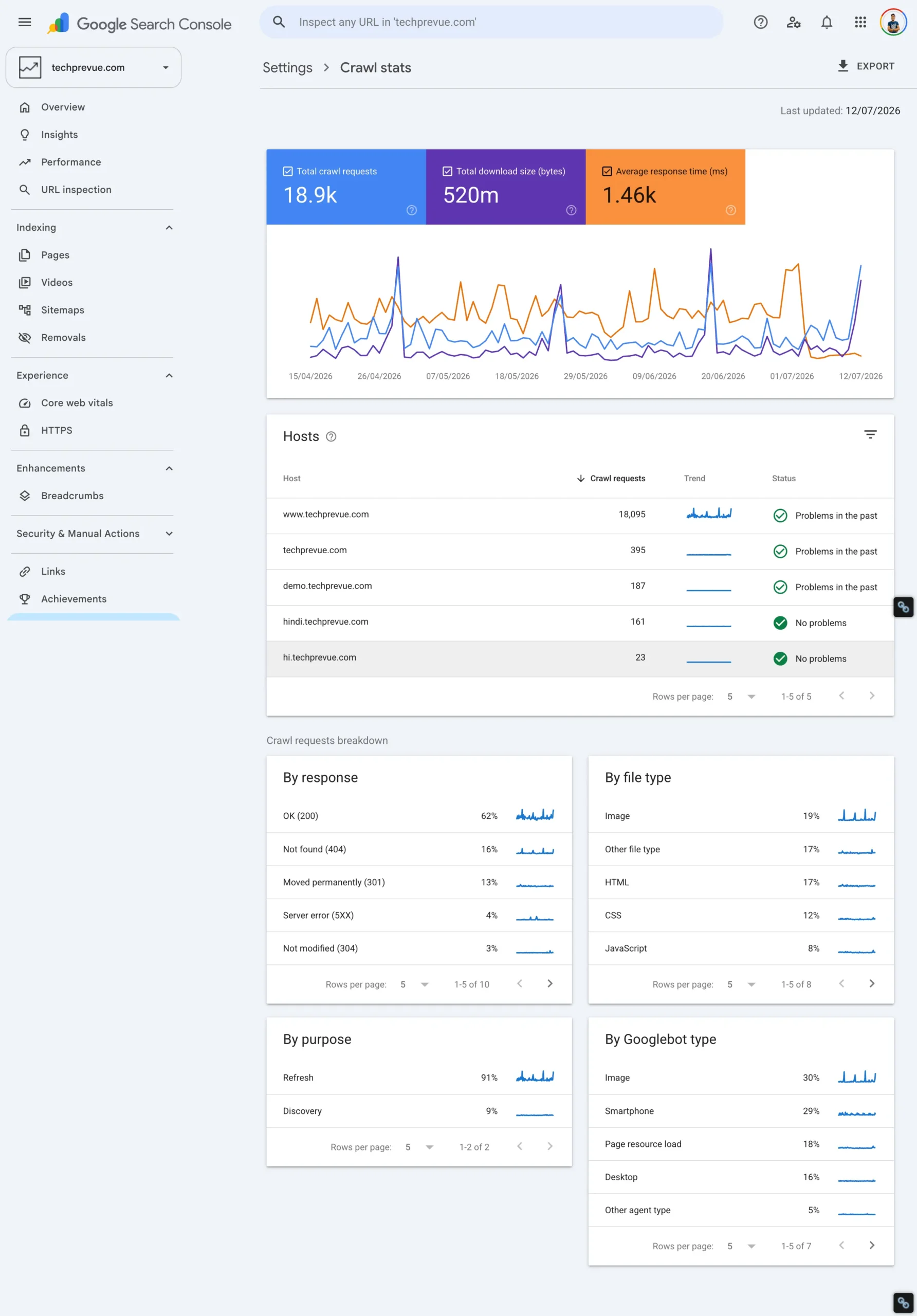
Common causes:
- Faceted navigation multiplying filter combinations into millions of URLs
- Internal search result pages exposed to crawling
- Calendar widgets and other infinite URL spaces
- Session IDs or tracking parameters appended to internal links
- Thin tag and date archives auto-generated by the CMS
- Staging or development environments left open to bots
How to diagnose:
- Open Crawl Stats (Settings → Crawl Stats) and study what Google fetches most — if junk URLs dominate, the budget is leaking
- Run a crawler and watch for infinite or parameter-generated paths
- Use log file analysis (covered in the advanced section) for the definitive picture of real bot behavior
How to fix:
- Block crawl traps in robots.txt and remove links into infinite spaces
- Apply noindex to thin archive pages; canonicalize parameter variants to their clean versions
- Password-protect staging environments
- Keep the sitemap ruthlessly clean so it functions as a priority list of what deserves attention
Issue 4: JavaScript Rendering Failures
Symptoms: the page looks perfect in your browser but ranks like it’s empty; URL Inspection’s rendered HTML is missing your main content; AI systems never cite you.
Common causes:
- Main content built entirely client-side by React, Vue, Angular, or similar frameworks
- Title tags, meta descriptions, or canonicals injected by JavaScript after page load
- Critical scripts blocked in robots.txt, so the renderer can’t build the page
- Rendering timeouts on heavy pages — the crawler gives up before content appears
How to diagnose:
- In Search Console, inspect the URL and view the crawled/rendered HTML — is your text actually there?
- Quick browser test: view the page source (not DevTools’ rendered view) and search for a sentence from your content; absence means a client-side dependency
- Compare rankings between your simple HTML pages and JS-dependent pages — a consistent gap is a rendering symptom
How to fix:
- Move content pages to server-side rendering (SSR) or static site generation (SSG)
- If a full migration isn’t feasible yet, prioritize money pages: ensure critical text, titles, meta tags, and schema exist in the initial HTML
- Unblock JavaScript and CSS resources crawlers need for rendering
- Remember the AI-era stake: most AI crawlers have no rendering queue at all — unrendered content simply doesn’t exist for them
Issue 5: Failing Core Web Vitals (Especially INP)
Symptoms: PageSpeed Insights field data shows red or amber; users report the site “feels laggy”; rankings soften on mobile.
Common causes:
- Long JavaScript tasks blocking the main thread (the classic INP killer)
- Excessive third-party scripts — chat widgets, tag managers, social embeds
- Slow server response times dragging LCP down before the page even starts
- Heavy, unoptimized images and missing width/height attributes
- Ads, embeds, and web fonts loading without reserved space, causing layout shift
How to diagnose:
- Trust field data (real users) as the verdict; use lab data as the debugging aid
- Identify which metric fails on which templates — failures cluster by template, not by page
- Profile interactions in Chrome DevTools’ Performance panel to find the exact scripts blocking responsiveness
How to fix:
- Apply the metric-specific playbook from the Core Web Vitals section above
- Fix templates, not individual pages — one template fix repairs a thousand URLs at once
- Defer or remove third-party scripts that don’t earn their cost
- Re-test after each change and let field data confirm the win over the following weeks
Issue 6: Duplicate Content Splitting Your Signals
Symptoms: the “wrong” URL ranks; Search Console reports “Duplicate, Google chose different canonical than user”; several similar pages all rank poorly instead of one ranking well.
Common causes:
- URL variants serving identical content: HTTP/HTTPS, www/non-www, trailing slash, uppercase paths, tracking parameters
- Products listed in multiple categories at multiple URLs
- Print-friendly or AMP-style duplicates left indexable
- Staging copies of the site indexed alongside production
- Two articles on your own site chasing the same search intent (keyword cannibalization)
How to diagnose:
- Search Google for
site:example.com "an exact sentence from the page"and count how many URLs return - Review Search Console’s duplicate-related exclusions in the Pages report
- Crawl the site and audit canonical tags, URL variants, and near-identical titles
How to fix:
- Enforce one canonical URL format site-wide with redirects; self-canonical everywhere
- 301 or consolidate true duplicates into a single strong URL
- Merge articles that target the same intent into one stronger page — the cure for cannibalization as well
- Password-protect staging and block it from crawling
Issue 7: Mobile-Only Failures
Symptoms: everything looks fine on your desktop; meanwhile mobile rankings and engagement sag.
Common causes:
- Fixed-width layouts that force horizontal scrolling on phones
- Fonts below 16px and touch targets too small or too crowded
- Intrusive interstitials ambushing visitors on arrival
- Content collapsed into accordions or tabs that fail to load on mobile
- A mobile version that serves less content than desktop — and gets indexed that way
How to diagnose:
- Test on a real, inexpensive Android device with network throttling — not just a resized browser window
- Check tap-target spacing, font sizes, interstitial behavior, and whether collapsed content actually loads
- Compare mobile vs. desktop Core Web Vitals in Search Console’s report
How to fix:
- Apply the level-one and level-two mobile playbooks above
- Restore content parity between mobile and desktop
- Adopt the mindset shift that matters more than any single fix: design and test mobile-first, because that’s the version being indexed and the version most of the world actually uses
Technical SEO and Content: The Secret to Building Authority
A common beginner mistake is treating the technical layer as separate from content strategy and link building. In reality it’s the multiplier on both — and the silent killer of both when it fails.
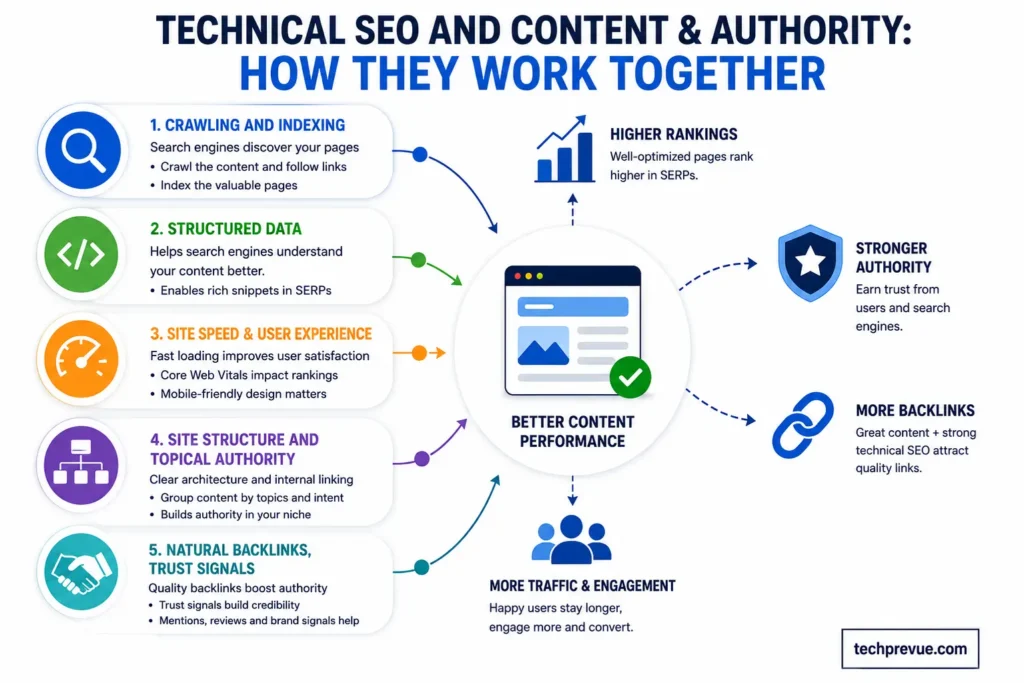
1. Discoverability: Great Content Can’t Rank If It Can’t Be Found
You invest days in a 3,000-word resource. It never ranks. The content wasn’t the problem:
- The page was orphaned, so crawlers never found it
- It was missing from the sitemap, or a leftover noindex tag excluded it
- Crawl budget was burning on filter URLs while the new page waited
The technical guarantee to build: every new asset gets internal links from two or three relevant pages within a click or two of crawlable hubs, lands in the sitemap automatically on publish, and shows “Indexed” in Search Console within days — verified, not assumed.
2. Structured Data Gives Content Context
Search has become entity-driven and intent-driven. Schema markup acts as a translator between your content and the algorithms judging it:
- It qualifies pages for supported rich results — stars, prices, images
- It clarifies relationships: this author wrote this article for this organization, updated on this date
- It hands AI systems clean, unambiguous facts to build answers from
Markup doesn’t rank pages by itself. It changes how accurately machines represent you — and misrepresentation is a quiet traffic killer.
3. Speed and UX Decide Whether Content Gets Consumed
A comparison page that takes five seconds to load on mobile bleeds visitors before the first word renders:
- Slow LCP means readers leave before content appears; poor INP makes interactions feel broken
- Engagement signals feed back into how ranking systems evaluate helpfulness
- The same fix — compress images, defer scripts, reserve layout space — lifts rankings, time on page, and conversions together
4. Technical Health Preserves the Authority You Earn
A backlink from a major publication is gold — unless your technical layer wastes it:
- If the linked URL now 404s, the authority evaporates; redirect it and the value returns
- If the page canonicalizes elsewhere or sits behind a redirect chain, signals dilute at every hop
- 301 redirects during migrations, consistent canonicals, and regular status-code audits are how earned authority stays earned
Link building is hard. Losing links to broken plumbing is inexcusable.
5. The Technical Layer Supports E-E-A-T
Experience, Expertise, Authoritativeness, and Trustworthiness are judged partly through technical evidence:
- HTTPS, a stable layout, and honest markup signal a site that’s cared for
- Visible authorship, organization schema, and accurate dates make expertise machine-verifiable
- Clean technical health keeps you eligible for the surfaces where trust pays — featured snippets, AI Overviews, Discover, and news carousels
You can’t shortcut authority. But a broken technical foundation can absolutely sabotage the authority you’ve already built.
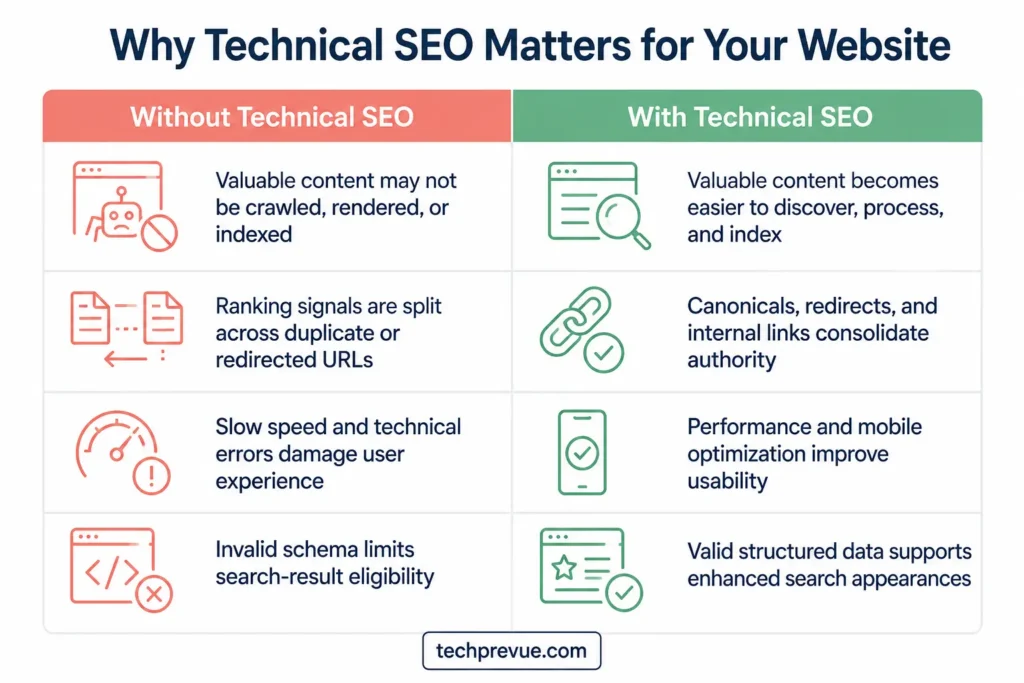
How to Do Your First Technical SEO Audit (Free, Step by Step)
Everything so far becomes real the day you audit an actual site. Here’s a complete first audit using only free tools — no budget required. Expect it to take one focused afternoon.
Step 1 — Set up your instruments. Verify the site in Google Search Console and let it gather data. Bookmark PageSpeed Insights and the Rich Results Test. Install a crawler — Screaming Frog’s free tier handles 500 URLs, plenty for a first site.
Step 2 — Check the front door. Visit /robots.txt. Confirm nothing important is disallowed and the sitemap line is present. Visit /sitemap.xml. Confirm it loads, is current, and contains only real, indexable URLs.
Step 3 — Read the indexing story. In Search Console, open Indexing → Pages. Compare indexed count against your expectation. Read every exclusion category and ask: is this exclusion intentional? Inspect three important URLs individually and confirm each is indexed with the canonical you intended.
Step 4 — Crawl the site yourself. Run your crawler and triage the output: broken internal links (404s), redirect chains, missing or duplicate titles and meta descriptions, noindex tags in surprising places, canonical anomalies, and pages deeper than three clicks. Export issues into a simple sheet: problem, URL count, priority.
Step 5 — Measure speed where it hurts. Test your homepage plus your two most important templates (an article page, a category or product page) in PageSpeed Insights. Record LCP, INP, and CLS field values. Note the top two suggested fixes per template — not all twenty; the top two.
Step 6 — Interrogate the mobile experience. Real phone, throttled network. Load the key templates. Can you read without zooming? Tap accurately? Does anything jump while loading? Does a pop-up ambush you?
Step 7 — Verify the trust layer. Confirm HTTPS everywhere, test that HTTP and www/non-www variants redirect in one hop, and check a few pages for mixed-content warnings in the browser console.
Step 8 — Validate structured data. Run key templates through the Rich Results Test. Fix errors first, warnings second.
Step 9 — Check AI access. Confirm robots.txt and your CDN aren’t blocking AI crawlers you’d rather welcome. Grep recent logs for GPTBot and friends if you have log access.
Step 10 — Prioritize like a professional. Sort every finding into three buckets: blockers (stops crawling/indexing — fix now), degraders (hurts performance or clarity — fix this month), polish (nice to have — backlog). Fix in that order, one bucket at a time, and re-verify after each change. That final verification habit — never assuming a fix worked — is what separates professionals from hopeful amateurs.
Do this once and the pipeline model stops being theory. You’ll have seen discovery, crawling, rendering, and indexing behave on a live site — and you’ll never read your Search Console the same way again.
Advanced Technical SEO Techniques
Once the fundamentals are stable, these advanced practices are where large sites and ambitious specialists find their edge. Read them now for the map; return when your site’s scale demands them.
Log File Analysis: Watching Bots in the Wild
Crawling tools simulate a bot. Server logs show you the real thing — every request Googlebot, Bingbot, GPTBot, and every other crawler actually made, with timestamps and status codes.
What logs reveal that nothing else can:
- Which pages bots visit constantly, and which they’ve quietly abandoned
- Whether your most valuable pages get a fair share of crawl attention
- Crawl traps in action — thousands of requests to parameter URLs you thought were blocked
- Exactly which AI crawlers read your site, how often, and what they took
- Errors bots encounter that human visitors never report
How to get started:
- Download raw access logs from your hosting control panel (or ask your host where they live)
- Filter rows by bot user-agent and count requests per URL pattern — even a spreadsheet pivot table delivers insight
- Graduate to a dedicated log analysis tool when volume outgrows spreadsheets
- After any major fix, check the logs two weeks later and confirm bot behavior actually changed — logs are the ground truth that ends every “did it work?” debate
Crawl Budget Optimization at Scale
Small sites rarely exhaust their crawl budget. Sites with hundreds of thousands of URLs live or die by it. The advanced playbook:
- Monitor crawling from logs, not assumptions. Build a recurring report of crawl frequency by site section, and watch for sections bots are abandoning.
- Create crawl priority pathways. Internal links from your most-crawled pages (homepage, hubs, fresh-content feeds) pull bots toward the URLs you want fetched next.
- Keep sitemaps dynamic and segmented. Split by section —
/sitemaps/posts.xml,/sitemaps/products.xml— so Search Console shows exactly which section has discovery trouble, and keeplastmoddates honest so engines trust them. - Prune ruthlessly. Consolidate or remove thin, outdated, and near-duplicate URLs; every junk URL removed hands its crawl attention to a page that matters.
- Make every fetch cheaper. Faster server responses and proper caching raise the number of pages bots fetch per visit — performance is crawl budget.
- Add a “recently published” hub that automatically links your newest pages, keeping fresh content within immediate crawl reach.
Edge SEO: Fixing Sites You Can’t Touch
Sometimes the CMS is rigid, the development queue is six months long, and the fix still needs shipping today. Edge SEO implements changes at the CDN layer — code running between the visitor and your origin server, using tools like Cloudflare Workers. Common uses:
- Injecting or correcting canonical tags and meta robots directives
- Deploying redirects instantly, without touching server config
- Inserting hreflang annotations or structured data
- Modifying HTTP headers (caching, security, X-Robots-Tag)
- Running SEO tests by serving modified HTML to a slice of traffic
One governance rule keeps this power tool safe: version-control and document every edge change. Invisible modifications nobody remembers are how future migrations go wrong.
Faceted Navigation and Pagination at Scale
Ecommerce and listing sites live or die by how they handle filters and page sequences.
Faceted navigation strategy:
- Decide which filter combinations deserve indexing: those with real search demand (“red running shoes”) get clean URLs, self-canonicals, and internal links
- Low-value combinations (“red running shoes size 9 under $50 sorted by newest”) get canonicalized to the parent category or blocked from crawling
- Watch the failure mode of indifference — millions of filter URLs fighting for crawl budget while category pages starve
Pagination:
- Give every page in a series a self-referencing canonical — page 2 canonicals to page 2, not to page 1; canonicalizing the series to page one hides every product on the later pages
- Link sequences with real, crawlable
<a href>links - Retire the myth: Google stopped using
rel="next"andrel="prev"as indexing signals back in 2019. The markup is harmless and other engines may read it, but it is not a pagination strategy
JavaScript SEO at Scale
For sites committed to React, Vue, or Angular, JavaScript SEO becomes its own ongoing practice:
- Choose rendering strategies per template — static generation for content pages, hydration only where interactivity demands it
- Monitor rendered-versus-source parity continuously so regressions are caught the week they ship, not the quarter rankings drop
- Keep critical tags — titles, meta robots, canonicals, schema — server-side, never injected by scripts
- Test what non-rendering crawlers receive, because for most AI bots the initial HTML is the whole story
The strategic principle stays constant: the more of your meaning that exists in plain HTML, the fewer machines can misread you.
AI and ML-Powered Technical Auditing
The scale of modern websites has outgrown manual checking — and machine intelligence now works on the auditor’s side too:
- Anomaly detection on crawl and log data. Automated monitors flag spikes in 404s, sudden jumps in noindexed URLs, or a collapse in crawl activity the day they happen — not at next quarter’s audit.
- Predictive monitoring. Trend analysis on Core Web Vitals, index coverage, and crawl stats forecasts problems before they become ranking losses.
- Automated pre-deployment testing. Wire checks into your release pipeline — Lighthouse CI for performance budgets, diff tests comparing rendered vs. source HTML, and validators that block a deploy carrying a stray noindex.
- ML pattern recognition in server logs. At millions of rows, machine learning spots bot-behavior patterns and emerging crawl traps no human reviewer would catch.
- LLM-assisted analysis. AI assistants can summarize a crawl export, cluster thousands of errors into root causes, and draft redirect maps in minutes.
One non-negotiable guardrail: AI accelerates diagnosis; humans verify before anything ships. Never deploy an AI-suggested fix — a redirect map, a robots.txt edit, a canonical change — without checking it against the live site. Automation at scale means mistakes at scale, too.
The Specializations Map
As you go deeper, you’ll meet named sub-fields — useful search terms for your continued learning: JavaScript SEO (rendering and frameworks), Edge SEO (CDN-layer work), international SEO (hreflang and multi-region architecture), ecommerce technical SEO (facets, variants, feeds), enterprise technical SEO (million-URL crawl management), and accessibility-adjacent SEO (semantic HTML and ARIA, which improve machine comprehension and human inclusion together). Nobody masters all of them at once. Everybody masters the same fundamentals first — the ten elements you now know.
How to Measure Technical SEO Success
Fixes without measurement are guesses. Track a small set of numbers on a rhythm, and technical work becomes provable.
| What to track | Where | Healthy signal | Cadence |
|---|---|---|---|
| Indexed vs. excluded pages | Search Console → Pages | Indexed count tracks your real page count; exclusions are intentional | Weekly |
| Crawl activity | Search Console → Crawl Stats | Bots spend time on valuable sections, not junk | Monthly |
| Core Web Vitals (field) | Search Console → CWV report / PageSpeed Insights | Rising share of “Good” URLs on all three metrics | Monthly |
| Broken links & redirect chains | Site crawler | Trending toward zero after each cleanup | Monthly |
| Structured data validity | Search Console → Enhancements | Zero errors on supported types | Monthly |
| AI crawler activity & referrals | Server logs + analytics segment | Present, and growing if you allow them | Monthly |
| Full crawl audit | Crawler, full run | No new issue categories since last quarter | Quarterly |
Two reporting habits make you credible beyond the SEO team. First, tie technical wins to business language: “flattened 300 redirect chains” means little; “recovered link value from 59 referring domains and cut load time on money pages by 0.8s” means budget. Second, annotate your analytics with the date of every significant fix, so cause and effect stay visible months later.
Technical SEO Tools: Official and Third-Party
You can practice everything in this guide without spending a dollar. Start with the official tools — they’re free, and they show you search engines’ own view of your site. Add third-party tools when a specific limit blocks you.
Official Search Engine Tools (Start Here — Free)
| Tool | What it does | Cost |
|---|---|---|
| Google Search Console | Indexing status, crawl stats, Core Web Vitals, URL inspection — your primary instrument | Free |
| PageSpeed Insights | Field + lab performance data with fix suggestions | Free |
| Bing Webmaster Tools | Bing’s equivalent console; also relevant to Copilot visibility | Free |
| Rich Results Test | Validates structured data against Google’s supported features | Free |
| Schema Markup Validator | Syntax validation for any schema.org markup | Free |
| Chrome DevTools | Rendering, network, performance profiling, device + network throttling | Free |
| Lighthouse | Automated audits for performance, accessibility, SEO basics | Free |
Third-Party Technical SEO Tools
Independent tools add what the official consoles can’t: full-site crawling on demand, scheduling, historical tracking, and log analysis. The names you’ll meet most often:
- Screaming Frog SEO Spider — the industry-standard desktop crawler; finds broken links, redirect chains, duplicate tags, canonical anomalies, and crawl depth issues. Free up to 500 URLs, which covers most learning projects.
- Semrush Site Audit — cloud crawler with 130+ automated checks, issue prioritization, scheduled re-crawls, and change tracking over time.
- Ahrefs Site Audit — cloud crawler with strong indexability reporting and internal-link opportunity detection; a free tier exists for verified site owners.
- Sitebulb — desktop and cloud crawler known for visual architecture maps and plain-language explanations of every issue it flags.
- JetOctopus and Screaming Frog Log File Analyser — purpose-built log analysis, turning raw server logs into crawl-behavior insight.
- Botify and Lumar — enterprise platforms that join crawl data with log files and analytics for million-URL sites.
Two buying rules keep you sane. First, tools diagnose; they don’t decide — every tool exports a hundred “issues,” and your job is knowing which three matter. Second, never pay for scale you don’t have yet. The free tiers above will carry you through your first year of real work.
Your 30-Day Technical SEO Learning Path
Reading builds vocabulary; doing builds skill. Here’s a four-week plan that turns this guide into hands-on competence. All you need is a website — your own blog, a friend’s site, or a fresh WordPress install on cheap hosting.
Week 1 — See like a crawler. Set up Search Console. Read your robots.txt and sitemap. Inspect ten URLs and write down each one’s status in pipeline terms: discovered? crawled? indexed? canonical as expected? By Friday you should be able to explain any URL’s journey from memory.
Week 2 — Run the full audit. Follow the ten-step audit from this guide, end to end. Produce the three-bucket priority sheet. This single exercise consolidates everything: crawling, indexing, architecture, speed, mobile, security, schema.
Week 3 — Fix and verify. Ship the blocker bucket: redirects flattened, stray noindex tags removed, broken links repaired, one template’s images optimized, dimensions added to stop layout shift. After each fix, verify — re-inspect the URL, re-run the test, confirm the change landed. Fixing without verifying is the beginner habit to break this week.
Week 4 — Enter the AI era. Check your AI crawler access (robots.txt + CDN settings). Search your logs for AI user-agents. Add answer-first paragraphs under your key headings. Set up the AI referral segment in analytics. Then ask three AI assistants a question your best page answers, and record who they cite. That’s your baseline to beat.
After thirty days you won’t be an expert — but you’ll have done what most people who talk about SEO have never done: diagnosed and repaired a real site, with proof.
Technical SEO Checklist (Condensed)
Print-worthy summary of everything above:
Crawling & indexing: robots.txt correct and not blocking anything valuable · XML sitemap current, submitted, indexable-URLs-only · no accidental noindex · orphan pages linked · crawl traps blocked · exclusions in Search Console all intentional.
Architecture & URLs: important pages ≤ 3 clicks deep · logical hierarchy with topic clusters · descriptive internal anchor text · breadcrumbs with markup · short hyphenated lowercase URLs · one canonical URL format enforced by redirects.
Performance: LCP ≤ 2.5s, INP ≤ 200ms, CLS ≤ 0.1 in field data · modern image formats, lazy-loading below the fold · JavaScript deferred and audited · fonts loaded with swap · tested under throttling on real budget hardware.
Mobile: responsive at every width · viewport declared · 16px+ body text · 44px touch targets · no intrusive interstitials · content parity with desktop.
Security: HTTPS everywhere, auto-renewing · single-hop HTTP→HTTPS redirects · zero mixed content · CMS and plugins updated.
Structured data: Article + BreadcrumbList valid on content pages · only visible content marked up · no reliance on retired rich results (HowTo, FAQ) · validated after every template change.
Duplicates & international: self-canonicals everywhere · variants consolidated · hreflang reciprocal, self-referencing, exact ISO codes, x-default set.
AI readiness: reputable AI crawlers allowed deliberately · content present in initial HTML · answer-first sections · hallucinated 404s redirected · AI referrals segmented in analytics.
Technical SEO Glossary for Quick Revision
Bookmark this section. Every term below appears earlier in the guide; here they are in one place for revision and interviews.
- Crawling — a bot fetching your pages and following the links on them to discover more.
- Crawl budget — the finite amount of crawling a search engine will spend on your site in a given period.
- Rendering — executing a page’s JavaScript to build the complete version a browser would show.
- Indexing — a search engine storing and organizing a page so it can be returned for queries. Crawled ≠ indexed.
- Canonical URL — the version of a duplicated page you (or Google) declare as the master copy.
- robots.txt — the file at your domain root that tells crawlers which paths they may fetch. Controls crawling, not indexing.
- Noindex — a meta robots directive telling engines not to show a page in results.
- XML sitemap — a machine-readable list of the URLs you want discovered and indexed.
- Orphan page — a page with no internal links pointing to it; hard to discover, starved of authority.
- Crawl trap — a URL pattern (filters, calendars, session IDs) that generates near-infinite low-value URLs.
- 301 / 302 redirect — permanent / temporary forwarding from one URL to another.
- Redirect chain — a redirect pointing at another redirect; flatten to a single hop.
- Core Web Vitals — Google’s three field metrics for page experience: LCP (loading), INP (responsiveness), CLS (visual stability).
- Mobile-first indexing — Google predominantly using your mobile version for indexing and ranking.
- HTTPS / mixed content — encrypted delivery; mixed content is an HTTPS page loading insecure HTTP resources.
- Structured data / schema markup — JSON-LD code that labels your content in a machine vocabulary (schema.org).
- Rich results — enhanced search listings (stars, prices, images) powered by supported structured data types.
- Hreflang — annotations that map language/region versions of a page to the right audiences.
- Server-side rendering (SSR) — building the full HTML on the server so every crawler receives complete content.
- Log file analysis — reading server access logs to see what bots actually did, not what a tool simulated.
- Edge SEO — implementing fixes at the CDN layer when the underlying site can’t be changed quickly.
- AI crawlers — bots like GPTBot, ClaudeBot, and PerplexityBot that fetch content for AI training and live answers.
- GEO / AEO — generative engine optimization and answer engine optimization: making content easy for AI systems to retrieve, extract, and cite.
FAQs About Technical SEO
What is technical SEO in simple terms?
Technical SEO is the work of making your website easy for machines to find, read, and trust. It covers crawling, indexing, site speed, mobile experience, security, and structured data — the invisible infrastructure that decides whether your content can appear in search engines and AI answers at all.
What is the difference between technical SEO and on-page SEO?
On-page SEO optimizes the content people read — keywords, titles, headings, and copy. Technical SEO optimizes the machinery underneath — whether crawlers can access pages, how fast they load, and how cleanly machines can interpret them. On-page makes pages relevant; technical makes them reachable. Both are required, and neither substitutes for the other.
Is technical SEO hard to learn?
The fundamentals are learnable by anyone in a few weeks — most fixes are CMS settings, plugin configuration, and small file edits, not programming. The learning curve steepens at scale (JavaScript rendering, log analysis, enterprise crawl management), but you can deliver real value long before you get there. The 30-day path above is a realistic on-ramp.
How do I know if my website has technical SEO issues?
Warning signs: new pages take weeks to appear in Google or never do; Search Console shows growing exclusions or crawl errors; pages load slowly or fail Core Web Vitals; mobile users struggle; rankings dropped after a redesign or migration. A one-afternoon audit with free tools — Search Console, PageSpeed Insights, and a crawler — will surface the truth.
Does technical SEO matter for AI search like ChatGPT and Perplexity?
Yes, arguably more than for classic search. AI systems can only cite pages their crawlers can access and read — and most AI crawlers don’t execute JavaScript, making plain-HTML content delivery essential. Allowing reputable AI bots, structuring content for extraction, and monitoring AI referrals are now standard parts of the job.
How often should I do a technical SEO audit?
A full audit quarterly, plus a mandatory check after any major event: redesign, migration, CMS change, or unexplained traffic drop. Between audits, a weekly five-minute glance at Search Console’s Pages report catches most new problems while they’re still small.
What are examples of technical SEO?
Everyday examples include fixing a robots.txt file that blocks important pages, submitting a clean XML sitemap, removing a stray noindex tag, flattening redirect chains into single 301 hops, compressing images to pass Core Web Vitals, adding canonical tags to kill duplicate URLs, implementing Article and BreadcrumbList schema, setting up hreflang for language versions, and allowing AI crawlers deliberate access. Each one removes a specific obstacle between your content and the machines that rank it.
Can I do technical SEO myself without a developer?
Mostly, yes. On common platforms like WordPress, the majority of fixes are settings, plugins, and small file edits: sitemaps, redirects, image compression, meta robots, schema, and caching are all reachable without writing code. You’ll want a developer for structural work — rendering strategy, template changes, server configuration — but by then you’ll be able to diagnose the problem precisely and brief them clearly, which is half the job.
Is technical SEO a one-time job?
The big structural work — architecture, HTTPS, rendering strategy — is mostly one-time. But websites decay: plugins update, links break, content teams add pages, developers ship changes. Treat technical health like dental hygiene — a solid foundation, then regular checkups. The monitoring cadence table above is the checkup schedule.
Final Word: The Foundation Comes First
Strip away the jargon, and the answer to “what is technical SEO” comes down to a promise: a promise that when any machine — Googlebot, GPTBot, or whatever crawls the web next — comes to read your work, nothing stands in its way. Fast pages. Clean structure. Honest markup. Content that’s actually there in the HTML.
That promise is unglamorous, and it’s also the highest-leverage work in search: every article you’ll ever publish inherits the foundation you build once. Start this week. Open Search Console, read your Pages report, and fix the first thing that surprises you. Technical SEO rewards the people who look under the floorboards — and it starts paying the moment you do.
