
If you’ve ever asked “what is SEO?” and received a confusing, jargon-heavy lecture in return, this guide is for you. Here’s SEO explained in plain English — what it means, its core components, how it works, and how to start. Short sentences. Real examples. No mystery.
By the end, you’ll understand SEO well enough to talk about it confidently, plan your first steps, and spot bad advice from a mile away.
This is a complete guide, and it’s long on purpose. Bookmark it, and learn in passes.
Quick answer: SEO (search engine optimization) is the practice of improving a website so search engines can find, understand, and rank its pages — and so people can discover it in unpaid search results. The goal of SEO is more visibility, more qualified organic traffic, and more trust, without paying for ads.
- What Does SEO Stand For?
- The 3 Core Components – Types of SEO
- A Quick Example: SEO in Action
- SEO Specialties: Beyond the Basics
- What Is E-E-A-T, and Why Does Google Care?
- White Hat vs Black Hat SEO
- How Do Search Engines Work?
- How Does SEO Work? The Process, Step by Step
- Keyword Research and Search Intent: A Beginner's Walkthrough
- SEO vs SEM vs PPC: What's the Difference?
- Why Is SEO Important in Digital Marketing?
- SEO vs GEO vs AEO: Does SEO Still Matter in the AI Era?
- How Long Does SEO Take — and What Does It Cost?
- A Short History of SEO
- How SEO Evolves
- SEO as a Service and a Career
- How to Learn SEO: Resources, Tools, and a Practice Plan
- How to Do SEO: A 10-Step Quickstart for Beginners
- Common SEO Myths, Corrected
- Quick SEO Glossary
- FAQ: What Is SEO?
- What is SEO in simple words?
- What is the full form of SEO?
- What are the main types of SEO?
- Is SEO free?
- What's the difference between SEO and Google Ads?
- Can I do SEO myself?
- What are keywords in SEO?
- Do I need to know coding for SEO?
- How can I learn SEO for free?
- Is SEO still worth it now that AI answers questions?
- How long does it take to learn SEO?
- Which free tools should a beginner start with?
- Final Word: What SEO Really Is
What Does SEO Stand For?
SEO stands for search engine optimization. The full form matters, because it describes exactly what the work is: optimizing your website for search engines like Google and Bing.
Optimizing for what, exactly? Three things:
- Discovery. Search engines need to find your pages.
- Understanding. They need to know what each page is about and who it helps.
- Ranking. They need reasons to show your page above millions of others.
So when someone asks what is SEO really about, the shortest honest answer is: making it easy for search engines to recommend you. SEO is a core digital marketing practice, and it applies to any website. It doesn’t matter if you sell products, offer services, run a blog, or publish research. If people search for what you do, search engine optimization helps them find you instead of a competitor.
One more thing worth saying early: search has changed shape. A “search” today might be typed, spoken to a voice assistant, or snapped as a photo. A “click” might be a tap on a phone screen.
And the result might be a classic blue link — or an AI-generated summary. Modern SEO covers all of it.
The 3 Core Components – Types of SEO
Search engine optimization work falls into three buckets: technical SEO, on-page SEO, and off-page SEO.
Picture your website as a house. Technical SEO is the foundation and wiring. On-page SEO is the rooms people actually live in. Off-page SEO is your reputation in the neighborhood.
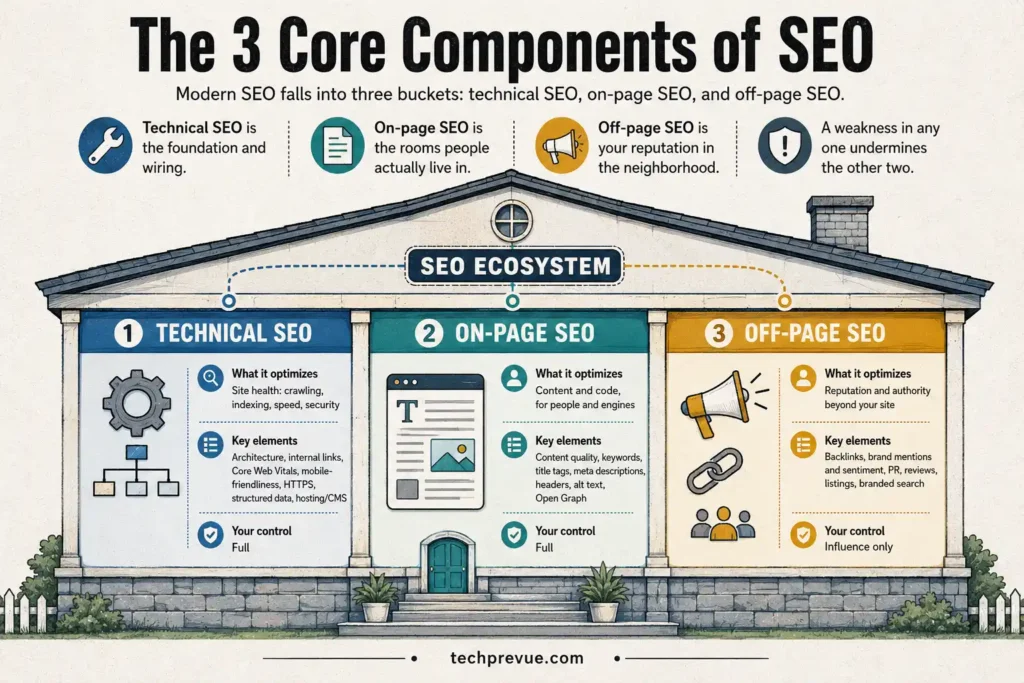
A weakness in any one undermines the other two.
You control the first two completely. Off-page, you can only influence — which is exactly why it carries so much weight with search engines.
| Component | What it optimizes | Key elements | Your control |
|---|---|---|---|
| Technical SEO | Site health: crawling, indexing, speed, security | Architecture, internal links, Core Web Vitals, mobile-friendliness, HTTPS, structured data, hosting/CMS | Full |
| On-page SEO | Content and code, for people and engines | Content quality, keywords, title tags, meta descriptions, headers, alt text, Open Graph | Full |
| Off-page SEO | Reputation and authority beyond your site | Backlinks, brand mentions and sentiment, PR, reviews, listings, branded search | Influence only |
Now let’s actually learn each one — not just what it is, but how it’s done.
1. Technical SEO
Technical SEO makes your site easy for search engines to crawl, render, and index — and pleasant for humans to use. It comes first because nothing else works without it. As one Google analyst famously put it, the first job is simply making the site crawlable.
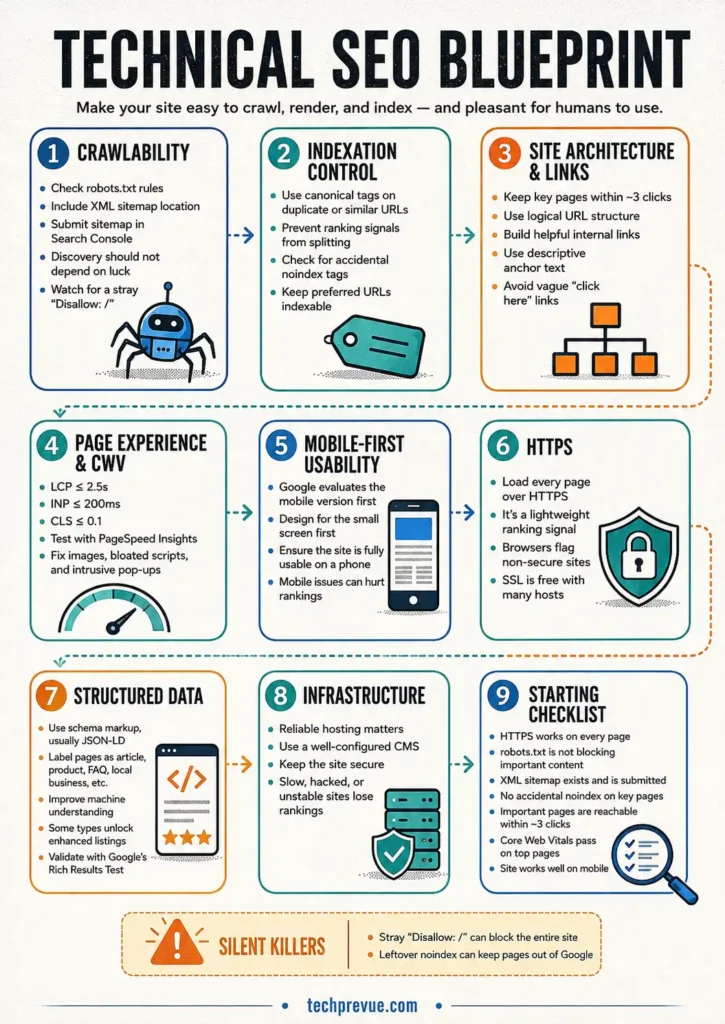
Here are the pieces a learner should understand, in order.
Crawlability: robots.txt and sitemaps
Every site can place a small file at yourdomain.com/robots.txt. It tells crawlers which areas they may and may not visit. A basic one looks like this:
User-agent: *
Disallow: /admin/
Sitemap: https://yourdomain.com/sitemap.xml
The sitemap line points to your XML sitemap — a machine-readable list of every page you want indexed. Most CMS platforms and plugins generate one automatically. Submit it in Search Console so discovery never depends on luck.
Two silent killers to know: a stray Disallow: / in robots.txt blocks your entire site, and a noindex tag left over from development keeps pages out of the index entirely. Both happen to real businesses constantly.
Indexation control: canonical tags
When two URLs show the same or similar content — say, a product page reachable through two categories — a canonical tag tells engines which version is the “real” one. It looks like this in the page code:
<link rel="canonical" href="https://yourdomain.com/preferred-page/" />
Without it, duplicate versions compete against each other and split their ranking signals.
Site architecture and internal linking
Structure your site so every important page is reachable within about three clicks of the homepage. Use a logical URL structure (/services/cake-design/ beats /page?id=8231).
Internal links do two jobs at once. They guide visitors to related content, and they show crawlers which pages matter most — pages with more internal links pointing at them are treated as more important. Use descriptive anchor text (“see our pricing guide”), never “click here.”
Page experience and Core Web Vitals
Google measures real-user experience through three metrics called Core Web Vitals:
| Metric | What it measures | “Good” threshold |
|---|---|---|
| LCP (Largest Contentful Paint) | How fast the main content loads | ≤ 2.5 seconds |
| INP (Interaction to Next Paint) | How fast the page responds to clicks and taps | ≤ 200 milliseconds |
| CLS (Cumulative Layout Shift) | How much the layout jumps around while loading | ≤ 0.1 |
Test any page free with PageSpeed Insights, and read the official metric definitions on web.dev. The usual fixes are unglamorous: compress images, remove bloated scripts, use decent hosting, and avoid pop-ups that bury the content (Google calls these intrusive interstitials, and penalizes them).
Mobile-friendliness
Google predominantly evaluates the mobile version of your site — a policy called mobile-first indexing. If your site works beautifully on desktop but breaks on a phone, the broken version is the one being judged. Design for the small screen first.
HTTPS
Your site should load over https://, full stop. It’s a confirmed lightweight ranking signal, browsers flag non-secure sites, and SSL certificates are free through most hosts.
Structured data (schema markup)
Structured data is code — usually JSON-LD — that labels your content’s meaning in a vocabulary machines understand, maintained at schema.org. It can mark a page as an article, a product, a recipe, a local business, an FAQ, and much more.
Two benefits: engines understand your pages with more confidence, and some types unlock enhanced listings (star ratings, prices, event dates). Validate your markup free with Google’s Rich Results Test.
Infrastructure
Reliable hosting, a well-configured CMS, and site security all quietly shape SEO. A site that’s frequently down, painfully slow, or hacked loses rankings no matter how good its content is.
A learner’s technical starting checklist
- Site loads over HTTPS on every page
- robots.txt isn’t blocking anything important
- XML sitemap exists and is submitted in Search Console
- No accidental noindex tags on key pages
- Every important page reachable within ~3 clicks
- Core Web Vitals pass on your top pages
- Site is fully usable on a phone
2. On-Page SEO (Content Optimization)
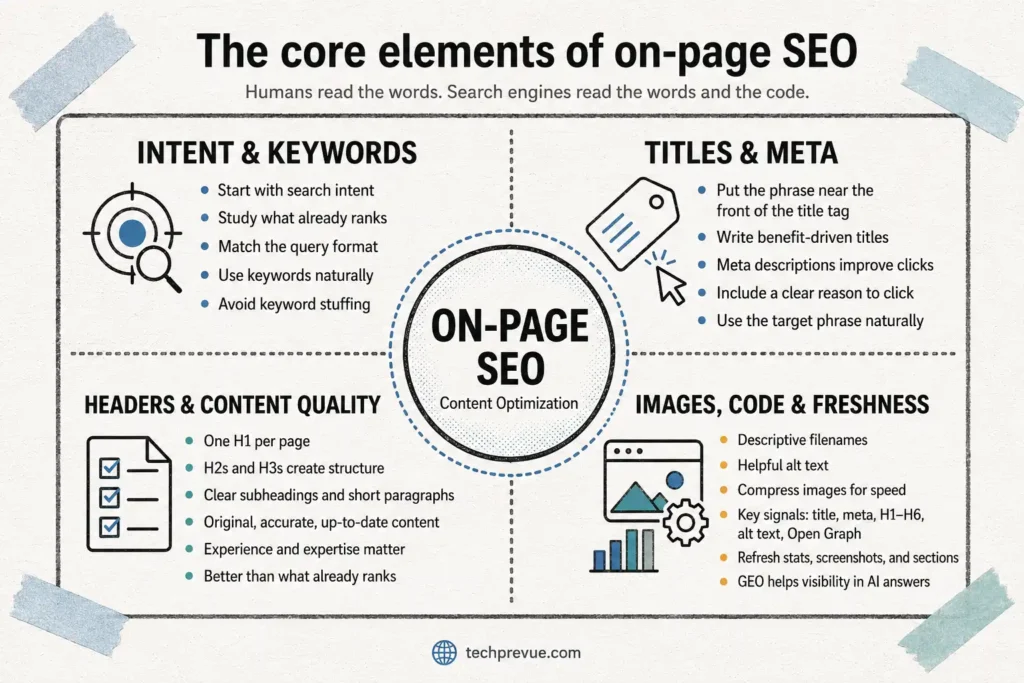
On-page SEO optimizes what’s actually on your pages — for two audiences at once. Humans read the words. Search engines read the words and the code.
Start with search intent, not keywords
Before writing anything, search your target phrase and study what ranks. If the results are all listicles, a product page won’t rank there — the engine has already decided what that query “means.” Matching intent is the single highest-leverage on-page decision. (The keyword research walkthrough later in this guide covers intent in detail.)
Where keywords actually go
Once you know your target phrase, place it naturally in the spots that carry the most weight:
- The title tag — as close to the front as reads naturally
- The H1 (usually the visible headline)
- The first 100 words of the page
- At least one subheading
- The URL slug
- Image alt text, where it genuinely describes the image
- The meta description
Then stop. Modern engines understand synonyms and related phrases, so write about the topic thoroughly instead of repeating the phrase. Keyword stuffing reads badly and ranks worse.
Writing title tags that earn clicks
The title tag is your listing’s headline in search results — roughly 50–60 characters before it gets cut off. A reliable formula: primary phrase + benefit or differentiator.
| Example | |
|---|---|
| Weak | Home — Baker Street Cakes |
| Strong | Custom Birthday Cakes in Austin — 48-Hour Turnaround |
The weak one wastes the most valuable real estate on the page. The strong one says what, where, and why you.
Meta descriptions
The meta description is the ~150–160 character blurb under your title in results. It’s not a direct ranking factor, but it heavily influences whether people click — and engines sometimes rewrite weak ones. Treat it as ad copy: state the value, include the phrase (it gets bolded when it matches the query), end with a reason to click.
Header hierarchy
Use one H1 per page, H2s for major sections, and H3s nested beneath them — exactly like this guide does. Headers give skimmers a map and give engines a content outline. Question-style headers (“How much does it cost?”) also feed answer boxes and AI results.
Content quality: the checklist that actually matters
For people, high-quality content:
- Covers topics you have genuine experience or expertise in
- Uses the words your audience actually types into search
- Matches search intent — the real reason behind the query
- Is original, accurate, and up to date
- Reads well: clear subheadings, short paragraphs, lists, bolding, and an appropriate reading level
- Is free of grammar and spelling errors
- Includes helpful multimedia like images and videos
- Is simply better than what currently ranks
Images
Use descriptive filenames (chocolate-drip-cake.jpg, NOT IMG_4402.jpg), write alt text that describes the image for screen readers and crawlers, and compress files so they don’t drag down load speed.
The code layer
For search engines specifically, the key on-page elements are title tags, meta descriptions, header tags (H1–H6), image alt text, and Open Graph metadata that controls how pages look when shared socially.
Keep content alive
On-page work isn’t publish-and-forget. Refresh statistics, update screenshots, and expand sections as questions evolve. Engines notice both freshness and staleness.
A newer specialty has grown inside content optimization: generative engine optimization (GEO) — optimizing content for visibility inside AI-driven answers such as Google’s AI Overviews, ChatGPT, Copilot, and Perplexity. More on that later in this guide, because it’s changing what “ranking” even means.
3. Off-Page SEO (Authority and Brand Building)
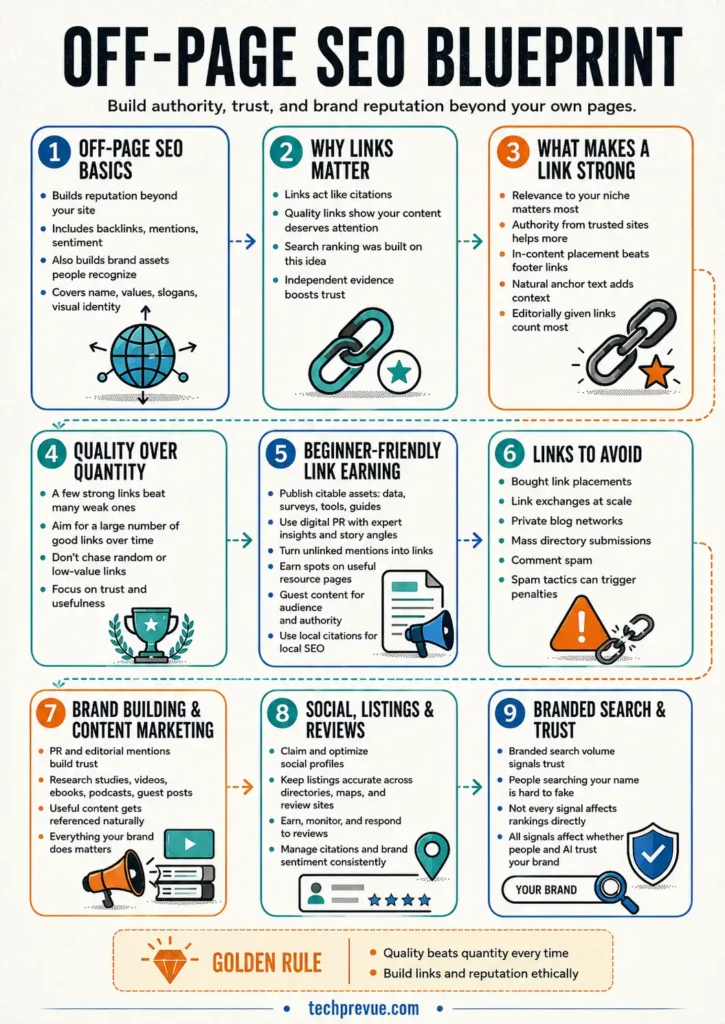
Off-page SEO covers everything that builds your site’s reputation beyond your own pages: earning backlinks, and influencing how people mention and feel about your brand across the web. It includes building the brand assets people recognize and search for — your name, values, slogans, and visual identity.
Why links matter so much
The best-known off-page activity is link building: earning links from relevant, trusted websites. Search ranking was practically founded on this idea — links work like citations. Each quality link is independent evidence that your content deserves attention.
What makes one link worth more than another
- Relevance: a link from a baking blog to a bakery beats a link from a random tech forum
- Authority: links from established, trusted sites pass more weight
- Placement: a link inside the main content beats one buried in a footer
- Anchor text: descriptive, natural anchors help engines understand the target page
- Editorial choice: links someone chose to give count; links you placed yourself mostly don’t
Quality beats quantity every time. The ideal is a large number of good links — not just a large number.
Beginner-friendly ways to earn links
- Publish something citable: original data, a survey, a calculator, a genuinely definitive guide. Assets earn links; ads for yourself don’t
- Digital PR: offer journalists and bloggers expert comments, data, or story angles
- Unlinked mentions: find places already talking about your brand and politely ask for the link
- Resource pages: many sites maintain “useful links” pages in every niche — earn your spot with genuinely useful content
- Guest content: write for relevant publications your audience reads (for the audience and authority, not just the link)
- Local citations: directories, chambers of commerce, and industry associations — essential for local businesses
Links to never chase
Bought link placements, link exchanges at scale, private blog networks, mass directory submissions, and comment spam. All violate search engine spam policies, and all can trigger penalties that cost far more than the links ever gained.
Beyond links: the brand layer
Off-page is bigger than links. It includes:
- Brand building and PR that earn editorial mentions and coverage
- Content marketing — research studies, videos, ebooks, podcasts, guest posts — that people naturally reference
- Social media presence: claiming and optimizing your profiles on every relevant platform
- Listing management: keeping your business information accurate across directories, review sites, and wikis
- Ratings and reviews: earning them, monitoring them, responding to them
- Reputation and citation management: monitoring brand sentiment, and keeping your business information accurate and consistent everywhere it appears — directories, maps, review platforms, and AI-readable sources
- Branded search volume: growth in people searching your brand by name. You can’t fake it, which is exactly why engines treat it as a trust signal
Not all of this affects rankings directly. All of it affects whether people — and increasingly, AI systems — trust and mention your brand. Everything your brand does matters.
A Quick Example: SEO in Action
Definitions and component lists stay abstract until you watch one play out. Imagine a small bakery that wants more custom cake orders.
Someone nearby searches “custom birthday cakes near me.” The search engine now has to choose: which bakery pages are relevant, trustworthy, and useful enough to show first? The bakery that wins that moment is usually the one that did the quiet work beforehand.
That work looks like this. The bakery built a dedicated page for custom cakes — not just a homepage that mentions everything. The page loads fast on a phone, because that’s where the search happened.
Its title tag says exactly what it offers and where. The content shows real photos of real cakes, prices, ordering steps, and answers to common questions. The business profile is claimed and accurate, reviews are plentiful and answered, and a couple of local food blogs have linked to it.
None of those steps is magic. Together, they tell the search engine a clear story: this page deserves the click. Multiply that thinking across every page and every question your audience asks, and you understand what SEO actually is day to day. It’s dozens of small, honest signals, compounding.
SEO Specialties: Beyond the Basics
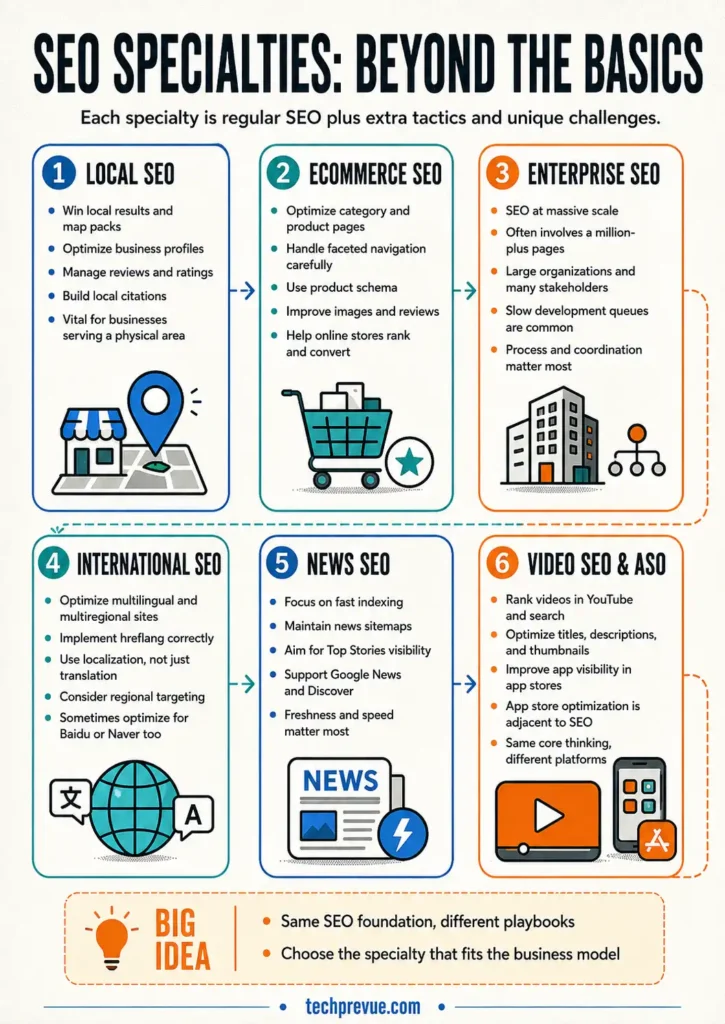
Once you know the three pillars, you’ll meet the specialties. Each is “regular SEO” plus extra tactics and unique challenges:
- Local SEO: winning visibility in local results and map packs by optimizing business profiles, managing reviews, and building local citations. Vital for any business serving a physical area.
- Ecommerce SEO: optimizing category pages, product pages, faceted navigation, product schema, images, and reviews so online stores rank and convert.
- Enterprise SEO: SEO at massive scale — sites with a million-plus pages or very large organizations. The hard part is often process: multiple stakeholders and slow development queues.
- International SEO: optimizing multilingual and multiregional sites (hreflang, localization) and non-Google engines like Baidu or Naver.
- News SEO: speed-focused optimization for publishers — fast indexing, news sitemaps, and eligibility for Top Stories, Google News, and Discover.
- Video SEO and app store optimization (ASO): ranking videos within YouTube and search, and improving app visibility inside app stores. Adjacent disciplines, same core thinking.
What Is E-E-A-T, and Why Does Google Care?
E-E-A-T stands for experience, expertise, authoritativeness, and trustworthiness. It comes from Google’s Search Quality Rater Guidelines — the manual given to the human evaluators who assess whether search results are actually good.
E-E-A-T isn’t a single ranking factor you can toggle. It’s the quality standard the ranking systems are built to reward, which makes it a practical checklist for anyone creating content:
- Experience: Has the author actually done the thing? First-hand proof — original photos, screenshots, test results, “here’s what happened when I tried it” — separates real content from recycled summaries.
- Expertise: Does the author know the subject deeply? Credentials help; demonstrated depth helps more.
- Authoritativeness: Do others treat this site as a go-to source? Links, mentions, and citations from respected places build this over time.
- Trustworthiness: Is the page accurate, honest, and safe? Cited sources, transparent authorship, updated dates, a secure site, and no misleading claims. Google calls trust the most important member of the family.
The bar rises further for YMYL topics — “your money or your life” content like health, finance, safety, and legal advice — where bad information can genuinely harm people. If you publish in those spaces, credentials, sourcing, and review processes aren’t optional extras. They’re the entry fee.
E-E-A-T also explains a pattern beginners find frustrating: a technically perfect article from an anonymous site losing to a rougher one from a recognized expert. Search engines aren’t just ranking words on a page. They’re ranking who’s behind the words and whether the wider web vouches for them.
White Hat vs Black Hat SEO
Not all optimization is created equal, and the industry has color-coded the difference:
- White hat SEO follows search engine guidelines: helpful content, honest optimization, earned links. Slower, but the results last.
- Black hat SEO tries to trick the algorithms — hidden text, keyword stuffing, bought link schemes, doorway pages, cloaking. It sometimes works briefly. Then the site gets caught, and penalties can wipe out rankings entirely or remove a site from the index.
- Grey hat SEO lives in between: tactics that skirt the rules without clearly breaking them. The risk profile shifts with every algorithm update.
The economics settle the debate. Search engines get better at detection every year, and a penalized domain can take months or years to recover — if it recovers at all. Everything in this guide is white hat, and for a real business that plans to exist in five years, that’s the only rational choice.
How Do Search Engines Work?
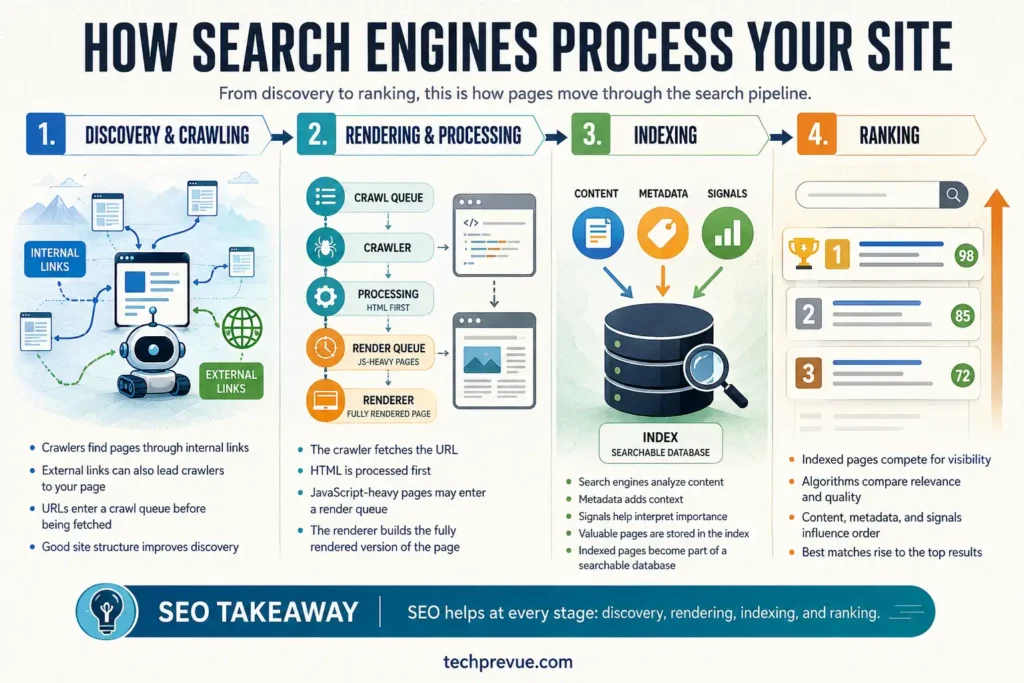
You can’t optimize for a machine you don’t understand. Traditional web search engines like Google and Bing process the web in four stages:
- Crawling. Automated programs called crawlers (or spiders) discover pages by following links and reading sitemaps.
- Rendering. The engine builds a picture of how each page actually looks, processing its HTML, CSS, and JavaScript.
- Indexing. The engine analyzes the content and metadata, then stores the page in a giant database called the index. Not every page makes it in — indexing is never guaranteed.
- Ranking. When someone searches, algorithms weigh hundreds of signals to decide which indexed pages are relevant and trustworthy enough to show, and in what order.
SEO improves your odds at every stage. Technical work helps crawlers reach and render your pages. Content work helps the engine understand and index them. Authority work helps you win the ranking battle when several good answers exist.
What Signals Decide the Ranking?
Google’s public explanation at How Search Works groups its ranking systems around five kinds of signals. Learn these five and most SEO advice suddenly makes sense:
- Meaning of the query. The engine first interprets what the searcher actually wants — including synonyms, misspellings, and whether the query demands fresh results.
- Relevance of content. Does the page cover the topic the query is about? The most basic signal is the query’s words appearing on the page; the deeper signal is whether the page satisfies the same need other users had.
- Quality of content. Which of the relevant pages seems most helpful and trustworthy? This is where expertise, sourcing, originality, and links and mentions from other respected sites carry weight.
- Usability. Between two equally good answers, the one that loads fast, works on mobile, is secure, and doesn’t bury content under pop-ups wins.
- Context and settings. Location, language, and search history shape results — “football” returns different pages in Lucknow, London, and Louisiana.
No one outside Google knows the exact recipe, and machine-learning systems mean even Google engineers can’t point to a single lever for a single ranking. But every legitimate SEO tactic in this guide maps back to one of those five signals. If a tactic doesn’t, be suspicious of it.
Anatomy of a Search Results Page
Run any search and look closely at what comes back. From top to bottom, a typical results page may include: sponsored ads (labeled), an AI Overview summarizing the answer, a featured snippet quoting one page, a People Also Ask box, local map results, videos and images, and finally the classic organic listings. (Add an annotated screenshot here — label each feature. Few beginner guides do this, and it instantly clarifies where SEO wins happen.)
Each of those features is a separate door your content can walk through — and each one opens differently:
| SERP feature | What it is | How to earn it |
|---|---|---|
| AI Overview | AI-generated summary citing a handful of sources | Answer-first writing, clear structure, factual sourcing, strong topical authority |
| Featured snippet | One page’s answer quoted above the results | A concise 40–60 word answer directly under a question-style heading |
| People Also Ask | Expandable related questions | FAQ-style sections answering adjacent questions briefly |
| Local pack / Maps | Map with three local businesses | An optimized, review-rich business profile and consistent local citations |
| Knowledge panel | Entity info box (brands, people, places) | Established entity signals: consistent facts, structured data, authoritative coverage |
| Video / image results | Media carousels inside results | Optimized titles, descriptions, thumbnails, alt text, and media schema |
| Top stories | Recent news carousel | Publisher-grade freshness, news sitemaps, and fast indexing |
| Sitelinks | Extra links under a listing | Clear site structure and descriptive internal navigation |
A page that ranks #4 in the classic listings but owns the featured snippet and the AI Overview citation often gets more visibility than the #1 result. Modern SEO plays for all the doors at once.
Other Platforms Rank Differently
Optimizing for Google is not the same as optimizing for YouTube or Amazon. YouTube weighs watch time and engagement. Amazon weighs sales velocity and reviews. Social platforms weigh interactions, recency, and connections. And because modern engines use machine learning, even Google’s rankings can’t be reduced to a simple checklist — the algorithm weighs signals differently for different queries. The principle stays constant: understand how the platform decides, then earn its trust signals.
How Does SEO Work? The Process, Step by Step
Zoom out, and SEO works through four ingredients: people who do the work, processes that make it repeatable, technology (platforms and tools), and activities — the actual output. In practice, ongoing SEO runs as a six-part cycle.
Step 1: Understand How Your Search Platforms Rank
Everything starts with the crawl-render-index-rank model covered above — applied to every platform where your audience searches, whether that’s Google, YouTube, Amazon, or an AI assistant. You’re learning which signals each platform rewards so you can deliberately provide them.
Step 2: Research
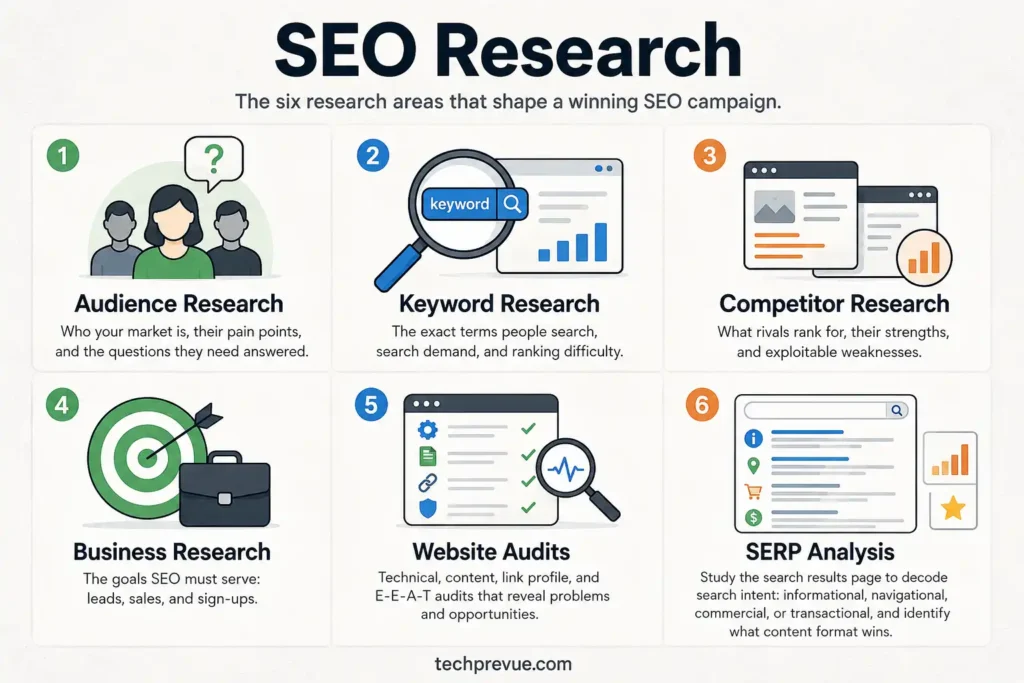
Research is where SEO campaigns are won or lost. The main types:
- Audience research: who your market is, their pain points, and the questions they need answered
- Keyword research: the exact terms people search, how much demand each has, and how hard each is to rank for
- Competitor research: what rivals rank for, their strengths, and their exploitable weaknesses
- Business research: the goals SEO must actually serve — leads, sales, sign-ups
- Website audits: technical, content, link profile, and E-E-A-T audits that surface problems and opportunities
- SERP analysis: studying the results page for each target query to decode its search intent — informational, navigational, commercial, or transactional — and what format wins
Step 3: Plan Your SEO Strategy
An SEO strategy is your long-term roadmap: where you’re going and how you’ll get there. The route will change — algorithms update, competitors move — but the destination shouldn’t.
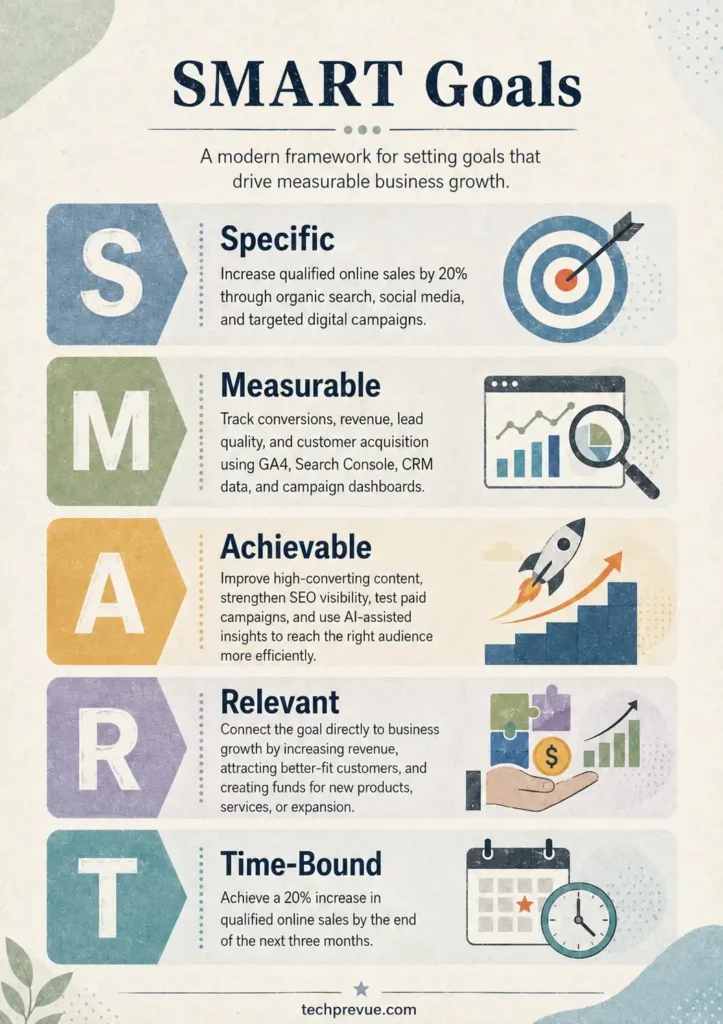
A solid SEO strategy document covers:
- Goals (frameworks like SMART or OKRs help)
- Expectations and timelines
- The KPIs that define success
- Who does the work (in-house, agency, or hybrid)
- The tools and budget involved
- How stakeholders stay informed
- How results get measured and reported.
Writing it down sounds bureaucratic. It’s the difference between a strategy and a pile of random tactics.
Step 4: Create and Implement
Now the ideas become action:
- Create new content targeting the keywords and questions your research surfaced
- Improve existing pages — refresh outdated sections, add internal links, cover missed subtopics, strengthen weak answers
- Prune dead weight — remove or consolidate old, thin, or outdated content that isn’t helping users or rankings
That third one surprises beginners. Deleting content can genuinely improve a site’s overall quality signal.
Step 5: Monitor and Maintain
Things break silently. Pages fall out of the index. Links rot. A site redesign quietly blocks crawlers. Monitoring means you find out when traffic drops to a key page, pages slow down or go offline, or errors spike — before the damage compounds.
Step 6: Measure, Analyze, and Report
If you don’t measure SEO for your website, you can’t improve it. At minimum, set up the free essentials: Google Search Console, Google Analytics, and Bing Webmaster Tools. Larger teams layer commercial all-in-one platforms on top — or build their own tooling — but the free stack teaches you everything that matters first.
The metrics worth watching, and what each one actually tells you:
| Metric | What it tells you | Where to find it |
|---|---|---|
| Impressions | How often you appear in results — your visibility footprint | Search Console → Performance |
| Clicks & CTR | Whether your titles and snippets earn the click | Search Console → Performance |
| Average position | Where you typically rank per query | Search Console → Performance |
| Organic sessions & engagement | Whether visitors arrive and actually stay | Analytics |
| Conversions from organic | Whether SEO produces business results, not just traffic | Analytics goals/events |
| Index coverage & Core Web Vitals | Whether technical health is holding | Search Console reports |
One habit separates learners who improve from learners who plateau: open Search Console’s query report monthly and find pages sitting at positions 5–15. Those are your fastest wins — content that’s almost trusted, one improvement away from the first page.
Then report on meaningful intervals — monthly or quarterly, usually compared year over year, since search traffic is seasonal. Good reports tell a story: what changed, why, and what happens next.
Then the cycle repeats. SEO is never finished. Search engines update, competitors improve, content goes stale, and user behavior shifts. That’s not a bug — it’s why consistent effort compounds into a moat.
Keyword Research and Search Intent: A Beginner’s Walkthrough
Step 2 of the process above mentioned keyword research. It deserves its own walkthrough, because it’s the skill everything else depends on. Keywords are the map between what people want and what you publish.
Here’s how to do it from zero, using only free tools.
Step 1: Build a seed list
Write down every word and phrase your audience might use — not the industry jargon you use. Mine real language from customer emails, support questions, reviews (yours and competitors’), and sales conversations.
Then let search engines finish your sentences. Type a seed phrase into Google and note the autocomplete suggestions. Scroll to the People Also Ask box and the related searches at the bottom. Every one of those is a real query from real people.
Step 2: Expand and check demand
Take your seeds into free tools:
- Google Trends shows whether interest in a topic is growing, shrinking, or seasonal — and compares regions
- Google Keyword Planner (free inside a Google Ads account) provides search volume ranges and related terms
- Search Console — once your site has some history — shows the exact queries you already appear for, which are often your fastest wins
Paid tools add convenience and competitive data, but no beginner needs them on day one.
Step 3: Judge three things for every keyword
- Demand: roughly how many people search it
- Difficulty: how strong the sites currently ranking are
- Relevance: whether ranking for it would actually serve your goal
A keyword that scores high on demand but zero on relevance is a trap. Traffic that doesn’t convert is a vanity metric.
Step 4: Decode the search intent
Every query hides a goal. Engines classify them roughly four ways:
| Intent | The searcher wants to… | Example query | Content that wins |
|---|---|---|---|
| Informational | Learn something | “how do canonical tags work” | Guide, explainer, tutorial |
| Navigational | Reach a specific site | “search console login” | The brand’s own page |
| Commercial | Compare before deciding | “best rank tracking tools” | Comparison, review, list |
| Transactional | Act or buy now | “hire cake designer austin” | Product, service, or landing page |
The test is simple: search the phrase and look at what ranks. The results page is the answer key. If page one is all tutorials, the engine has decided the intent is informational — and no sales page will break in.
Step 5: Cluster keywords and map one page per intent
Group keywords that share the same intent — “what is a canonical tag,” “canonical tag meaning,” and “canonical URL explained” all want the same page. That group is a keyword cluster, and it gets exactly one page.
This prevents the classic beginner mistake of keyword cannibalization: publishing several pages chasing near-identical queries, which forces your own pages to compete with each other and usually sinks them all.
Step 6: Prioritize long-tail first
Long-tail keywords are longer, more specific phrases with lower search volume — and much lower competition. “Cakes” is unwinnable for a new site. “Eggless custom birthday cakes in Lucknow” is winnable this quarter, and the searcher is far closer to buying.
New sites should build almost entirely on long-tail terms. Rankings there generate the traffic, engagement, and authority that eventually make broader terms reachable. The head terms are the reward, not the starting point.
Keep a simple keyword map
One spreadsheet: keyword cluster, intent, target page, current ranking, status. That single document turns keyword research from a one-time exercise into an operating system for your content.
SEO vs SEM vs PPC: What’s the Difference?
These three terms get mixed up constantly, so let’s settle them before going further.
- SEO (search engine optimization): earning clicks from organic (unpaid) search results.
- PPC (pay-per-click): buying clicks through paid ads, such as Google Ads. Advertisers bid on keywords, and they pay each time someone clicks their ad.
- SEM (search engine marketing): the umbrella term that covers both. SEM = SEO + PPC.
Think of it like housing. PPC is renting visibility — the moment you stop paying, you’re out. SEO is building equity in a home — slower to start, but the value compounds and stays yours. SEM is simply the real estate market that contains both.
| SEO | PPC | |
|---|---|---|
| Traffic type | Organic (unpaid) results | Paid ad placements |
| Cost model | Time, content, and expertise | Pay per click |
| Speed | Months to build | Instant |
| When you stop | Traffic often continues | Traffic stops immediately |
| Trust factor | Higher — users prefer organic results | Lower — marked as “Sponsored” |
Two honest caveats. First, organic traffic isn’t literally free. SEO takes time, skill, content, and often paid tools — you invest effort instead of ad budget. Second, “SEO vs PPC” is a false fight. They’re complementary channels. If budget allows, smart teams run both: PPC for instant, controllable traffic, and SEO for durable, compounding growth.
One quirk of the industry: many marketers now use “SEM” to mean paid search only. Technically, SEM includes SEO. In everyday conversation, expect both usages.
Why Is SEO Important in Digital Marketing?
SEO in digital marketing plays the role of a foundation. Ads, social posts, and email campaigns are built on top of it, because search is where intent lives. When someone wants to go somewhere, learn something, fix something, or buy something, their journey usually starts with a search.
The scale is hard to overstate. Google reports handling over 5 trillion searches per year — roughly 14 billion every day — a figure from Google’s own announcement, and it holds around 90% of the global search engine market according to StatCounter’s live tracker.
The industry built on top of that behavior is enormous too: Research and Markets projects the search optimization services market will pass $200 billion by 2030, growing at roughly 17% a year. Businesses don’t pour that kind of money into a channel that doesn’t pay back.
Position matters as much as presence. Backlinko’s click-through analysis of millions of results found the top organic result attracts roughly 27% of all clicks — and click share collapses fast with every position below it. Page two might as well be invisible. That’s the gap SEO exists to close.
Here’s why SEO earns that investment:
Search drives the largest share of trackable website traffic. For most sites, organic search is the single biggest traffic source — bigger than social media, email, or referrals. It reaches people at the exact moment they’re looking for answers.
SEO traffic is sustainable. When a paid campaign ends, its traffic ends. Social media reach is rented and unreliable — a fraction of what it once was for most brands. A page that ranks well can keep bringing visitors month after month with only maintenance-level effort.
Rankings build trust. People treat high organic rankings as a credibility signal. Search engines reward the same qualities users trust: expertise, accuracy, and authority. Good SEO and a good reputation feed each other.
The results page is crowded — and shrinking. Modern SERPs (search engine results pages) are packed with features competing for attention: AI Overviews, featured snippets, knowledge panels, maps, images, videos, top stories, People Also Ask boxes, carousels, and paid ads. Without deliberate optimization, your site gets buried beneath all of it.
Search is fragmenting — and SEO thinking travels. People no longer search only on Google. Product searches often start on Amazon. How-to searches happen on YouTube. Younger users increasingly search on TikTok and Instagram. Each platform is a search engine with its own ranking rules, and the core skill of SEO — understanding what people search for and serving it better than anyone else — applies on every one of them. That’s why some professionals half-jokingly rebrand SEO as “search experience optimization” or “search everywhere optimization.”
SEO informs everything else. Keyword and audience research reveals what your market actually wants, in their own words. Smart teams reuse that intelligence across paid campaigns, website content, product pages, and social media. That’s what makes SEO the connective tissue of a digital marketing strategy rather than a silo.
SEO vs GEO vs AEO: Does SEO Still Matter in the AI Era?
People now ask what is SEO worth when AI can just answer directly. Short answer: it’s worth more than ever — but the job description has widened. AI assistants and AI-generated answers now sit between your content and your audience. That created a cluster of new acronyms:
| Term | Full form | What it optimizes for |
|---|---|---|
| SEO | Search engine optimization | Ranking in traditional organic search results |
| GEO | Generative engine optimization | Being cited inside AI-generated answers (AI Overviews, ChatGPT, Perplexity, Copilot) |
| AEO | Answer engine optimization | Winning direct-answer placements: featured snippets, People Also Ask, voice results |
| AIO | AI optimization | Umbrella term for making content easy for AI systems to parse, trust, and reuse |
Here’s the part beginners should tattoo somewhere visible: these are not replacements for SEO. They’re extensions of it. AI systems learn from and cite content that is crawlable, well-structured, factually sourced, and authoritative — which is precisely what good SEO has always produced. The tactics overlap almost completely:
- Lead sections with a direct, quotable answer (like the quick answer at the top of this page)
- Use question-style headings that mirror how people actually ask
- Back claims with data and primary sources AI systems can verify
- Add structured data so machines understand your content’s meaning
- Build the brand mentions and authority that make AI systems “trust” you
What changes is the scoreboard. In AI-mediated search, success isn’t only a #1 blue link — it’s being the source an AI answer quotes and links. Fewer clicks may reach your site, so each visit, citation, and brand impression counts more. Sites that ignore this shift will watch visibility erode even while their old rankings hold.
How Long Does SEO Take — and What Does It Cost?
The two questions every beginner asks, and most guides dodge. Honest answers:
Timeline. Google itself notes in its documentation that changes can take anywhere from a few hours to several months to show effects in search results. In competitive niches, meaningful results typically look like this:
| Timeframe | What’s realistic |
|---|---|
| Months 0–3 | Technical fixes, research, first content; movement on low-competition terms |
| Months 4–6 | Rankings climb for medium-difficulty keywords; organic traffic trends upward |
| Months 6–12 | Compounding growth; competitive terms come into reach; authority builds |
| Year 2+ | SEO often becomes the highest-ROI channel — if effort stayed consistent |
Anyone promising “#1 on Google in two weeks” is selling something you shouldn’t buy.
Cost. SEO’s price is effort or money — usually both. Doing it yourself costs time and a modest tool budget (free tools can carry you surprisingly far — list below). Hiring help ranges from a few hundred dollars a month for small local campaigns to five figures monthly for enterprise work. Judge any quote against the value of ranking: for most businesses, a single durable page-one ranking pays for the work many times over.
A Short History of SEO
Knowing where SEO came from makes today’s rules make sense.
Website owners started optimizing for search engines in the mid-1990s, as the first crawlers began cataloging the early web. Early “optimization” was crude — repeat a keyword enough times and you ranked. Directories curated by humans filled the gaps.
Google’s arrival in 1998 changed the game with a simple insight: links between pages could work like votes. Sites that earned more trusted links deserved higher rankings. That single idea made manipulation harder and quality more valuable — and it kicked off a decades-long arms race between spammers and the algorithm.
The 2010s brought the hammer blows. Major algorithm updates punished thin content and manipulative links, rewarded mobile-friendly and fast sites, and pushed the industry from keyword tricks toward genuine usefulness. Machine learning entered the ranking systems, letting Google interpret the meaning behind queries rather than just matching words.
The 2020s raised the quality bar again — an added emphasis on first-hand experience, a sweep of updates targeting content made for search engines instead of people, and then the biggest shift since Google itself: generative AI answering questions directly in search and in standalone assistants.
Notice the through-line. Every era punished shortcuts and rewarded the same thing: being genuinely the best answer. That’s the safest long-term bet in SEO, because it’s the one direction the industry has never reversed.
How SEO Evolves
SEO is a living discipline because it sits exactly where human behavior meets technology. Both keep moving, so SEO moves with them.
Technology reshapes the work. Three shifts in the last decade rewrote the SEO playbook:
- AI-driven results. Generative answers now appear directly in search, summarizing sources before anyone clicks. Optimizing for citation inside those answers barely existed as a job a few years ago.
- Mobile-first indexing. The majority of searches happen on phones, and Google completed its switch to judging sites primarily by their mobile version in 2023. Mobile experience isn’t a nice-to-have; it’s the version of your site that counts.
- Speed and user experience. As devices and connections improved, patience evaporated. Slow, clunky pages that felt normal fifteen years ago now lose both visitors and rankings — measured concretely through Core Web Vitals.
Society reshapes the work too. Economic cycles change what people can spend and therefore what they search. Global disruptions can transform consumer behavior almost overnight — search demand shifts, and SEO strategies must shift with it.
Perspective helps here: libraries have organized human knowledge for thousands of years; Google has existed since 1998. Web search is still young, and the way we retrieve information will keep changing. The SEO mindset — understand the seeker, serve the answer — outlives any single algorithm.
SEO as a Service and a Career
SEO is both a marketing discipline and a job title — you can do SEO, and you can be an SEO. With the services market growing toward that projected $200 billion, demand for practitioners keeps rising — and the field is broader than most beginners expect.
The main roles, and what each one actually does all day:
| Role | Day-to-day work | Core skills |
|---|---|---|
| Content SEO / SEO writer | Keyword research, content briefs, writing and refreshing pages | Writing, intent analysis, topic research |
| Technical SEO | Audits, crawl and indexation fixes, speed, structured data | HTML/CSS basics, diagnostics, log analysis |
| Link builder / digital PR | Outreach, campaigns, earning coverage and mentions | Communication, creativity, persistence |
| SEO analyst | Dashboards, reporting, finding opportunities in data | Search Console, Analytics, spreadsheets |
| Local SEO specialist | Business profiles, reviews, citations, map rankings | Listings management, reputation care |
| SEO strategist / manager | Roadmaps, budgets, stakeholders, team coordination | All of the above, plus communicating upward |
Most people enter through content or analytics, then specialize. Agencies offer variety and fast learning. In-house roles offer depth on one site. Freelancing offers freedom — and requires self-marketing. All three paths are real.
A typical entry route: run your own practice site for a few months, document one or two small wins with real data, then apply for junior roles or take a first freelance client. Portfolios beat certificates.
Two things make it an unusually accessible career, which is part of why it’s booming in markets like India and across the world:
- No formal degree is required. Unlike law or accounting, SEO has no universal qualification. Skills, results, and a portfolio matter more than certificates.
- The core tools are free. Google Search Console and Google Analytics cost nothing and teach you real performance analysis. You can learn the craft with zero budget: one free website, the free tools below, and consistent practice.
The trade-off: because there’s no licensing body, the field attracts noise and outdated advice. Data literacy and healthy skepticism are the SEO professional’s survival skills.
How to Learn SEO: Resources, Tools, and a Practice Plan
The best way to learn SEO is to do SEO. Build a small site about something you genuinely care about. Try tactics. Break things. Watch what happens in Search Console.
Hands-on experiments teach more than any course. But pairing practice with the right resources compresses years into months. Here’s the complete toolkit.
Official documentation (start here — it’s free and definitive)
- Google’s starter documentation for search — the basics, straight from the source
- Search Essentials — Google’s technical requirements, spam policies, and key best practices
- Creating helpful content — Google’s guidance on what “quality” means, in its own words
- How Search Works — a plain-language tour of crawling, indexing, and ranking; the Search Quality Rater Guidelines (the E-E-A-T source document) are linked from Google’s documentation hub
- Search Central Blog — where Google announces every change that matters; the primary source behind most SEO news
Free tools every learner should install in week one
| Tool | What it does | Cost |
|---|---|---|
| Google Search Console | Shows your queries, clicks, rankings, and indexing issues | Free |
| Google Analytics | Tracks what visitors do after they arrive | Free |
| Bing Webmaster Tools | Search Console’s equivalent for Bing (and useful extra data) | Free |
| Google Trends | Topic demand over time and by region | Free |
| PageSpeed Insights | Core Web Vitals and speed diagnostics per page | Free |
| Rich Results Test | Validates your structured data | Free |
| Schema Markup Validator | Checks any schema, beyond just Google’s types | Free |
| Data Studio | Builds free dashboards from Search Console and Analytics data | Free |
The free tiers of major SEO platforms (keyword tools, backlink checkers, site auditors) fill the remaining gaps. Start free; pay only when a specific limit blocks you.
Structured courses and academies
Free, self-paced, and certificate-bearing options from the major tool makers:
- Semrush Academy — broad course catalog across every SEO discipline
- Ahrefs Academy — excellent beginner course plus one of the best video channels in the field
- HubSpot Academy — solid content-focused and inbound marketing courses
- Moz’s learning hub and Yoast’s academy — long-running beginner curricula from two of the field’s oldest names
Certificates from these look fine on a CV, but a small site you ranked yourself will impress an employer more than any of them.
Communities, news, and staying current
Searcher behavior and algorithms never stop changing — a weekly learning habit is part of the job:
- Communities: the r/SEO and r/TechSEO subreddits, Google’s own Search Central Help Community, and practitioner Slack/Discord groups
- Industry publications: Search Engine Land, Search Engine Journal, and Search Engine Roundtable cover daily news; most offer free newsletters
- Video and audio: Google Search Central’s YouTube channel, Google’s Search Off the Record podcast, and countless practitioner podcasts
- Events: one or two conferences or local meetups a year — the hallway conversations teach as much as the talks
- Books: long-form fundamentals (a classic like The Art of SEO pairs well with always-current documentation)
- Experts: follow credible practitioners on social platforms — and watch how they disagree; the debates teach you where the genuine uncertainty lives
A 90-day practice plan
Learning sticks when it has a schedule. A simple one:
- Days 1–30: set up a practice site, install Search Console and Analytics, complete one beginner course, publish your first three genuinely helpful pages
- Days 31–60: run your first keyword research cycle, build a keyword map, publish weekly, fix every technical item on the checklist earlier in this guide
- Days 61–90: study your first Search Console data, improve two underperforming pages, earn your first backlink or listing, and write down what worked
Ninety days won’t make you an expert. It will make you dangerous enough to keep going — with real data of your own to learn from.
One warning as you learn
SEO advice ages fast, and the internet is full of confidently stated tactics that stopped working years ago. When in doubt, test it yourself or check it against Google’s current documentation.
There are no universal secrets — just consistent work across all the phases above.
How to Do SEO: A 10-Step Quickstart for Beginners
Everything above becomes real the moment you apply it. Here’s the order I’d work in on any new site:
- Set up measurement first. Install Google Search Console and Google Analytics before touching anything else. You can’t improve what you can’t see — and you’ll want the “before” data.
- Confirm the basics. Your site loads over HTTPS, works cleanly on a phone, and loads fast. Fix these before creating anything new; they’re the foundation everything sits on.
- Check that you’re indexable. Search for
site:yourdomain.com. If key pages are missing, find out why — a stray noindex tag or robots.txt block silently kills more sites than any algorithm update. - Research keywords around real intent. List the questions your audience asks and the terms they’d use. Start with specific, lower-competition phrases — “eggless custom birthday cakes near me” beats “cakes” for a new site every time.
- Study the current winners. Search each target phrase and read what ranks. Note the format, depth, and angle. Your job is to serve the same intent noticeably better, not marginally similarly.
- Create one genuinely excellent page per topic. Direct answer up top. Clear headings. Original detail only you can provide — photos, data, first-hand experience. Optimize the title tag, meta description, headings, and image alt text as you go.
- Link your pages together. Internal links with descriptive anchor text help visitors navigate and help crawlers understand what matters most on your site.
- Earn your first mentions. Claim your business profiles and directories. Tell people who’d genuinely care about your content. One relevant local or industry link is a real start.
- Watch, then iterate. After a few weeks, Search Console shows which queries surface your pages. Strengthen what’s almost working — pages ranking 5th–15th are your fastest wins.
- Repeat on a schedule. One improved or new page a week beats a burst of ten followed by silence. SEO pays the consistent.
Print this list. It’s 90% of what beginners actually need, and every step is free.
Common SEO Myths, Corrected
- “SEO is dead.” Declared annually since the 2000s; still false. Search behavior evolved — into AI answers, voice, and new platforms — and SEO evolved with it.
- “SEO is a one-time task.” SEO is a process, not a project. Rankings decay without maintenance.
- “Just stuff the keyword everywhere.” Keyword stuffing stopped working long ago and now actively hurts. Modern engines reward topical depth and natural language, not repetition.
- “More links, no matter what.” Low-quality link schemes are the fastest route to a penalty. One earned link from a trusted site outweighs hundreds of junk links.
- “Guaranteed #1 rankings.” No one can promise a ranking — not even for money. Treat guarantees as a red flag.
- “PPC improves organic rankings.” Ads and organic results are separate systems. Running ads doesn’t buy ranking favor.
Quick SEO Glossary
- SERP: search engine results page — everything you see after hitting Enter
- Organic results: the unpaid listings, earned through SEO
- Keyword: the word or phrase someone types (or says) into a search engine
- Search intent: the underlying goal of a query — to learn, to find a site, to compare, or to buy
- Crawling / indexing: how engines discover pages, then store and organize them
- Backlink: a link from another website to yours; a core authority signal
- Title tag / meta description: the HTML snippets that often become your listing’s headline and blurb
- Schema markup: structured data code that helps machines understand page meaning
- E-E-A-T: experience, expertise, authoritativeness, trustworthiness — Google’s quality lens
- Core Web Vitals: Google’s page-experience metrics for loading, interactivity, and visual stability
- Long-tail keyword: a longer, specific query with lower volume and competition — a new site’s best friend
- Anchor text: the clickable words of a link; they describe the destination to users and engines
- Canonical tag: code naming the preferred version of a page when duplicates exist
- Nofollow: a link attribute telling engines not to pass ranking credit through that link
- Impressions / CTR: how often you appear in results, and the share of appearances that earn a click
- XML sitemap: a machine-readable list of the pages you want indexed
- robots.txt: the file telling crawlers which parts of a site they may visit
- Keyword cannibalization: multiple pages on one site competing for the same query, hurting all of them
- AI Overview: Google’s AI-generated answer box, which cites source pages
- GEO / AEO: optimizing for AI-generated answers and for direct answer boxes, respectively
- Long-tail keyword: a longer, specific phrase with lower volume but clearer intent and easier competition
- Anchor text: the clickable words of a link; a relevance hint for the page being linked to
- Canonical tag: code declaring the master version of a page when duplicates or variants exist
- XML sitemap: a machine-readable list of the URLs you want search engines to index
- robots.txt: the file telling crawlers which parts of a site not to visit
- Nofollow: a link attribute asking engines not to pass ranking credit through that link
- CTR (click-through rate): the percentage of people who click your listing after seeing it
- Algorithm update: a change to how a search engine ranks results; major ones can reshuffle entire industries
- Internal link: a link between two pages on the same site; how authority and context flow within your site
- AI Overview: the AI-generated summary at the top of many results pages, citing selected sources
FAQ: What Is SEO?
What is SEO in simple words?
SEO means improving your website so it shows up higher in unpaid search results. Better visibility brings more visitors, and more of the right visitors — people already searching for what you offer.
What is the full form of SEO?
Search engine optimization. The person who does the work is often called an SEO too — a search engine optimizer.
What are the main types of SEO?
Three: technical SEO (site health and crawlability), on-page SEO (content and HTML elements), and off-page SEO (links, mentions, and reputation). Specialties like local, ecommerce, and international SEO build on those three.
Is SEO free?
The clicks are unpaid, but the work isn’t. SEO costs time, skill, and content — or the money to hire those. What it removes is the per-click toll of advertising.
What’s the difference between SEO and Google Ads?
Google Ads (PPC) buys placement in the sponsored slots and stops the moment you stop paying. SEO earns placement in organic results and keeps working after the effort is invested. They complement each other.
Can I do SEO myself?
Yes. Start with Google’s free documentation and tools, fix your site’s basics, and publish genuinely helpful content on topics you know. Small sites in modest niches absolutely can win without an agency.
What are keywords in SEO?
Keywords are the words and phrases people type or speak into search engines. In practice, a keyword represents a demand you can serve: research finds the phrases, and pages get built to answer them.
Do I need to know coding for SEO?
No — most SEO work is research, writing, and analysis, and modern CMS platforms handle the code. Basic HTML literacy (titles, headings, links) helps a lot, and technical specialists go deeper, but you can start and succeed without programming.
How can I learn SEO for free?
Combine Google’s free documentation and tools with a practice website of your own. The curated resource list above — official guides, free certified courses, industry news sites, and communities — covers a complete free education path.
Is SEO still worth it now that AI answers questions?
Yes — arguably more than ever. AI answers are built from sources, and the sources they cite are overwhelmingly pages with strong, traditional SEO signals: clarity, structure, authority, and trust. The discipline extends into GEO and AEO; it doesn’t disappear.
How long does it take to learn SEO?
The fundamentals take a few weeks. Real competence takes three to six months of hands-on practice on a site you control. After that, learning becomes a permanent habit — the field moves, and that’s part of the appeal.
Which free tools should a beginner start with?
Google Search Console and Google Analytics first — they’re your eyes. Add PageSpeed Insights for performance and Google Trends for demand. The full table lives in the learning resources section above.
Final Word: What SEO Really Is
Strip away the acronyms, and what is SEO at its core? A promise to the searcher: ask your question anywhere, and my site will be the most useful, trustworthy answer available. Search engine optimization is simply the craft of keeping that promise at scale — technically sound pages, genuinely helpful content, and a reputation that machines and humans both trust.
Start small. Set up Search Console this week. Pick one page, one keyword, one honest improvement. SEO rewards the patient — and it starts paying the moment you do.
