
If you’ve published good content and it still isn’t ranking, on-page SEO is usually the layer where the problem — and the fix — lives.
This guide walks through the complete on-page optimization process for 2026: search intent, keyword placement, content structure, titles, links, images, schema markup, page experience, and the newer answer-engine and generative-engine techniques that decide whether AI systems cite your pages.
Quick answer: On-page SEO (also called on-page optimization) is the practice of optimizing individual web pages — their content, HTML elements, and structure — so search engines can understand them, rank them higher, and so AI systems can extract and cite them. Core on-page SEO factors include search intent alignment, keyword placement, title tags, meta descriptions, headings, internal linking, image optimization, structured data, and page experience.
Everything here works whether you run a WordPress blog, an ecommerce store, or a service business site. Every recommendation is checked against current Google documentation and the realities of AI search — no recycled 2019 advice, no fixed-limit myths, and no AI-search gimmicks.
This is a long, complete resource. Bookmark it and work through it page by page.
- What Is On-Page SEO?
- How On-Page SEO Works in Google Search and AI Answers
- How to Do On-Page SEO for Your Website: 10 Steps
- Step 1: Match Search Intent Before Choosing Keywords
- Step 2: Keyword Research, Keyword Clustering, and Keyword Placement
- Step 3: Write Helpful Content With Information Gain
- Step 4: Structure Content for Readers, Crawlers, and LLMs
- Step 5: Optimize Title Tags, Meta Descriptions, and URLs
- Step 6: Internal Linking and External Link Optimization
- Step 7: Image SEO and Video Optimization
- Step 8: Schema Markup That Matches the Page
- Step 9: Page Experience, Core Web Vitals, and Accessibility
- Step 10: AI Search Optimization — AEO, GEO, and AIO in Practice
- On-Page SEO Example: Optimizing One Page From Start to Finish
- How to Implement On-Page SEO in WordPress (RankMath and Yoast)
- On-Page SEO Best Practices by Page Type
- How to Audit and Prioritize On-Page SEO Improvements
- How to Measure On-Page SEO Performance
- Common On-Page SEO Mistakes and Myths
- Complete On-Page SEO Checklist
- FAQs About On-Page SEO
- Final Thoughts: On-Page SEO That Earns Search and AI Visibility
What Is On-Page SEO?
On-page SEO is the process of optimizing everything on a web page — the visible content and the underlying HTML — to help search engines and AI answer systems understand the page, and to help it rank for relevant searches. It’s one of the three core components of SEO, alongside technical SEO and off-page SEO.
The name is literal. On-page SEO covers what lives on the page itself. That makes it the part of search engine optimization you control completely: no waiting on other sites to link to you, no fighting server infrastructure. You open the editor, you improve the page, and the change is live.
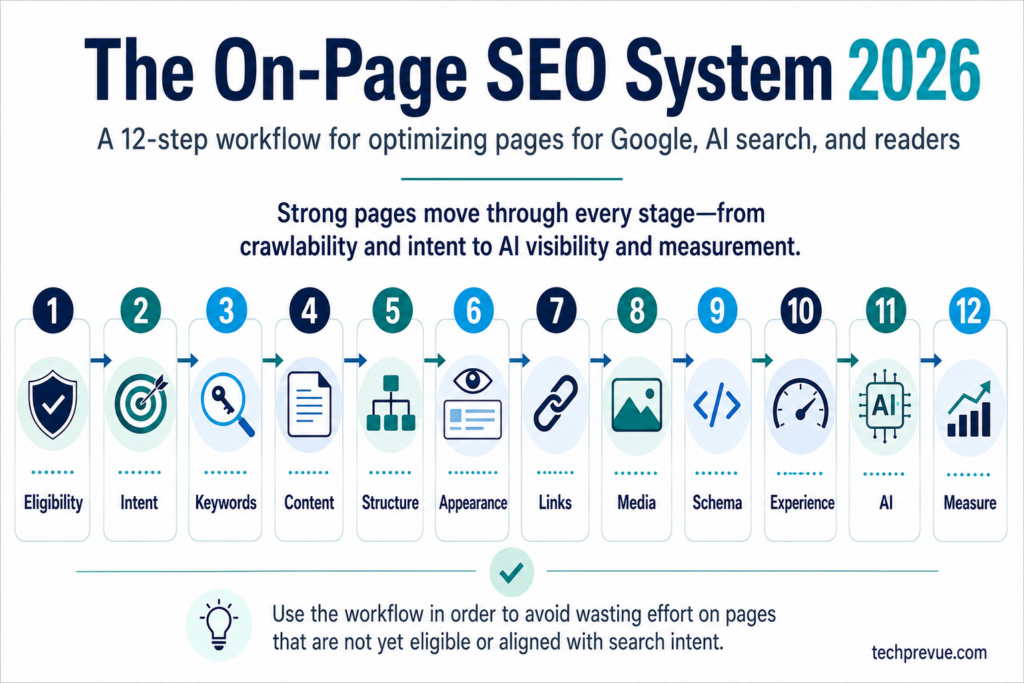
Good on-page optimization improves four outcomes at once:
- Understanding — search engines and LLMs grasp what the page is about and who it serves.
- Discoverability — the page becomes eligible for rankings, featured snippets, AI Overviews, and AI citations.
- User satisfaction — visitors find their answer quickly and trust what they read.
- Conversion — satisfied readers take the next step, whether that’s subscribing, enquiring, or buying.
Which Page Elements Are Part of On-Page SEO?
The core on-page SEO elements every optimized page shares:
| On-page SEO element | What it does |
|---|---|
| Content quality and depth | Satisfies search intent better than competing pages |
| Keyword placement | Signals topical relevance in the title, headings, and body |
| Title tag | Your headline in search results; the biggest click lever |
| Meta description | The snippet blurb; influences click-through rate |
| URL (permalink) | A short, descriptive address that confirms the topic |
| Heading structure (H1–H4) | Organizes content for readers, crawlers, and LLMs |
| Internal links | Distributes authority and guides discovery |
| External links | Cites sources and builds trust |
| Image optimization | Alt text, file names, compression, dimensions |
| Structured data (schema markup) | Machine-readable meaning; rich-result eligibility |
| Page experience | Core Web Vitals, mobile usability, accessibility |
On-Page SEO vs Technical SEO vs Off-Page SEO
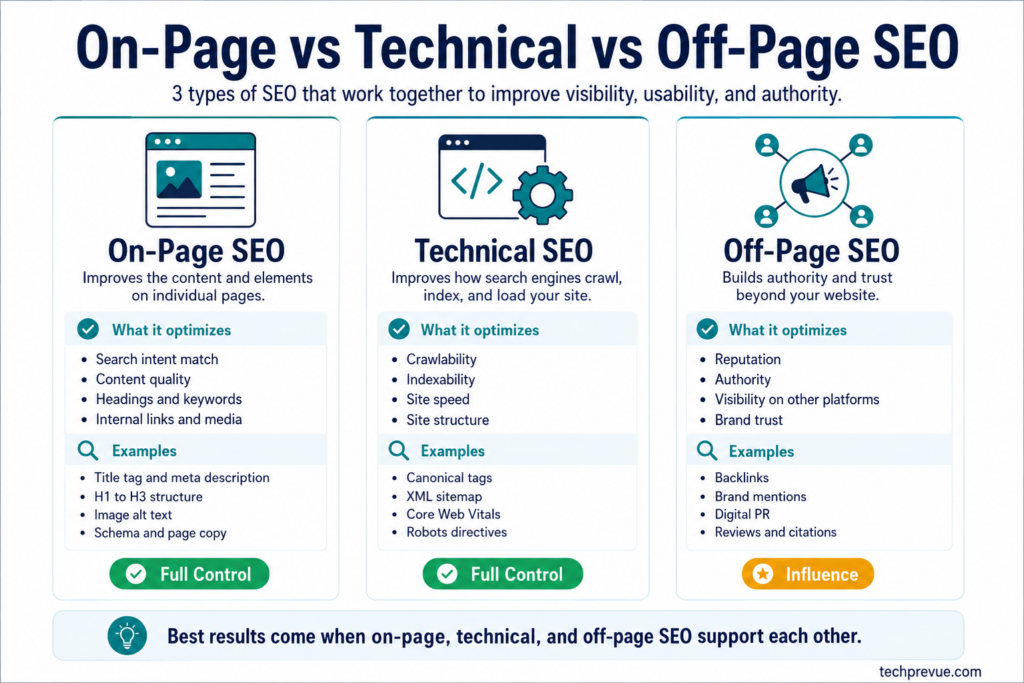
The three disciplines are easy to confuse because they overlap at the edges. The clean boundary:
- On-page SEO optimizes individual pages — content, keywords, HTML tags, media, and page-level structure. Full control.
- Technical SEO optimizes the site’s infrastructure — crawling, indexing, rendering, sitemaps, site architecture, speed at the server level. Full control, different skill set.
- Off-page SEO builds reputation beyond your site — backlinks, brand mentions, reviews, digital PR. Influence only.
Some factors sit on the border. Page speed is technical work with page-level impact. Internal linking is site architecture applied one page at a time. Don’t lose sleep over the taxonomy; just know which team or workflow owns each fix.
One boundary worth defending: backlinks are not on-page SEO. Some popular guides list link acquisition, business citations, and Google Business Profile work under on-page factors. They aren’t. They’re off-page and local SEO, and mixing them in confuses beginners about what page-level optimization can actually achieve.
Why On-Page SEO Still Matters in AI Search
A fair question in 2026: if AI Overviews and ChatGPT answer questions directly, does on-page SEO still matter?
More than ever — and this comes straight from the source. Google’s official guidance on succeeding in its generative AI features says SEO best practices continue to be relevant, because AI Overviews and AI Mode are rooted in Google’s core Search ranking and quality systems (Google Search Central, AI optimization guide). AI answers are assembled from indexed, well-structured, trustworthy pages — which is precisely what on-page SEO produces.
What changed is the scoreboard. Ranking #1 as a blue link is no longer the only win. Being the page an AI Overview cites, a featured snippet quotes, or ChatGPT links as a source are wins too — sometimes bigger ones. On-page optimization in 2026 plays for all of those surfaces at once. The techniques barely diverge; this guide covers where they do.
How On-Page SEO Works in Google Search and AI Answers
Before optimizing anything, it helps to understand what your on-page signals actually feed. In 2026, a single well-optimized page can surface in at least five places.
Traditional Rankings and Search Snippets
Google’s ranking systems weigh your page’s relevance (does the content cover what the query means?), quality (is it helpful, original, trustworthy?), and usability (does it load fast and work on mobile?).
On-page SEO directly strengthens the first two and contributes to the third.
Your title tag and meta description then become the search snippet — the headline and blurb searchers see — which decides whether a ranking becomes a click.
Featured Snippets, People Also Ask, and Answer Engines
Featured snippets and People Also Ask boxes extract short passages from ranking pages and display them as direct answers.
Voice assistants read many of the same passages aloud. Optimizing for these placements is called answer engine optimization (AEO) — writing sections that answer a question completely in a compact, quotable block.
Step 10 of this guide covers AEO techniques in detail.
AI Overviews, AI Mode, ChatGPT, and Generative Engines
Google’s AI Overviews and AI Mode use retrieval-augmented generation: the system runs searches against Google’s index — often several related searches at once, a technique Google calls query fan-out — then synthesizes an answer with citation links to supporting pages (Google, AI features and your website). ChatGPT search, Perplexity, and Copilot work similarly against their own indexes.
Optimizing to be retrieved, selected, and cited by these systems is generative engine optimization (GEO). The foundational GEO research, presented at KDD 2024, showed content-side changes can lift visibility in generative responses by up to 40% (Aggarwal et al., GEO: Generative Engine Optimization) — a study result under benchmark conditions, not a guaranteed traffic outcome, but strong evidence that on-page work moves AI visibility.
SEO vs AEO vs GEO vs AIO: What Each Term Means
These acronyms overlap, and the industry uses them loosely. Here’s the working taxonomy this guide uses:
| Term | Optimizes for | Primary surfaces | Core techniques |
|---|---|---|---|
| SEO | Organic rankings | Google, Bing results | Intent, keywords, content, links, experience |
| AEO (answer engine optimization) | Direct-answer placements | Featured snippets, People Also Ask, voice | Answer-first blocks, question headings, concise formats |
| GEO (generative engine optimization) | AI citations and answer use | AI Overviews, AI Mode, ChatGPT, Perplexity | Evidence density, quotable passages, entity clarity, source citations |
| AIO (AI optimization) | The umbrella | All AI-assisted discovery | SEO eligibility + AEO + GEO + crawler management + measurement |
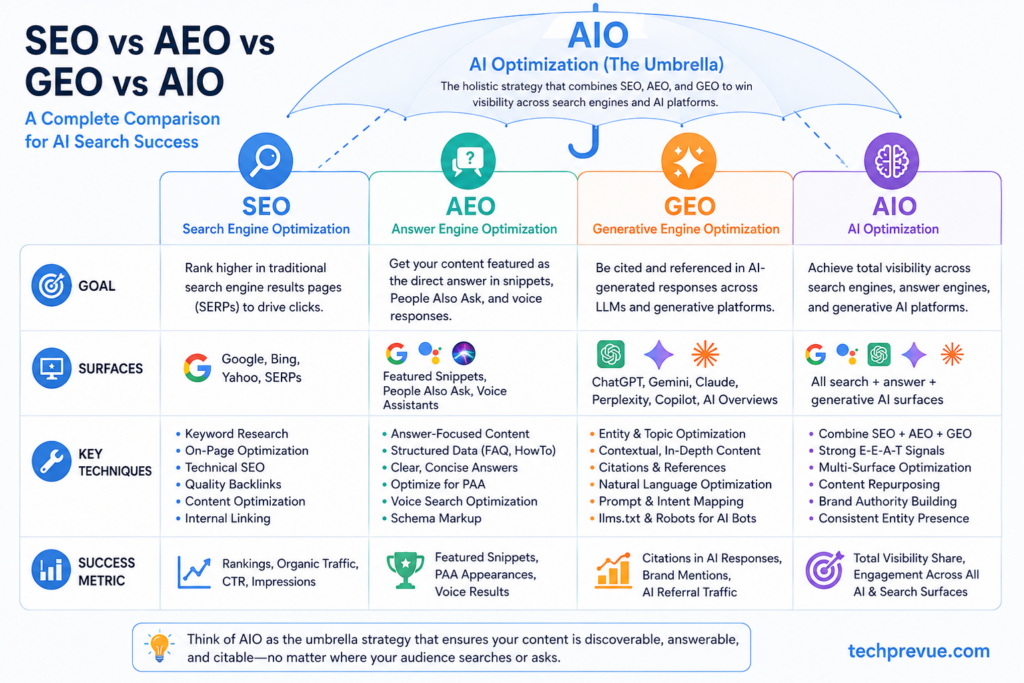
The critical insight: AEO and GEO are extensions of on-page SEO, not replacements. Roughly everything that earns a featured snippet or AI citation — clear structure, direct answers, verifiable claims, crawlable pages — is on-page SEO done well. Treat them as one integrated workflow, which is exactly how this guide is organized.
What On-Page Optimization Can and Cannot Guarantee
Honest expectations, before the how-to begins:
- On-page SEO can make your page eligible, understandable, competitive, and extractable. It reliably improves rankings when content quality and intent match are already sound.
- On-page SEO cannot guarantee a #1 ranking, a featured snippet, a rich result, or an AI citation. Nobody can — competition, authority, and query context all sit outside the page.
- No secret schema type, AI text file, or magic keyword ratio unlocks AI visibility. Google explicitly says there are no special technical requirements for appearing in AI Overviews or AI Mode beyond standard indexing and snippet eligibility (Google Search Central).
With expectations set, let’s optimize — starting with the gate most guides skip.
How to Do On-Page SEO for Your Website: 10 Steps
Before You Optimize: The On-Page SEO Eligibility Checklist
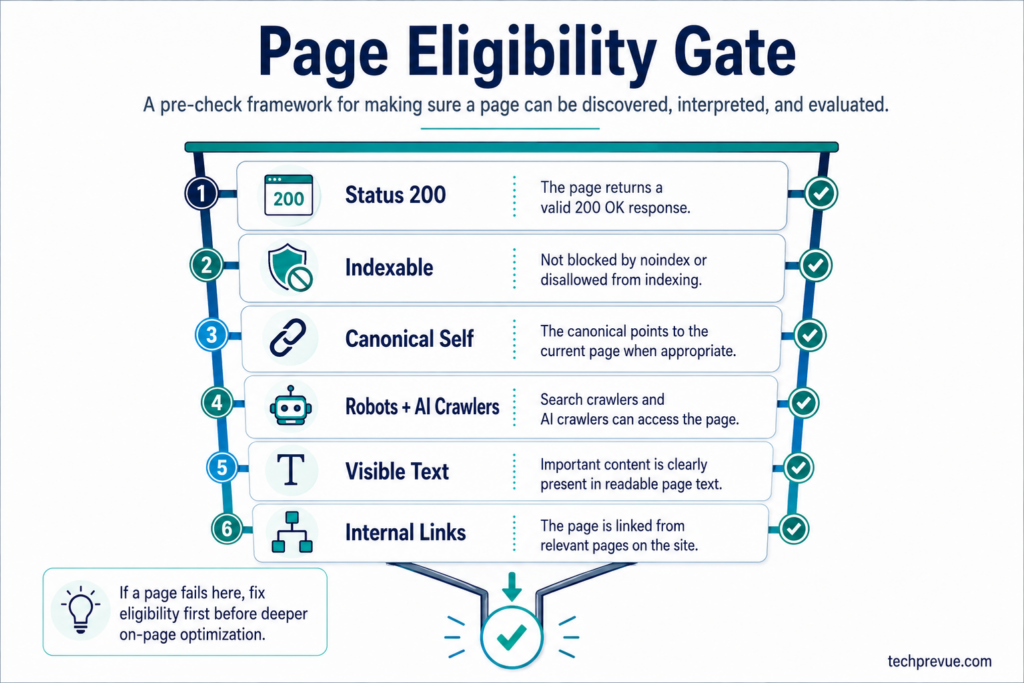
No amount of keyword placement can rescue a page that search engines can’t crawl, index, or read. Yet almost every popular on-page SEO guide skips this gate entirely — which is why so many “optimized” pages never rank. Run these checks first. They take fifteen minutes and prevent months of wasted optimization.
Confirm the Page Is Indexable (Status Code, Noindex, Canonical)
A page must be in the index before any on-page SEO factor matters. Check three things:
- Status code. The URL should return HTTP 200. Redirect chains, soft 404s, and server errors disqualify a page before content is even evaluated. Test it in Google Search Console’s URL Inspection tool.
- Noindex tags. A stray
<meta name="robots" content="noindex">— often left over from staging or set by a plugin — silently removes the page from search. In WordPress, check the RankMath or Yoast sidebar for the index setting on the specific post. - Canonical tags. The page’s canonical should point to itself (self-referencing) unless you deliberately consolidated it into another URL. A canonical pointing elsewhere tells Google “rank that page instead of me.”
Quick verification: search site:yourdomain.com/your-page-url on Google, then confirm details in Search Console. If the page isn’t indexed, fix that before touching a single keyword.
Check Robots Rules and AI Search Crawler Access
Your robots.txt must allow Googlebot to reach the page — and in 2026, crawler access has a second dimension. AI answer engines use their own crawlers, and blocking them means invisibility in those systems no matter how good your on-page optimization is.
The key user agents to review in your robots.txt and firewall rules:
| Crawler | Operator | Controls |
|---|---|---|
| Googlebot | Search, AI Overviews, AI Mode (one index feeds all) | |
| Google-Extended | Whether content trains Gemini models (separate from Search) | |
| OAI-SearchBot | OpenAI | Whether pages appear in ChatGPT search results |
| ChatGPT-User | OpenAI | User-triggered page fetches from ChatGPT |
| GPTBot | OpenAI | Whether content may train OpenAI foundation models |
| PerplexityBot | Perplexity | Perplexity search inclusion |
The distinction that trips up most site owners: OpenAI separates search inclusion from model training.
You can allow OAI-SearchBot (so ChatGPT search can cite you) while disallowing GPTBot (so your content isn’t used for training) — they’re independent robots.txt directives (OpenAI crawler documentation).
Blocking “GPTBot” alone does not block ChatGPT search, and blocking everything labeled “AI” in a security plugin can quietly erase your AI visibility.
Also check your firewall or CDN: aggressive rate-limiting rules that return 429 errors to these bots block them even when robots.txt allows access.
Keep Important Content Visible as Text
Search and AI systems primarily read rendered text. Audit the page for content that exists only inside:
- Images — a comparison chart saved as a JPG is invisible to retrieval systems. Keep the data in an HTML table too.
- JavaScript-only rendering — content that appears only after client-side scripts run may be missed by AI crawlers, most of which don’t execute JavaScript the way Googlebot does. Critical content should exist in the initial HTML.
- Tabs, accordions, and click-to-reveal panels — Google generally indexes this content, but keep genuinely essential answers in plainly visible text.
Make Sure the Page Has Internal Links Pointing to It
A page with zero internal links — an orphan page — signals “unimportant” to crawlers and often gets crawled rarely or dropped.
Before optimizing a page, confirm at least two or three relevant pages on your site link to it. If they don’t, that’s your first fix (Step 6 covers internal linking strategy in full).
Eligibility checklist complete? Now the actual On-page SEO optimization begins — and it begins with intent, not keywords.
Step 1: Match Search Intent Before Choosing Keywords
Search intent is the reason behind a query — what the searcher actually wants to accomplish.
Matching it is the single highest-leverage on-page SEO decision, because Google’s entire ranking premise is serving the page that best satisfies the intent.
A page fighting the intent of its target keyword loses to weaker pages that match it.
The Four Search Intent Types (and What Ranks for Each)
| Intent | The searcher wants to… | Example query | Page format that wins |
|---|---|---|---|
| Informational | Learn or understand | “what is on-page seo” | Guide, tutorial, explainer |
| Navigational | Reach a specific site | “rankmath login” | The brand’s own page |
| Commercial | Compare before deciding | “best seo plugins for wordpress” | Comparison, review, listicle |
| Transactional | Act or buy now | “hire seo consultant lucknow” | Service, product, landing page |
Real intent is often more granular. “On-page SEO checklist” is informational but demands a checklist format. “On-page SEO services” is transactional. Same topic, different pages.
Read the SERP — It’s the Answer Key
Don’t guess intent. Search your target keyword and study page one:
- What formats rank? All guides? All tools pages? A mix means mixed intent — often an opportunity to serve the dominant slice better.
- What angle wins? Beginner explainers or advanced playbooks? Match the level.
- What SERP features appear? A featured snippet means Google wants a concise definition — write one. An AI Overview means answer-extraction matters — structure for it. Video carousels mean consider embedding video.
- What do the People Also Ask questions reveal? Each PAA question is a subtopic your page should probably answer.
Do this for both your primary markets. US and Indian SERPs for the same keyword often differ in ranking pages, PAA questions, and featured formats — differences that reveal localization opportunities competitors ignore.
One Page or Several? Mapping Keywords to Pages
Every distinct intent deserves its own page. If keyword research surfaces “on-page SEO techniques” (informational) and “on-page SEO audit services” (transactional), forcing both onto one page satisfies neither — and splits your relevance signals.
The test: would the same page genuinely satisfy both searches? If yes, one page. If no, separate pages with distinct purposes. This single decision prevents most keyword cannibalization before it starts.
Define the Page’s SEO Purpose Before Writing
Finish Step 1 by writing one sentence: “This page helps [audience] accomplish [task], and its next step is [conversion or follow-up].” Every optimization decision downstream — keywords, structure, depth, calls to action — answers to that sentence.
Step 2: Keyword Research, Keyword Clustering, and Keyword Placement
Keywords remain the backbone of on-page SEO — not because you repeat them mechanically, but because they’re the map between what people search and what your page delivers.
In 2026, keyword work has three layers: the classic keyword cluster, the entities behind those keywords, and the conversational prompts people now type into AI systems.
Build a Keyword Cluster, Not a Keyword List
A keyword cluster is a group of related keywords that share the same search intent and can be satisfied by a single page. One cluster = one page. This is the modern replacement for chasing isolated phrases.
Build it in five moves:
- Pick the primary keyword — the highest-value term that defines the page (“on-page SEO”).
- Gather secondary keywords — close variants and subtopics that belong on the same page (“on-page SEO techniques,” “on-page optimization,” “on-page SEO checklist,” “on-page SEO factors”).
- Collect semantic and LSI keywords — terms Google expects to see in genuinely expert coverage (“title tag,” “meta description,” “search intent,” “internal linking,” “schema markup,” “keyword density,” “heading structure,” “alt text,” “E-E-A-T,” “featured snippet”).
- Mine question keywords — People Also Ask, autocomplete, and forum questions (“what is on-page SEO,” “how to do on-page SEO,” “what is a good keyword density”).
- Add long-tail keywords — specific, lower-competition phrases (“on-page SEO for WordPress,” “on-page SEO for beginners”) that often convert better and win faster.
Free sources cover all five: Google autocomplete, People Also Ask, related searches, Google Keyword Planner, Google Trends, and — once the page has history — Search Console’s query report showing terms you already almost rank for.
Add Entities and AI Prompts to the Cluster
Two additions competitors mostly skip:
Entities. Search engines understand pages through entities — recognizable things and concepts — and their relationships, not just word matches.
For an on-page SEO page, expected entities include Google Search, title tag, meta description, Core Web Vitals, schema.org, RankMath, Yoast SEO, AI Overviews, and ChatGPT.
Covering the entities a topic genuinely involves builds semantic SEO relevance that no amount of keyword repetition can fake.
Prompts. People increasingly “search” by asking AI assistants full questions: “explain on-page SEO to me like I run a small WordPress blog” or “give me an on-page SEO checklist I can follow today.”
Note the prompts your audience would ask, and make sure your page contains self-contained passages that answer them — that’s what generative engines retrieve.
Google’s AI features use query fan-out, issuing multiple related sub-queries to build one answer, so covering the cluster of related questions makes your page retrievable for far more AI answers than the primary keyword alone.
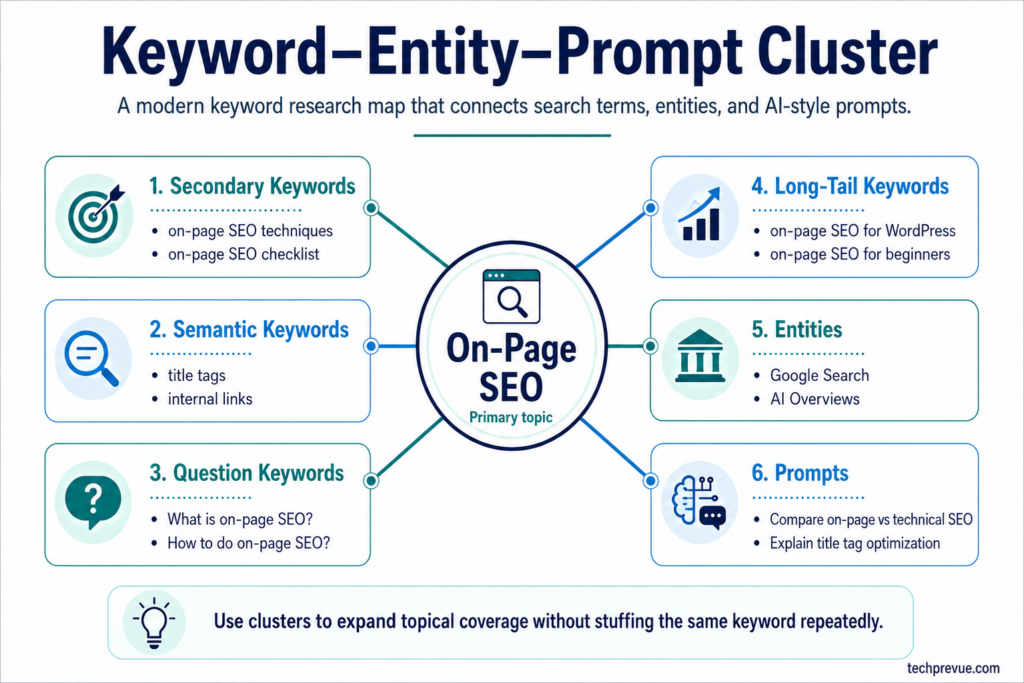
A Worked Keyword Cluster Example
Here’s what a complete cluster looks like for a single page, using this article’s own topic. Notice how every row maps to a specific placement on the page — that mapping, not the list itself, is what makes a cluster actionable:
| Cluster layer | Keywords | Placement on the page |
|---|---|---|
| Primary | on-page SEO | Title, H1, first 100 words, URL, meta description |
| Secondary | on-page SEO techniques, on-page optimization, on-page SEO checklist, on-page SEO factors | H2/H3 headings and section intros |
| Semantic | title tag, meta description, search intent, internal linking, schema markup, keyword density, alt text, Core Web Vitals | Body of the sections they belong to |
| Questions | what is on-page SEO, how to do on-page SEO, why on-page SEO is important, what is a good keyword density | Quick answer, question headings, FAQ |
| Long-tail | on-page SEO for WordPress, on-page SEO for beginners | Subsections and examples |
| Entities | Google Search, RankMath, Yoast, schema.org, AI Overviews, ChatGPT | Wherever those things are genuinely discussed |
| Prompts | “give me an on-page SEO checklist,” “explain AEO vs GEO” | Self-contained sections that answer them |
Keywords that surfaced during research but carry a different intent — “on-page SEO services” (transactional), “on-page SEO tools” (commercial comparison) — stay off this page and go onto the keyword map for pages of their own. That single discipline is what keeps clusters from turning into cannibalization.
Where to Place Keywords on the Page
Placement still matters because these locations carry the most weight for establishing relevance — for crawlers, LLMs, and skimming humans alike. Place the primary keyword naturally in:
- The SEO title / title tag — as close to the front as reads naturally
- The H1 — usually the visible headline
- The first 100 words — establish the page’s subject immediately; readers, search engines, and answer extractors all decide what a page is about from its opening. A quick-answer block at the top handles this elegantly
- At least one or two H2/H3 headings — where it genuinely describes the section
- The URL slug — short and exact (
/on-page-seo/) - Image alt text — where it truly describes the image
- The meta description — it gets bolded when it matches the query
- Naturally through the body and conclusion
Secondary keywords go into section headings, section-opening sentences, FAQ questions, and image alt text — each where it fits the actual content. If a keyword has no natural home, that’s usually a signal it belongs on a different page.
Keyword Density: The Honest Answer and the 1–2% Working Range
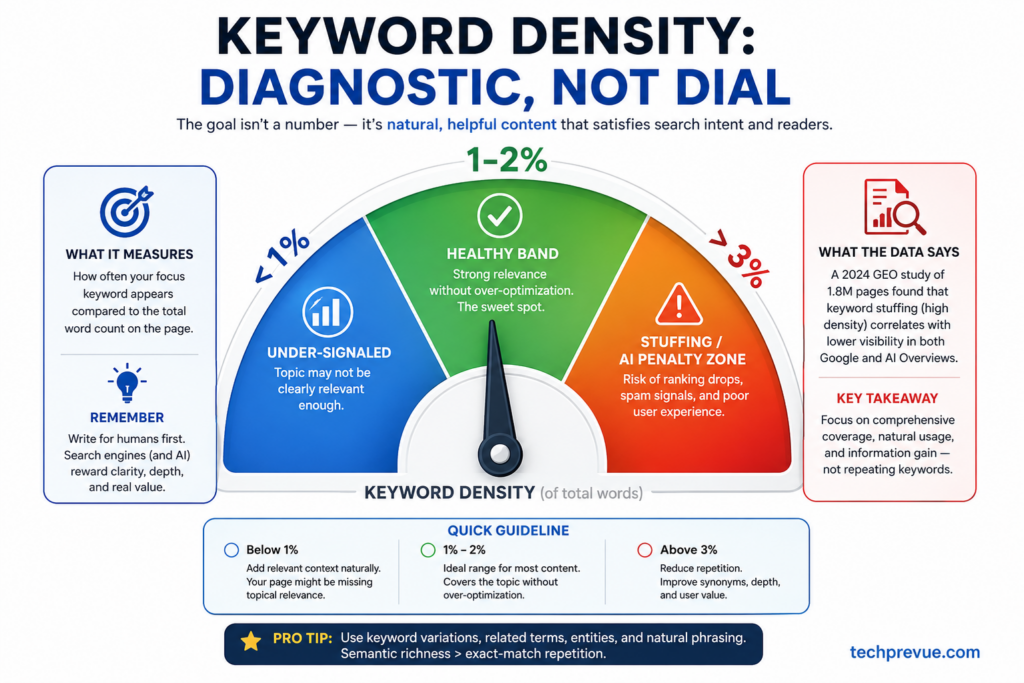
Here’s the truth most guides get wrong in one direction or the other.
Keyword density is not a Google ranking factor. There is no percentage that triggers a ranking, and chasing an exact number produces robotic writing.
In generative engines it’s actively harmful: the KDD 2024 GEO study found keyword stuffing performed roughly 10% worse than an unoptimized baseline in AI-generated responses (Aggarwal et al.).
But density is a genuinely useful editorial diagnostic — and dismissing it entirely leaves writers with no quality gate at all. Professional teams verify density because it catches the two real failure modes:
- Omission — a 3,000-word “on-page SEO” article that mentions on-page SEO four times probably drifts off-topic and under-signals its subject.
- Stuffing — the same article at 5% density reads like spam and now measurably hurts AI visibility.
The working range that experienced editors and tools like RankMath and Yoast use as a health check: keep focus keyword density between roughly 1% and 2%, calculated across the full text.
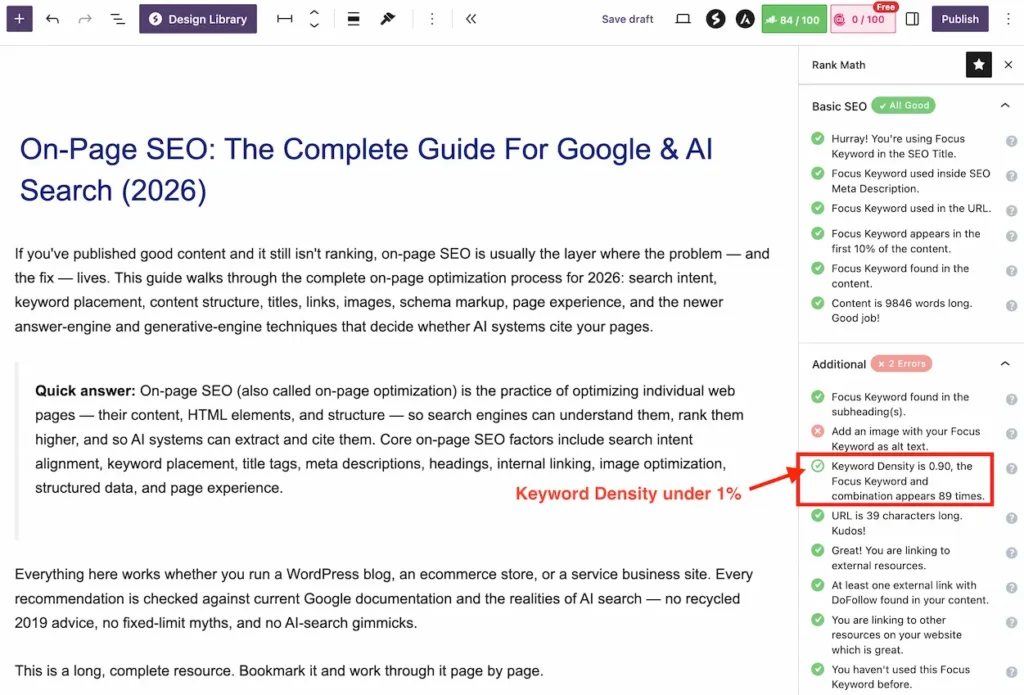
Inside that band, write naturally and never force an occurrence. Treat the number as a smoke detector, not a target to hit — if natural writing lands at 0.9% or 2.2% and the content reads well and covers the topic, the content wins.
Verify it the professional way: after drafting, run a simple count (occurrences × words in the keyword ÷ total words × 100, the weighted method RankMath uses) rather than eyeballing.
Prevent Keyword Cannibalization Between Pages
Keyword cannibalization happens when two or more of your pages target the same intent, forcing them to compete against each other — usually sinking both. Prevent it at the planning stage:
- Keep a keyword map: one spreadsheet row per page listing its primary keyword, cluster, and intent. Before creating any page, check the map.
- Differentiate overlapping topics by audience or intent, not just wording — “on-page SEO” (definition + how-to) and “on-page SEO audit” (evaluation of existing pages) can coexist; two general “on-page SEO tips” posts cannot.
- When two existing pages already compete, consolidate: merge the weaker into the stronger and 301-redirect the old URL.
Step 3: Write Helpful Content With Information Gain
Content quality is the heart of on-page SEO — every other factor amplifies content, none replaces it. Google’s helpful content guidance and its AI-features guidance converge on the same standard: original, people-first content that demonstrates experience and offers something beyond what already ranks (Google, creating helpful content).
Answer the Primary Question Early and Completely
Open the page by answering its core question directly — the quick-answer pattern this article uses.
A concise 40–60 word definition or answer near the top serves everyone at once: readers get immediate value, featured snippets have a candidate passage, and AI systems have a clean extraction target.
Then earn the rest of the page by going deeper than the summary: the quick answer satisfies the impatient, the depth satisfies the serious.
Add Information Gain: What Your Page Offers That Competitors Don’t
Information gain is the measure of what your page adds beyond existing results. A page that restates the top five results — however cleanly — gives Google and AI systems no reason to surface it.
Google’s 2026 AI-features guidance is explicit on this point: differentiated, non-commodity content is what earns visibility in generative results (Google AI optimization guide).
Practical sources of information gain, roughly in order of power:
- First-hand testing — “we ran this on our own site and here’s what happened,” with dates and numbers
- Original data — surveys, aggregated stats from your own analytics, experiments
- Original screenshots and process photos — proof you actually did the thing
- Expert insight — your professional judgment on trade-offs, not just descriptions
- Decision frameworks — “choose A if…, choose B if…” guidance competitors reduce to feature lists
- Regional depth — coverage of both US and Indian contexts where competitors assume one market
- Limitations and failure modes — honest “when this doesn’t work” sections that generic content never includes
- Current corrections — fixing the outdated advice competitors still repeat (this article’s density and llms.txt sections, for example)
Strengthen E-E-A-T Signals on the Page
E-E-A-T — experience, expertise, authoritativeness, trustworthiness — is Google’s quality lens, and most of it is demonstrated on-page:
- Show experience: original examples, testing notes, dates, versions (“tested on WordPress 6.7 with RankMath, July 2026”). Never fabricate these — a fake “tested on” line is a trust liability, not a signal.
- Show expertise: an author byline linking to a real author page with credentials; a reviewer credit for YMYL-adjacent topics.
- Show trustworthiness: cite primary sources for every important claim, date your statistics, and link official documentation rather than blogs summarizing it.
- Place evidence next to claims. A statistic three paragraphs away from the claim it supports helps neither readers nor extraction systems. Claim, then evidence, in the same passage.
Localize On-Page Content for US and Indian Readers
If your audience spans markets — as most English-language sites targeting both the US and India do — localization is on-page work, and it’s a genuine information-gain opportunity because most competitors optimize for exactly one market and ignore the other.
Practical localization inside a single page:
- Check both SERPs during research. The same keyword often surfaces different People Also Ask questions, different featured formats, and different competitors in google.com versus google.co.in — each difference is a subtopic or angle you can cover that single-market pages miss.
- Localize examples, not just spellings. Pricing references, tool availability, payment methods, and regulations differ; a quick “in India, …” or “for US publishers, …” aside costs one sentence and earns trust in both markets.
- Write in one consistent variety of English (US English here) while keeping vocabulary that both audiences share — consistency reads as editorial care.
- Don’t split into two pages unless intent truly diverges. “On-page SEO” means the same thing in both countries — one strong page serving both beats two thin regional twins that cannibalize each other. Reserve separate regional pages (and hreflang) for topics where the answer itself changes by country.
Trim Content That Doesn’t Earn Its Place
Helpful content is as much about subtraction. Before publishing, delete: restated introductions, padded transitions, repeated points across sections, outdated statistics with no current replacement, and any paragraph that exists to reach a word count.
Every paragraph must teach, prove, compare, or move the reader forward. Long articles earn their length section by section — they’re never long for length’s sake.
Step 4: Structure Content for Readers, Crawlers, and LLMs
Content structure — heading hierarchy, section design, and formatting — is where readability and machine extraction meet.
In 2026, structure does double duty: it helps humans skim and it defines the passages that featured snippets, AI Overviews, and chat assistants can lift.
Use a Clean Heading Hierarchy (One H1, Descriptive H2s and H3s)
- One H1 per page, containing the primary keyword — usually the visible headline.
- H2s for major sections, each descriptive enough to stand alone. “Step 5: Optimize Title Tags, Meta Descriptions, and URLs” beats “Getting the details right” — the first tells crawlers, LLMs, and skimmers exactly what follows; the second tells nobody anything.
- H3s and H4s for subtopics and questions nested logically underneath.
Put keywords into headings where they genuinely describe the section — descriptive headings naturally contain the topic’s vocabulary.
What to avoid is the inverse: inventing sections just to house a keyword, or torturing a heading into keyword salad. A heading’s first job is telling the reader what the section delivers.
Question-phrased headings (“What Is a Good Keyword Density?”) work brilliantly for sections answering real search questions — they mirror queries, feed People Also Ask, and give AI systems an explicit question-answer pair.
Write Answer-First, Self-Contained Sections
Search and generative systems increasingly operate at the passage level: they lift one section, not the whole page. Design each important section to survive extraction:
- Answer the heading in the first sentence or two, then expand with context, conditions, and examples.
- Make the section self-contained. Name the subject (“keyword density is…”) instead of leaning on pronouns (“it is…”) that lose meaning outside the page.
- Keep evidence inside the section it supports.
- Stay accurate in isolation. If a lifted paragraph would mislead without its surrounding caveats, move the caveat into the paragraph.
Format for Readability: Paragraphs, Lists, and Tables
- Short paragraphs — two to three sentences. Walls of text lose mobile readers, who are most readers.
- Lists for sequences and sets, tables for comparisons — but only where the format genuinely clarifies. A table comparing four schema types earns its place; a table restating two sentences doesn’t.
- Bold sparingly for genuinely key phrases, so bolding still means something.
- A table of contents for long guides — it improves navigation, generates jump links in search results, and maps the page for crawlers. In WordPress, RankMath and most TOC plugins generate one from your headings automatically.
Step 5: Optimize Title Tags, Meta Descriptions, and URLs
Your title tag, meta description, and URL form your search appearance — the tiny advertisement that decides whether a ranking earns a click. This is the highest ROI-per-minute work in on-page SEO.
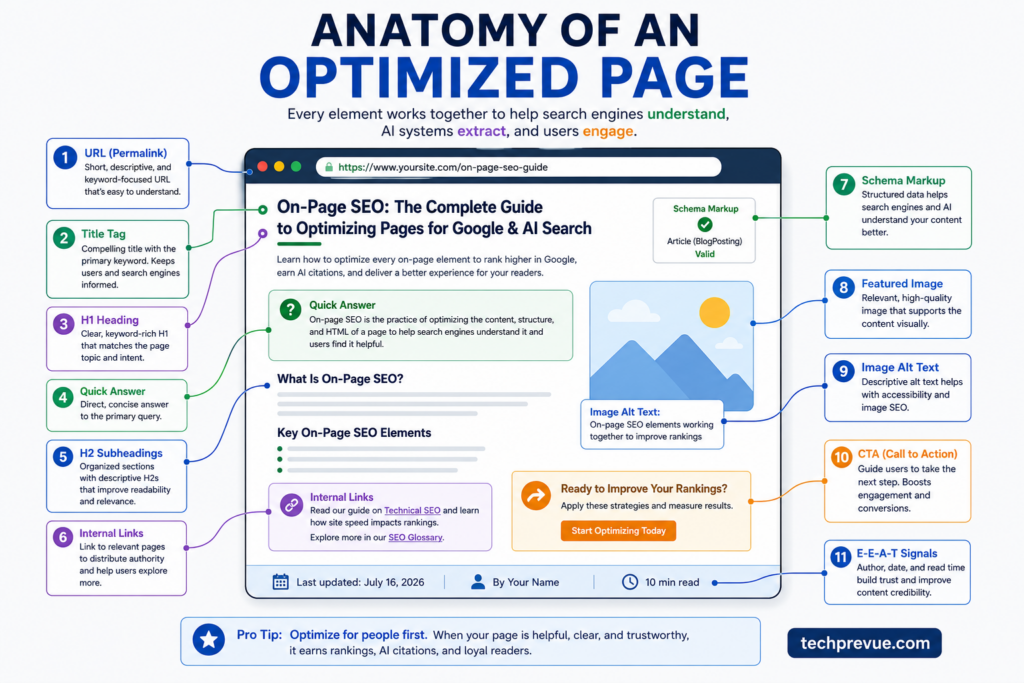
Write a Title Tag That Wins the Click
The title tag is the headline of your search listing and a genuine relevance signal. The reliable formula: primary keyword + concrete benefit or differentiator.
| Title tag example | |
|---|---|
| Weak | Blog Post – My Company |
| Better | On-Page SEO Tips |
| Strong | On-Page SEO: The Complete Guide for Google & AI Search (2026) |
Practical title tag guidelines:
- Front-load the keyword where it reads naturally.
- Keep it roughly 50–60 characters so it displays fully. That’s a display-width guideline, not a Google rule — Google reads longer titles; screens just truncate them.
- Match the intent — a “checklist” query wants “Checklist” in the title.
- Be accurate. Google rewrites titles it considers misleading or poorly descriptive; accurate, specific titles keep control of your own snippet.
- Use a year only when the content genuinely changes by year. For SEO guidance — which does — “(2026)” signals maintained freshness. For evergreen topics, a year just creates an annual editing chore.
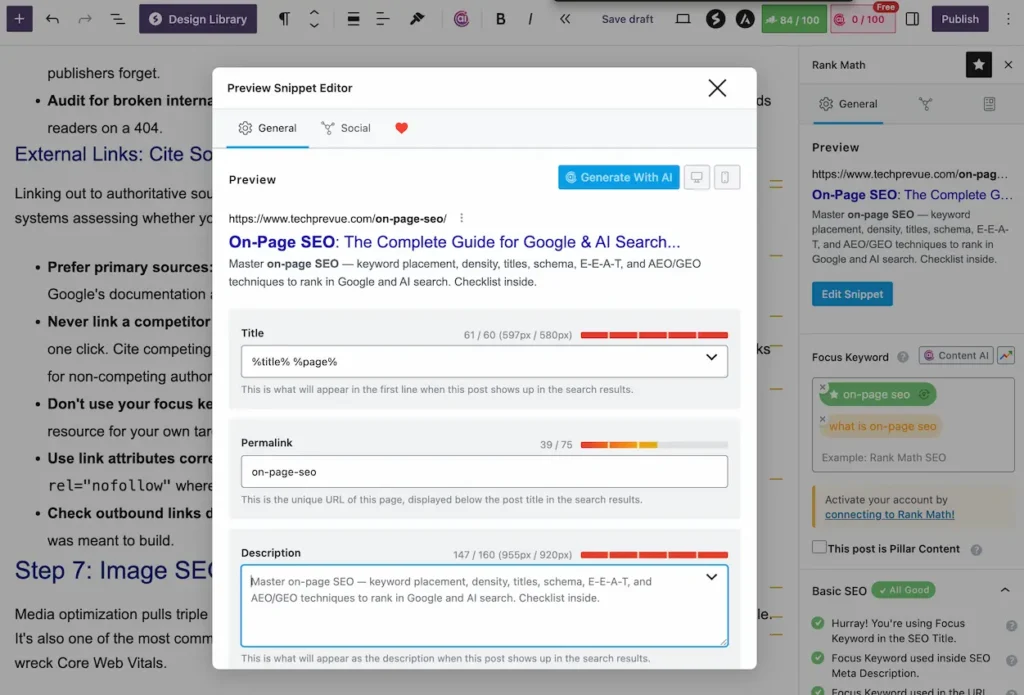
Write a Meta Description That Sells the Click Honestly
The meta description doesn’t directly affect rankings — Google has confirmed this for years — but it heavily influences click-through rate, and CTR is where rankings become traffic. Treat it as ad copy:
- Roughly 150–160 characters for full display.
- Include the primary keyword — it appears bolded when it matches the query.
- State the concrete value of the page and end with a reason to click.
- Write a unique one per page. Google rewrites weak or duplicate descriptions; a strong one usually survives.
Create Short, Descriptive, Stable Permalinks
- Short and exact:
/on-page-seo/beats/what-is-on-page-seo-complete-guide-2026/. - Hyphens between words, all lowercase, no stop-word clutter.
- No dates or years in the URL — a
/2024/slug makes next year’s update look stale and forces a redirect to fix. - Never change a ranking URL without a strong reason. If you must, 301-redirect the old address permanently.
Breadcrumbs complete the picture: they clarify the page’s place in your site hierarchy for users and, with BreadcrumbList schema, can replace the raw URL in search results with a cleaner path.
Step 6: Internal Linking and External Link Optimization
Links on the page — pointing inward and outward — shape how authority flows through your site and how much both readers and machines trust the content.
Internal Linking: Build Topic Hubs, Kill Orphans
Internal links do three jobs at once: they route readers to the next useful page, distribute link equity to the pages you want ranking, and show crawlers your site’s topical structure.
- Link where it’s contextually useful, at the moment a reader would want the deeper resource — as this guide links to the technical SEO guide exactly where technical boundaries come up.
- Use descriptive anchor text that tells readers and crawlers what the target page covers (“how search engines crawl and index pages”), never “click here.” Don’t force exact-match anchors everywhere; natural variation reads better and looks better.
- Build hub-and-spoke clusters: a pillar page on the broad topic, supporting articles on subtopics, all interlinked. That structure — pillar linking to spokes, spokes linking back and sideways — is how topical authority is built one page at a time.
- Fix orphan pages. Any important page should receive links from at least two or three relevant pages. When you publish something new, immediately add links to it from your existing related articles — the step most publishers forget.
- Audit for broken internal links during every refresh. A single typo in a slug silently leaks authority and strands readers on a 404.
External Links: Cite Sources That Build Trust
Linking out to authoritative sources strengthens your page’s trustworthiness — for readers, quality raters, and AI systems assessing whether your claims are verifiable.
- Prefer primary sources: official documentation, standards bodies, research papers, government data. Link Google’s documentation about Google, not a blog paraphrasing it.
- Never link a competitor page targeting your own keyword — you’d hand it relevance and your reader in one click. Cite competing publishers as plain-text attribution when their data matters, and reserve followed links for non-competing authorities.
- Don’t use your focus keyword as anchor text for external links — that tells Google another page is the resource for your own target term.
- Use link attributes correctly:
rel="sponsored"for paid links,rel="ugc"for user-generated content,rel="nofollow"where you don’t vouch for the destination. - Check outbound links during refreshes — linking to dead or outdated pages erodes the trust the citation was meant to build.
Step 7: Image SEO and Video Optimization
Media optimization pulls triple duty: it improves page speed, wins image-search traffic, and makes pages accessible. It’s also one of the most common on-page SEO weaknesses on WordPress sites, where full-size uploads quietly wreck Core Web Vitals.
Optimize Image Files: Format, Size, Compression
- Use modern formats — WebP or AVIF cut file sizes 25–50% versus JPEG at similar quality. WordPress converts on upload via most optimization plugins.
- Resize to display dimensions. Don’t serve a 4000-pixel original in a 800-pixel slot.
- Compress everything before or during upload.
- Set width and height attributes on every image so the browser reserves space — this prevents the layout shifts that damage your CLS score.
- Lazy-load below-the-fold images, but never the hero image — the largest visible image is usually your LCP element, and lazy-loading it slows the metric you’re trying to improve.
Write Alt Text That Describes, File Names That Mean Something
- Alt text describes the image for people using screen readers — that’s its first job, and doing that job well naturally serves image SEO. “RankMath keyword density check showing 1.4% for the focus keyword” beats “seo image” and beats keyword-stuffed nonsense.
- Decorative images get empty alt text (
alt="") so screen readers skip them. - File names should describe content:
on-page-seo-checklist-infographic.webp, notIMG_8841.png. - Captions where they add context — captions are read far more than body text.
- Prefer original images — screenshots, diagrams, and photos you created are information gain; the same stock photo as everyone else is filler.
Optimize Video for Search
Where a page includes video: host or embed it prominently, write a keyword-relevant title and description, provide a transcript (accessibility plus indexable text), add chapters for long videos, use a compelling custom thumbnail, and add VideoObject schema so Google understands what the video contains.
Step 8: Schema Markup That Matches the Page
Structured data — schema markup, usually in JSON-LD — labels your page’s meaning in a machine-readable vocabulary from schema.org. It helps search engines understand content and entities with confidence, and it can make pages eligible for rich results.
What Schema Markup Can and Cannot Do
Schema can: clarify what the page is (an article, a product, a recipe), who’s behind it (author, organization), and make the page eligible for supported rich results.
Schema cannot: guarantee a rich result, boost rankings by itself, or unlock AI visibility — Google is explicit that no special structured data is required for AI Overviews or AI Mode; accurate standard markup is what helps (Google Search Central).
One iron rule: markup must match visible page content. Schema describing things the page doesn’t show violates Google’s guidelines and risks manual action.
Which Schema Types to Use (and Which to Skip)
For editorial content, the reliable 2026 stack:
| Schema type | Use it for | Notes |
|---|---|---|
| Article / BlogPosting | Every editorial page | Include headline, author, dates, image |
| BreadcrumbList | Site hierarchy | Cleaner search appearance |
| Person + Organization | Author and publisher entities | Link author markup to a real author page — this is entity SEO groundwork |
| FAQPage | Pages with genuine FAQ sections | Still valid, machine-readable markup that clarifies Q&A structure — but Google now shows FAQ rich results only for a narrow set of sites, so add it for structure and clarity, not for guaranteed stars-and-dropdowns |
| Product / LocalBusiness / VideoObject | Matching page types only | Never on pages that aren’t those things |
Skip HowTo schema — Google deprecated HowTo rich results in September 2023, and maintaining dead markup is wasted effort. And ignore any plugin or guru selling a special “AI schema”: it doesn’t exist.
In WordPress, RankMath and Yoast generate Article, BreadcrumbList, Person, and Organization markup automatically; FAQ blocks add FAQPage markup.
Validate everything with Google’s Rich Results Test and the Schema Markup Validator after publishing, and monitor Search Console’s enhancement reports for errors.
Step 9: Page Experience, Core Web Vitals, and Accessibility
Between two equally relevant pages, the one that loads fast, works on mobile, and doesn’t fight the reader wins.
Page experience is where on-page SEO borders technical SEO — page-level fixes with site-level tooling. (For the infrastructure side, see the full technical SEO guide.)
Meet the Core Web Vitals Thresholds (LCP, INP, CLS)
Google’s Core Web Vitals measure real user experience with three metrics — and note that INP replaced FID in March 2024, a change plenty of older on-page guides still miss:
| Metric | Measures | Good threshold |
|---|---|---|
| LCP (Largest Contentful Paint) | Main content load speed | ≤ 2.5 seconds |
| INP (Interaction to Next Paint) | Responsiveness to clicks and taps | ≤ 200 milliseconds |
| CLS (Cumulative Layout Shift) | Visual stability while loading | ≤ 0.1 |
Thresholds are assessed at the 75th percentile of real visits (web.dev/vitals). Test any page free with PageSpeed Insights; the usual page-level fixes are compressing the hero image, setting image dimensions, removing render-blocking scripts, and reserving space for ads and embeds.
Perspective matters: Core Web Vitals are one part of page experience, not a ranking cheat code. A perfect 100 score on a mediocre page loses to a good page scoring 85. Fix genuinely bad experience; don’t chase perfection at the expense of content.
Mobile Optimization and Intrusive Interstitials
Google evaluates the mobile version of your page — mobile-first indexing has been fully in effect for years. Check that text is readable without zooming, tap targets aren’t cramped, tables scroll rather than break the layout, and nothing critical is desktop-only.
And keep pop-ups civil: intrusive interstitials that bury content on arrival are an explicit negative in Google’s page experience guidance.
Accessibility Is On-Page SEO
Accessible pages and optimized pages converge on the same practices: real heading hierarchy, descriptive alt text, sufficient color contrast, descriptive link text, keyboard-navigable elements, and readable font sizes.
Accessibility widens your actual audience, reduces legal risk, and — because assistive technologies and search crawlers parse pages in similar ways — nearly everything you do for accessibility strengthens machine understanding too.
Almost no competing on-page SEO guide treats this seriously; treat it as standard practice.
Step 10: AI Search Optimization — AEO, GEO, and AIO in Practice
Everything in Steps 1–9 already improves AI visibility, because AI answer systems are built on the same crawled, indexed, quality-ranked web. This step adds the techniques specific to answer engines and generative engines — and clears out the myths that waste publishers’ time.
AEO: Win Featured Snippets, People Also Ask, and Direct Answers
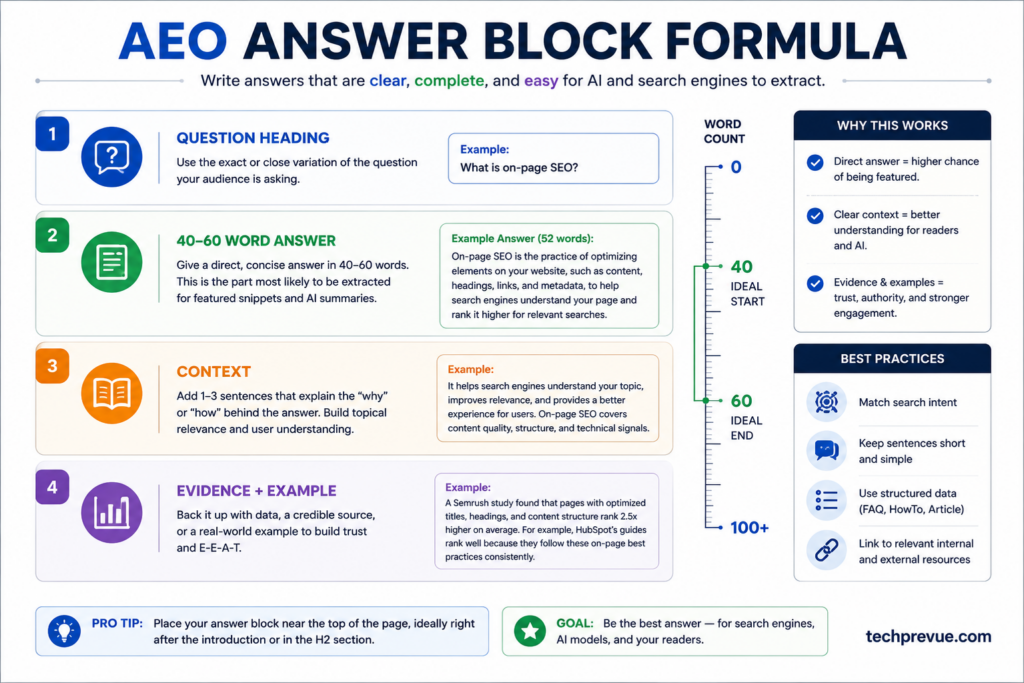
Answer engine optimization is the craft of the extractable answer. The formula, section by section:
- Identify the questions worth answering — People Also Ask entries, question keywords from research, and questions AI assistants surface for your topic.
- Use the question (or a tight description of it) as the heading.
- Answer in the first 40–60 words below the heading — complete, direct, self-contained.
- Then expand with conditions, evidence, and examples for readers who need more.
- Format for the snippet type the SERP shows: paragraph snippets want a definition block, list snippets want numbered steps, table snippets want a clean comparison table.
- State units, dates, and scope (“as of 2026,” “in the US,” “for WordPress sites”) so the extracted answer stays accurate outside your page.
Here’s the difference an answer-first block makes, using the same question both ways:
Weak (buried answer): “Keyword density has been debated in the SEO community for many years, and opinions vary widely depending on who you ask. Some experts believe it matters a great deal, while others dismiss it entirely.
Before we can answer the question, it’s important to understand the history…” — an extraction system finds nothing quotable here, and neither does a reader.
Strong (extractable answer): “A good keyword density is roughly 1–2% of total words — enough to clearly signal the topic without stuffing.
Density is an editorial diagnostic rather than a ranking factor: no percentage triggers rankings, and forced repetition hurts both readability and AI visibility.” — complete, self-contained, accurate in isolation.
That’s the block a featured snippet quotes and an AI Overview cites.
Add a visible FAQ section only where it answers real additional questions — a dozen shallow FAQ entries stuffed with keywords helps no one and reads as exactly what it is.
GEO: Get Retrieved, Selected, and Cited by Generative Engines
Generative engine optimization targets the pipeline AI answers actually run: your page must be crawled and indexed, then retrieved for a relevant prompt, then selected as a source, then cited in the answer. On-page GEO techniques, backed by the research:
- Increase evidence density. The KDD 2024 GEO study found the strongest visibility gains came from adding relevant statistics, credible quotations, and source citations — improving benchmark visibility 30–40% — while keyword stuffing reduced it (Aggarwal et al.). Facts, figures, and attributed claims are what generative answers are built from.
- Write quotable, self-contained passages (Step 4’s structure work is GEO work).
- Cover the query fan-out. Because Google’s AI features issue multiple related sub-queries, comprehensive pages answering the cluster of related questions get more retrieval opportunities than narrow ones (Google, AI features).
- Keep entities consistent. Your brand name, author names, and product names should be spelled and described identically across your site and profiles — entity confusion costs citations.
- Make claims verifiable. Dated statistics with linked primary sources are safer for an AI system to reuse than vague assertions, and systems demonstrably prefer them.
- Monitor multiple prompts. AI answers vary run to run; never judge visibility from one test.
For the Google-side playbook in full — citation patterns, freshness signals, and what earns inclusion — see how to rank in AI Overviews.
Manage AI Crawler Access Deliberately
Revisit the crawler table from the eligibility section with strategy in mind.
For most publishers who want AI visibility, the sensible 2026 posture is: allow Googlebot (there is no separate opt-in for AI Overviews — the Search index feeds them), allow OAI-SearchBot and ChatGPT-User so ChatGPT search can cite and fetch your pages, and make a deliberate, separate decision on GPTBot and Google-Extended, which govern model training rather than search visibility.
ChatGPT referrals arrive tagged utm_source=chatgpt.com, so you can measure exactly what that access earns you in GA4.
AI Search Myths to Ignore in 2026
Google published its first official AI optimization guide in 2026 partly to bust the folklore. The record, straight:
- There is no special AI schema, AI meta tag, or AI-specific file required for AI Overviews or AI Mode. Standard indexability and snippet eligibility are the requirements (Google AI optimization guide).
- llms.txt is not a ranking requirement — and barely gets read. Ahrefs’ May 2026 analysis of 137,000 sites found 97% of existing llms.txt files received zero traffic. Treat it as a harmless experiment at most, never a priority.
- Allowing an AI crawler doesn’t guarantee citations — it makes them possible. Content quality does the earning.
- Rewriting content into robotic “LLM-friendly” fragments backfires. Readable, well-structured human writing is what both audiences reward.
- Google’s spam policies apply to generative results too — manipulation tactics carry the same risks in AI surfaces as in classic rankings.
AIO: The Umbrella Discipline
AI optimization (AIO) isn’t a separate tactic — it’s the umbrella covering everything above: SEO eligibility, AEO answer design, GEO citation readiness, entity consistency, accurate structured data, deliberate crawler management, and AI-visibility measurement.
If your on-page SEO is genuinely sound, your AIO is 80% done; the remaining 20% is the deliberate answer-formatting, evidence density, and measurement this step adds.
On-Page SEO Example: Optimizing One Page From Start to Finish
Frameworks stick when you watch one run. Here’s the complete process applied to a realistic case — a WordPress article titled “SEO Tips for Beginners,” published 18 months ago, sitting at position 14 for its main query with declining clicks.
Eligibility check (10 minutes). URL Inspection shows the page indexed and canonical — good. But a crawl finds only one internal link pointing to it, from an old roundup. The robots.txt allows Googlebot but a security plugin is blocking everything matching “bot,” including OAI-SearchBot. Two eligibility fixes logged before touching content.
Intent check (15 minutes). The live SERP for the target query shows step-by-step beginner guides with checklists — and an AI Overview citing three of them. Our page is a loose list of 25 unordered tips. Format mismatch identified: the page needs a sequential, checklist-shaped structure, not more tips.
Keyword cluster review (20 minutes). Search Console shows the page already earning impressions for eight queries it never deliberately targeted, including two question phrases appearing in People Also Ask. Those questions get added to the outline as H3s. One query on the list — a “best SEO tools” phrase — carries commercial intent and gets moved to the keyword map for a separate future page instead of being stuffed into this one.
Content and structure rewrite (the real work). The 25 tips get reorganized into 8 sequential steps under descriptive H2s, each opening with a direct answer. Three outdated claims get corrected against current Google documentation, each with a linked primary source placed next to the claim. A short “what we changed on our own site and what happened” passage adds first-hand experience the competing pages lack. Two thin sections saying nearly the same thing get merged. Word count drops by 300 while coverage improves — length was never the problem.
Search appearance (10 minutes). Title rewritten from “SEO Tips for Beginners | Blog” to a front-loaded, intent-matched title with a concrete differentiator. Meta description rewritten as honest ad copy with the keyword included. The URL stays exactly as it is — it ranks, so it doesn’t move.
Links, media, schema (30 minutes). Four contextual internal links added out to related guides, and — the step everyone forgets — three links added from older related posts into this page. Hero image compressed from 900 KB to 60 KB WebP with dimensions set. Dead HowTo schema removed; Article and FAQPage markup validated.
Verification and logging (10 minutes). Focus keyword density comes back at 1.4% — in band, no action. Change list and date logged, baseline metrics recorded: position 14, 2.1% CTR.
Six weeks later: position 6, CTR 4.8%, and the page appears as a cited source in the AI Overview for one of the two PAA questions it now answers directly. Nothing exotic happened — the page simply passed every gate in order. That’s what this entire guide looks like compressed into one afternoon of focused work.
How to Implement On-Page SEO in WordPress (RankMath and Yoast)
Most readers of this guide will execute everything above inside WordPress, so here’s where each optimization actually lives. (The workflow is nearly identical in RankMath and Yoast SEO; menu names differ slightly.)
- Title tag and meta description: the SEO plugin’s snippet editor below the post editor. Set the focus keyword there too — the plugin’s checks (keyword in title, in first paragraph, in headings, density) then run automatically against everything this guide covered manually. Treat plugin scores as a preflight checklist, not a grade to max out: a 100/100 score on content that reads badly is a failed page.
- Permalink: the URL slug field in the editor sidebar. Set it once, before publishing; WordPress creates redirects for post-publish changes, but clean-from-the-start is safer.
- Headings and structure: the block editor’s heading blocks handle hierarchy; a table-of-contents block or plugin generates the TOC from them automatically.
- Images: set alt text in the media library or the image block sidebar; an optimization plugin handles WebP conversion and compression on upload.
- Schema: RankMath and Yoast output Article, BreadcrumbList, Person, and Organization markup automatically once site-wide settings are configured. FAQ blocks emit FAQPage JSON-LD. Confirm HowTo markup is disabled anywhere it lingers.
- Internal links: both plugins suggest link opportunities, but the manual habit matters more — after publishing, open your three most related posts and add contextual links to the new page.
- Crawler controls: robots.txt is editable under the SEO plugin’s tools section for the AI-crawler directives from Step 10 — and remember to whitelist those bots in your security or CDN layer too, or the robots.txt permission is meaningless.
One WordPress-specific warning: plugins multiply, and so do their side effects.
A caching plugin, a security plugin, and an SEO plugin can each independently break something this guide depends on — lazy-loading your LCP image, blocking legitimate crawlers, or emitting duplicate schema.
After any plugin change, re-run the eligibility checks from the top of this guide.
On-Page SEO Best Practices by Page Type
A blog post and a product page shouldn’t be optimized identically — a gap almost every competing guide leaves open. The core process (Steps 1–10) stays constant; the emphasis shifts:
- Blog posts and guides: depth, information gain, answer-first sections, FAQ coverage, strong internal links into and out of the topic cluster. Article + BreadcrumbList schema.
- Ecommerce product pages: unique product descriptions (never the manufacturer’s boilerplate), specification tables, original photos, honest pros and cons, review content, and Product schema with accurate price and availability.
- Category pages: a genuinely useful intro that defines the category and helps users choose, clean faceted navigation with canonical control, and internal links to the best products and buying guides.
- Service and lead-generation pages: transactional intent means proof over prose — outcomes, process, credentials, testimonials, transparent pricing signals, and one unmissable call to action.
- Local pages: genuinely local content (areas served, directions, local proof), consistent name-address-phone details, and LocalBusiness schema.
- YMYL pages (health, finance, legal, safety): the E-E-A-T bar rises sharply — credentialed authors, named reviewers, primary-source citations for every claim, and visible update dates are the entry fee, not extras.
How to Audit and Prioritize On-Page SEO Improvements
Optimizing existing pages usually returns more, faster, than publishing new ones — if you fix things in the right order. Work down this priority ladder; each level is wasted effort until the ones above it pass:
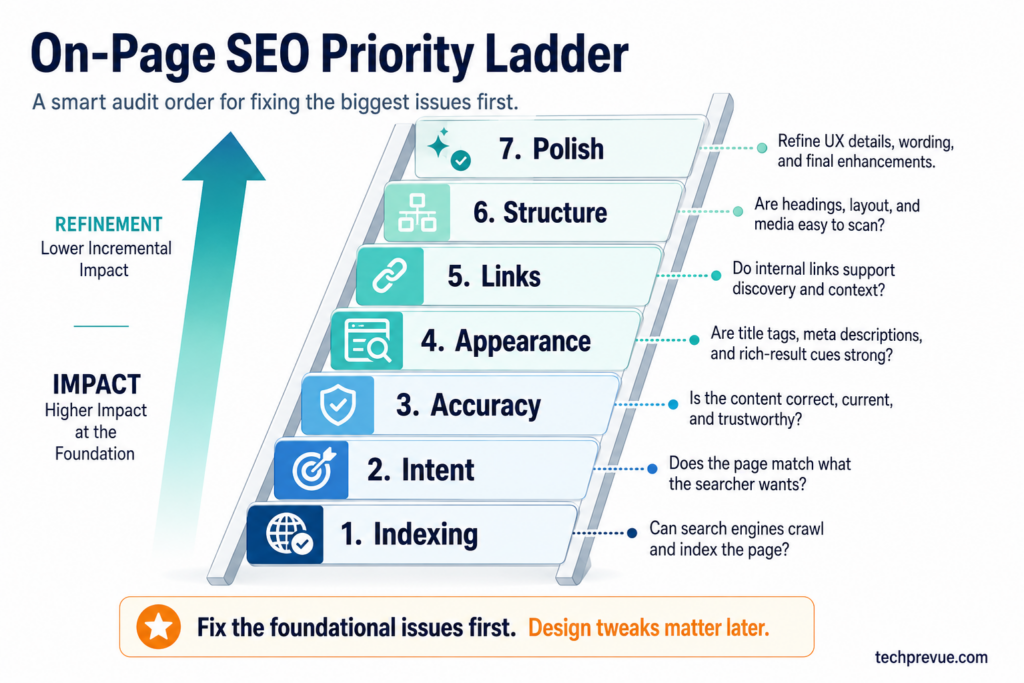
- Indexing and canonical defects — the page must be eligible before anything else matters.
- Search intent mismatch — the wrong page format can’t be polished into ranking.
- Inaccurate, outdated, or incomplete content — fix facts, fill the gaps competitors and PAA questions reveal.
- Weak search appearance — title tag and meta description rewrites are the fastest CTR wins, especially for pages ranking 4–10.
- Missing internal links — often the cheapest ranking lift available.
- Structure and extractability — headings, answer-first sections, tables.
- Media, schema, and experience polish — real gains, smaller ones.
Where to start: open Search Console’s performance report and filter for pages ranking positions 5–15. Those are your fastest wins — pages Google already almost trusts, one focused improvement from page one.
Prioritize by impact versus effort: a title rewrite on a position-6 page beats a full rewrite of a position-60 page every time.
Refresh triggers beat arbitrary schedules. Update a page when: rankings or clicks decline over 2–3 months, facts or interfaces changed, competitors published something stronger, PAA shows questions you don’t answer, or the topic’s year rolled over.
And when you refresh, actually update the substance — bumping the date on unchanged content fools no one, including Google.
Document each change with its date. When rankings move, you’ll know why.
How to Measure On-Page SEO Performance
Optimization without measurement is guessing. The 2026 scoreboard has two halves.
Classic search performance (Google Search Console + GA4):
- Impressions — your visibility footprint per query
- Clicks and CTR — whether your search appearance earns the visit; compare CTR before and after title changes
- Average position — per query, watched over time rather than day to day
- Engagement and conversions — whether visits become value; traffic that bounces without converting flags an intent mismatch
- Index coverage and Core Web Vitals — whether eligibility and experience are holding
AI search visibility — newer, and still partly manual:
- AI referral traffic: segment GA4 by source — ChatGPT arrives as
utm_source=chatgpt.com; Perplexity and others appear as referrers - Citation checks: run your important prompts (and paraphrases) through AI Overviews, ChatGPT, and Perplexity monthly; log whether you’re cited, how you’re described, and whether the description is accurate
- Branded demand: growth in searches for your brand often reflects AI-era mentions that never produced a click
Annotate every significant content change with its date, then compare month over month and — because search is seasonal — year over year. Give changes four to eight weeks before judging; on-page improvements are usually visible within a quarter, rarely within a week.
Common On-Page SEO Mistakes and Myths
The fastest way to improve at on-page optimization is to stop doing the things that quietly hurt. The 2026 list:
- Optimizing before checking indexability. Months of keyword work on a noindexed page. It happens constantly. Eligibility first, always.
- Treating keyword density as a ranking dial. Density is a diagnostic (the 1–2% health check from Step 2), not a lever. Cranking it up is stuffing — which now measurably hurts AI visibility on top of reading badly.
- Ignoring keywords entirely because “Google understands topics now.” The opposite overcorrection. Google understands topics through clear signals — a page that never plainly names its subject under-communicates it to every system that might rank or cite it.
- Forcing keywords into every heading. Headings exist to describe sections. Keyword-salad headings repel readers and get rewritten in snippets anyway.
- One page per keyword variation. “On-page SEO,” “on-page optimization,” and “on-page SEO techniques” share one intent and belong on one page. Splitting them manufactures cannibalization.
- Publishing raw AI-generated content without review. Generic, unverified AI output is commodity content by definition — no experience, no information gain, and frequently confident errors. AI-assisted drafting is fine; unedited publishing is a quality liability.
- Expecting schema to guarantee rich results or AI citations. Markup creates eligibility and clarity, nothing more. And HowTo schema has been dead since 2023 — remove it.
- Believing meta descriptions boost rankings. They boost clicks. Write them for humans.
- Citing engagement metrics as ranking factors. Bounce rate and dwell time are diagnostics of whether your page satisfies visitors — worth watching, not worth mythologizing as direct universal ranking signals.
- Changing a ranking URL casually. Every URL change gambles accumulated equity. Redirect properly or don’t touch it.
- Chasing a perfect PageSpeed score while the content stays mediocre. Experience polish amplifies good content; it can’t substitute for it.
- Updating the date without updating the page. Freshness is content-deep, not timestamp-deep.
Complete On-Page SEO Checklist
The full workflow, condensed into a working checklist. Save it, and run every page through it.
Before writing
- [ ] Page is indexable: 200 status, no noindex, self-referencing canonical
- [ ] robots.txt and firewall allow Googlebot and your chosen AI search crawlers
- [ ] Search intent identified from a live SERP check (both target markets)
- [ ] Keyword cluster built: primary, secondary, semantic terms, questions, entities, prompts
- [ ] Keyword map checked — no existing page targets this intent
- [ ] Page purpose written in one sentence, competitor gaps noted
While writing
- [ ] Primary keyword in the title, H1, and first 100 words
- [ ] Quick answer block near the top
- [ ] Descriptive H2/H3 headings carrying cluster keywords naturally
- [ ] Answer-first, self-contained sections; 2–3 sentence paragraphs
- [ ] Information gain included: experience, data, examples, frameworks, limitations
- [ ] Every important claim backed by a linked primary source
- [ ] Internal links added with descriptive anchors; external links to authorities only
Before publishing
- [ ] Title tag ~50–60 characters, keyword front-loaded, intent-matched
- [ ] Meta description ~150–160 characters, keyword included, click-worthy
- [ ] Short, descriptive permalink — no dates, no filler
- [ ] Images compressed, dimensioned, descriptively named, alt text written
- [ ] Schema added and validated (Article, BreadcrumbList; FAQPage where genuine; no HowTo)
- [ ] Keyword density verified in the 1–2% band; reads naturally throughout
- [ ] Grammar, facts, dates, and statistics checked; nothing outdated
After publishing
- [ ] Internal links added from existing related pages to the new page
- [ ] URL submitted for indexing in Search Console
- [ ] Rich Results Test passed; Core Web Vitals spot-checked
- [ ] Change and date logged; baseline metrics recorded
At every refresh
- [ ] Rankings, clicks, and PAA questions reviewed for gaps
- [ ] Facts, statistics, screenshots, and versions updated
- [ ] Broken internal and external links fixed
- [ ] AI citations spot-checked across major assistants
FAQs About On-Page SEO
What is on-page SEO in simple words?
On-page SEO means improving everything on a web page itself — its content, keywords, titles, headings, links, images, and code — so search engines understand it, rank it higher, and AI systems can cite it.
What are the most important on-page SEO factors?
Search intent match and content quality come first — nothing rescues a page that answers the wrong question badly. After those: the title tag, keyword placement, heading structure, internal linking, and page experience deliver the largest measurable gains.
What is a good keyword density for SEO?
Keep focus keyword density roughly between 1% and 2% as an editorial health check — enough to clearly signal the topic, nowhere near stuffing territory. Density is a diagnostic, not a ranking factor: no percentage triggers rankings, and forcing occurrences hurts readability and AI visibility.
How is on-page SEO different from technical SEO?
On-page SEO optimizes individual pages — content, HTML elements, media. Technical SEO optimizes site-wide infrastructure — crawling, indexing, architecture, and speed at the server level. They overlap at page experience, and both must work for either to pay off.
How many keywords should one page target?
One primary keyword plus its full cluster — typically five to twenty related secondary, semantic, and question keywords sharing the same search intent. Keywords with a different intent belong on different pages.
Does on-page SEO help with AI Overviews and ChatGPT visibility?
Yes — it’s the foundation. Google confirms its AI features are rooted in core Search ranking systems, so indexable, well-structured, evidence-rich pages are what AI Overviews and AI Mode cite. For ChatGPT search specifically, also allow OAI-SearchBot in robots.txt.
Does schema markup improve rankings?
Not directly. Schema helps search engines understand your page and makes it eligible for supported rich results, which can improve visibility and clicks — but there’s no ranking boost from markup itself, and no schema type guarantees a rich result or an AI citation.
How often should I update on-page SEO?
On triggers, not a calendar: declining rankings or clicks, changed facts or interfaces, stronger competitor content, new unanswered questions, or a year rollover for time-sensitive topics. High-value pages usually warrant a genuine review every 3–6 months.
How long does on-page SEO take to show results?
Typically two to eight weeks for changes to be recrawled, reprocessed, and reflected — faster for established sites, slower for new ones. Title and snippet improvements often show CTR gains within days of reindexing; content-depth improvements take longer to settle.
Can AI-generated content rank in Google?
Yes — Google evaluates content quality, not production method. But unedited AI output is usually commodity content with no first-hand experience or information gain, which is exactly what quality systems demote. Use AI as a drafting assistant; add the expertise, verification, and originality yourself.
Final Thoughts: On-Page SEO That Earns Search and AI Visibility
Strip away the acronyms and on-page SEO in 2026 comes down to one discipline practiced at three depths. Make the page eligible — indexable, crawlable, readable as text. Make it excellent — intent-matched, genuinely helpful, evidence-rich, structured so any section can stand alone. Then make it measurable — watch the classic metrics and the AI citations, and refresh on evidence rather than habit.
The encouraging truth: search surfaces keep multiplying — blue links, snippets, AI Overviews, chat citations — but they all reward the same underlying page. Optimize it once, properly, and you’re competing everywhere at the same time.
Start today with one page: pick something ranking between positions 5 and 15, run it through the checklist above, and log the date. That’s on-page SEO — one honest improvement at a time, compounding.
