
Slow internet that started three days ago has a different cause than slow internet you have lived with for a year. The first is a change you can find. The second is a limit you have to work around.
So “why is my internet so slow” has two different answers, and which one applies to you decides everything else you do. Most guides hand you a list of twenty fixes and let you work down it. This page tells you which handful apply, so you can skip the rest.
If you already know where the fault sits, go straight to our step-by-step guide to fixing slow internet. If you do not, start here.
Why is my internet so slow? The most common causes
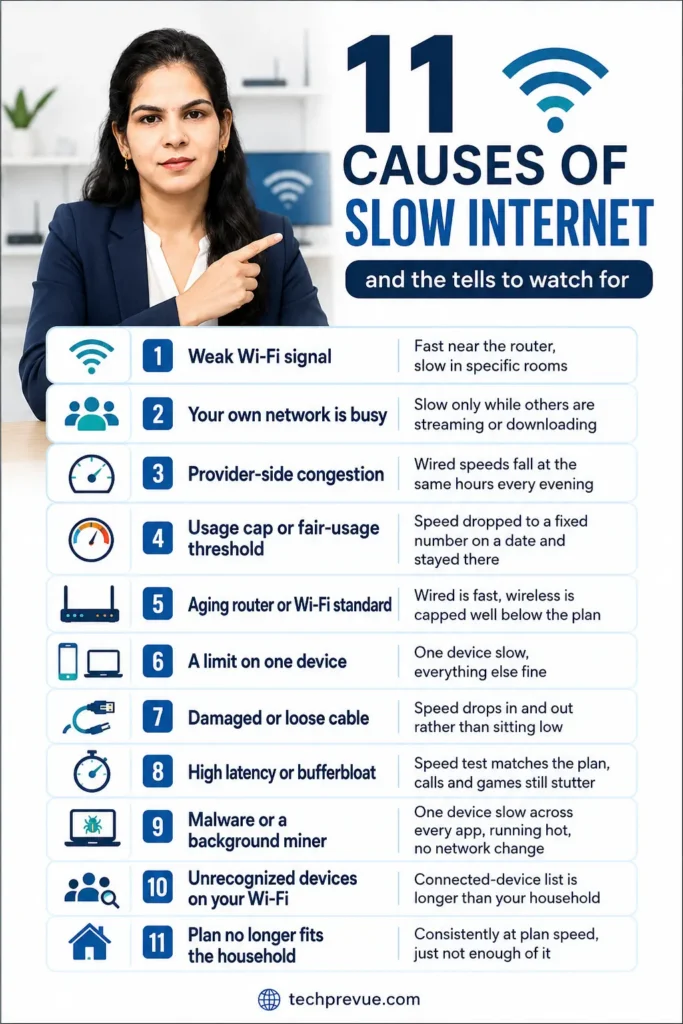
Most slow connections trace to one of eleven things: a weak Wi-Fi signal, too much happening on your own network, congestion on your provider’s network, a usage cap, aging equipment, a limit on one device, damaged cabling, high latency, malware, uninvited devices on your Wi-Fi, or a plan that no longer fits the household.
The list is the easy part. What separates these is the tell — the observable signature that identifies one cause before you change anything.
| Cause | The tell |
|---|---|
| Weak Wi-Fi signal | Fast near the router, slow in specific rooms |
| Your own network is busy | Slow only while others are streaming or downloading |
| Provider-side congestion | Wired speeds fall at the same hours every evening |
| Usage cap or fair-usage threshold | Speed dropped to a fixed number on a date and stayed there |
| Aging router or Wi-Fi standard | Wired is fast, wireless is capped well below the plan |
| A limit on one device | One device slow, everything else fine |
| Damaged or loose cable | Speed drops in and out rather than sitting low |
| High latency or bufferbloat | Speed test matches the plan, calls and games still stutter |
| Malware or a background miner | One device slow across every app, running hot, no network change |
| Unrecognized devices on your Wi-Fi | Connected-device list is longer than your household |
| Plan no longer fits the household | Consistently at plan speed, just not enough of it |
Two suspects get blamed far more often than they deserve. Browser cache and low storage change how a device feels, not how fast data arrives.
Ruling those two out early saves an afternoon. The rest of this page narrows the remaining eleven by when the problem started and where it shows up.
Why is my internet so slow all of a sudden?
Sudden slowdowns trace to a change, not a fault. Something crossed a threshold, updated itself, joined the network, or broke in the last few days. Find the change and you have found the cause.
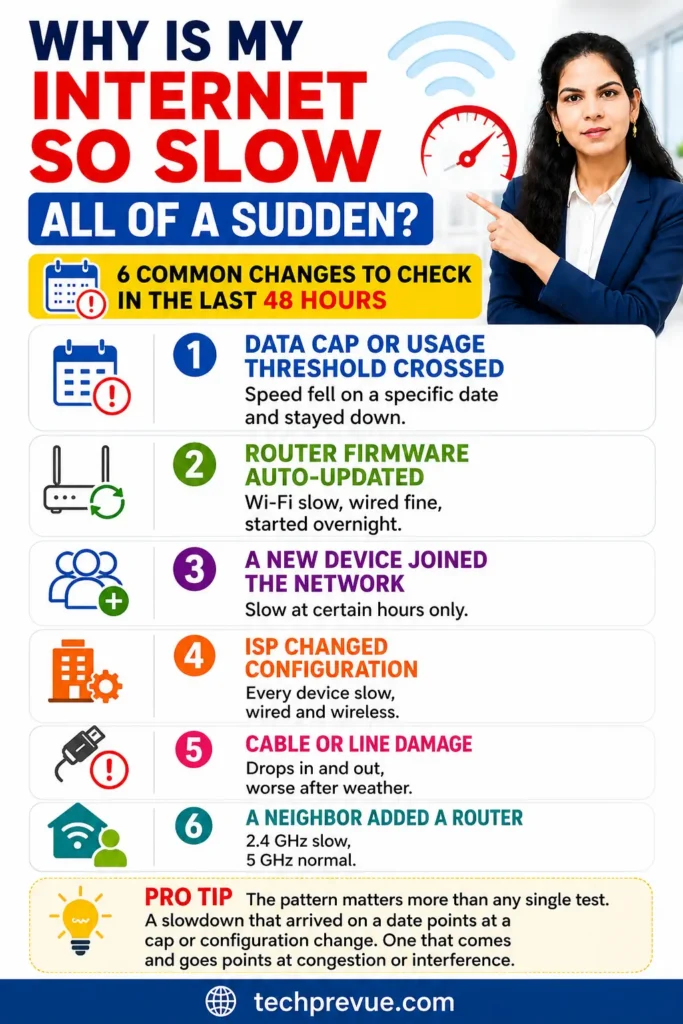
Work backwards through the last 48 hours before touching your equipment. Six changes account for most sudden drops, and each leaves a different signature.
| What changed | What it looks like | How to confirm |
|---|---|---|
| Data cap or usage threshold crossed | Speed fell on a specific date and stayed down | Check usage in your ISP app against your plan limit |
| Router firmware auto-updated | Wi-Fi slow, wired fine, started overnight | Check the router’s update log for a recent install |
| A new device joined the network | Slow at certain hours only | Open the router’s connected-device list |
| ISP changed configuration | Every device slow, wired and wireless | Test at the modem and compare against your plan |
| Cable or line damage | Drops in and out, worse after weather | Look for kinks, chew marks, loose connectors |
| A neighbor added a router | 2.4 GHz slow, 5 GHz normal | Check channel occupancy in a Wi-Fi analyzer app |
The pattern matters more than any single test. A slowdown that arrived on a date points at a cap or a configuration change. One that comes and goes points at congestion or interference.
Why is my internet so slow today when it was fine yesterday?
Check for an outage before anything else. A one-day slowdown affecting every device is more often a provider-side event than anything in your home, and restarting equipment will not touch it.
Open your provider’s app or status page, then search for outage reports in your area. Maintenance windows, regional faults, and cable repairs all produce this exact pattern. If the problem is theirs, so is the fix.
One test rules your home network in or out in about a minute. Switch a phone to mobile data and load the same site. If it loads normally on cellular, your fixed connection is the problem rather than the device in your hand.
Why is my internet so slow at night but fine during the day?
Evening slowdowns are almost always congestion on your provider’s network rather than anything in your home. More people in your area come online between roughly 7 pm and 11 pm, and shared capacity gets divided among them.
Proving it takes about a week of timestamped wired tests, and the proof is what moves a support ticket past the standard script. Our fix guide covers the method and the wording to use: see how to confirm night-time congestion.
Why is my internet so slow on my phone?
A phone can be slow for reasons that have nothing to do with your home connection. Before troubleshooting the router, work out whether the phone is on Wi-Fi or mobile data, because those two share almost no causes.
Is it your mobile data or your Wi-Fi?
Turn Wi-Fi off and run a speed test on mobile data. Then turn Wi-Fi back on, turn mobile data off, and run it again. Whichever is slow is the one to work on.
If both come back slow, the phone itself is the suspect. Full storage, an active battery-saver mode, and a background restore all produce this.
When mobile data is the slow one
Signal bars measure signal strength, not throughput, which is why a phone can show full bars and still crawl. What matters is how many people share that tower and which band your phone has attached to.
Four causes cover most cases:
- 5G to 4G fallback. The phone reports 5G while attached to a congested band, or drops indoors where higher-frequency signal cannot penetrate walls.
- Throttling past a usage threshold. Many plans sold as unlimited cut speed sharply after a daily or monthly allowance. Jio documents this behavior for its own devices and services.
- Tower load. Speeds fall at commuter hours and near crowded venues, then recover on their own.
- Indoor penetration. Moving to a window or balcony often changes the result more than any setting will.
Toggling airplane mode for ten seconds forces the phone to reattach and re-select a band. It is the closest thing to a real quick fix on mobile, and it costs nothing to try.
When Wi-Fi is the slow one
Now the problem is your home network and the phone was only the messenger. Band selection and router placement are where to start, both covered in the fix guide.
Why is my internet so slow on my computer but fine on my phone?
When one device is slow and everything else is fast, stop troubleshooting the network. The cause is on that machine.
Three things account for most of it. The wireless adapter may be an older generation than the router, capping throughput no matter what you pay for. Background sync from cloud storage or a game launcher may be quietly consuming the connection.
The third is the network driver, which can be outdated or simply sitting in a bad state after a sleep cycle.
A laptop that runs fast on Ethernet and slow on Wi-Fi has an adapter or driver problem rather than an internet problem. The platform-specific settings worth checking — Delivery Optimization on Windows, Private Relay and Low Data Mode on Apple devices, Data Saver on Android — are covered in the fix guide.
If one website is slow while everything else is fine, the site is the problem, not you. That pattern is common enough to have its own diagnosis: why Facebook loads slowly shows what it looks like in practice. Work networks add a second possibility, since some corporate and campus setups inspect or block traffic in ways that only affect certain services, which is the usual explanation when WhatsApp Web fails on an office connection.
Why is my internet so slow in rural areas?
Rural slowdowns are usually infrastructure limits rather than faults, so most home-network advice does not apply. Moving a router will not overcome distance to a tower or signal loss over a long copper line.
Four connection types dominate outside cities, and each has a different ceiling.
| Connection type | What limits it | What to expect |
|---|---|---|
| Mobile and fixed wireless | Distance to tower, backhaul capacity, users sharing the cell | Fast off-peak, sharply slower at busy hours |
| DSL over copper | Signal loss over line length | Falls with distance from the exchange |
| Geostationary satellite | Round trip to orbit and back | Workable bandwidth, high latency |
| Low-earth-orbit satellite | Satellites overhead, ground station capacity | Far lower latency, weather-sensitive |
Two things do help here. An external or directional antenna on a fixed wireless setup usually gains more than any indoor change. And scheduling large downloads outside evening hours works better in rural areas than urban ones, because the shared capacity is smaller and the peak is sharper.
Confirm the limit is external before spending anything. Test wired, at different hours, across several days. If speeds are consistent and consistently low, the ceiling is the infrastructure, and no equipment purchase will raise it.
How slow is actually slow?
Plenty of people asking why is my internet so slow are getting exactly the speed they pay for. Before changing anything, check what the service you are actually using asks for.
Every figure below comes from the vendor’s own documentation, not from an internet provider.
| What you are doing | What the vendor asks for | Source |
|---|---|---|
| Netflix, HD 720p | 3 Mbps | Netflix |
| Netflix, Full HD 1080p | 5 Mbps | Netflix |
| Netflix, 4K Ultra HD | 15 Mbps | Netflix |
| Zoom, 720p group call | 2.6 Mbps up / 1.8 Mbps down | Zoom |
| Zoom, 1080p group call | 3.8 Mbps up / 3.0 Mbps down | Zoom |
| Zoom, audio only | 60–80 Kbps | Zoom |
| Screen sharing without video | 50–75 Kbps | Zoom |
Notice how low those numbers are. Much of the advice online quotes far higher figures — 25 Mbps for 4K, 50 Mbps for a household that watches Netflix — and those come from sites paid a commission on internet provider signups rather than from Netflix’s own speed guidance or Zoom’s published bandwidth requirements.
Two things do cause real trouble at these speeds. The first is concurrency, since three 4K streams need three times 15 Mbps and the arithmetic stacks quickly. The second is consistency, because a connection averaging 40 Mbps that dips to 8 Mbps every evening will stall at exactly the wrong moment.
Online gameplay is the outlier worth knowing about. It uses very little bandwidth, often only a few Mbps, and is limited almost entirely by latency and jitter. A player on 200 Mbps with 90 ms of lag has a worse time than one on 20 Mbps with 15 ms.
If your speed test comfortably clears the row that matches what you were doing, bandwidth is not your problem, and a faster plan will not fix it.
If you are in India, three things work differently
Most writing on this subject describes American cable internet, where hundreds of homes share a neighborhood node. That model covers very little of the Indian market, so three of the standard explanations mislead.
Fiber and 5G dominate rather than cable. On fiber to the home, evening slowdowns come from splitter or backhaul contention rather than a shared coaxial node. The confirmation method is the same, but the language to use with support is not.
Fair usage thresholds are common on plans sold as unlimited. Speed that falls to a fixed low number and stays there until the billing cycle resets is a usage threshold rather than a fault. Jio publishes its own guidance on slow speeds, and comparable notes exist for other operators.
Restarting the ONT matters more than restarting the router. On fiber, power down the ONT and the router together, bring the ONT back first, and wait for it to sync fully before the router comes up.
How to escalate, and what you are owed
Here is the part almost no page gets right. TRAI does not handle individual consumer complaints. Its own guidance states that the TRAI Act, 1997 does not provide for this, and that subscribers must use the two-tier mechanism every provider is required to operate.
That two-tier route is your actual path, and it carries deadlines.
| Stage | Deadline |
|---|---|
| Complaint at the provider’s complaint center | Faults and service disruption: 3 days. Other complaints: 7 days |
| Billing or charging complaint | 4 weeks, with any credit applied within one week of resolution |
| Appeal to the provider’s Appellate Authority | File within 30 days of that deadline expiring. No fee |
| Disposal of the appeal | 39 days from filing |
The entitlement most people never claim sits underneath those deadlines. On wireline broadband, if a fault takes longer than three working days to repair, you are owed compensation. Postpaid subscribers receive a proportional rent rebate on the next bill for the days the fault stayed open, and prepaid subscribers get validity extended by the same number of days.
Ask for a complaint reference number on the first call and keep it. Appellate Authority contact details sit on your provider’s own website, and TRAI maintains a directory of internet service provider grievance contacts. The full timelines come from TRAI’s consumer grievance guidance.
One pattern is worth testing before you escalate. If speeds improve noticeably with a VPN connected, that points at traffic-specific throttling rather than congestion. Our guide to bandwidth throttling covers how to confirm it, and what a VPN is and how it works explains why the test works at all.
Now that you know the cause, fix it
By this point the answer to why is my internet so slow should be one of a handful of things. Match your diagnosis to the right section rather than working through everything in order.
| Your diagnosis | What to do next |
|---|---|
| Something changed in the last few days | Restart in the right order, then check cables |
| Slow on Wi-Fi only | Band selection, router placement, dead zones |
| Slow on one device only | Device-specific settings |
| Slow every evening | Confirm the pattern, then escalate with data |
| Speed test fine, still feels slow | Latency and bufferbloat |
| Slow on mobile data | Toggle airplane mode, then check your usage threshold |
Each of these is covered step by step in our guide to fixing slow internet. Buffering that only affects streaming apps is a narrower case, and Hulu playback errors show how a speed problem and an app problem can look identical from the sofa.
Frequently asked questions
Why is my internet so slow all of a sudden when nothing changed?
Something changed, though not necessarily something you did. Firmware installs overnight, usage thresholds get crossed mid-cycle, and neighbors add routers. Check your usage against your plan limit first, then your router’s update log.
Why is my internet so slow on my phone but fast on my laptop?
If both sit on the same Wi-Fi, the phone is the problem, so check storage, battery saver, and any data-saving mode. If the phone is on mobile data, you are comparing two separate connections, and the cellular one may be throttled or congested.
Does restarting the router actually help?
Sometimes, and it is worth doing early because it costs two minutes. A restart clears memory, refreshes the connection to your provider, and resolves temporary faults. It will not fix congestion, a usage cap, or a weak signal.
How long should my provider take to fix a fault in India?
Under TRAI’s quality of service rules, faults and service disruption should be rectified within three days and other complaints within seven. Past three working days on wireline broadband, you are entitled to a rent rebate or a validity extension.
Is high ping the same as slow internet?
No. Ping measures delay and bandwidth measures capacity. A connection can score well on a speed test and still feel slow, which is why upgrading a plan often changes nothing at all.
