
Publishing another 50 articles will not fix a website that Google cannot crawl, render, index, or understand.
Saramin, a large employment platform, began its SEO work by correcting crawl errors identified through Google Search Console. Those initial fixes increased organic traffic by 15%. After improving canonicalization, duplicate content, structured data, and other SEO elements, the company reported a 102% year-over-year increase in Google organic traffic during its peak hiring season. New organic registrations rose by 93%, while the conversion rate increased by 9%. (Google Search Central case study)
The lesson is simple: SEO works when you complete the right tasks in the right order and verify the result.
This SEO checklist helps beginners, business owners, bloggers, content marketers, developers, ecommerce teams, and SEO professionals:
- Set measurable SEO goals.
- Find keywords that match customer intent.
- Fix crawling and indexing problems.
- Optimize individual pages.
- Create original, trustworthy content.
- Improve internal linking and website architecture.
- Strengthen page speed and mobile usability.
- Earn backlinks and external authority.
- Prepare content for Google Search and AI-generated answers.
- Measure, document, and repeat successful SEO work.
Readers who need an introduction before using the checklist can start with TechPrevue’s guide to what SEO is and how search engine optimization works.
Quick Answer: What Does an SEO Checklist Include?
An SEO checklist covers the tasks required to make a website crawlable, indexable, relevant, fast, useful, trustworthy, and measurable. It includes keyword research, technical SEO, on-page SEO, content quality, internal links, structured data, backlinks, Core Web Vitals, mobile usability, AI search optimization, and performance reporting.
Google explains that Search works through three broad stages: crawling, indexing, and serving results. Following best practices does not guarantee indexing or rankings, but it helps search engines discover, understand, and evaluate your pages. (Google Search documentation)
- Quick Answer: What Does an SEO Checklist Include?
- Choose the Right SEO Checklist for Your Website
- Basic SEO Checklist for Immediate Improvements
- How to Use SEO Checklist to Complete SEO Tasks
- SEO Strategy Checklist for Goals, KPIs, and Baselines
- SEO Tools Checklist for Search Data and Website Monitoring
- Keyword Research SEO Checklist
- Website Architecture SEO Checklist
- SEO-Friendly URL Checklist
- Technical SEO Crawlability Checklist
- XML Sitemap SEO Checklist
- SEO Indexability and Canonical Checklist
- HTTP Status Code and Redirect SEO Checklist
- JavaScript SEO Checklist
- Page Speed and Core Web Vitals SEO Checklist
- Mobile SEO and Accessibility Checklist
- On-Page SEO Checklist
- Content SEO and EEAT Checklist
- Content Audit SEO Checklist
- Internal Linking SEO Checklist
- External Authority Link SEO Checklist
- Image and Video SEO Checklist
- Structured Data SEO Checklist
- Off-Page SEO and Backlink Checklist
- Local SEO Checklist
- Ecommerce SEO Checklist
- International SEO Checklist
- AI Search, AEO, GEO, and AIO SEO Checklist
- SEO Reporting Checklist
- Daily, Weekly, Monthly, and Quarterly SEO Checklist
- New Website SEO Launch Checklist
- Website Migration SEO Checklist
- SEO Priority Checklist: What Should You Fix First?
- Common SEO Checklist Mistakes
- Frequently Asked Questions About an SEO Checklist
- Final SEO Checklist Summary
Choose the Right SEO Checklist for Your Website
Not every reader needs to complete every task immediately. Use this table to select the most relevant path.
| Website situation | Start with these SEO checklist sections | Main objective |
|---|---|---|
| New website | SEO tools, keyword research, architecture, technical SEO, launch checklist | Build a crawlable and measurable foundation |
| Existing website | Baseline, technical audit, content audit, internal links, reporting | Find and prioritize current weaknesses |
| Website redesign | URL inventory, redirect mapping, template testing, migration monitoring | Preserve rankings and conversions |
| Blog or publisher | Keyword clustering, content quality, internal links, content updates | Build topical authority and organic traffic |
| Local business | Google Business Profile, location pages, reviews, citations | Generate calls, appointments, and visits |
| Ecommerce website | Categories, products, filters, inventory, Product schema | Increase commercial visibility and sales |
| International website | Local keyword research, localization, hreflang, canonicalization | Match users by country and language |
| SaaS or service business | Commercial keyword mapping, solution pages, case studies, conversions | Generate qualified leads and trials |
Basic SEO Checklist for Immediate Improvements
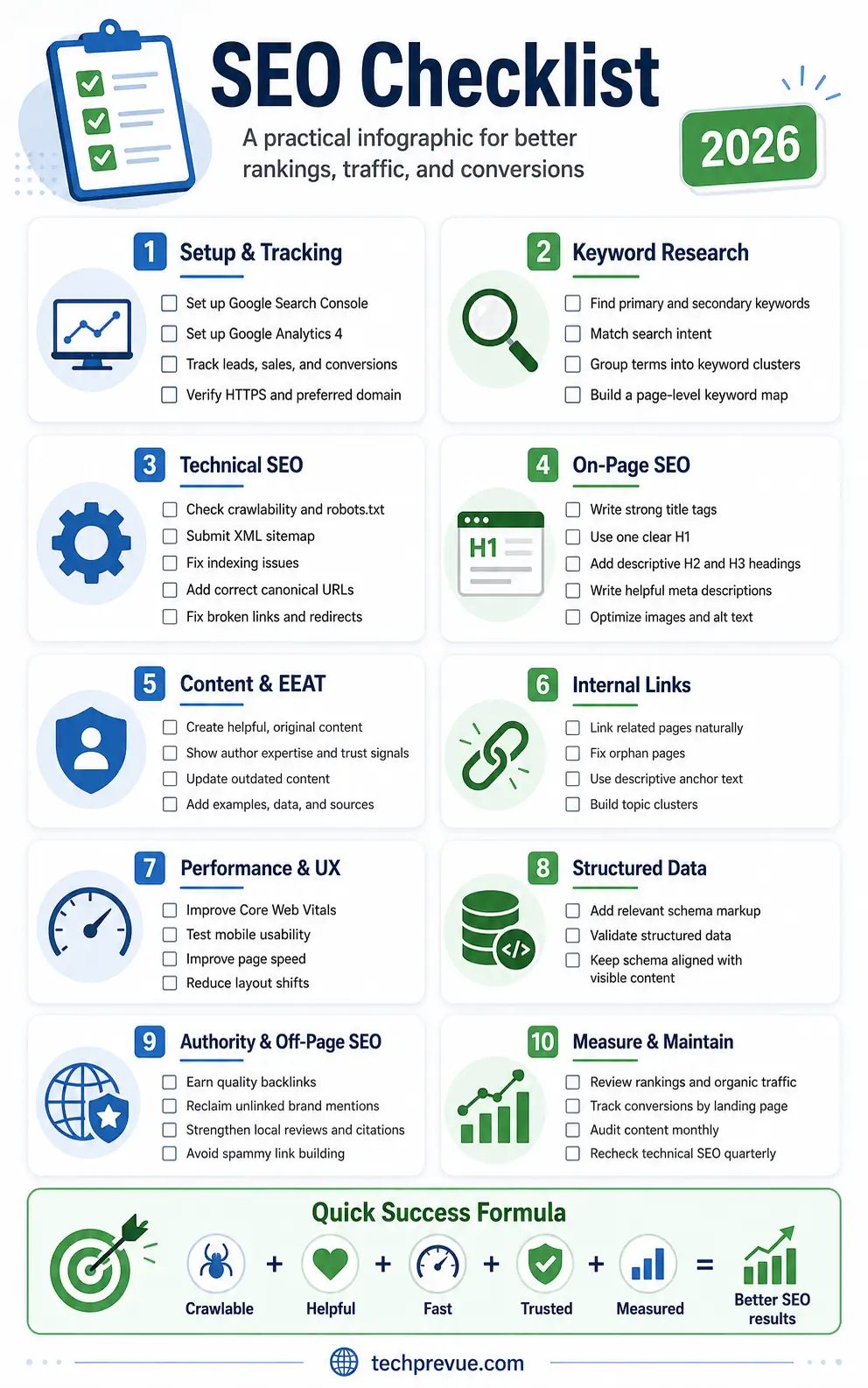
Use this basic SEO checklist when you need a fast health check before conducting a deeper audit.
- Set up Google Search Console.
- Set up Google Analytics 4.
- Configure lead, sales, and revenue tracking.
- Verify the preferred HTTPS website version.
- Check whether Google can crawl priority pages.
- Check whether priority pages are indexed.
- Create and submit an XML sitemap.
- Review the robots.txt file.
- Remove accidental
noindexdirectives. - Fix server errors and broken pages.
- Remove redirect chains and loops.
- Add correct canonical URLs.
- Check mobile content parity.
- Measure Core Web Vitals.
- Research keywords before creating new pages.
- Assign one primary search intent to each page.
- Write unique title tags.
- Add one clear H1 heading.
- Use descriptive H2 and H3 headings.
- Write useful meta descriptions.
- Add contextual internal links.
- Update thin, inaccurate, or outdated content.
- Optimize important images and videos.
- Add applicable structured data.
- Display clear author and business information.
- Earn relevant backlinks and brand mentions.
- Measure organic conversions rather than rankings alone.
- Review SEO performance monthly.
- Conduct a broader SEO audit quarterly.
- Repeat the checklist after migrations, redesigns, or major CMS changes.
Google’s Search Essentials recommends helpful content, crawlable links, descriptive language, and compliance with technical and spam policies.
How to Use SEO Checklist to Complete SEO Tasks
A useful SEO checklist should tell you more than what to inspect. Every task needs a priority, owner, affected URL, verification method, and recheck date. This converts a long collection of recommendations into an operating process that a real team can complete.
SEO Checklist Workflow: Diagnose, Fix, Verify, Record, and Recheck
Use this five-stage SEO checklist workflow:
- Diagnose the SEO problem.
Identify the URL, template, query, file, script, or technical condition responsible. - Fix the root cause.
Make the smallest dependable change that addresses the actual problem. - Verify the SEO change.
Check the live URL, rendered HTML, HTTP response, analytics event, crawler result, or Search Console report. - Record the SEO work.
Save the change date, owner, affected pages, expected result, and supporting evidence. - Recheck SEO performance.
Review the page after search engines recrawl and reprocess it.
For example, suppose an important service page is missing from Google:
- Inspect the page with the Google Search Console URL Inspection tool.
- Identify an accidental
noindexdirective. - Remove the directive from the page template.
- inspect the live HTML.
- Run a live URL test.
- Request indexing when appropriate.
- Recheck the indexing status after Google crawls the page.
The URL Inspection tool can show Google’s indexed version, test potential indexability, display rendered output, report the Google-selected canonical, and help diagnose missing pages.
SEO Checklist Priority Matrix
Use this priority matrix before assigning work.
| SEO priority | Fix timeline | SEO checklist examples |
|---|---|---|
| Critical | Immediately | Malware, downtime, sitewide noindex, broken checkout |
| High | Before publishing more content | Incorrect canonicals, indexing failures, migration errors |
| Medium | After technical stability | Internal links, weak titles, content updates, image optimization |
| Low | During ongoing refinement | Minor metadata cleanup, optional schema enhancements |
SEO Checklist Tracking Fields
Record these fields for every task:
- SEO task
- Keyword cluster
- Affected URL
- Affected template
- Priority
- Estimated impact
- Estimated effort
- Responsible owner
- Due date
- Completion status
- Verification method
- Evidence
- Recheck date
- Result
SEO Strategy Checklist for Goals, KPIs, and Baselines
An SEO strategy checklist should connect organic visibility to a business outcome. Define what visitors should do, which pages support that action, and how success will be measured. Without a baseline, teams may mistake seasonality, tracking errors, or changing search demand for SEO progress.
SEO Business Goals Checklist
Select the primary outcome that SEO should support:
- Ecommerce revenue
- Qualified leads
- Software trials
- Account registrations
- Newsletter subscriptions
- Advertising revenue
- Local telephone calls
- Appointment bookings
- Store visits
- Product adoption
- Brand recognition
- Reduced customer-support demand
A first-place ranking for an irrelevant query may create less value than a fifth-place ranking for a query with strong purchasing intent.
SEO KPI Checklist for Organic Search Performance
Track visibility, traffic, and business metrics separately.
| SEO measurement stage | Recommended SEO KPIs |
|---|---|
| Discovery | Indexed pages, search impressions, keyword visibility |
| Acquisition | Organic clicks, CTR, sessions, new visitors |
| Engagement | Engaged sessions, downloads, video engagement |
| Conversion | Leads, sales, revenue, calls, registrations |
| Authority | Referring domains, relevant links, brand mentions |
| Experience | LCP, INP, CLS, mobile usability |
| AI visibility | AI referrals, citations, mentions, assisted conversions |
SEO Baseline Checklist Before Major Changes
Before redesigning, migrating, or substantially updating the website, export:
- Twelve months of Search Console data.
- Organic landing-page sessions.
- Organic conversions and revenue.
- Current keyword positions.
- Indexed and excluded URL counts.
- Core Web Vitals status.
- Existing backlinks and referring domains.
- Highest-traffic landing pages.
- Pages losing traffic.
- Branded search queries.
- Non-branded search queries.
- Mobile and desktop performance.
- Country-level performance.
- Page-type performance.
- Conversion rates by landing page.
Record promotions, outages, analytics changes, migrations, redesigns, algorithm updates, and major content changes in an SEO change log.
SEO Tools Checklist for Search Data and Website Monitoring
An SEO tools checklist should include platforms that reveal how search engines access the website, how users find it, and whether organic traffic generates value. Select tools based on decisions they support rather than purchasing several platforms with overlapping reports.
Google Search Console SEO Checklist
Complete these Search Console tasks:
- Verify the domain property.
- Add users with suitable permissions.
- Submit the XML sitemap.
- Review the Page Indexing report.
- Review Manual Actions.
- Review Security Issues.
- Check Core Web Vitals.
- Inspect high-priority URLs.
- Review search queries.
- Review landing-page performance.
- Compare mobile and desktop results.
- Check external links.
- Export performance data regularly.
- Monitor major changes in impressions and clicks.
- Record meaningful website changes separately.
The Page Indexing report shows the indexing status of URLs Google knows about and groups reasons that URLs were not indexed. Redirected and duplicate URLs may be excluded intentionally, so not every exclusion requires correction.
Google Analytics SEO Checklist
Configure analytics to measure:
- Organic sessions
- Landing pages
- Form submissions
- Completed purchases
- Telephone clicks
- Email clicks
- Demo bookings
- Account registrations
- Newsletter subscriptions
- File downloads
- Video engagement
- Assisted conversions
- Revenue
- Returning visitors
- Conversion rate by landing page
Test every event manually. Incorrect conversion data can lead to confident but inaccurate SEO decisions.
Supporting SEO Tools Checklist
Select tools for:
- Website crawling
- Keyword research
- Keyword clustering
- Rank tracking
- Backlink analysis
- Log-file analysis
- Page-speed testing
- Uptime monitoring
- Structured data validation
- Content inventories
- SEO change tracking
- Local listing management
- Competitor monitoring
TechPrevue also maintains a free browser-based tools hub for content, SEO writing, and publishing workflows.
Keyword Research SEO Checklist
Keyword research identifies how customers describe problems, compare choices, and make decisions. A practical keyword research SEO checklist evaluates intent, business relevance, traffic potential, SERP composition, competition, and the website’s ability to offer a more useful result—not search volume alone.
SEO Audience Research Checklist
Before collecting keywords, answer:
- Who is searching?
- What problem are they trying to solve?
- What do they already understand?
- Which words do they use?
- What questions do they ask sales teams?
- What questions do they ask support teams?
- Which objections prevent action?
- Are they learning, comparing, or purchasing?
- Which country or language matters?
- Which device are they likely to use?
- What result would satisfy them?
- What should they do after reading?
Seed Keyword Research Checklist
Build seed terms from:
- Products
- Services
- Features
- Benefits
- Customer problems
- Industries
- Use cases
- Locations
- Alternatives
- Competitor comparisons
- Sales objections
- Support requests
- Product reviews
- Community discussions
- Internal website searches
- Search Console queries
Primary and Secondary Keyword Checklist
For every proposed page, identify:
- Primary keyword: The phrase that best represents the main intent.
- Secondary keywords: Closely related variations matching the same intent.
- Question keywords: Questions the page should answer.
- Long-tail keywords: Specific searches with narrower needs.
- Entities: People, organizations, tools, products, places, and concepts connected to the subject.
- Semantic keywords: Natural terminology expected in a complete explanation.
- Commercial modifiers: Best, price, service, company, comparison, and review.
- Informational modifiers: What, why, how, guide, tutorial, example, and checklist.
Google’s current generative-search guidance warns against creating separate low-value pages for numerous small query variations. Build comprehensive pages around shared intent rather than producing a page for every wording change. (Google AI search optimization guide)
SEO Keyword Opportunity Table
Use this table before approving a keyword.
| Keyword factor | SEO research question |
|---|---|
| Search intent | What result does the searcher expect? |
| Business value | Can the query create revenue, leads, or authority? |
| Traffic potential | How much total traffic could the topic attract? |
| Competition | Can the website offer a stronger result? |
| Content format | Does the query need a guide, tool, video, category, or product page? |
| SERP features | Are videos, snippets, local packs, discussions, or AI answers present? |
| Information gain | What original evidence can the page add? |
| Conversion path | What should the visitor do next? |
Search Intent SEO Checklist
Classify each keyword:
- Informational intent: The user wants an explanation or instructions.
- Commercial intent: The user wants to compare possible solutions.
- Transactional intent: The user is ready to purchase or act.
- Navigational intent: The user wants a specific website or brand.
- Local intent: The user wants a nearby service or location.
Then inspect the current search results:
- Are ranking pages guides, tools, products, categories, videos, or homepages?
- Do the results prioritize recent information?
- Is the query geographically sensitive?
- Which SERP features appear?
- What questions appear repeatedly?
- Which topics are covered poorly?
- What original value can your page contribute?
Keyword Clustering SEO Checklist
Group keywords when they share:
- The same search intent.
- Similar ranking URLs.
- The same likely solution.
- Closely related entities.
- A common audience.
- A common customer-journey stage.
- The same suitable content format.
Separate keywords when the searcher needs a different page.
For example:
- “What is technical SEO?” needs an educational guide.
- “Technical SEO audit services” needs a service page.
- “Technical SEO audit template” may need a downloadable file.
- “Technical SEO agency pricing” needs commercial information.
For a deeper explanation of crawling, rendering, indexation, canonicalization, performance, and schema, link readers to TechPrevue’s complete technical SEO guide.
Keyword Mapping SEO Checklist
Include these fields in a keyword map:
- Proposed URL
- Primary keyword
- Secondary keywords
- Semantic keywords
- Entities
- Search intent
- Content format
- Target audience
- Funnel stage
- Competing internal URL
- Content owner
- Priority
- Conversion goal
- Internal-link sources
- Required expert input
- Update frequency
Keyword Cannibalization SEO Checklist
Look for:
- Multiple pages ranking for the same query.
- Articles with almost identical titles.
- Pages targeting small wording variations.
- Category and article pages targeting one intent.
- Old and new versions of the same guide.
- Location pages with little unique information.
- Product and category pages competing for one keyword.
Choose an appropriate action:
- Merge overlapping pages.
- Reposition one page for another intent.
- Improve internal linking.
- Redirect the weaker page.
- Retain both pages when they genuinely answer different needs.
- Use a canonical only when duplicate pages must remain accessible.
Website Architecture SEO Checklist
Website architecture helps visitors and crawlers understand how pages relate to one another. Organize content into logical categories, keep priority pages accessible through crawlable links, and prevent filters, archives, and parameters from creating uncontrolled URL combinations.
SEO-Friendly Website Hierarchy Checklist
Build a hierarchy around real user needs:
- Homepage
- Primary topic or category
- Supporting subcategory
- Detailed article, service, or product
Example:
/seo//seo/technical-seo//seo/technical-seo/crawlability/
A small website should not create unnecessary folder depth merely to appear organized.
Website Crawl Depth SEO Checklist
Keep priority pages discoverable through:
- Main navigation
- Category pages
- Contextual internal links
- Breadcrumbs
- Related-content blocks
- Product recommendations
- Hub pages
- HTML sitemaps where useful
Important pages should not depend solely on an XML sitemap for discovery.
Orphan Page SEO Checklist
Find orphan pages by comparing:
- Crawler-discovered URLs
- XML sitemap URLs
- CMS exports
- Search Console URLs
- Analytics landing pages
- Backlinked pages
- Server-log URLs
For each orphan page:
- Add a relevant internal link.
- Include it in an appropriate category.
- Merge it with a stronger page.
- Redirect it to a relevant replacement.
- Remove it from the sitemap.
- Delete it when it no longer serves a purpose.
SEO-Friendly URL Checklist
SEO-friendly URLs should be readable, stable, descriptive, and easy to manage. Avoid unnecessary parameters, repeated keywords, random identifiers, and dates that make evergreen pages appear obsolete.
SEO URL Structure Checklist
Use:
- Lowercase letters.
- Hyphens between words.
- Short descriptive slugs.
- Consistent trailing-slash rules.
- Stable folder structures.
- The preferred HTTPS hostname.
Avoid:
- Session IDs.
- Tracking parameters in canonical URLs.
- Random character strings.
- Repeated exact-match keywords.
- Excessive folder depth.
- Unnecessary publication dates.
- Uppercase and lowercase duplicates.
- Several URLs for the same content.
Published URL Change SEO Checklist
Before changing an existing URL:
- Confirm that the long-term benefit justifies the risk.
- Map the old URL to the closest relevant replacement.
- Use a server-side permanent redirect.
- Update internal links.
- Update canonical tags.
- Update the XML sitemap.
- Update structured data.
- Update hreflang where applicable.
- Review advertising and email campaigns.
- Test the redirect.
- Monitor indexing and traffic.
- Monitor conversions.
Technical SEO Crawlability Checklist
Technical SEO crawlability determines whether search bots can request and process important pages and resources. Review robots.txt, internal links, server responses, JavaScript rendering, crawl traps, and staging restrictions. Blocking crawling is not the same as preventing indexing.
Robots.txt SEO Checklist
Check that robots.txt:
- Returns a successful response.
- Uses valid syntax.
- Does not block priority pages.
- Does not block essential CSS or JavaScript.
- references the XML sitemap.
- Does not contain obsolete directives.
- Does not expose sensitive URLs as a security strategy.
- Uses rules intended for the correct crawlers.
- Is retested after platform changes.
Google explains that robots.txt controls crawling, not guaranteed index exclusion. A blocked URL may still appear in results without a content snippet. Use appropriate indexing controls or authentication when a page must remain out of search. (Google robots guidance)
Crawlable Internal Link SEO Checklist
Essential links should generally:
- Use an HTML
<a>element. - Include a resolvable
href. - Point directly to the preferred URL.
- Use descriptive anchor text.
- Work without hover-only interactions.
- Remain available after rendering.
- Avoid unnecessary redirect hops.
Avoid navigation that depends entirely on:
- JavaScript click handlers.
- Search forms.
- Non-link elements.
- Infinite scrolling without crawlable pagination.
- Buttons with no exposed URL.
- Content revealed only after user interaction.
Crawl Trap SEO Checklist
Common crawl traps include:
- Infinite calendars
- Internal search results
- Filter combinations
- Sorting parameters
- Session IDs
- Printable page versions
- Empty tag archives
- Repeated pagination paths
- Automatically generated URLs
- Uppercase and lowercase duplicates
Possible fixes include:
- Prevent unnecessary URLs from being generated.
- Remove internal links to low-value variations.
- Consolidate duplicates.
- Apply
noindexwhere crawling remains possible. - Return suitable error responses.
- Simplify website architecture.
- Restrict selected crawl patterns carefully.
Staging Website Indexing Checklist
Protect development environments with:
- Password authentication.
- IP restrictions.
- Private networks.
- Search controls as an additional layer.
- Separate analytics properties.
- No public internal links.
- Removal after the launch.
Do not depend on robots.txt alone to protect a private staging website.
XML Sitemap SEO Checklist
An XML sitemap should list preferred, canonical, indexable pages rather than every URL the CMS can generate. Submit it to search engines, monitor processing, and compare submitted URLs with indexing reports.
XML Sitemap URL Checklist
Include URLs that are:
- Canonical
- Indexable
- Returning 200
- Internally linked
- On the preferred hostname
- Valuable for search
- Updated meaningfully
Remove:
- Redirected URLs
- 404 pages
noindexpages- Blocked pages
- Duplicate URLs
- Internal search results
- Tracking URLs
- Filter variations
- Thin utility pages
- Staging URLs
Google describes a sitemap as a file that provides information about important pages, images, and videos. Submission can aid discovery, but it does not guarantee indexing. (Google sitemap documentation)
XML Sitemap Monitoring Checklist
After submission:
- Confirm that the sitemap was fetched.
- Review the number of discovered URLs.
- Compare submitted and indexed URLs.
- Investigate unexpected increases or decreases.
- Review excluded sitemap URLs.
- Confirm new templates enter the correct sitemap.
- Confirm removed URLs disappear.
- Update
lastmodonly after meaningful content changes.
SEO Indexability and Canonical Checklist
Indexability determines whether a crawled page is eligible for a search index. Review status codes, meta robots directives, HTTP headers, canonicals, rendering, duplication, and content quality. A canonical is a preference signal, not an absolute command.
Indexable Page SEO Checklist
For every priority URL, confirm:
- It returns a 200 response.
- It is publicly accessible.
- It has no accidental
noindex. - Its canonical is correct.
- Its primary content appears after rendering.
- It receives internal links.
- It appears in the sitemap where appropriate.
- It is not an unnecessary duplicate.
- It provides standalone value.
- Important resources are crawlable.
Noindex Directive SEO Checklist
Check for noindex directives in:
- HTML meta tags
X-Robots-TagHTTP headers- CMS privacy settings
- SEO plugin settings
- Theme templates
- Staging configurations
- PDF and file headers
Google must crawl a URL to process its noindex instruction. Blocking that URL in robots.txt may prevent the instruction from being seen.
Canonical URL SEO Checklist
Check that:
- Indexable pages usually self-canonicalize.
- Canonical tags use absolute URLs.
- Canonical destinations return 200.
- Canonical destinations are indexable.
- Canonical destinations do not redirect.
- Internal links use canonical URLs.
- Sitemaps contain canonical URLs.
- Hreflang refers to canonical URLs.
- Mobile and desktop signals align.
- JavaScript does not inject conflicting canonicals.
Non-Indexed Page SEO Checklist
Investigate:
- Crawled—currently not indexed
- Discovered—currently not indexed
- Duplicate without user-selected canonical
- Alternate page with proper canonical
- Excluded by
noindex - Blocked by robots.txt
- Soft 404
- Redirect
- Server error
- Duplicate content
- Empty or low-value content
Not every excluded URL represents an error. Redirects, duplicate pages, and intentionally non-indexable utility pages may be working correctly.
HTTP Status Code and Redirect SEO Checklist
HTTP status codes tell crawlers and browsers whether a resource loaded, moved, failed, or disappeared. Important indexable pages should normally return 200. Permanent URL changes need relevant redirects, while removed content without a replacement should return an honest 404 or 410 response.
HTTP Status Code SEO Table
| HTTP status | Meaning | Recommended SEO action |
|---|---|---|
| 200 | Page loaded successfully | Keep indexable when useful |
| 301 or 308 | Permanently moved | Use for permanent URL changes |
| 302 or 307 | Temporarily moved | Use only for temporary changes |
| 404 | Page not found | Restore, redirect, or leave removed |
| 410 | Intentionally removed | Use when permanent removal is clear |
| 500 | Internal server error | Investigate immediately |
| 503 | Temporarily unavailable | Use during temporary maintenance |
Soft 404 SEO Checklist
Find pages returning 200 that behave like errors:
- Empty templates
- Blank pages
- “Product not found” messages
- Empty search-result pages
- Expired listings with no information
- Error messages served with 200
- Empty categories
- Failed JavaScript shells
SEO Redirect Checklist
Use permanent redirects when:
- A page moved permanently.
- HTTP redirects to HTTPS.
- A hostname is consolidated.
- A duplicate URL is retired.
- Multiple pages are merged.
- A product has a direct replacement.
Avoid:
- Redirect chains.
- Redirect loops.
- Redirecting unrelated pages to the homepage.
- Leaving internal links pointed at old URLs.
- Redirecting every removed article to a category.
- Sending visitors to irrelevant destinations.
Broken Link SEO Checklist
For internal broken links:
- Restore the missing page when it should exist.
- Update the link to the correct URL.
- Redirect the old URL when a relevant replacement exists.
- Remove the link when no replacement exists.
For broken external links:
- Replace the source.
- Find an official alternative.
- Remove unsupported claims.
- Update outdated information.
- Use an archived source only when historically necessary.
JavaScript SEO Checklist
JavaScript SEO ensures that important content, links, metadata, and structured data remain available after rendering. Compare initial and rendered HTML rather than assuming that content visible in a modern browser is automatically accessible to every crawler or assistive technology.
Rendered HTML SEO Checklist
Check whether rendered HTML contains:
- Main page text
- Product information
- Navigation links
- Contextual internal links
- Title elements
- Meta robots directives
- Canonical tags
- Structured data
- Images
- Pagination links
- Author details
- Pricing and availability
JavaScript Content Reliability SEO Checklist
Improve reliability by:
- Serving important content in initial HTML where practical.
- Using server-side rendering or static generation for priority pages.
- Keeping navigation crawlable.
- Avoiding interaction requirements before main content loads.
- Preventing conflicting canonicals.
- Preventing accidental robots changes.
- Testing lazy-loaded content.
- Testing slow network conditions.
- Checking API failures.
- Monitoring hydration and rendering errors.
Page Speed and Core Web Vitals SEO Checklist
Page-speed optimization should improve real user experience rather than chase a laboratory score. Measure field data, identify the affected template or resource, and fix the root cause without damaging content, analytics, accessibility, or conversions.
Core Web Vitals SEO Table
| Core Web Vital | What it measures | Good threshold |
|---|---|---|
| LCP | Main-content loading | 2.5 seconds or less |
| INP | Interaction responsiveness | 200 milliseconds or less |
| CLS | Visual stability | 0.1 or less |
Core Web Vitals are evaluated using real-user data at the 75th percentile. Search Console groups similar URLs, while PageSpeed Insights combines field and laboratory information. (Web.dev Core Web Vitals)
Largest Contentful Paint SEO Checklist
Improve LCP by:
- Identifying the actual LCP element.
- Compressing the hero image.
- Serving correctly sized images.
- Using WebP or AVIF where suitable.
- Preloading the LCP resource when justified.
- Avoiding lazy loading on the LCP image.
- Improving server response time.
- Reducing render-blocking CSS.
- Removing unnecessary redirects.
- Loading critical fonts efficiently.
- Reducing client-side rendering delays.
- Using a suitable CDN.
Interaction to Next Paint SEO Checklist
Improve INP by:
- Reducing long JavaScript tasks.
- Removing unnecessary third-party scripts.
- Dividing large tasks into smaller work.
- Deferring nonessential code.
- Simplifying event handlers.
- Reducing DOM complexity.
- Loading widgets only when necessary.
- Testing filters, menus, forms, and accordions.
- Avoiding excessive synchronous processing.
- Monitoring real user interactions.
Cumulative Layout Shift SEO Checklist
Improve CLS by:
- Adding image width and height.
- Reserving space for advertisements.
- Reserving space for embeds.
- Avoiding banners inserted above existing content.
- Loading fonts carefully.
- Using stable fallback fonts.
- Reserving space for consent notices.
- Preventing late widgets from shifting layouts.
- Avoiding layout-changing animations.
- Retesting after plugin or advertising changes.
Website Template Performance SEO Checklist
Test:
- Homepage
- Article
- Category archive
- Product page
- Service page
- Search page
- Checkout page
- Account page
- Location page
- High-traffic landing page
A fast homepage does not prove that product, article, and category templates perform equally well.
Mobile SEO and Accessibility Checklist
Mobile SEO requires content, metadata, links, structured data, and functionality to remain available on smaller screens. Accessible semantic structure, readable typography, stable layouts, and keyboard-friendly interactions benefit users and improve machine understanding.
Mobile SEO Content Parity Checklist
Confirm that mobile pages retain:
- Main content
- Important images
- Internal links
- Metadata
- Structured data
- Author details
- Product specifications
- Reviews
- Videos
- Calls to action
- Breadcrumbs
- Canonical information
Google uses the mobile version of a page for indexing and ranking, so important desktop-only content may be absent from the version Google primarily evaluates. (Google mobile-first indexing guidance)
Mobile SEO Usability Checklist
Test:
- Navigation
- Internal search
- Product filters
- Forms
- Checkout
- Pop-ups
- Sticky elements
- Tables
- Accordions
- Videos
- Cookie banners
- Telephone links
- Font sizes
- Touch targets
- Horizontal scrolling
SEO Accessibility Checklist
Review:
- Heading hierarchy
- Color contrast
- Keyboard navigation
- Visible focus indicators
- Form labels
- Error messages
- Descriptive link text
- Image alt text
- Video captions
- Audio transcripts
- Touch-target sizes
- Zoom behavior
- Semantic landmarks
Tables should scroll horizontally on small screens rather than break the mobile layout.
On-Page SEO Checklist
On-page SEO aligns a page’s visible content, HTML elements, internal links, media, and search appearance with user intent. Optimize each page as one coherent experience instead of treating keywords, title tags, headings, and images as unrelated tasks.
For deeper implementation examples, see TechPrevue’s complete on-page SEO guide.
Search Intent On-Page SEO Checklist
Before changing individual elements, ask:
- Does the page use the format searchers expect?
- Does it solve the primary problem?
- Is it written for the correct knowledge level?
- Does it answer the main question quickly?
- Does it provide useful next steps?
- Does it support an appropriate conversion?
- Is its purpose clear above the fold?
- Does it offer information competitors lack?
SEO Title Tag Checklist
Write a title that:
- Describes the page accurately.
- Includes the primary topic naturally.
- Matches search intent.
- Differentiates the page.
- Avoids repetitive keywords.
- Avoids unnecessary boilerplate.
- Makes sense outside the website.
- Encourages qualified clicks without clickbait.
Weak title:
SEO Checklist | SEO Checklist Guide | Best SEO Checklist
Better title:
SEO Checklist: The Complete Website Optimization Guide
Meta Description SEO Checklist
Write a meta description that:
- Summarizes the page.
- Matches visible content.
- Explains the benefit.
- Includes the primary keyword naturally.
- Avoids unsupported promises.
- Uses active language.
- Differs from other page descriptions.
- Matches search intent.
Google may generate a search snippet from the page instead of using the supplied description, so the visible copy must also explain the page clearly.
SEO Heading Structure Checklist
Use:
- One clear H1 for the main topic.
- H2 headings for major keyword clusters.
- H3 headings for specific SEO tasks.
- Descriptive headings that make sense independently.
- Natural keyword variations.
- Logical heading order.
- Concise answer paragraphs below important headings.
Avoid:
- Generic headings such as “Learn More.”
- Repeating the exact keyword in every sentence.
- Using headings only for visual styling.
- Skipping heading levels without reason.
- Combining several awkward keywords in one heading.
Featured Snippet SEO Checklist
For important questions:
- Answer in approximately 40–60 words.
- State the main answer first.
- Add the most important qualification.
- Use a definition, list, table, or ordered process.
- Avoid unnecessary background.
- Expand with evidence afterward.
- Ensure the answer makes sense independently.
Semantic SEO and NLP Checklist
Use natural topic language in:
- SEO title
- H1
- Opening answer
- H2 and H3 headings
- Body content
- Image alt text
- Internal anchors
- URL slug
- Meta description
- FAQs
Relevant entities and semantic terms for this article include:
- Google Search
- Googlebot
- Search Console
- Google Analytics
- Keywords
- Search intent
- Crawlability
- Rendering
- Indexability
- Canonical URLs
- Robots directives
- XML sitemaps
- HTTP status codes
- Structured data
- Schema.org
- Internal linking
- Core Web Vitals
- LCP
- INP
- CLS
- Mobile-first indexing
- EEAT
- Backlinks
- Referring domains
- AI Overviews
- AEO
- GEO
- AIO
- Organic traffic
- Conversions
Use these terms in the sections where they add meaning. Do not insert them merely to increase density.
Content SEO and EEAT Checklist
High-quality SEO content should answer the search need without making the reader open several competing pages to fill obvious gaps. It should be original, accurate, well organized, and transparent about who created it, how it was produced, and why it exists.
Search Intent Content SEO Checklist
Ask:
- What answer does the reader need immediately?
- What question appears next?
- Which mistakes could waste time or money?
- Which exceptions change the recommendation?
- What evidence supports important claims?
- What should the reader do next?
- Which examples make the guidance practical?
- When is expert assistance appropriate?
SEO Information Gain Checklist
Add original value through:
- First-hand tests
- Original screenshots
- Real examples
- Before-and-after comparisons
- Proprietary data
- Templates
- Calculators
- Decision trees
- Downloadable checklists
- Expert interviews
- Failure analysis
- Implementation lessons
- Market-specific recommendations
- Transparent limitations
Google’s current guidance encourages non-commodity, expert-led content that adds value beyond widely available summaries.
EEAT Author and Reviewer Checklist
Include:
- Author name
- Relevant experience
- Author biography
- Applicable qualifications
- Links to related work
- Reviewer information when appropriate
- Editorial policy
- Correction policy
- Contact information
- Meaningful update date
SEO Content Methodology Checklist
For reviews, tutorials, and tests, explain:
- Products or tools tested
- Testing period
- Software version
- Devices used
- Data sources
- Selection criteria
- Scoring method
- Limitations
- Conflicts of interest
- AI assistance when disclosure benefits readers
SEO Content Accuracy Checklist
Verify:
- Names
- Dates
- Statistics
- Prices
- Laws
- Policies
- Product versions
- Screenshots
- Interface instructions
- External sources
- Calculations
- Regional differences
Weak SEO Content Removal Checklist
Remove or rewrite:
- Repetitive definitions
- Empty introductions
- Keyword-stuffed paragraphs
- Generic benefits sections
- Unsupported forecasts
- Outdated screenshots
- Irrelevant FAQs
- Duplicate examples
- Competitor summaries without original value
- Sections added only to increase word count
Content Audit SEO Checklist
A content audit determines whether an existing page should be retained, improved, combined, redirected, repositioned, or removed. Evaluate search traffic, conversions, links, accuracy, intent, originality, and strategic value before making the decision.
SEO Content Inventory Checklist
For every indexable page, record:
- URL
- SEO title
- Content type
- Publication date
- Update date
- Author
- Organic clicks
- Impressions
- Rankings
- Conversions
- Backlinks
- Internal links
- Indexing status
- Primary search intent
- Recommended action
Content Decay SEO Checklist
Look for:
- Declining clicks
- Falling impressions
- Lost keyword positions
- Lower CTR
- Changed search intent
- Outdated information
- Broken citations
- Old screenshots
- Missing subtopics
- Stronger competitor coverage
- Reduced internal linking
- Declining conversions
Also consider:
- Seasonality
- Search-demand changes
- SERP layout changes
- Tracking errors
- Technical indexing problems
- Website migrations
- Brand-demand changes
- Search-system updates
SEO Content Audit Decision Table
| Audit decision | When to use it |
|---|---|
| Keep | The page remains accurate, distinct, and useful |
| Improve | The intent is valid, but execution is weak |
| Merge | Several pages overlap substantially |
| Redirect | A better direct replacement exists |
| Reposition | The page should target a different intent |
| Remove | The page is obsolete, harmful, or purposeless |
| Republish | Substantial improvements justify renewed promotion |
Internal Linking SEO Checklist
Internal links help visitors find related information and help crawlers discover pages and understand topical relationships. Link from relevant pages to priority destinations using descriptive anchor text rather than automated quotas or repetitive exact-match phrases.
New Content Internal Linking SEO Checklist
After publishing a page:
- Find relevant established pages.
- Search the website for suitable phrases.
- Add contextual links from related articles.
- Add links from category or pillar pages.
- Link the new page to supporting resources.
- Use descriptive anchor text.
- Avoid forcing unrelated links.
- Confirm each link is crawlable.
SEO Topic Cluster Internal Linking Checklist
A topic cluster may include:
- Pillar guide
- Definition
- Tutorial
- Comparison
- Troubleshooting article
- Tool
- Template
- Case study
- FAQ
- Commercial page
Connect supporting pages to the pillar and link closely related sibling pages where useful.
This SEO checklist should internally link to:
- What Is SEO?
- Technical SEO Guide
- On-Page SEO Guide
- Off-Page SEO Guide
- How to Rank in AI Overviews
- Content Marketing Guide
- TechPrevue SEO Services
Internal Link Audit SEO Checklist
Find:
- Orphan pages
- Broken internal links
- Redirected internal links
- Important pages with too few links
- Low-value pages receiving excessive links
- Priority pages buried deeply
- Repetitive anchor text
- Irrelevant sitewide links
- Links pointing to noncanonical URLs
- Links pointing to
noindexpages
External Authority Link SEO Checklist
External links support claims, help readers verify information, and demonstrate responsible sourcing. Link to authoritative primary sources when a statement depends on changing policies, technical standards, research, laws, or platform documentation.
External Source Quality SEO Checklist
Prioritize:
- Official search-engine documentation
- Government websites
- Standards organizations
- Original research
- Universities
- Peer-reviewed papers
- Primary company announcements
- Public datasets
- Reputable industry reports
- Direct case studies
Avoid citing a competing SEO article when an official source documents the same fact.
External Link Placement SEO Checklist
Use descriptive anchor text such as:
Google Search EssentialsCore Web Vitals documentationURL Inspection toolstructured data guidelinesmobile-first indexing guidance
Avoid:
- Raw URLs in body copy
- Repeated “click here” anchors
- Links unrelated to the claim
- Broken sources
- Outdated unofficial summaries
- Excessive external linking
Image and Video SEO Checklist
Media SEO makes images and videos accessible, fast, understandable, and eligible for relevant search experiences. Use original media where possible, add descriptive context, and avoid sacrificing page performance for decorative visuals.
Image SEO Checklist
Optimize each important image:
- Use a descriptive filename.
- Resize it to appropriate dimensions.
- Compress it efficiently.
- Use WebP or AVIF where suitable.
- Add width and height attributes.
- Use responsive image markup.
- Write contextual alt text.
- Add a caption when useful.
- Place it near relevant text.
- Lazy-load below-the-fold images.
- Do not lazy-load the LCP image.
- Include important images in a sitemap when appropriate.
Image Alt Text SEO Checklist
Good alt text:
- Describes the image’s meaning or function.
- Reflects the surrounding context.
- Supports readers using assistive technology.
- Includes a keyword only when relevant.
- Avoids unnecessary “image of” wording.
Good example:
SEO audit dashboard showing 37 non-indexed pages
Weak example:
SEO checklist SEO audit best SEO checklist Google SEO checklist
Video SEO Checklist
For important videos:
- Create a dedicated watch page.
- Write a unique title.
- Add a useful description.
- Provide captions.
- Publish a transcript.
- Use a stable thumbnail.
- Make the video prominent.
- Add
VideoObjectstructured data. - Include the video in a sitemap when needed.
- Monitor video indexing.
Structured Data SEO Checklist
Structured data supplies machine-readable information about page content and entities. Add only schema types that match visible content, validate the markup, keep it accurate, and monitor Search Console enhancement reports.
SEO Schema Type Checklist
Use applicable types such as:
- Organization
- Person
- Article
- BreadcrumbList
- Product
- Offer
- LocalBusiness
- VideoObject
- Event
- JobPosting
- Recipe
- Course
- Dataset
Do not add a schema type merely because an SEO plugin offers it.
Structured Data Accuracy SEO Checklist
Ensure the markup matches the visible:
- Page title
- Author
- Publication date
- Updated date
- Product price
- Availability
- Review information
- Business details
- Event dates
- Video details
- Breadcrumb path
- Organization information
Structured Data Validation SEO Checklist
Check:
- JSON-LD syntax
- Required properties
- Recommended properties
- Correct entity type
- Valid URLs
- Consistent entity IDs
- Duplicate plugin output
- Rendered structured data
- Search Console errors
- Content-policy eligibility
Google uses supported structured data to understand pages and determine eligibility for enhanced search appearances, but valid markup does not guarantee a rich result. (Google structured data documentation)
Off-Page SEO and Backlink Checklist
Off-page SEO builds evidence that a brand or resource is recognized beyond its own website. Focus on relevant editorial links, digital PR, expert mentions, reviews, partnerships, citations, and reputation instead of relying solely on third-party authority scores.
For a detailed framework, see TechPrevue’s off-page SEO guide.
Backlink Audit SEO Checklist
Review:
- Referring domain
- Linking-page relevance
- Link placement
- Anchor text
- Target URL
- Link attributes
- Linking-page traffic
- Lost-link status
- Spam patterns
- Business relevance
- Geographic relevance
- Surrounding content
Link Earning SEO Checklist
Create assets worth referencing:
- Original research
- Industry data
- Surveys
- Free tools
- Calculators
- Templates
- Expert commentary
- Visual explainers
- Definitive guides
- Public datasets
- Case studies
- Statistics pages
Link Reclamation SEO Checklist
Find:
- Unlinked brand mentions
- Broken backlinks
- Links pointing to redirects
- Misspelled brand links
- Obsolete resource links
- Partner profiles
- Supplier pages
- Association memberships
- Podcast appearances
- Author profiles
Spammy Link Building SEO Checklist
Avoid:
- Paid editorial links without appropriate qualification.
- Large-scale guest-post networks.
- Irrelevant directories.
- Automated comment links.
- Private blog networks.
- Excessive reciprocal links.
- Keyword-rich sponsored anchors.
- Fake scholarship campaigns.
- Links from compromised websites.
- Mass-produced contributor pages.
Local SEO Checklist
Local SEO helps eligible businesses appear for searches connected to a geographic location. Maintain accurate business profiles, service information, reviews, local pages, citations, and conversion tracking.
Google Business Profile SEO Checklist
Complete:
- Business name
- Primary category
- Secondary categories
- Address or service area
- Telephone number
- Website
- Opening hours
- Holiday hours
- Services
- Products
- Business description
- Original photos
- Appointment links
- Relevant attributes
Local Business Information SEO Checklist
Keep core information accurate across:
- Website
- Google Business Profile
- Bing Places
- Apple Business Connect
- Major directories
- Industry directories
- Local associations
- Social profiles
- Licensing records where relevant
- Review platforms
Location Page SEO Checklist
A useful location page may include:
- Services offered
- Address
- Service area
- Directions
- Opening hours
- Local phone number
- Staff information
- Original photos
- Accessibility details
- Parking details
- Location-specific FAQs
- Customer reviews
- LocalBusiness structured data
- Nearby landmarks
Do not generate large numbers of pages that differ only by city name.
Local Review SEO Checklist
- Ask genuine customers for reviews.
- Choose an appropriate moment.
- Make the process simple.
- Follow platform rules.
- Respond professionally.
- Address recurring service problems.
- Avoid buying reviews.
- Avoid review gating.
- Do not pressure customers for positive ratings.
- Monitor false or abusive reviews.
Ecommerce SEO Checklist
Ecommerce SEO must control products, categories, variants, filters, inventory changes, reviews, merchant information, and internal navigation at scale. Category pages should target broader commercial intent, while product pages support specific purchase decisions.
Ecommerce Keyword Mapping SEO Checklist
Use:
- Category pages for broad commercial searches.
- Subcategories for narrower product groups.
- Product pages for specific products and models.
- Buying guides for research searches.
- Comparison pages for evaluation searches.
- Support content for installation and troubleshooting.
- Location pages for store-level demand.
Ecommerce Category Page SEO Checklist
Include:
- Clear H1
- Useful introductory copy
- Helpful filters
- Crawlable product links
- Buying guidance
- Relevant FAQs
- Contextual internal links
- Crawlable pagination
- Original category descriptions
- Suitable structured data
Ecommerce Product Page SEO Checklist
Include:
- Unique product title
- Original description
- Price
- Availability
- Specifications
- High-quality images
- Product videos where useful
- Shipping information
- Returns information
- Genuine reviews
- Product FAQs
- Related products
- Product structured data
Product Variant and Faceted SEO Checklist
Decide whether variants deserve separate indexable URLs based on:
- Search demand
- Independent user value
- Distinct product information
- Inventory
- Linkability
- Separate purchasing intent
Control filters so every combination does not create a crawlable and indexable page.
Discontinued Product SEO Checklist
Choose among:
- Keep the page live with relevant alternatives.
- Redirect to a direct replacement.
- Return 404 or 410 when no replacement exists.
- Preserve useful support information.
- Remove the URL from internal navigation.
- Remove it from the sitemap.
Do not redirect every discontinued product to the homepage.
International SEO Checklist
International SEO matches pages to users by country and language. Research local terminology and intent, localize the user experience, select a sustainable URL structure, and align canonical and hreflang signals.
International SEO URL Checklist
Choose among:
- Country-code domains
- Subdomains
- Subdirectories
Base the decision on:
- Existing authority
- Technical resources
- Branding
- Legal requirements
- Market independence
- Reporting requirements
- Hosting needs
- Expansion plans
International Content Localization SEO Checklist
Localize:
- Keywords
- Search intent
- Currency
- Measurement units
- Date formats
- Address formats
- Examples
- Payment methods
- Shipping
- Product availability
- Legal notices
- Cultural references
- Customer support
- Spelling and vocabulary
Hreflang SEO Checklist
Check that:
- Each page references itself.
- Alternate pages reference one another.
- Language and country codes are valid.
- Referenced URLs return 200.
- Canonicals align.
- Referenced pages are indexable.
x-defaultis used when appropriate.- Annotations are updated after migrations.
- Mobile and desktop signals remain consistent.
- Removed or redirected URLs are deleted from annotations.
AI Search, AEO, GEO, and AIO SEO Checklist
AI search optimization begins with the same foundation as traditional SEO: crawlable pages, indexable content, clear entities, reliable evidence, internal links, and useful answers. Avoid thin pages for every prompt and unsupported tactics presented as shortcuts.
TechPrevue’s guide to ranking in Google AI Overviews provides a focused companion to this section.
AI Search Technical SEO Checklist
- Keep important content publicly accessible.
- Allow required crawling.
- Keep priority pages indexable.
- Use crawlable internal links.
- Write descriptive titles.
- Maintain accurate structured data.
- Include useful text around media.
- Keep pages fast and mobile-friendly.
- Avoid conflicting canonical signals.
- Monitor rendering and indexing.
Google states that optimization for its AI search features remains SEO and that foundational best practices continue to apply.
Answer Engine Optimization Checklist
For common questions:
- State the direct answer first.
- Add the main qualification.
- Explain the reasoning.
- Provide a concrete example.
- Cite authoritative evidence.
- Link to deeper supporting information.
- Use tables or lists where helpful.
- Keep each section focused on one question.
Entity SEO Checklist for AI Search
Keep facts consistent for:
- Organization
- Brand
- Authors
- Reviewers
- Products
- Services
- Locations
- Founders
- Contact information
- Social profiles
Connect these entities through:
- About pages
- Author pages
- Organization schema
- Person schema
- Consistent profiles
- Authoritative third-party mentions
- Clear relationships between pages
AI Search Information Gain SEO Checklist
Publish:
- Original tests
- First-party data
- Expert analysis
- Clear methodologies
- Unique examples
- Decision tools
- Transparent limitations
- Market-specific findings
- Original graphics
- Verifiable case studies
AI Search Measurement SEO Checklist
Monitor:
- Search Console queries
- Conversational search patterns
- Branded searches
- AI feature visibility
- AI platform referral traffic
- Brand mentions
- Citations
- Factual inaccuracies
- Assisted conversions
- Lead quality
AI visibility is useful when it contributes to awareness, qualified visits, trust, or conversions—not merely citation counts.
SEO Reporting Checklist
SEO reporting should explain what changed, why performance changed, which tasks were completed, and what should happen next. Separate visibility, traffic, engagement, and business results rather than hiding them inside a single score.
Monthly SEO Report Checklist
Include:
- Organic clicks
- Search impressions
- Organic sessions
- Organic conversions
- Revenue or lead value
- Branded search performance
- Non-branded search performance
- Top gaining pages
- Top declining pages
- Indexing issues
- Core Web Vitals
- New referring domains
- Lost referring domains
- Completed work
- Planned work
- Risks and blockers
Organic Traffic Change Diagnosis SEO Checklist
Investigate:
- Search demand
- Seasonality
- Rankings
- CTR
- Indexing
- Analytics tracking
- SERP features
- Competitor improvements
- Website deployments
- Internal-link changes
- Content updates
- Backlinks
- Search-system updates
- Conversion-path changes
Do not attribute every change to an algorithm update without supporting evidence.
Daily, Weekly, Monthly, and Quarterly SEO Checklist
SEO maintenance prevents small technical or content problems from becoming substantial traffic losses. Adjust the frequency according to website size, publishing volume, revenue dependence, inventory changes, and technical complexity.
SEO Maintenance Schedule Table
| Frequency | Primary SEO checklist tasks |
|---|---|
| Daily | Uptime, security, major errors, conversion paths |
| Weekly | Search visibility, indexing, new pages, internal links |
| Monthly | Technical crawl, content decay, backlinks, conversions |
| Quarterly | Strategy, competitors, architecture, content quality |
| Annually | Goals, tools, templates, permissions, cornerstone content |
Daily SEO Checklist
- Check uptime.
- Review security alerts.
- Monitor severe traffic anomalies.
- Check failed deployments.
- Review major server errors.
- Test essential checkout or lead paths.
Weekly SEO Checklist
- Review clicks and impressions.
- Check unexpected ranking changes.
- Inspect newly published pages.
- Add internal links to new content.
- Review priority URL indexing.
- Check structured data alerts.
- Compare branded and non-branded visibility.
- Verify analytics after website changes.
Monthly SEO Checklist
- Complete a technical crawl.
- Review excluded pages.
- Check Core Web Vitals.
- Audit broken links.
- Update declining content.
- Review conversions.
- Analyze backlink gains and losses.
- Review local profile accuracy.
- Compare performance with business goals.
- Update the SEO change log.
Quarterly SEO Checklist
- Review search intent.
- Reassess competitors.
- Update keyword clusters.
- Review website architecture.
- Audit content quality.
- Merge cannibalizing pages.
- Review author and trust signals.
- Test important templates.
- Reassess internal linking.
- Review AI search visibility.
- Update the 90-day SEO roadmap.
Annual SEO Checklist
- Revisit business goals.
- Review analytics configuration.
- Audit user permissions.
- Review major page templates.
- Update SEO documentation.
- Review tool costs.
- Reassess international architecture.
- Review legal and platform changes.
- Refresh cornerstone content.
- Test backups and restoration.
- Review migration procedures.
- Update organization and author information.
New Website SEO Launch Checklist
A new website SEO checklist should confirm that search engines can access the production site, visitors can complete important actions, and temporary development controls have been removed.
Pre-Launch Website SEO Checklist
- Crawl the staging website.
- Check title tags.
- Check H1 and H2 headings.
- Check canonicals.
- Test forms.
- Test checkout.
- Test analytics.
- Test conversions.
- Validate structured data.
- Test mobile layouts.
- Check page speed.
- Review accessibility.
- Create redirect maps.
- Create robots.txt.
- Generate the XML sitemap.
- Back up the existing website.
- Record performance baselines.
Website Launch SEO Checklist
- Remove staging
noindex. - Confirm robots.txt permits intended crawling.
- Activate redirects.
- Verify HTTPS.
- Confirm the preferred hostname.
- Test navigation.
- Test priority URLs.
- Verify analytics.
- Submit the XML sitemap.
- Inspect the homepage.
- Inspect priority landing pages.
- Test conversions again.
Post-Launch Website SEO Checklist
- Crawl the production website.
- Check redirect errors.
- Monitor server logs.
- Monitor indexing.
- Review Search Console alerts.
- Compare traffic with the baseline.
- Fix unexpected 404 pages.
- Review conversions.
- Monitor Core Web Vitals.
- Check structured data.
- Check mobile usability.
- Review canonical selection.
Website Migration SEO Checklist
A website migration SEO checklist protects rankings, external links, content relevance, and conversions while changing URLs, domains, platforms, architecture, or design. SEO planning should begin before development is complete.
SEO Migration URL Inventory Checklist
Combine:
- Website crawl
- XML sitemap
- Search Console
- Analytics
- Backlink data
- CMS exports
- Server logs
- Paid campaign URLs
- Email campaign URLs
- Important bookmarked resources
SEO Redirect Mapping Checklist
Map every valuable old URL to:
- Its direct replacement
- A consolidated equivalent
- The closest relevant page
- A valid 404 or 410 when no replacement exists
SEO Migration Signal Preservation Checklist
Preserve where appropriate:
- Main content
- SEO titles
- Headings
- Internal links
- Canonicals
- Structured data
- Author information
- Image URLs
- Hreflang
- Backlinked resources
- Conversion elements
- Page intent
Post-Migration SEO Monitoring Checklist
Monitor:
- Old URL crawling
- New URL indexing
- Redirect errors
- Organic traffic
- Rankings
- Conversions
- Server errors
- Canonical selection
- Sitemap processing
- Core Web Vitals
- Backlink destinations
- Analytics tracking
SEO Priority Checklist: What Should You Fix First?
Fix SEO problems in the order that they restrict results. Address security, availability, crawling, indexing, and broken conversion paths before refining metadata or publishing more content.
Priority Zero SEO Checklist
Fix immediately:
- Website downtime
- Malware
- Manual actions
- Sitewide
noindex - Broken checkout
- Broken lead forms
- Expired SSL certificate
- Major analytics failure
Priority One Technical SEO Checklist
Fix:
- Priority pages blocked from crawling
- Incorrect canonicals
- Server errors
- Redirect loops
- Failed migrations
- Empty rendered content
- XML sitemap errors
- Duplicate URL explosions
- Mobile content loss
- Security problems
Priority Two On-Page SEO Checklist
Improve:
- Search intent mismatch
- Thin commercial pages
- Weak product information
- Missing service details
- Poor title tags
- Low CTR
- Outdated cornerstone content
- Mobile usability problems
- Weak internal linking
- Missing conversion paths
Priority Three SEO Growth Checklist
Build:
- Topic clusters
- Original research
- Linkable assets
- Local-market pages
- International content
- Digital PR
- Comparison pages
- AI search visibility
- Industry partnerships
- Expert-led resources
Common SEO Checklist Mistakes
Avoid these frequent errors:
- Marking tasks complete without verification.
- Optimizing for tool scores rather than users.
- Publishing without search-intent research.
- Creating a page for every keyword variation.
- Forcing so-called LSI keywords into paragraphs.
- Changing URLs without redirect planning.
- Adding unsupported schema types.
- Treating SEO as only a writing responsibility.
- Publishing generic AI content at scale.
- Tracking rankings without conversions.
- Ignoring mobile content parity.
- Blocking crawling while expecting
noindexto work. - Redirecting unrelated pages to the homepage.
- Buying irrelevant backlinks.
- Treating SEO as a one-time project.
Frequently Asked Questions About an SEO Checklist
What Is an SEO Checklist?
An SEO checklist is a structured list of tasks used to improve a website’s crawlability, indexability, search relevance, content quality, user experience, authority, and organic conversions. It normally covers tools, keywords, technical SEO, on-page SEO, links, structured data, page speed, and reporting.
What Does Checklist SEO Mean?
“Checklist SEO” is an uncommon word-order variation of “SEO checklist.” Both describe a repeatable set of search optimization tasks. “SEO checklist” is the more natural phrase and should be used in the title, H1, metadata, and most body content.
What Should a Basic SEO Checklist Include?
A basic SEO checklist should include Search Console, analytics, HTTPS, crawling and indexing checks, an XML sitemap, robots.txt review, keyword research, title optimization, helpful content, internal links, mobile testing, Core Web Vitals, and conversion measurement.
What Is the Difference Between an SEO Checklist and an SEO Strategy Checklist?
An SEO checklist covers individual implementation tasks. An SEO strategy checklist also defines business goals, audiences, keyword priorities, competitors, content plans, resources, timelines, KPIs, risks, and long-term growth opportunities.
What Is a Google SEO Checklist?
A Google SEO checklist follows Google Search Essentials and Search Central guidance. It focuses on crawlable links, indexable pages, helpful content, descriptive language, structured data accuracy, mobile usability, page experience, spam-policy compliance, and Search Console monitoring.
How Often Should You Complete an SEO Checklist?
Complete essential monitoring daily or weekly, review performance monthly, and conduct a broader audit quarterly. Run another SEO checklist after a migration, redesign, CMS update, security incident, major traffic decline, or large content change.
Can One SEO Checklist Work for Every Website?
The foundation is similar, but priorities differ. Ecommerce websites need product and filter management. Local businesses need profiles and citations. Publishers need crawl control and content updates. International websites need localization and hreflang.
Do You Need Paid SEO Tools?
No. Smaller websites can complete many SEO checklist tasks using Search Console, analytics, PageSpeed Insights, browser developer tools, spreadsheets, and manual search research. Paid platforms become more valuable for large-scale crawling, rank tracking, backlinks, and competitor analysis.
How Long Does SEO Take to Work?
Technical fixes may begin helping after recrawling and reprocessing. Competitive content and authority strategies generally take longer. Timing depends on website history, search demand, competition, technical health, content quality, and implementation speed.
Has AI Search Replaced Traditional SEO?
No. Google states that foundational SEO practices remain relevant to AI search features. Crawlability, indexability, useful content, clear structure, original evidence, media, and user experience still matter. AI optimization adds an answer-extraction and entity layer rather than replacing SEO.
Final SEO Checklist Summary
Before marking the complete SEO checklist finished, confirm that the website is:
- Available: Users and crawlers can access it reliably.
- Secure: HTTPS, software, accounts, and backups are maintained.
- Crawlable: Search engines can discover important pages.
- Indexable: Priority pages are eligible for indexing.
- Canonicalized: Duplicate signals point to preferred URLs.
- Fast: Important templates perform well for real users.
- Mobile-friendly: Content and features work on smaller screens.
- Intent-aligned: Every page solves a defined search need.
- Useful: Content is accurate, complete, original, and actionable.
- Connected: Internal links expose relationships among pages.
- Trustworthy: Authors, methods, sources, and policies are clear.
- Authoritative: The brand earns relevant links and mentions.
- Measurable: Organic search contributes to business goals.
- Maintained: Tasks are verified, recorded, and repeated.
The best SEO checklist is not the one with the largest number of boxes.
It is the one your team can prioritize, complete, verify, measure, and repeat.
