
A toxic backlink is a link built mainly to manipulate rankings rather than help a real reader — paid links, private blog networks, and sudden spam floods are common examples. Google calls this “link spam,” not “toxic,” and its systems ignore most of it automatically. Disavowing is rarely the right first move.
Type “toxic backlinks” into the Google Search Console help forum and you’ll find the same story on repeat. A site owner spots hundreds of spammy links they never built, assumes the worst, and starts hunting for a disavow tutorial before checking whether they actually have a problem. Most of the time, they don’t.
In this guide:
- What actually counts as a toxic backlink vs. normal background noise
- The 9 most common sources — and which ones are worth worrying about
- A free-plus-paid method to find and check your own backlink profile
- Google’s actual two-condition test for whether disavowing is worth doing
- A real, repeated field experiment on what disavowing does (and doesn’t do)
- Step-by-step disavow instructions, common mistakes, and 11 FAQ-ready answers
Guidance below reflects Google’s Search Essentials and disavow documentation as published, current as of July 2026.
- What Are Toxic Backlinks?
- Where Toxic Backlinks Come From (9 Common Sources)
- How to Find and Check Toxic Backlinks
- Should You Disavow Toxic Backlinks?
- How to Disavow Toxic Backlinks
- Real-World Examples: How Different Sites Handled Toxic Backlinks
- Common Mistakes People Make With Toxic Backlinks
- How to Prevent Toxic Backlinks From Piling Up
- Frequently Asked Questions
- When It's Worth Bringing In a Professional
- Key Takeaways
What Are Toxic Backlinks?
A toxic backlink is any incoming link that carries enough risk of manipulation, in Google’s eyes, to work against your rankings instead of for them.
Backlinks can serve as votes of confidence, but remember that some inbound links may hurt your search engine rankings.
Toxic vs. Spammy vs. Manipulative — Why the Words Matter
SEO forums use these three words interchangeably. They aren’t the same thing, and mixing them up is why so many site owners panic over links that were never going to hurt them.
| Term | What it means | Who controls it |
|---|---|---|
| Spammy backlink | Shows up on its own — scraper sites, junk directories, stray forum bots | Not you |
| Manipulative backlink | Built specifically to influence rankings — paid links, link exchanges, PBNs | You (or someone on your behalf) |
| “Toxic” | Not a Google term — shorthand SEO tools use for any link that looks risky, spammy or manipulative or both | The label depends on which bucket the link is actually in |
Quick sort for any link you find:
| If the link… | It’s probably… | Your typical move |
|---|---|---|
| Appeared on its own, from a site you’ve never interacted with | Spammy | Usually nothing |
| You paid for, exchanged, or built through automation | Manipulative | Qualify or remove it going forward |
| Is flagged by a checker tool as high-risk | “Toxic” (by tool definition) | Review manually before acting |
| Is part of a sudden, coordinated spike | Possibly a negative SEO attack | Document, then decide based on impact |
What Google Actually Calls Them (Hint: Not “Toxic”)
Search Google’s own documentation for “toxic backlinks” and you’ll come up empty — the term doesn’t exist in Google’s spam policies.
What Google defines instead is link spam: creating links to or from a site primarily to manipulate search rankings. That single definition covers:
- Paid links without a
nofolloworsponsoredtag - Automated, large-scale link-building
- Low-quality directory listings
- Widget links distributed at scale
- Forum and comment spam
The nuance most “toxic backlink” content skips: Google’s spam policies explicitly say buying and selling links is a normal part of the web’s advertising economy — it’s not a violation as long as the link carries a rel="nofollow" or rel="sponsored" attribute. A sponsored post with the correct attribute is fully compliant. The violation only happens when a paid or exchanged link is left unqualified and passes ranking credit as if it were an earned editorial endorsement.
A Quick History: Penalizing Links → Ignoring Them
| Update | Year | What changed |
|---|---|---|
| PageRank | 1998 | Links became a trust signal — each one treated roughly as a vote |
| Penguin 1.0 | 2012 | First dedicated crackdown on manipulative link building; entire sites could lose rankings |
| Penguin 2.0 – 3.0 | 2013–2014 | Deeper, more frequent backlink-profile analysis |
| Penguin 4.0 | 2016 | Folded into the core algorithm, made real-time; shift from penalizing whole sites to devaluing individual links |
| SpamBrain | Ongoing | Google’s current AI-based spam-detection system |
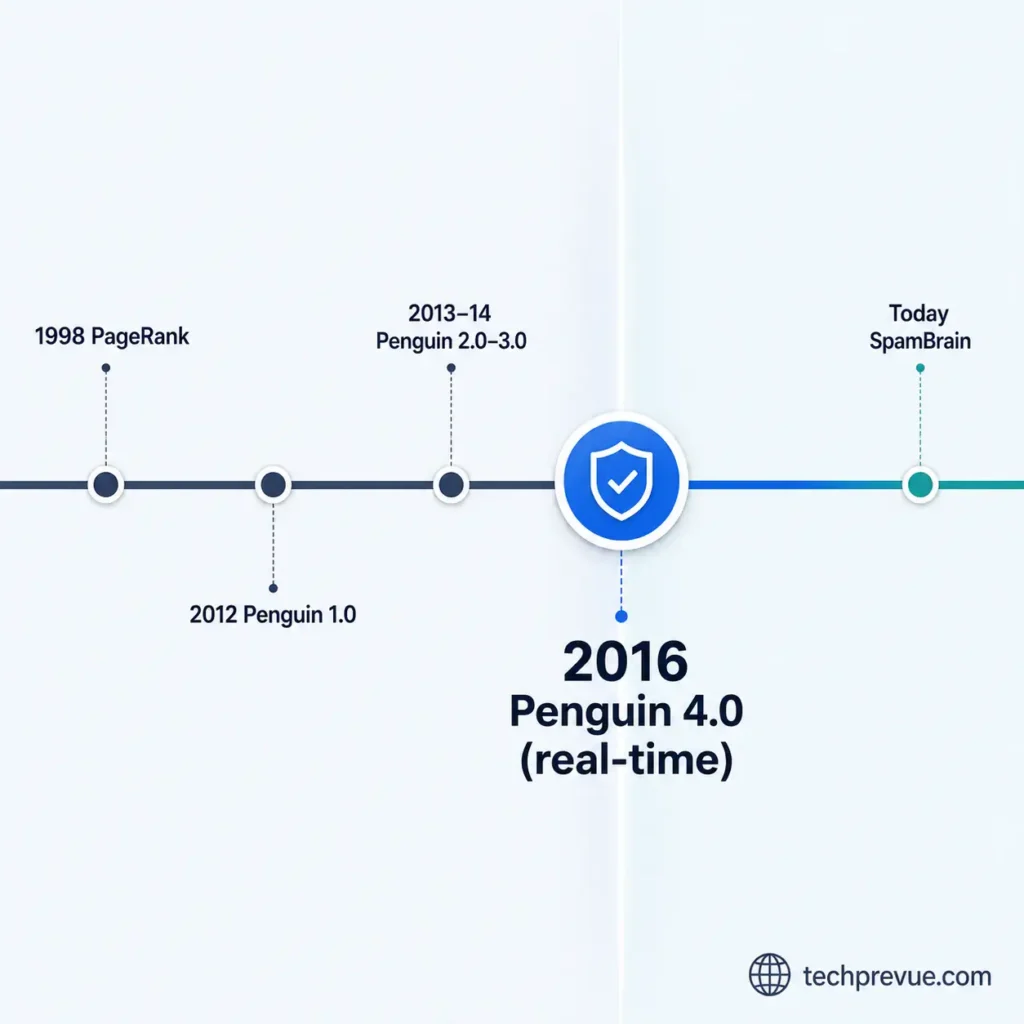
The takeaway: before 2016, a pile of spammy links could drag an entire site down. After Penguin 4.0, Google’s default move is to quietly strip the link’s value rather than punish the site it points to.
Why Context Decides Whether a Link Is Toxic
- A link from a gambling site: unremarkable for a casino review blog, alarming for a pediatric clinic
- A foreign-language link: expected for an international brand, suspicious for a strictly local business
- Toxicity checkers flag patterns (low authority, unnatural anchors, foreign donor domains) — they can’t judge whether a link makes sense for your business
- A “73% toxic” score is a starting point for review, never a verdict
Algorithmic Devaluation vs. Manual Action
Google deals with bad links in two completely different ways, and confusing them is where most of the panic starts.
| Algorithmic Devaluation | Manual Action | |
|---|---|---|
| How it happens | Google’s systems silently stop counting the link’s ranking value | A human reviewer confirms a deliberate manipulation pattern |
| Do you get notified? | No — nothing in Search Console | Yes — Security & Manual Actions report |
| How common is it? | Very — this is the default outcome for most spammy links | Rare |
| Does disavowing help? | No — there’s nothing to fix | Often necessary |
| What should you do? | Nothing | Disavow + reconsideration request |
If you’ve never seen a manual action notice, algorithmic devaluation is almost certainly the only thing happening to any spammy links pointing at your site — which means there’s usually nothing for you to do.
Do Toxic Backlinks Affect AI Overviews and AI Search?
- Classic ranking algorithms mostly evaluate whether one specific link passes value for one specific query
- AI-powered search (Google AI Overviews, ChatGPT, Perplexity) evaluates a site’s overall authority and trustworthiness more holistically before deciding whether to cite it
- A backlink profile dominated by manipulative links can quietly affect AI citation even when traditional rankings barely move
- The fix doesn’t change: a clean, well-contextualized profile protects both classic rankings and AI visibility at once
Where Toxic Backlinks Come From (9 Common Sources)
Almost nobody builds a toxic backlink profile on purpose — most site owners end up with one through a shortcut that seemed harmless at the time.
All 9 sources at a glance:
| # | Source | What it looks like | What to do |
|---|---|---|---|
| 1 | Unqualified paid links | Money, product, or services exchanged for a follow link | Add nofollow/sponsored, or ask the publisher to |
| 2 | Link exchanges | Structured “I’ll link you, you link me” programs | Fine occasionally; reconsider if systematic |
| 3 | Private blog networks | Templated sites, shared hosting, thin content, one hidden owner | Treat as a genuine risk, especially if inherited |
| 4 | Automated bots | Blog comments, forum signatures, free directories, blasted at scale | Avoid services promising fast, cheap link volume |
| 5 | Spammy UGC/forum links | Self-promotional links dropped in comments or threads | Qualify with rel="ugc"; lead with real value instead |
| 6 | Low-quality directories | No editorial standard, pay-to-list, poor UX | Keep human-reviewed listings (BBB, chambers); drop the rest |
| 7 | Unqualified widget links | Embeddable tools copied onto other sites, link not qualified | Add nofollow to future embeds |
| 8 | Contract-mandated links | ToS/contract requires a follow link, no qualification option | Revisit contract templates with legal/partnerships |
| 9 | Negative SEO / inherited domains | Competitor attack, or link history from a past owner/agency | Document spikes; audit before building on an acquired domain |
1. Unqualified Paid Links
- Paying for a backlink isn’t the violation — paying for a follow link that passes value without a
nofollow/sponsoredtag is - Covers digital ads, influencer collaborations, gifted-product reviews, and paid directory listings
- Watch for: freelance marketplaces flooded with “1,000 backlinks for $10” gigs — almost always automated blasting, not real placement
- Fix: a five-minute conversation with whoever published a paid link, confirming it’s correctly qualified
2. Link Exchanges and Reciprocal Schemes
- A handful of natural reciprocal links (because the content genuinely fits) is normal
- A structured, systematic “you link me, I’ll link you” program is a link scheme — Google’s spam policies call this out by name
- Test: would this link exist if search engines didn’t exist at all? If no, reconsider it
3. Private Blog Networks (PBNs)
- A group of sites, usually under one hidden owner, built solely to pump links to a target site
- Google spots these through shared hosting, identical templates, thin content, and clustered IPs
- One of the clearer disavow candidates once confirmed — the pattern is self-contained and easy to isolate
4. Automated Link-Building Bots
- Place backlinks at scale in unreviewed spaces: comment sections, forum signatures, free directories
- No editorial judgment involved, so the resulting links follow obvious, repetitive patterns
- Tell: genuine editorial placements take time and relationships; neither scales to thousands of links a month for a few dollars each
5. Spammy Guest Posts, Forums, and UGC Links
- Dropping links into forums/comments purely to build backlinks hurts brand credibility as much as rankings
- Community moderators actively remove this pattern, along with the account posting it
- Google recommends
rel="ugc"on genuine user-generated links so search engines know you didn’t personally vouch for them
6. Low-Quality or Pay-to-List Directories
- Risky: directories with no editorial standard, where anyone can pay to get listed instantly
- Still legitimate: Google Business Profile, industry associations, BBB, local chambers of commerce
- The difference is entirely editorial standards and real user value, not “directory = bad”
7. Widgets and Embeds With Unqualified Links
- Embeddable calculators, charts, or price tickers copied onto other sites should carry a
nofollowlink back - You don’t control placement or anchor text once it’s embedded elsewhere, so Google won’t treat it as editorial endorsement
- Fix going forward: update the embed code; no need to chase every site running an older version
8. Contract-Mandated Backlinks
- Requiring a follow link via a Terms of Service or contract, with no option to qualify it, counts as link spam under Google’s guidelines
- Tends to hide in boilerplate agreements written years before anyone thought about backlink risk
- Worth a legal/partnerships review if your business uses contract templates like this
9. Negative SEO Attacks and Inherited Domains
- Negative SEO: a competitor deliberately points thousands of spammy links at you, hoping Google mistakes it for your own manipulation. Google is generally good at recognizing this — but document sudden spikes anyway.
- Inherited links: buying an expired domain, acquiring a business, or taking over a site can bring PBN placements, hacked-site injections, or old paid-link campaigns you never authorized
- Hacked sites: a legitimate, high-authority domain can be compromised and made to host hidden spam links without its owner knowing
How to Find and Check Toxic Backlinks
The fastest reliable way to find toxic backlinks is to cross-check Google Search Console’s free Links report against one paid backlink checker, then apply the red flags below before acting on anything either one flags.
Start With Google Search Console’s Links Report
- Open Links in the left-hand sidebar
- Go to Top linking sites → export the full list
- Scan for domains you don’t recognize sending an unusually high number of links
- Check Top linking text too — this shows the anchor text Google associates with your links, straight from its own crawl
Limitation to remember: Search Console shows a sample, not your complete profile, and it won’t score or rank anything. Treat it as your baseline and reality check, not your final answer.
Red Flags That Signal a Toxic Link
None of these is disqualifying alone — weigh them together, not in isolation.
- Exact-match/”money” anchor text repeated across many links
- Sitewide placement — same link in the footer/sidebar of every page on a donor domain
- Mismatched language or topic — no plausible editorial connection
- Unusually high external-link count on the referring page relative to its actual content
- Sudden spike in referring domains over days, not months, with no matching outreach on your end
- Low-authority, low-traffic domains that have existed for years without ever building real visibility
- Deindexed or non-crawlable donor pages — whatever “vote” they cast isn’t reaching your rankings anyway
Use a Toxic Backlink Checker
If you’re specifically looking for how to check toxic backlinks across a large or long-established site without reviewing thousands of links by hand, a checker scores your whole profile against known spam patterns at once. None of them determine toxicity with certainty — they surface candidates for your review, ranked by risk.
Comparing Toxic Backlink Checkers
| Tool | Score name | How it evaluates | Worth knowing |
|---|---|---|---|
| Semrush | Toxicity Score (0–100) | Dozens of risk markers per link | Strong for fast triage; treat as a filter, not a verdict |
| Ahrefs | No single score | Manual filters: DR, traffic, one-link-per-domain | Deepest raw backlink index; needs more manual judgment |
| SE Ranking | Toxicity Score | Similar model to Semrush, own index | Good second opinion if you already use Semrush |
| Moz | Spam Score (%) | 27 signals per referring domain | Solid free tier; treat 60%+ as worth reviewing, not disavowing |
| Majestic | Trust Flow / Citation Flow | Earned trust vs. raw link volume | Good for spotting link farms specifically |
| Google Search Console | No score | Your actual Links report | Free and authoritative, only a sample |
In practice: pick one paid checker, run it against Search Console, and only bring in a second tool if the two disagree sharply on a cluster you’re unsure about. Subscribing to multiple checkers just to compare scores weekly fuels anxiety, not better decisions.
Reading a Toxicity Score the Right Way
A high score means a link matched known spam patterns — it doesn’t mean the link is hurting you, and it’s not a disavow order.
Before acting on any flagged link, ask:
- Does this look like a real site with real content?
- Is there any plausible editorial reason it would reference you?
| Answer | What it means |
|---|---|
| No to both | Reasonable disavow candidate |
| “Maybe” or unsure | Leave it alone — a link doing nothing is not the same as a link doing damage |
Example: two links flagged with the same 80+ score by the same tool. One traces to a generic domain with thin AI-generated content and dozens of unrelated outbound links — no editorial reason to reference you.
The other traces to a small, real local business blog that’s new, low-traffic, and genuinely wrote about your industry in passing. Same score, only one belongs anywhere near a disavow file — and mistaking every low-scoring link for genuinely spammy backlinks is exactly how legitimate sites end up disavowed by accident.
A Quick Self-Check: Ignore, Investigate, or Disavow?
| Situation | What it usually means | What to do |
|---|---|---|
| A few odd, unfamiliar links, no ranking change | Normal background spam | Ignore |
| Checker flags several links, but GSC shows minimal activity from them | Low actual impact, high tool sensitivity | Note it, don’t act yet |
| Sudden spike, low authority, matching anchor text, coinciding with a ranking drop | Possible negative SEO attack | Investigate and document; disavow only if it doesn’t resolve on its own |
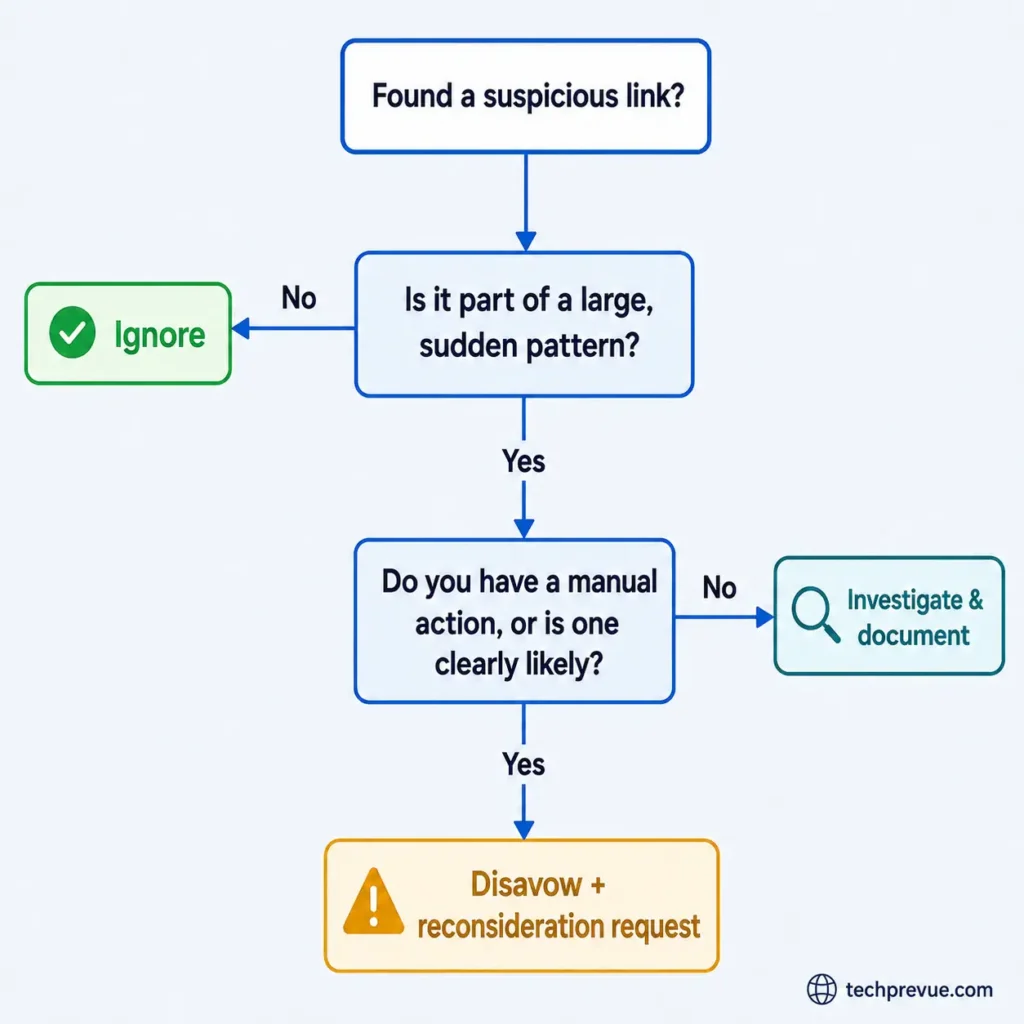
| Confirmed manual action in Search Console | Deliberate manipulation Google already flagged | Disavow the pattern and request reconsideration |
| Knowingly bought/built links at scale in the past, no manual action yet | Real risk, not yet realized | Consider a proactive, conservative disavow of the clearest offenders |
Should You Disavow Toxic Backlinks?
For most sites, no — not yet, and possibly not ever. Google’s systems devalue spammy links automatically, and disavowing without a manual action or clear manipulation history can strip out links that were quietly helping you.
When Google Says to Just Ignore Them
- Google’s disavow documentation states plainly: in most cases, its systems can already judge which links to trust
- The majority of sites will never need the disavow tool at all — that’s the stated default, not a hedge
- You’re likely in this category if: no manual action notice, no bought links at scale, no unexplained spike in spammy referring domains
- Right move: keep building good links, review quarterly, stop checking your toxicity score every week
- Every backlink checker has a business incentive to show you a scary number — Google’s guidance doesn’t, which is exactly why it’s the more trustworthy source here
When Disavowing Actually Makes Sense
Google ties disavowing to two conditions that must both be true at once:
- You have a genuinely large volume of spammy, artificial, or low-quality links — not just a handful
- Those links have already triggered a manual action, or are genuinely likely to
If you can’t answer yes to both, the honest answer is “not yet” — and that’s a perfectly fine place to land.
The Risk of Disavowing When You Didn’t Need To
- Disavowing isn’t neutral — it tells Google to stop counting a link’s value entirely
- Google is upfront that this feature can hurt your search performance if used incorrectly
- Practical risk: an unfamiliar, low-authority domain can look exactly like spam in a toxicity report while sending real referral traffic or genuine topical relevance
- Disavow it reflexively, and you’ve voluntarily given up something that was quietly working in your favor
⚠️ Warning: uploading a new disavow file completely replaces your previous one for that property. If you forget to re-include links you disavowed months ago, they quietly become active again the moment you submit an incomplete update.
Pros and cons of disavowing, at a glance:
| Pros | Cons |
|---|---|
| Directly addresses a confirmed manual action | Can strip value from links that were actually helping if misapplied |
| Documents due diligence for a reconsideration request | No guaranteed outcome — Google treats it as a request, not a command |
| Removes a defined, self-contained spam cluster cleanly | New uploads replace old ones entirely, so mistakes compound easily |
| Gives you a clear, closed-out action item | Takes weeks to process, with no visibility into progress in the meantime |
Before you touch the disavow tool, confirm every toxic backlink on your list actually clears this checklist:
- [ ] I have a documented manual action, or a clearly imminent one — not just a scary toxicity score
- [ ] I have a genuinely large volume of low-quality links, not a handful
- [ ] I’ve already attempted removal on the highest-priority links
- [ ] I’ve downloaded my existing disavow file, if one exists, before building a new one
- [ ] I understand a new upload replaces the old list rather than adding to it
What a Real Disavow Experiment Found
Most toxic-backlink advice is theoretical. This isn’t: SEO consultant Cyrus Shepard (Zyppy SEO) has run a public, repeatable test on his own site — disavowing every backlink he could find.
| Detail | Data |
|---|---|
| Links disavowed (most recent run) | 10,000+ |
| Referring domains affected | 1,473, including several major SEO publications |
| Ran the experiment | Twice, months apart |
| Measurable ranking/traffic change | None |
| Small traffic uptick noticed | Yes — attributed to unrelated factors, not the disavow |
It’s strong, well-documented evidence for exactly what Google’s own guidance already says: disavowing links that were never causing a problem doesn’t produce a benefit, because they weren’t costing you anything to begin with.
Worth flagging for the future: Google’s John Mueller has said the disavow tool could eventually be retired altogether, as algorithms get better at ignoring spam without manual input. The tool is still live in Search Console today — but it’s a signal of where Google’s priorities sit.
How to Disavow Toxic Backlinks
If you’ve genuinely cleared both conditions above, here’s the correct sequence — in order.
Before you start, you’ll need:
- Access to the Google Search Console property for the affected domain (Owner or Full User permission)
- A plain text editor
- The list of confirmed toxic backlinks from whichever checker or manual review surfaced them, so you’re working from a defined list rather than guessing
Step 1 — Try to Get the Link Removed First
Google’s guidance is explicit: removal comes before disavowal, not the other way around.
- Find a contact address or form on the linking site
- Send a short, polite request — name the exact page, ask for removal or
nofollow, give a brief non-accusatory reason - Don’t threaten legal action; don’t offer payment for removal — both tend to backfire
“Hi — I noticed your site links to [yourdomain.com] from [exact URL]. We’re cleaning up our backlink profile and would appreciate it if you could remove the link, or add a nofollow attribute if you’d prefer to keep it. Thanks for your time.”
Expected result: either the link disappears or gets qualified within a couple of weeks, or you hear nothing back. Both outcomes are fine to move forward from — a documented attempt strengthens any reconsideration request later.
Step 2 — Build Your Disavow File Correctly
A disavow file is plain text, UTF-8 encoded, one entry per line.
| To disavow | Format | Use when |
|---|---|---|
| An entire domain | domain:example.com | PBN, link farm, widespread hack — the safer default |
| A single URL | The full page URL, one per line | Otherwise-legitimate site, isolated bad page |
| A note to yourself | # comment text | Google ignores anything after # |
Worked example:
# Disavow list — reviewed 2026-07-25
# PBN cluster identified in agency handoff audit
domain:cheaplinksnetwork-example.com
domain:spamdirectory-example.net
# Single page on an otherwise legitimate hacked site
https://legitsite-example.com/hidden-spam-page/
Domain-level disavows also catch duplicate or future URLs on the same domain — a gap a single-page disavow would miss.
Step 3 — Upload It to Google’s Disavow Tool
- Go to Google’s disavow links tool inside Search Console
- Select the correct property from the dropdown
- Upload your file
⚠️ Warning: uploading a new file replaces your existing disavow list for that property — it doesn’t add to it. Download your current list first, merge in your new additions, and upload the combined file as one submission.
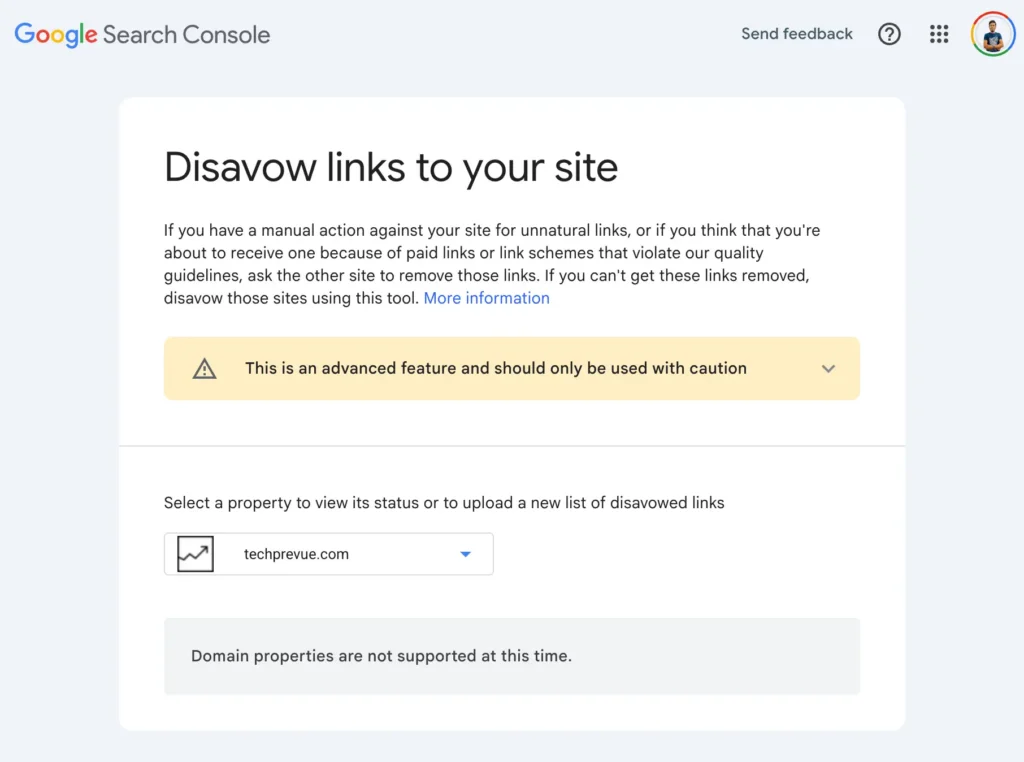
Expected result: an on-screen confirmation your file was received, and an updated “last uploaded” timestamp. Nothing else changes in Search Console immediately.
Step 4 — Request Reconsideration (Manual Action Only)
Only if your site currently has a manual action for unnatural links:
- Submit a reconsideration request through the Manual Actions report after uploading your disavow file
- A request that gets read carefully covers four things: what the action flagged, how you found the affected links, what you did about each category (removed/qualified/disavowed), and what changed going forward
- Vague requests (“we cleaned up our links, please reconsider”) tend to get rejected; specific ones with dates and counts move faster
If you don’t have a manual action, skip this step — there’s nothing to reconsider.
Expected result: a written response within roughly one to a few weeks, either lifting the action or explaining what still needs to change. A second request is common and not a bad sign.
What to Expect Afterward
- Processing takes a few weeks, sometimes longer, as Google recrawls and reprocesses affected pages
- No guaranteed outcome, and reconsideration isn’t always approved on the first attempt
- Resist re-uploading your file every few days while you wait — let one submission fully process first
Real-World Examples: How Different Sites Handled Toxic Backlinks
These four scenarios cover the situations that come up most often — and they don’t all end the same way.
| Scenario | What happened | Action taken | Outcome |
|---|---|---|---|
| Negative SEO spike | Several hundred low-authority domains linked in with matching commercial anchors, all within 48 hours | Documented with dated screenshots; watched rankings for two weeks before considering disavow | Spike faded on its own — no disavow needed |
| Hacked-site backlinks | New links traced to compromised, otherwise high-authority sites hosting hidden spam pages | Flagged to the affected site owners directly instead of disavowing | Most removed quickly once owners knew they’d been hacked |
| Agency handoff gone wrong | New audit found dozens of near-identical PBN-style domains from a past vendor’s undisclosed tactics | Disavowed the self-contained cluster; documented the pattern | Clean, low-risk cleanup — clear common origin, easy to isolate |
| Directory migration panic | A toxicity checker flagged a long list of low-DA links that were actually real local directories | Manually reviewed 20 flagged links instead of disavowing on sight | Nothing disavowed — low authority isn’t the same as toxic |
The pattern across all four: the sites that did the least damage to themselves were the ones that checked before acting. Documentation, not reflexive disavowing, is what actually protected them.
Common Mistakes People Make With Toxic Backlinks
Most of the damage in this space comes from how people react to finding bad links, not the links themselves.
| Mistake | Why it happens | Better approach |
|---|---|---|
| Disavowing without a manual action | Panic after seeing a scary toxicity score | Apply the two-condition test first — every time |
| Treating every low-authority link as toxic | Confusing “small/new” with “manipulative” | Check the actual page before acting on a score |
| Blaming a ranking drop on backlinks first | Backlinks feel like the obvious suspect | Check Search Console performance data and recent site changes before touching a single link |
| Re-uploading a partial disavow file | Forgetting uploads replace rather than add | Always download and merge your existing list first |
| Paying for preemptive cleanup on a healthy site | A service sells reassurance, not a fix | Google’s own guidance and the Shepard experiment both say healthy sites don’t need it |
| Ignoring an actual manual action | Assuming it will resolve itself | It won’t — disavow + reconsideration request, promptly |
How to Prevent Toxic Backlinks From Piling Up
Cleanup only ever addresses what’s already happened. Prevention is cheaper and calmer.
- Build links that don’t need defending. A profile dominated by earned coverage and genuine partnerships means a handful of stray bad backlinks simply gets outweighed and ignored. Sites leaning on cheap, scaled link-building have real problems later precisely because there’s no legitimate foundation to dilute the bad links.
- Qualify sponsored and UGC links from day one. Sponsored content gets
rel="sponsored", user-submitted content getsrel="ugc", anything you’re not vouching for getsrel="nofollow". This single habit prevents an entire category of toxic backlinks before it starts. - Monitor on a schedule, not in a panic. Quarterly is reasonable for most sites; monthly if you’re actively building links or in a competitive, attack-prone niche. Recurring “toxicity score” subscriptions sold as a monthly emergency mostly monetize anxiety.
- New sites should check a little more often. A thin backlink profile has less legitimate authority to dilute bad links, so monthly Search Console checks in year one are worth the extra few minutes. The upside: a new site has a much shorter history to audit — no inherited PBN cluster, no five-year-old paid-link campaign.
Frequently Asked Questions
An incoming link built mainly to manipulate rankings rather than help a reader — paid links without proper attributes, PBN placements, or automated spam. Google’s own term is link spam, not “toxic,” and its systems devalue most of it automatically.
Request removal directly from the hosting site first — a short, polite email. If removal isn’t possible and the link is tied to a manual action, disavowing through Google Search Console is the next step, not the first.
No. Most spammy or low-quality backlinks are ignored automatically and have no measurable effect. Exceptions: large-scale coordinated manipulation, or a site that already has a manual action.
No fixed number — Google looks at patterns, not counts. A more useful question than “how many” is “what percentage of my recent link growth do these represent.” Fifty spammy links over three years barely registers; the same fifty in one week, with nothing else happening, is a different story.
Spam backlinks appear on their own — you don’t build them and can’t stop them. “Toxic” is a broader, non-official label for any backlink, spammy or deliberately manipulative, that a checking tool flags as risky.
Rarely. Nofollow removes most manipulation risk on its own, but a large, coordinated pattern of spammy nofollow links can still signal a negative SEO attack even with zero ranking weight.
Yes — a negative SEO attack. Google is generally good at recognizing and discounting the pattern automatically, though a sudden, large spike is still worth documenting.
A few weeks, per Google’s own documentation, as it recrawls and reprocesses affected pages. No guaranteed outcome, and results aren’t visible immediately.
Potentially. AI-powered search evaluates authority and trust more holistically than classic ranking algorithms, so a manipulative-link-heavy profile can affect AI citation even when traditional rankings barely move.
Only with a confirmed manual action, for a second set of eyes on reconsideration — the mechanical steps don’t require specialized expertise. Be cautious of any service recommending preemptive disavowing with no manual action; that’s usually selling reassurance, not a fix.
Yes — Google’s spam policies, Search Console, and the disavow tool are identical worldwide. One practical note: a large share of the cheapest “bulk backlink” gig listings on global freelance marketplaces originate from South Asia-based operators, so businesses sourcing link-building through those channels specifically are worth extra scrutiny.
When It’s Worth Bringing In a Professional
- Everything above is genuinely doable without outside help — no specialized tooling or certification required
- Most sites following the two-condition test and the ignore/investigate/disavow framework will never need to pay anyone specifically for this
- Worth the cost: a manual action already hurting revenue that needs fast resolution; a profile too large and messy for realistic manual review; a sophisticated negative SEO attack you’re struggling to separate from normal fluctuation
- Red flag, not reassurance: anyone pitching preemptive cleanup for a healthy site — get a second opinion instead
Key Takeaways
- A toxic backlink is a link built mainly to manipulate rankings; Google’s own term is link spam, not “toxic.”
- Google’s systems devalue most spammy and manipulative backlinks automatically — most sites never need to act.
- Disavowing only makes sense with both a meaningful volume of harmful links and a manual action, existing or clearly imminent.
- A real, repeated field experiment disavowing 10,000+ backlinks found no meaningful ranking impact — matching Google’s own “most sites don’t need this” guidance.
- Toxic backlinks come from 9 common sources: paid links, exchanges, PBNs, bots, spammy UGC, low-quality directories, unqualified widgets, contract-mandated links, and negative SEO or inherited domains.
- Cross-check at least one backlink checker against Google Search Console before trusting any single toxicity score.
- Prevention — earned links, qualified sponsored/UGC links, scheduled reviews — beats reactive cleanup every time.
