
Ninety-six percent of websites fail Core Web Vitals on at least one page. That figure comes from Semrush’s analysis of more than 50,000 domains, and the rest of the data is just as rough.
Fifty-two percent of sites carry broken links. Sixty-nine percent have orphan pages that neither users nor Google can find.
Here’s the uncomfortable part: most of those site owners are busy publishing more content.
If your rankings are stuck, the problem often isn’t your writing. It’s the plumbing underneath it. This technical SEO checklist gives you every check in one copyable sheet, ranked by impact, with the exact free tool for each fix and a “you’re done when” test so you know the fix actually worked.
Quick answer: a technical SEO checklist covers nine areas — crawlability, renderability, indexability, Core Web Vitals, mobile, security, schema, site architecture, and AI crawler access — with 28 specific checks below, grouped into 6 parts, each ranked by priority and paired with a free tool and a pass condition.
Work top to bottom. The highest-impact items come first.
- What Is a Technical SEO Checklist?
- The Complete Technical SEO Checklist Sheet (Copy This)
- How to Use Technical SEO Checklist (Beginners vs. Agencies)
- Part 1: Discovery
- Part 2: Indexation — Are the Right Pages in Google's Index?
- Part 3: Speed and Core Web Vitals
- Part 4: Mobile and Security
- Part 5: Structure and Schema
- Part 6: AI Visibility — Can AI Systems Access and Cite Your Content?
- 5 Mistakes That Undo Everything Above
- Free Tools That Cover 90% of This Checklist
- FAQ
What Is a Technical SEO Checklist?
A technical SEO checklist is a structured list of site-level checks — crawlability, indexing, speed, mobile usability, security, structured data, and AI crawler access — that confirms search engines can find, render, and rank your pages. Run it quarterly, and always after a redesign, migration, or CMS change.
Think of it as a pre-flight inspection. Pilots don’t inspect the plane because they expect a failure. They inspect it because a single unnoticed fault grounds everything else.
Content and links work the same way. They only pay off when the technical layer underneath them is sound.
The Complete Technical SEO Checklist Sheet (Copy This)
This is the full 28-point sheet, grouped into 6 parts. Copy it into Google Sheets or Notion and it doubles as a reusable technical SEO checklist template for every audit you run. Prefer to track this on the page? Try the free interactive checklist tracker.
Three columns make this different from the lists you’ve seen elsewhere. Priority tells you what moves rankings fastest.
Frequency tells you how often to re-check. And where data exists, the notes tell you how likely your site is affected, based on Semrush’s 50,000-domain study.
| # | Part | Check | Priority | Frequency | Free Tool |
|---|---|---|---|---|---|
| 1 | Discovery | robots.txt isn’t blocking key pages | Critical | Quarterly | Browser + GSC |
| 2 | Discovery | XML sitemap is clean and submitted | High | Quarterly | Search Console |
| 3 | Discovery | No redirect chains or loops | High | Quarterly | Screaming Frog |
| 4 | Discovery | Broken internal links fixed | High | Monthly | Screaming Frog |
| 5 | Discovery | Orphan pages linked | High | Quarterly | Crawler + GA4 |
| 6 | Discovery | Crawl budget managed (large sites) | Medium | Quarterly | Server logs |
| 7 | Discovery | Non-200 pages aren’t skipping rendering | Critical | After changes | URL Inspection |
| 8 | Indexation | Site is indexed (GSC Pages report) | Critical | Monthly | Search Console |
| 9 | Indexation | No stray noindex tags | Critical | Quarterly | Screaming Frog |
| 10 | Indexation | Canonical tags set correctly | High | Quarterly | Screaming Frog |
| 11 | Indexation | One canonical site version (HTTPS, www or non-www) | Critical | One-time | Browser test |
| 12 | Indexation | Duplicate content consolidated | High | Quarterly | Site crawler |
| 13 | Indexation | 5xx server errors resolved | Critical | Weekly alert | GSC + logs |
| 14 | Speed & CWV | LCP under 2.5 seconds | High | Monthly | PageSpeed Insights |
| 15 | Speed & CWV | INP under 200 milliseconds | High | Monthly | PageSpeed Insights |
| 16 | Speed & CWV | CLS under 0.1 | High | Monthly | PageSpeed Insights |
| 17 | Speed & CWV | Field data checked, not just lab data | High | Monthly | GSC CWV report |
| 18 | Mobile & Security | Mobile content parity with desktop | High | After changes | URL Inspection |
| 19 | Mobile & Security | Mobile usability (tap targets, fonts, popups) | High | Quarterly | Real device test |
| 20 | Mobile & Security | HTTPS everywhere, no mixed content | Critical | One-time + monitor | Browser + crawler |
| 21 | Mobile & Security | Security headers and malware monitoring | Medium | Quarterly | securityheaders.com |
| 22 | Structure & Schema | Schema markup on key page types | Medium | Quarterly | Rich Results Test |
| 23 | Structure & Schema | Schema validated and current | Medium | Quarterly | Rich Results Test |
| 24 | Structure & Schema | Important pages within 3 clicks of home | Medium | Quarterly | Crawl depth report |
| 25 | Structure & Schema | Internal links and breadcrumbs audited | Medium | Quarterly | Screaming Frog |
| 26 | AI Visibility | AI training crawlers allowed/blocked deliberately | Medium | Quarterly | robots.txt review |
| 27 | AI Visibility | AI retrieval crawlers allowed/blocked deliberately | High | Quarterly | robots.txt review |
| 28 | AI Visibility | Content structured for AI extraction | Medium | Ongoing | Manual review |
Every item is explained below with the fix and the pass condition. Search intent, met. Now let’s make each row actionable.
How to Use Technical SEO Checklist (Beginners vs. Agencies)
Use this sheet two ways depending on who you are. Beginners should run the free-tool path in order, fixing Critical items first. Agencies should convert it into a recurring client deliverable with automated crawls, a severity column, and a monthly change log tied to ranking movements.
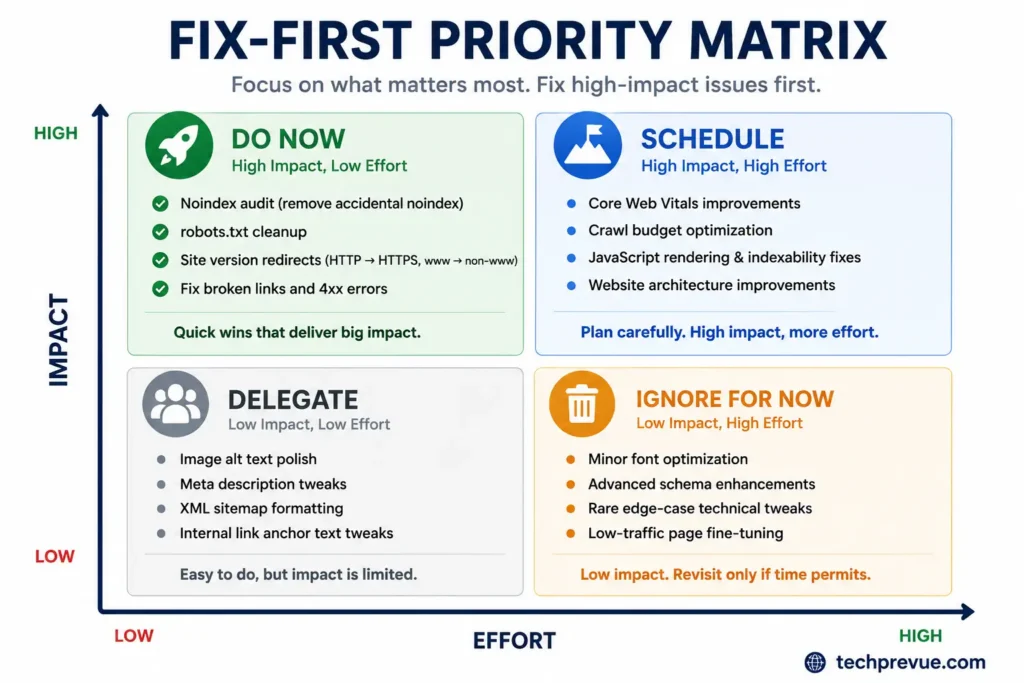
If you’re a site owner or beginner: start this technical SEO checklist with items 1–4. They decide whether Google can see your site at all. You need nothing beyond a browser and a free Google Search Console account for the first pass.
If you run an agency: this doubles as a technical SEO checklist for agencies. Duplicate the sheet per client, add columns for “Assigned to,” “Status,” and “Verified date,” and schedule automated weekly crawls. The prevalence data helps you set client expectations — when 52% of sites have broken links, finding some isn’t a crisis. It’s Tuesday.
One warning before you start. Fix things in priority order, not discovery order. A missing meta description feels easy to fix, but a noindex tag on your money page is the fire.
Part 1: Discovery
Discovery covers whether Google can find your pages and actually process what’s on them. Crawlability confirms bots can reach a page at all; renderability confirms Google’s rendering pipeline executes your JavaScript once it gets there. Both have to pass before indexing is even possible.
Crawlability: Can Google Find Your Pages? These checks confirm that search engine bots can discover and access every page that matters. If crawlers can’t reach a page, nothing else on this list applies to it. Start here, because crawl failures silently cancel out all of your content and link-building work.
1. Audit Your robots.txt File
Open yourdomain.com/robots.txt and read every Disallow line. You’re looking for two failure modes: blocking rankable content, and blocking the CSS or JavaScript files Google needs to render your pages.
Only about 2% of sites have robots.txt problems, per Semrush’s study. But the small odds hide the severity — a single Disallow: / can deindex your entire site.
Google’s robots.txt documentation covers the syntax if anything looks unfamiliar.
You’re done when: every blocked path is one you deliberately chose to block, and your sitemap URL is referenced in the file.
2. Submit a Clean XML Sitemap
Your sitemap is Google’s roadmap. Every URL in it should return a 200 status, be canonical, and be a page you actually want indexed.
Sitemaps stuffed with redirects, 404s, and noindexed URLs waste crawl budget and dilute trust in the file. RankMath and Yoast both auto-generate sitemaps on WordPress — but they’ll happily include junk post types unless you exclude them in settings.
Submit it under Sitemaps in Search Console, then check for errors monthly. Google’s sitemap guidelines cap each file at 50,000 URLs or 50MB uncompressed.
You’re done when: Search Console shows the sitemap as “Success” with a discovered-URL count that roughly matches your real page count.
3. Fix Redirect Chains and Loops
A chain is URL A → B → C. A loop is A → B → A.
Both waste crawl budget, slow users down, and leak link equity at every hop. Semrush found them on about 12% of sites.
Chains breed during redesigns and permalink changes. Crawl your site with Screaming Frog (free up to 500 URLs), open the redirect report, and update every internal link to point directly at the final URL.
You’re done when: no internal link resolves through more than one redirect.
4. Fix Broken Internal Links
Broken links are the most common issue in the entire dataset — 52% of sites have them. Each one dead-ends a user and a crawler at a 404.
For each broken internal link: restore the page, redirect it to the closest relevant page, or update the link. Don’t blanket-redirect everything to your homepage; Google treats irrelevant redirects as soft 404s.
Small sites can check monthly. Large or frequently edited sites should automate a weekly crawl, because broken links accumulate faster than you’d expect.
You’re done when: your crawler reports zero internal 4xx links.
5. Rescue Orphan Pages
An orphan page has zero internal links pointing to it. Crawlers rarely find it, users never do, and it earns nothing. Sixty-nine percent of sites have at least one.
Compare your crawl output against your sitemap and analytics page list. Any URL that appears in the sitemap but not the crawl is orphaned. Link to it from a relevant parent page — or ask the harder question: if nothing on your site naturally links to this page, does it deserve to exist?
You’re done when: every indexable URL receives at least one contextual internal link.
6. Manage Crawl Budget (Large Sites Only)
Sites under a few thousand pages can skip this. Above that, Google allocates finite crawl resources, and junk URLs — faceted filters, session parameters, endless archives — burn budget your money pages need.
Noindex low-value pages, canonicalize parameter variants, and prune expired content. If you can access server logs, filter for Googlebot and check which sections it actually visits. Log data regularly exposes waste that no crawler simulation catches.
Renderability: Can Google Actually See Your JavaScript Content? These checks confirm that Google’s rendering pipeline actually processes your JavaScript-dependent content, not just your raw HTML. This is the newest pillar in any technical SEO checklist, and most guides published before 2026 skip it entirely. A page can be crawled successfully and still lose its content at this stage, because rendering is a separate step that happens after crawling and before indexing.
7. Audit Non-200 Status Codes and JS Rendering
In December 2025, Google clarified its JavaScript SEO documentation on a detail most checklists still miss: pages with a 200 status code always queue for rendering, but pages returning a non-200 code — a 404 or 500, for instance — may skip the rendering queue entirely.
That’s a real risk for single-page apps. A broken URL that serves a generic 200-status shell can get its error state rendered and indexed as if it were valid content. The reverse breaks too: a page that correctly returns a 404 header, but relies on client-side JavaScript to show something like a “you might also like” section, may never have that helpful content rendered — the 404 status blocks the render step before any JavaScript runs.
Check this with the URL Inspection tool. View the tested page’s rendered HTML and compare it against what a browser actually shows. If your CMS or framework serves 200 for broken states, or depends on JavaScript to correct a bad status code after the fact, fix the header at the server level before any client-side script executes.
You’re done when: every valid page returns a 200 status before JavaScript loads, and every broken page returns an honest 4xx or 5xx instead of a soft 200.
Part 2: Indexation — Are the Right Pages in Google’s Index?
Indexability checks confirm that crawled pages actually enter Google’s index — and that pages you want excluded stay out. A page can be crawled yet never indexed, which means Google saw it and declined to store it. The Pages report in Search Console shows you exactly which and why.
8. Read the GSC Pages Report Line by Line
Open Pages in Search Console and study the “Why pages aren’t indexed” breakdown. Three statuses deserve immediate attention:
- Crawled – currently not indexed: Google reviewed the page and passed. Usually thin or near-duplicate content.
- Discovered – currently not indexed: Google knows the URL exists but hasn’t prioritized crawling it. Often an internal-linking or crawl-budget signal.
- Excluded by noindex: fine if intentional. A disaster if not.
Fix the cause, then use Validate Fix to request recrawling.
You’re done when: every excluded URL is excluded for a reason you can name.
9. Audit Every noindex Tag
The classic failure: a developer noindexes the staging site, then ships that code to production. Entire businesses have vanished from search this way, and it remains one of the most reported causes of sudden traffic collapse after launches.
Crawl your site, filter for noindex, and confirm each tagged page is meant to be hidden — admin screens, internal search results, thank-you pages. Also watch for contradictions: a canonical tag pointing at a noindexed page sends Google two incompatible instructions.
You’re done when: the noindex list contains only pages you’d never want a stranger to land on from Google.
10. Set Canonical Tags Correctly
Every indexable page should carry a self-referencing canonical unless you’re deliberately consolidating authority elsewhere. The common mistakes: canonicals pointing at HTTP versions, at redirected URLs, or at entirely wrong pages after a template bug.
WordPress users get self-referencing canonicals automatically from RankMath or Yoast. Verify anyway after any theme or plugin change — one filtered template can silently rewrite canonicals sitewide.
11. Consolidate Duplicate Site Versions
Test all four variants of your domain: HTTPS/HTTP, with and without www. Exactly one should load directly; the other three must 301 to it.
Semrush found 27% of sites leave both HTTP and HTTPS live at once — meaning more than a quarter of the web is competing against itself. This is a one-time server-level fix that takes a developer minutes.
You’re done when: three of the four variants redirect in a single hop to your chosen version.
12. Resolve Duplicate and Thin Content
Internal duplication affects 41% of sites. Product variants, printer-friendly pages, and parameter URLs are the usual sources. Consolidate with canonicals, or merge duplicates into one strong page with 301 redirects.
Thin content is the quieter killer. Pages that exist only to exist — auto-generated tag archives, 100-word posts, doorway pages — drag down Google’s quality assessment of the whole site under the Helpful Content signals. Improve them, merge them, or remove them.
13. Kill 5xx Server Errors
Server errors block crawling outright, and about 10% of sites experience them regularly. A 500 means the server failed; a 503 usually means overload or maintenance; a 504 is a timeout.
Search Console flags these, but by the time you check manually you may have lost days of crawling. Set up uptime monitoring with alerts.
Recurring 5xx errors under normal traffic is a hosting conversation, not an SEO one. And per the renderability note above, a 5xx isn’t just a crawl-budget cost anymore — it can suppress rendering outright.
Part 3: Speed and Core Web Vitals
Core Web Vitals are Google’s three field metrics for page experience: LCP (loading), INP (responsiveness), and CLS (visual stability). They’re a confirmed ranking signal, and with 96% of sites failing on at least one page, passing them is a genuine competitive edge rather than table stakes.
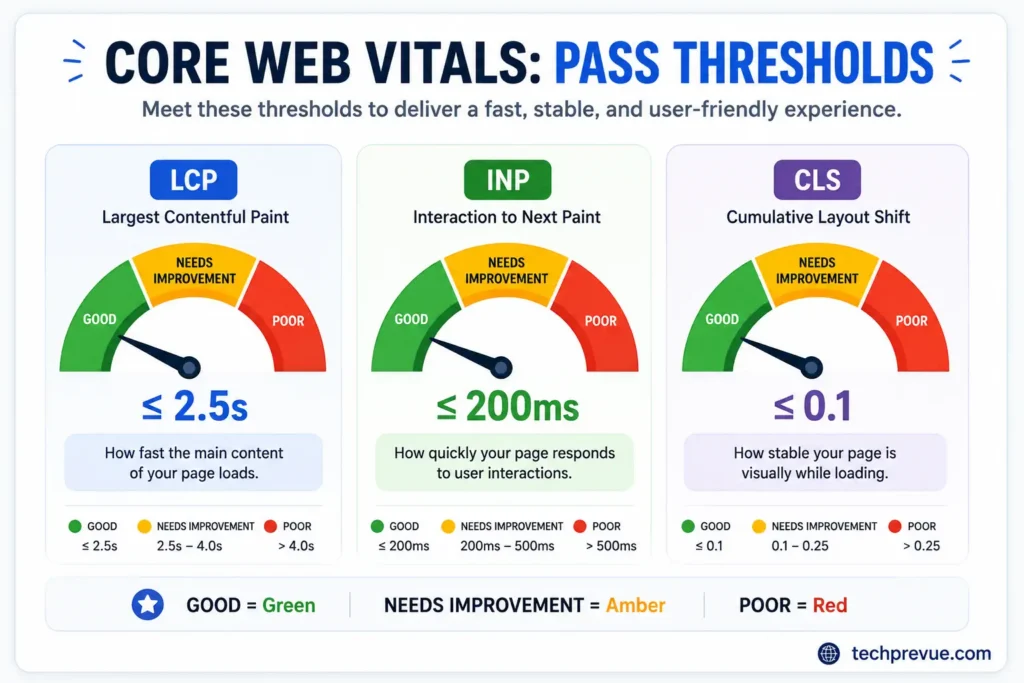
The thresholds, from Google’s Core Web Vitals documentation on web.dev:
| Metric | Measures | Good |
|---|---|---|
| LCP | Main content load time | ≤ 2.5s |
| INP | Response to taps/clicks | ≤ 200ms |
| CLS | Layout stability | ≤ 0.1 |
14. Get LCP Under 2.5 Seconds
Your LCP element is usually the hero image or headline block. The fixes that move it most, in order: compress and convert images to WebP or AVIF, preload the LCP image, defer non-critical JavaScript, and cut server response time with better hosting or a CDN.
Run your top ten pages through PageSpeed Insights and fix the worst performers first.
A note on server geography, because almost no checklist mentions it. CDN and hosting location relative to your audience is often the largest single LCP lever. If your readers are in the US, you want edge nodes in Virginia and Oregon. If your traffic is Indian, you want Mumbai or Chennai points of presence — a US-only host adds 200–400ms of latency before a single byte of your page renders.
15. Get INP Under 200 Milliseconds
INP replaced First Input Delay in March 2024 and it’s harder to pass. It measures how quickly the page visually responds when someone clicks, taps, or types.
The main offender is JavaScript: long tasks blocking the main thread. Break heavy scripts into chunks, delay third-party embeds (chat widgets, trackers, social pixels), and remove plugins you don’t use. On WordPress, a plugin audit alone frequently fixes INP.
If tapping a menu on your phone feels laggy, you already know your INP verdict.
16. Get CLS Under 0.1
CLS is the page-jump problem — you reach for a button and an ad shoves it down. Fix it by declaring width and height on every image and video, reserving space for ads and embeds, and setting font-display: swap so text renders immediately in a fallback font.
Sites publishing in non-Latin scripts need extra care here. Devanagari, Tamil, or Arabic web fonts are heavier than Latin ones, and on slower devices the late font swap can visibly reflow an entire article mid-read. Preload your primary text font and choose a fallback with closely matched metrics.
17. Check Field Data, Not Just Lab Scores
Lab tools like Lighthouse simulate one device on one connection. Field data — the Core Web Vitals report in Search Console, powered by real Chrome users — is what Google actually uses.
The gap matters most for mixed-geography audiences. A page that scores well from a US office can fail in the field when a large share of readers browse on budget Android phones over congested 4G, which is the reality for much of India, Southeast Asia, and Latin America.
Trust the field report. It’s your audience’s truth, not your laptop’s.
You’re done when: the GSC Core Web Vitals report shows zero URLs in “Poor” on mobile.
Part 4: Mobile and Security
This part covers whether your site works — and feels safe — on the device most visitors actually use. Google indexes the mobile version of your site by default, and a hacked-site warning or broken mobile layout costs you rankings and trust in the same breath.
Mobile-First Checks. Anything missing on the mobile version effectively doesn’t exist to Google. Any technical SEO checklist that skips mobile parity misses where most real traffic actually lands. These two checks confirm your phone experience matches — and works.
18. Verify Mobile Content Parity
Everything on desktop — text, images, structured data, internal links, meta tags — must exist on mobile. Themes that “simplify” mobile by hiding sections are hiding them from Google too.
Use the URL Inspection tool in Search Console and view the rendered mobile HTML. If content you can see on desktop is absent there, fix the template.
19. Test Real Mobile Usability
Load your key pages on an actual phone, ideally a mid-range one rather than a flagship. Check that text is readable without zooming, tap targets aren’t crammed together, nothing scrolls horizontally, and no popup smothers the content on arrival — intrusive interstitials carry their own ranking penalty.
Cookie notices, login prompts on paywalled content, and small dismissible banners are fine. A full-screen newsletter popup two seconds after landing is not.
Security. HTTPS and basic hardening are trust signals for users, browsers, and Google alike. No technical SEO checklist is complete without them, and a hacked-site warning in the SERP will hurt you faster than any algorithm update.
20. Enforce HTTPS Everywhere
Every URL should load over HTTPS, with HTTP variants 301-redirecting in one hop. Then hunt mixed content: secure pages loading insecure images or scripts, which trigger browser warnings.
Check that internal links, canonicals, and sitemap URLs all reference HTTPS. Old hardcoded HTTP links in ancient posts are the usual stragglers — a crawler finds them in minutes.
21. Add Security Headers and Malware Monitoring
Run your domain through securityheaders.com. The minimum set worth implementing: HSTS to force HTTPS, X-Content-Type-Options, and a Content-Security-Policy scoped to your actual resources.
On WordPress, keep core, themes, and plugins updated — outdated plugins are the number-one breach vector — and enable Search Console’s security alerts so a hack never surprises you weeks late.
Part 5: Structure and Schema
This part covers how your content is organized for crawlers and described to machines. Schema markup tells Google and AI systems what a page means; site architecture and internal links determine how much authority that page actually receives. Both shape visibility more than most audits assume.
Structured Data. This markup is written for machines, not readers — it’s not a ranking factor on its own, but it shapes how (and whether) your pages appear in rich results and AI answers.
22. Add Schema to Your Key Page Types
Match schema types to content: Article for posts, Organization for the homepage, Product for ecommerce, BreadcrumbList for navigation. The schema.org vocabulary defines the properties each type accepts.
Two 2026 realities most technical SEO checklists still get wrong. HowTo schema was deprecated by Google back in September 2023 — remove it; it earns nothing and adds bloat.
And FAQ schema no longer generates rich results for most sites either. It can still be worth keeping as clean, machine-readable Q&A structure for AI systems, but add it for that reason, not for stars in the SERP.
23. Validate Schema and Keep It Current
Run key templates through Google’s Rich Results Test after every markup change. Then re-check quarterly, because stale schema actively hurts: a product marked “InStock” that’s sold out, or FAQ markup describing questions you’ve since rewritten, reads as misleading.
You’re done when: every key template validates with zero errors and the markup matches the visible page content.
Site Architecture and Internal Links. A logical structure concentrates authority and shortens crawl paths. This area rarely gets automated, which is exactly why it gets skipped. Every important page should sit within three clicks of the homepage; pages buried deeper get crawled less and rank worse.
24. Flatten Your Click Depth
Run a crawl-depth report. Any priority page at depth four or beyond needs a shortcut: a link from the navigation, a category hub, or a related-posts module.
Category hubs deserve special attention. A category archive showing only three posts with no pagination is a weak hub — thin, dead-end pages where your strongest topical signals should live. Build hubs that genuinely gather and link a topic’s full cluster.
25. Audit Internal Links and Breadcrumbs
Internal links are the one ranking lever you fully control. Use descriptive anchor text instead of “click here,” link new posts from older relevant ones (not just the reverse), and add breadcrumbs with BreadcrumbList markup on hierarchical sites.
This technical SEO checklist covers the technical layer; the strategy layer — which pages deserve your equity — belongs to your broader plan for how SEO works as a system and the on-page work built on top of it.
Part 6: AI Visibility — Can AI Systems Access and Cite Your Content?
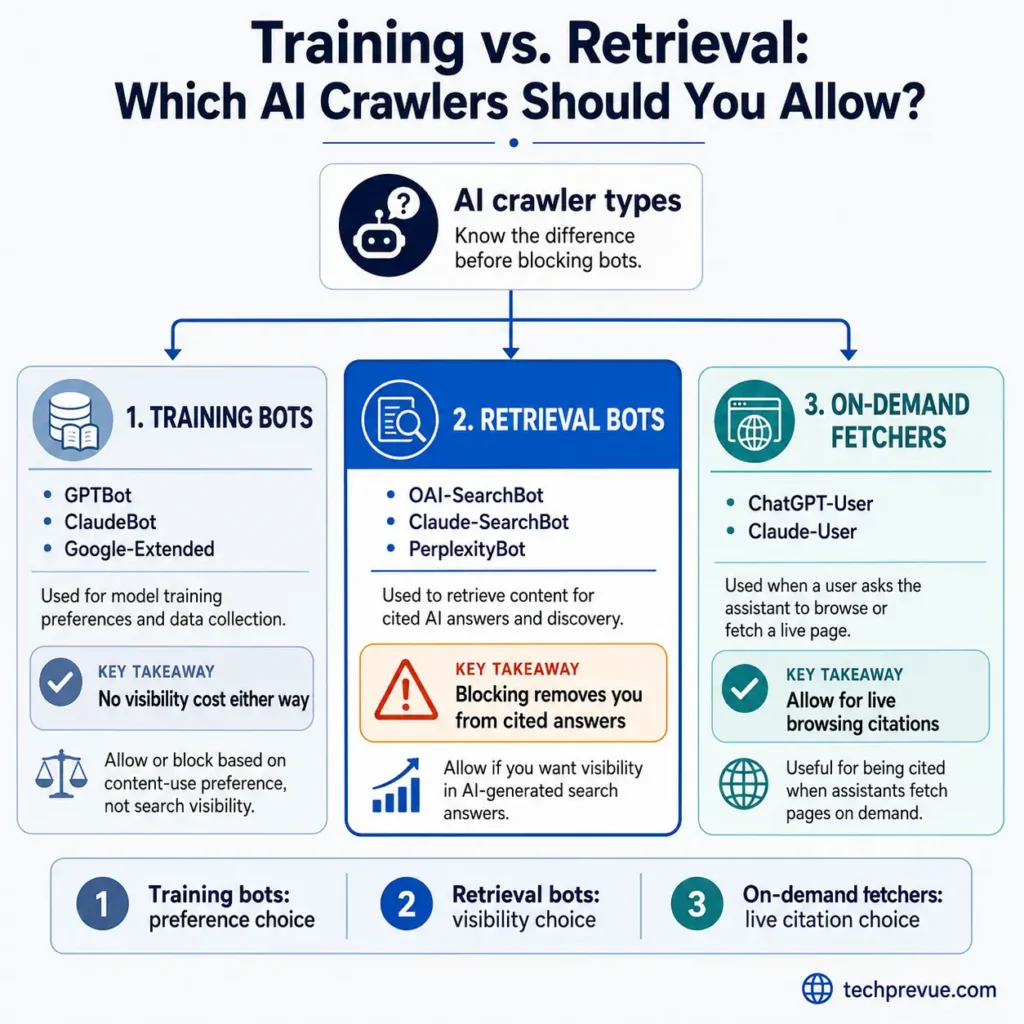
AI search readiness means AI crawlers can access your content and extract clean answers from it. This is the fastest-changing pillar of any technical SEO checklist right now. ChatGPT, Perplexity, Claude, and Google’s AI Overviews now cite sources directly, and the same technical foundation that serves Googlebot decides whether these systems can use your pages at all.
26. Audit robots.txt for AI Training Crawlers
Training crawlers scrape your content to build future model knowledge: GPTBot (OpenAI), ClaudeBot (Anthropic), and the Google-Extended token (Google’s Gemini and Vertex AI training control — see Google’s crawler documentation). Google-Extended isn’t a separate crawler and blocking it doesn’t touch Google Search rankings.
Blocking training bots is a legitimate content-ownership choice with no visibility cost either way — they don’t drive citations or referral traffic, allowed or not.
You’re done when: each training bot has a deliberate, documented allow or block — not one inherited from an old blanket rule.
27. Audit robots.txt for AI Retrieval and Citation Crawlers
Retrieval crawlers are different: they fetch pages in real time to answer live queries and cite you by name. The main ones are OAI-SearchBot (ChatGPT Search), Claude-SearchBot (Anthropic), and PerplexityBot. Block one by accident — often via that same old blanket rule — and your pages stop appearing in that engine’s cited answers, often within hours.
One caveat: Perplexity has been documented using undeclared crawlers that don’t always honor robots.txt, so a clean directive on your end doesn’t guarantee compliance on theirs.
You’re done when: every retrieval crawler is explicitly allowed, unless you’ve deliberately decided that engine shouldn’t cite you.
28. Structure Content for AI Extraction
AI systems don’t read pages; they extract chunks. Pages that get cited share a pattern: strict heading hierarchy, a direct answer in the first sentence or two under each heading, tables for comparisons, and defined terms stated plainly.
You’re seeing the format in this article — each major section opens with a compact answer before the detail. That structure serves featured snippets and AI citation with the same effort. For the strategy behind it, this tech SEO checklist pairs with the deeper concepts in the complete technical SEO guide.
5 Mistakes That Undo Everything Above
Even a well-built technical SEO checklist fails if you make these five mistakes.
- Fixing in discovery order, not priority order. Meta descriptions before noindex audits is polishing brass on a sinking ship.
- Auditing once and never again. Redesigns, new plugins, and CMS updates reintroduce issues constantly. The frequency column exists for a reason.
- Trusting lab scores over field data. Your users don’t browse on a simulated desktop connection.
- Redirecting every dead page to the homepage. Google reads irrelevant redirects as soft 404s.
- Shipping staging settings to production. Noindex tags, blocked robots.txt, wrong canonicals — the launch-day classics. Make a post-deploy check mandatory.
Free Tools That Cover 90% of This Checklist
| Tool | Covers | Cost |
|---|---|---|
| Google Search Console | Indexing, CWV field data, sitemaps, security alerts | Free |
| PageSpeed Insights | LCP, INP, CLS diagnostics per page | Free |
| Screaming Frog | Crawling, redirects, broken links, canonicals, noindex | Free to 500 URLs |
| Rich Results Test | Schema validation | Free |
| securityheaders.com | HTTP security headers | Free |
| Bing Webmaster Tools | Second index perspective, IndexNow | Free |
Paid crawlers (Semrush, Ahrefs, Sitebulb) add scheduling, history, and scale. For a single site under a few thousand pages, this free-tool stack is enough to run the entire technical SEO checklist without paying for anything.
FAQ
What is included in a technical SEO checklist?
A complete technical SEO checklist covers crawlability (robots.txt, sitemaps, redirects), renderability (JavaScript execution, status codes), indexability (canonicals, noindex, duplicates), Core Web Vitals and speed, mobile usability, HTTPS and security, structured data, site architecture, and AI crawler access. The 28 items above cover all nine areas with fixes and pass conditions.
How do I perform a technical SEO audit step by step?
Start in Search Console: review the Pages report for indexing issues and the Core Web Vitals report for performance failures — the first two stops on this technical SEO checklist. Then crawl the site with Screaming Frog to surface broken links, redirect chains, noindex tags, and canonical errors. Fix Critical-priority items first, validate each fix, and recrawl.
How often should I run a technical SEO audit?
Run a full seo technical audit checklist quarterly for established sites, monthly for large or frequently updated ones. Always run one immediately after a redesign, migration, or CMS change — that’s when the worst issues are introduced. Automate weekly broken-link and uptime checks in between.
Can I complete this checklist without a developer?
Mostly, yes. Search Console reviews, sitemap submission, broken-link fixes, schema, and content consolidation are all non-developer tasks — especially on WordPress, where RankMath or Yoast handles canonicals and sitemaps. You’ll want developer help for server-level items: redirects at scale, security headers, and deep Core Web Vitals work.
What’s the difference between technical SEO and on-page SEO?
Technical SEO is site-wide infrastructure: whether search engines can crawl, render, and index your pages at all. On-page SEO optimizes individual page content — titles, headings, keywords, internal links — once that access exists. Technical problems cap what on-page work can achieve, which is why audits start here.
Does technical SEO still matter for AI search engines like ChatGPT?
More than ever. AI systems crawl the same web through their own bots, and they can only cite content they can access and parse. Clean crawl access, fast pages, strict heading structure, and valid schema are exactly what makes content extractable — the technical checklist and the AI visibility checklist are now the same document.
How long does a technical SEO audit take?
A first pass on a small site takes 2–4 hours with free tools. A thorough technical seo audit checklist run on a large site — including log analysis and Core Web Vitals work — spans one to two weeks. Recurring quarterly checks are much faster, usually under an hour, because you’re verifying rather than discovering.
Which items should I fix first?
The four Critical items in this technical SEO checklist that control visibility outright: confirm the site is indexed, clear accidental robots.txt blocks, remove stray noindex tags, and consolidate duplicate site versions. Then move to broken links and Core Web Vitals, which affect the most pages per hour of effort.
Sources: issue-prevalence figures are from Semrush’s published analysis of 50,000+ domains. Core Web Vitals thresholds are from Google’s web.dev documentation. HowTo schema deprecation was announced by Google in September 2023. The non-200 rendering behavior was clarified in Google’s JavaScript SEO documentation update, December 2025.
