
Originally Published: 2016, May 14 · Date Updated: 2026, 15 August
In 2024, two researchers reviewed 78 instructional videos that secondary-school science and history teachers had chosen for their own classrooms. They were not checking whether the videos covered the right topic. They were checking whether the videos were built in a way students could actually learn from.
The answer was uneven. Some design principles showed up reliably, others were broken or missing, and the three groups of principles that matter most rarely appeared together in the same video. La Torre and Désiron’s design review, published in Technology, Knowledge and Learning, is a useful correction to the idea that adding a screen improves a lesson by itself.
The benefits of audio visual aids in teaching come from showing what words alone cannot: relationships, processes, sounds, and events students cannot observe directly. Those benefits are conditional rather than automatic. An aid earns its place when it serves a clear learning objective and gives students something specific to do with it.
Technology should assist the teacher, not take the teacher’s place. The same pattern holds across technology in education generally: access to more technology does not by itself produce better learning.
- The Benefits of Audio Visual Aids at a Glance
- What Are Audio Visual Aids in Teaching?
- Advantages of Audio Visual Aids in Teaching
- Where the "We Remember 90% of What We Do" Figures Came From
- Visual and Auditory "Learning Styles": What Teachers Should Know
- How to Choose the Right Audio-Visual Aid
- How to Use Instructional Videos Effectively
- Disadvantages of Audio-Visual Aids in Teaching
- Make Audio-Visual Materials Accessible
- Audio-Visual Aid Checklist for Teachers
- Frequently Asked Questions
- The Bottom Line
The Benefits of Audio Visual Aids at a Glance
- Makes abstract ideas visible — diagrams, models and animations expose structure and relationships that language describes slowly.
- Brings inaccessible processes and places into the classroom — events that are unsafe, expensive, microscopic or long since past.
- Lets words, images and sound do different jobs — each channel carries the part of the explanation it handles best.
- Supports replay and review — a recorded demonstration can be examined again; a spoken one cannot.
- Turns watching into active learning — when paired with a task, prediction or explanation.
- Improves access when designed inclusively — captions, transcripts and alternatives stop meaning from depending on one channel.
Each benefit is expanded below with the drawback that comes with it. Audio-visual aids are not neutral additions to a lesson — every gain carries a cost.
What Are Audio Visual Aids in Teaching?
Audio-visual aids are instructional materials that carry information through sight, sound, or both. In education the term is used broadly enough to include purely visual resources such as maps and diagrams alongside recordings and materials that combine pictures with sound.
The term is written both as audio-visual aids and audio visual aids. Both refer to the same category of teaching material.
An audio-visual teaching aid does not have to be digital. A physical model, photograph, wall chart, recorded conversation, teacher demonstration, animation or instructional video can all support a lesson.
Digital resources of this kind sit inside the wider field of ICT in education, which covers the technologies used to create, store, communicate and deliver educational information.
Types of Audio Visual Aids with Examples
| Type | Examples | Useful for |
|---|---|---|
| Audio aids | Recorded speech, podcasts, pronunciation models, music, sound recordings | Listening, languages, sound recognition |
| Visual aids | Charts, diagrams, maps, photographs, illustrations, models | Structure, location, comparison, relationships |
| Audio-visual aids | Instructional videos, narrated animations, documentaries, recorded demonstrations | Processes, procedures, events, demonstrations |
| Interactive multimedia | Simulations, virtual labs, quiz platforms, interactive presentations | Exploration, practice, problem-solving |
Interactive tools sit at the far end of that range because they ask students to respond rather than watch. Quiz and response platforms such as Kahoot belong here, as do simulations and virtual laboratories.
Projected and Non-Projected Aids
Teacher training courses often use a second split that cuts across the table above.
Non-projected aids work without equipment: chalkboards, whiteboards, charts, flashcards, maps, globes, models, specimens, printed pictures and bulletin boards. They cost little, fail rarely and need no power.
Projected aids require a device: projectors, interactive displays, films, slides, documentary video and screen-shared computer material. They can show motion, scale and detail that a chart cannot, at the cost of setup, budget and reliability.
The best option is not the most advanced one. A simple diagram may explain a relationship better than an elaborate animation, and a real object or live demonstration may be more useful than either. Our guide to the uses of computers in education covers where the projected end of that range fits.
Advantages of Audio Visual Aids in Teaching
The benefits below share one condition. Audio-visual aids are most useful when they solve a specific teaching problem: revealing a relationship, demonstrating a process, reproducing an important sound, providing access to an otherwise unreachable event, or giving students another chance to examine something difficult.
1. Make Abstract Ideas Visible
Some ideas resist explanation in spoken or written language. A diagram, model, animation or demonstration makes relationships and processes inspectable.
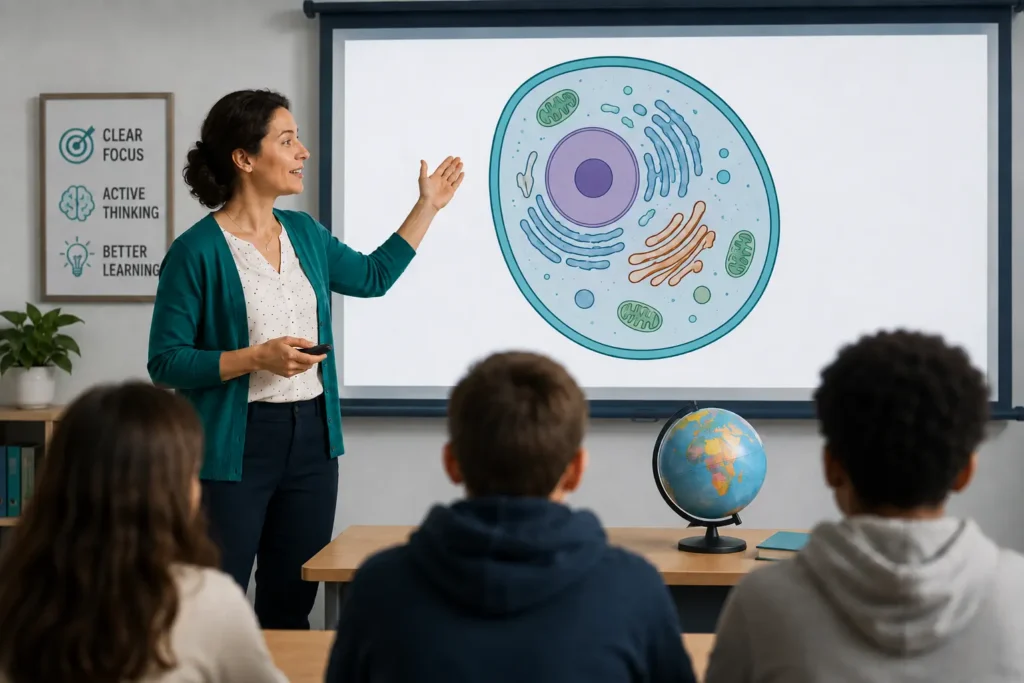
A science teacher can use an animation to show cell division. A geography teacher uses a map to explain spatial relationships, and a mathematics teacher uses a diagram to show how quantities or geometric elements relate to one another.
The media earns its place when it makes the subject easier to reason about, not when it makes the lesson look more modern.
Drawback — a clear visual can produce the feeling of understanding without the substance. Students who watched a well-made animation of a process often cannot reconstruct it from memory, which is why the explanation has to be handed back to them afterwards.
2. Bring Inaccessible Processes and Places Into the Classroom
Audio-visual material can bring events into the room when direct observation would be unsafe, impractical, expensive, too fast, too slow or physically impossible.
Students can watch historical footage, a chemical reaction, movement inside machinery, an ecosystem on another continent, or a laboratory procedure before attempting it themselves. Photographs show geographic environments; animations represent phenomena too small, large, distant or slow to observe normally.
Drawback — a three-minute video about an ecosystem or a historical event selects what students see and what is left out. It is a representation, not the thing itself, and where students can safely handle the real object or run the experiment, direct experience teaches more.
3. Let Words, Images and Sound Do Different Jobs
Words, images and sounds carry different parts of the same explanation.
A teacher discussing the circulatory system speaks while pointing to the relevant path on a diagram. A language teacher plays a pronunciation example because the sound itself is part of what students need to learn.
Cynthia Brame’s review of effective educational video in CBE—Life Sciences Education sets out the reason this works: learners have limited working memory, so audio-visual aids need to divide the explanation between the two channels rather than let them compete. Managing that cognitive load is one of the three things the review asks teachers to plan for.
Drawback — the same limit works against you when channels duplicate each other. A slide of dense text read aloud word for word gives students two copies of one message and no second source of information.
4. Support Replay and Review
A spoken explanation disappears once delivered, and some demonstrations cannot be repeated several times in a lesson. Recorded audio and video let students return to difficult material.
Replay helps most with pronunciation, musical features, physical movements, laboratory technique and processes that unfold in stages. It is also what makes recorded material valuable outside class, one of the more durable advantages of online learning.
Drawback — replay is not a teaching strategy. Repeating the same explanation without changing the task tends to reproduce the original misunderstanding rather than repair it.
5. Turn Watching Into Active Learning
Watching a video is an activity. It is not automatically a learning activity.
Ask students to predict an outcome, find evidence, identify an error, compare alternatives, explain a process or apply an idea. Brame’s review names active learning as one of the three factors teachers should plan for when using video, alongside cognitive load and student engagement.
The difference is simple:
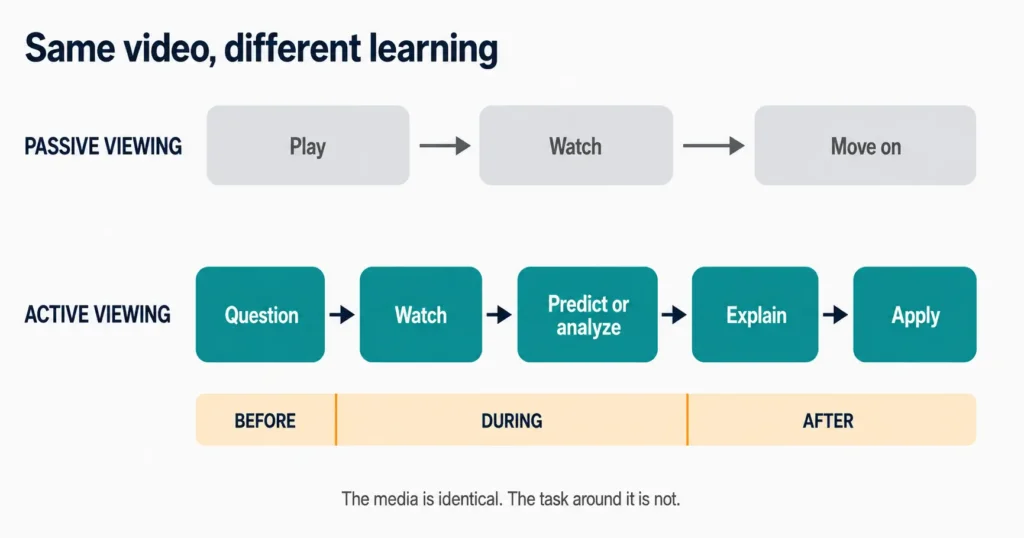
- Passive viewing: play → watch → move on.
- Active viewing: question → watch → predict or analyze → explain → apply.
The media can be identical. What students are asked to do with it changes the outcome.
Drawback — a polished video can make a classroom look busy while students do very little. Production quality and student thinking are unrelated variables.
6. Improve Access When Materials Are Designed Inclusively
Audio-visual media can make information more available, but only when accessibility is settled at the point of selection rather than after a student discovers they cannot use it.
Captions, transcripts, readable text, clear sound, alternative descriptions and accessible formats keep important information from depending on a single presentation channel. Under WCAG 2.2 Success Criterion 1.2.2, W3C requires captions for prerecorded audio in synchronized media, with a narrow exception where the media is itself an alternative for equivalent text.
Drawback — automatic captions are frequently wrong on exactly the words that matter, which are subject-specific terms. Captions that garble the technical vocabulary are worse than none, because they look like access.
Where the “We Remember 90% of What We Do” Figures Came From
Almost every article on this topic quotes a version of the same numbers: we remember 10% of what we read, 20% of what we hear, 50% of what we see and hear, 90% of what we do. They are usually attributed to Edgar Dale’s Cone of Experience.
Those percentages have no research behind them. Dale never linked levels of his cone to recall rates. The figures were superimposed onto the diagram around 1970 by a source no one has identified, and researchers tracing the history have found similar round-number maxims circulating in print as far back as 1913.
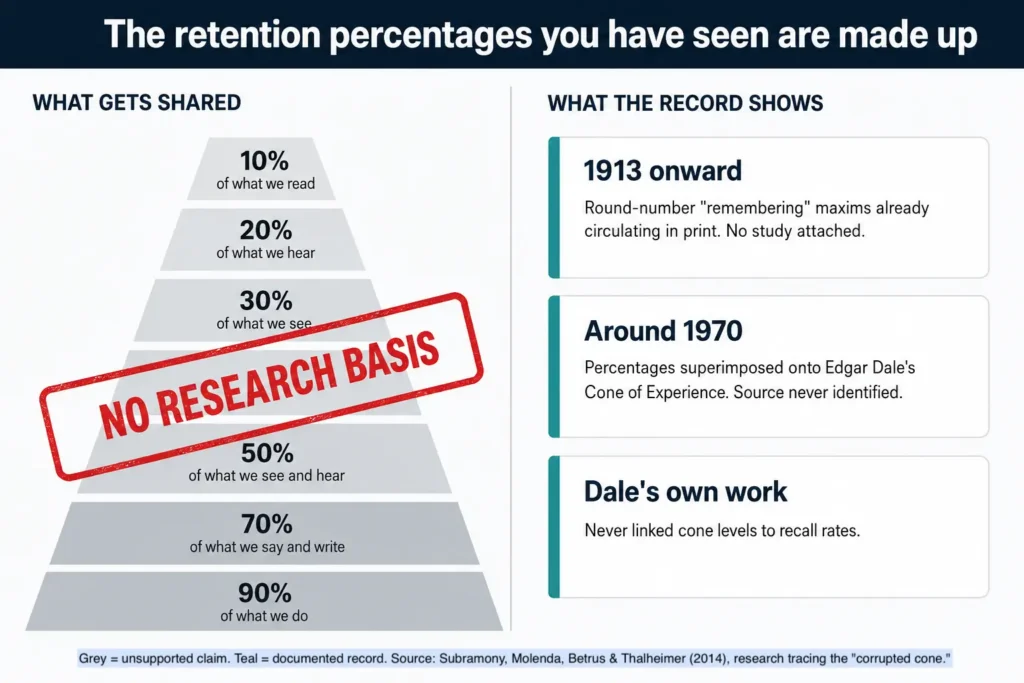
The University of Strathclyde’s summary covers why the “learning pyramid” should be dropped, and a detailed trace of the corrupted cone documents how the numbers changed shape across decades of reprinting.
A practical test worth keeping: figures that land on perfect multiples of ten across every category are almost always invented. Real measurement is messier than that.
This matters for teaching decisions. The made-up percentages are used to argue that richer media automatically produces better retention, which is the exact claim the 78-video review found teachers cannot rely on.
Visual and Auditory “Learning Styles”: What Teachers Should Know
Older teaching advice sorts students into categories such as “visual learners” and “auditory learners,” then recommends matching lesson format to the label.
Research does not support the matching claim. Husmann and O’Loughlin gave hundreds of undergraduate anatomy students the VARK questionnaire and then tracked how they actually studied. Their 2019 study in Anatomical Sciences Education found that most students did not study in line with their reported style, and that those who did gained no advantage in the course. Specific strategies, such as practising microscope work, predicted grades regardless of style.
The belief has proved durable anyway. The American Psychological Association has flagged both the absence of evidence and the cost of acting on it, including time spent tailoring lessons to categories that do not predict anything.
Students do differ in prior knowledge, ability, interest, language proficiency, disability and preference. Those differences are real and they matter. They are not the same as a fixed sensory category.
Choose the form of presentation according to what is being learned:
- Pronunciation needs sound, because sound is part of the subject.
- Geography benefits from maps, because location and spatial relationship are the content.
- Anatomy benefits from diagrams and models, because students need to inspect structure.
- A laboratory or mechanical procedure benefits from demonstration, because movement and sequence are the point.
The learning objective determines the medium. A label attached to the learner does not.
How to Choose the Right Audio-Visual Aid
The first question is not “what technology can I add?” It is “what will this aid help students understand or do?”
1. Start With the Learning Objective
Decide what students should know, explain, recognize, compare or perform after the lesson.
If they need to compare quantities, a chart may help. If they need to carry out a procedure, a demonstration makes more sense. If a plain explanation, a discussion, a physical object or a hands-on activity already gets there, multimedia adds cost without adding learning.
2. Ask What the Aid Reveals
A good audio-visual aid does a job. It should reveal a relationship, a sequence, a sound, a location, a structure, a change over time, or a process students cannot observe directly.
If it decorates information that is already clear, leave it out.
3. Review the Whole Thing First
A video can cover the correct topic and still move too quickly, use unfamiliar vocabulary, assume prior knowledge your students lack, carry irrelevant material or use examples that cut against the lesson.
Watch or read the complete resource before the lesson, not the first two minutes.
4. Check Accessibility
Ask whether every student can reach the information the task requires. Consider readability, audio quality, captions, contrast, visual description, language difficulty, assistive technology, seating and alternative formats.
5. Consider the Real Room
A strong resource can fail in an unsuitable environment. Room size, lighting, speakers, screen visibility, equipment, internet reliability, file compatibility, setup time and cost all decide whether it works.
A low-tech aid that runs reliably beats a sophisticated one that interrupts the lesson twice.
Match the Aid to the Teaching Need
| Teaching need | Likely aid |
|---|---|
| Explain a relationship | Diagram |
| Compare quantities | Chart or graph |
| Show location | Map |
| Demonstrate change over time | Video or animation |
| Teach pronunciation or sound | Audio or video |
| Examine physical structure | Model, photograph or diagram |
| Demonstrate a procedure | Live or recorded demonstration |
| Observe an inaccessible place or event | Photograph or video |
| Practice a decision | Simulation |
| Compare several examples | Images, clips or diagrams |
This is a starting point, not a rulebook. Begin with the teaching problem, then choose the simplest medium that solves it.
How to Use Instructional Videos Effectively
Telling students what to look for and discussing it afterwards is sound advice, but it leaves out the middle. Treat video as a before, during and after activity instead.
1. Before the Video
Tell students why they are watching. Give them a question, a prediction, an observation target or a problem.
“Watch carefully” directs nothing. “Watch for the moment the reaction changes, and be ready to explain why” gives attention a job.
2. During the Video
Pause where a pause creates useful thinking time. Students can predict the next step, explain what just happened, compare an observation against an earlier prediction, identify evidence or describe a change.
Avoid stopping so often that the structure of the explanation falls apart.
3. After the Video
Do more than ask whether everyone understood. Ask students to explain the process without replaying it, solve a related problem, compare examples, identify a misconception, defend an interpretation or apply the idea somewhere else.
The goal is to move students from watching information to using information.
Disadvantages of Audio-Visual Aids in Teaching
More media does not mean more learning. Audio-visual aids fail in predictable ways, and each problem below has a fix that costs less than the problem does.
1. Too Much Information Arrives at Once
A slide with dense text, moving graphics, narration, background music, labels and a second diagram, while the teacher is also talking, may look educational element by element. Together those elements compete for a fixed amount of attention.
Fix — cut what does not teach, signal the part students should look at, and break long material at meaningful stages rather than arbitrary ones. Put labels next to what they describe instead of in a distant key.
2. Decorative Media Competes for Attention
A photograph, icon, animation, transition, sound effect or music track does not become instructional by appearing in educational material.
Fix — remove anything that does not explain, demonstrate, organize, signal or supply needed context. Students should not have to work out which parts of a busy screen matter.
3. Students Become Passive Viewers
Technology stops helping when it does all the explaining and leaves students with no reason to retrieve, question, predict, practise or discuss.
Fix — attach a task to every viewing. If you cannot name what students will do with the material, the material is not ready to use.
4. Media Can Oversimplify or Misrepresent a Topic
An instructional video is a source and needs evaluating like one. Documentaries, animations, diagrams, news clips, simulations, social video and AI-generated media can omit context, flatten causation, contain errors or project more certainty than the evidence supports.
Fix — check the claim, not the production quality. Polish is not accuracy.
5. Technology Interrupts the Lesson
Buffering, low volume, unreadable projection, pop-ups, advertisements, login screens, incompatible files and failed equipment all move attention away from learning. Personal devices in the room add their own pull, one of the better-documented negative effects of smartphones in classrooms.
Fix — test the file on the room’s equipment before the lesson and keep a workable alternative ready.
What the Design Research Asks You to Do
The 78-video review grouped multimedia design principles by the kind of cognitive load they affect. That grouping doubles as a practical checklist for evaluating audio-visual aids before a lesson.
| Goal | What it means | What to do before the lesson |
|---|---|---|
| Reduce unnecessary processing | Strip out anything that does not teach | Remove decorative images, background music and animated transitions; label diagrams in place |
| Manage necessary processing | Break required load into handleable pieces | Segment long material at meaningful stages; pre-teach key vocabulary; signal what to look at |
| Support productive processing | Give students a reason to think | Set a question before viewing; pause for prediction; ask for an explanation afterwards |
The finding worth acting on is that these three rarely appeared together in the same video. A resource can satisfy one group and still fail the lesson.
Make Audio-Visual Materials Accessible
Settle accessibility when audio-visual aids are chosen or created, not after a student finds that key information is unavailable to them.
Before using an audio-visual aid, check that:
- spoken information carries accurate captions;
- captions represent important speech and meaningful non-speech sound;
- essential visual information exists in another form where needed;
- projected text is readable from the back of the room;
- important audio is clear enough to hear over the room;
- color is not the only way meaning is signalled;
- an alternative format exists where the original creates a barrier.
W3C defines captions as synchronized alternatives for speech and other audio needed to understand the media, and defines audio description separately as narration of important visual detail. They solve different problems and one does not substitute for the other.
Accessibility does not make a lesson less visual or less interactive. It stops the meaning of the lesson from depending on one route in.
Audio-Visual Aid Checklist for Teachers
Before using audio-visual aids in a lesson, ask:
- Does it support the learning objective?
- Does it reveal, explain or demonstrate something words would handle worse?
- Have I reviewed the complete material?
- Is the information accurate and appropriate for this group?
- Can every student reach the important content?
- Is unnecessary text, sound, animation or decoration competing for attention?
- Will students do something specific with it?
- Have I tested the equipment and the file in this room?
- Do I have an alternative if the technology fails?
An aid that clears those nine questions is far more likely to work as a teaching tool than as classroom decoration.
Frequently Asked Questions
What are the main types of audio-visual aids?
Teaching aids fall into four broad groups: audio, visual, audio-visual and interactive multimedia. Audio aids include recordings and spoken material. Visual aids include diagrams, charts, maps, photographs and models.
Audio-visual materials combine sound with visual information, while interactive multimedia lets learners make choices, explore, practise and receive feedback. Teacher training courses often add a second split between projected aids, which need equipment, and non-projected aids, which do not.
What are some examples of audio visual aids used in the classroom?
Charts, diagrams, maps, models, photographs, recorded speech, instructional videos, narrated animations, presentations, demonstrations, simulations and interactive quiz platforms are all common examples.
Which one is best depends on what students need to observe, hear, compare, practise or explain.
What is the main advantage of audio-visual teaching?
Its main advantage is the ability to represent information in the form the learning task requires.
A process can be demonstrated, a relationship visualized, a sound heard, or an event students cannot reach brought into the room. The benefit comes from choosing the right representation, not from the technology itself.
What are the disadvantages of audio-visual aids?
The main ones are overload from too many competing elements, decorative media that draws attention without teaching, passive viewing, inaccurate or oversimplified content, and technical failure during the lesson.
None of these are arguments against using audio-visual aids. They are arguments for reviewing material before class and attaching a task to it.
Do students really remember 90% of what they do?
No. Those percentages are not research findings. They were attached to Edgar Dale’s Cone of Experience around 1970 by an unidentified source, and Dale himself never connected the cone to recall rates.
Treat any set of retention figures that lands on perfect multiples of ten as folklore rather than evidence.
Are visual and auditory learning styles scientifically supported?
Students have preferences, strengths, support needs and different levels of prior knowledge, but research does not support matching instruction to fixed “visual” or “auditory” learning styles as a way to improve learning.
Choose the medium according to the content and the task instead. Students learning pronunciation need to hear sound; students studying spatial relationships benefit from a map or diagram.
The Bottom Line
The benefits of audio-visual aids in teaching are real and they are conditional. An aid works when it shows something words handle badly, when the material has been reviewed before the lesson, and when students are given something specific to do with what they see and hear.
The two claims most often used to sell these tools are the two with the least support behind them: that richer media automatically improves retention, and that lessons should be matched to a student’s sensory learning style. Neither survives contact with the evidence.
What survives is narrower and more useful. Start with the teaching problem, choose the simplest medium that solves it, cut everything that does not teach, and hand the thinking back to the student.
