
Quick answer: What is Kahoot? It is a game-based learning platform where a host displays quiz questions on a shared screen and players answer on their own phones, tablets, or laptops. Kahoot launched publicly in 2013 from Oslo, Norway, and is now privately owned. Joining a game is always free, but hosting on the free plan caps most sessions at 10 players.
Most people meet the platform the same way. A teacher projects a six-digit PIN, thirty phones light up, and the room gets loud for the next four minutes.
What nobody explains in that moment is what the platform costs, who owns it, or why a free account suddenly refuses to let the eleventh person join.
This guide answers all of it. Every player limit below was checked against Kahoot’s own support documentation, which the company last updated on 31 July 2026.
- What is Kahoot?
- When was Kahoot made?
- Kahoot features in 2026
- Is Kahoot free? Plans and player limits
- How to play Kahoot
- How to make a Kahoot
- Advantages of Kahoot
- Disadvantages and limitations
- Is Kahoot safe for students?
- Kahoot alternatives compared
- Kahoot in Indian classrooms
- Should you use Kahoot?
- Frequently asked questions
What is Kahoot?
Kahoot is a quiz platform built around live, timed, multiple-choice games used for teaching, corporate training, and entertainment. A host writes a set of questions, launches a game, and shares a PIN. Players join Kahoot at kahoot.it or through the mobile app and answer on their own devices.
The design depends on one split. Questions and answer options appear on the host’s big screen, while player devices show only coloured shapes and symbols that match those options.
That forces everyone to look up at the same screen, then down at their hands. It is why the format works in a physical classroom and feels flat over a bad video call.
What is Kahoot actually replacing? In most classrooms, a paper review quiz or a show of hands.
What does “a kahoot” mean?
A kahoot is a single quiz or game on the platform, in the same way a “doc” is a single file in Google Docs. The company writes its brand with an exclamation mark, Kahoot!, and uses the lowercase word for the games themselves.
So a teacher “makes a kahoot,” then “hosts a kahoot.” Most people drop the exclamation mark in everyday use.
How a Kahoot game actually works
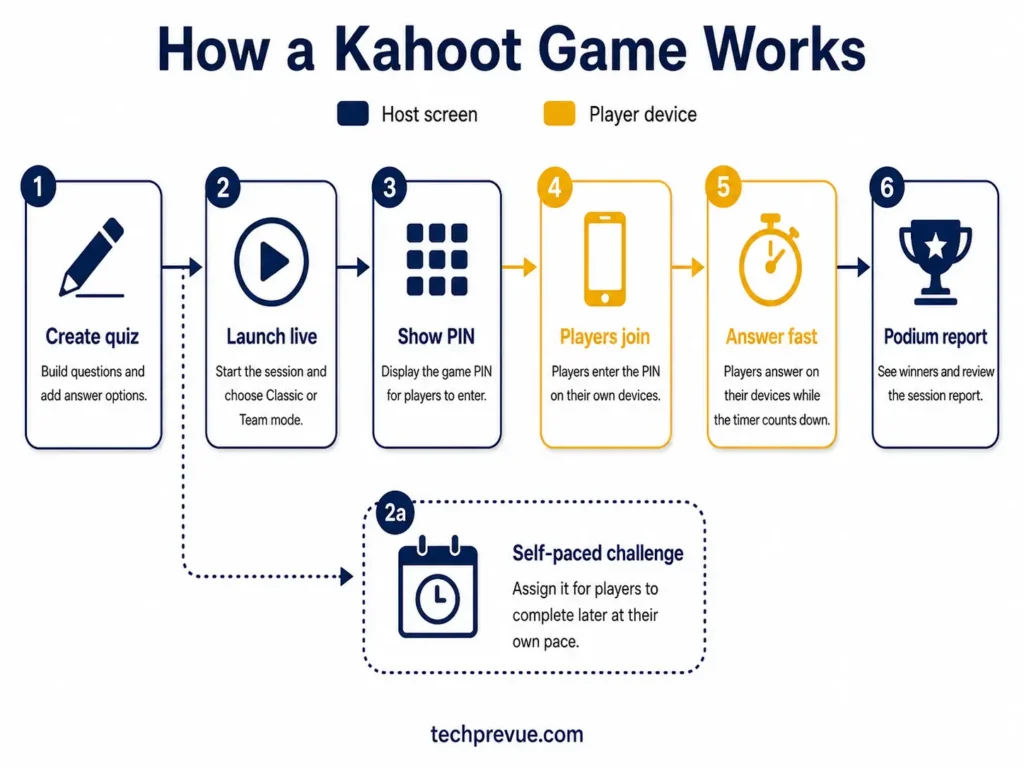
Here is the full sequence, from creation to results:
- The host builds a kahoot — a set of questions with two to four answer options each, plus a timer and point value per question.
- The host launches a live game and picks a mode: Classic, where every player competes alone, or Team mode, where groups share one device.
- A game PIN appears on the host screen. Players enter it at kahoot.it, pick a nickname, and wait in the lobby.
- Each question is displayed on the shared screen with a countdown. Players tap the shape matching their answer.
- Points are awarded for correct answers and speed. Answer faster, score higher. A leaderboard appears between questions.
- The game ends with a podium and a downloadable report showing which questions the group got wrong.
There is a second mode worth knowing. Instead of hosting live, a host can assign a kahoot as a self-paced challenge with a deadline, which works for homework or asynchronous training.
What is Kahoot used for?
| Setting | Typical use | Mode |
|---|---|---|
| K-12 classroom | Review before a test, vocabulary drills, lesson starters | Live |
| Higher education | Lecture check-ins, attendance, concept polling | Live |
| Corporate training | Onboarding, compliance refreshers, product knowledge | Live or assigned |
| Events and conferences | Audience warm-ups, icebreakers, prize rounds | Live |
| Home | Family trivia, birthday games, revision with parents | Live |
The common thread is a group in one place, at one time, with a shared screen. Kahoot is weakest when that condition is missing.
When was Kahoot made?
Kahoot was made in 2012 and released to the general public in September 2013. The underlying technology came out of academic research at the Norwegian University of Science and Technology (NTNU) several years earlier.
Co-founder Morten Versvik developed it as part of his master’s work with Professor Alf Inge Wang, building on an NTNU project that put quiz games into university lectures. Versvik then founded the company in Oslo with Johan Brand, Jamie Brooker, and Åsmund Furuseth.
Kahoot timeline
| Date | Milestone |
|---|---|
| Pre-2012 | Quiz-in-lecture research at NTNU under Professor Alf Inge Wang |
| 2012 | Company founded in Oslo, Norway |
| March 2013 | Private beta shown at SXSWedu in Austin, Texas |
| September 2013 | Public launch |
| March 2021 | Moves to the main list of the Oslo Stock Exchange |
| May 2021 | Announces the acquisition of US K-12 platform Clever, completed that September |
| July 2023 | Agrees to a take-private offer at NOK 35 per share, about NOK 17.2 billion |
| January 2024 | Delisted from Oslo Børs |
| By 2026 | Free plan runs as Kahoot! Go, with Basic, Pro, and Premium+ listed under legacy plans |
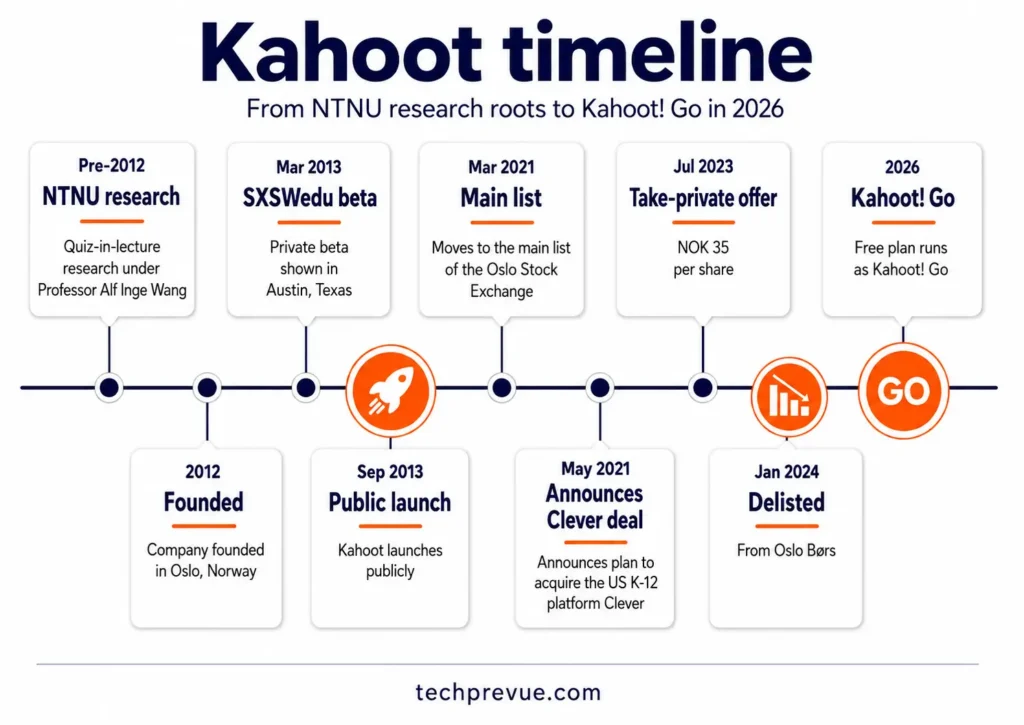
So both common phrasings of the question have the same answer. When did Kahoot come out? September 2013 for everyone, March 2013 for the invited beta crowd at SXSWedu.
Who owns Kahoot today?
Kahoot has been privately held since January 2024. It is owned by a consortium led by Goldman Sachs Asset Management, alongside General Atlantic, KIRKBI (the investment company of the family behind LEGO), and members of Kahoot’s own management team.
The consortium’s offer valued the company at roughly NOK 17.2 billion, and delisting from the Oslo Stock Exchange completed on 23 January 2024. You can confirm the ownership structure on Kahoot’s company page.
One correction worth making, because older articles repeat it constantly: Kahoot is not a standalone product with nothing around it. The Kahoot Group also owns Clever, DragonBox, Poio, Drops, Actimo, Motimate, and Whiteboard.fi.
Kahoot features in 2026
The feature list matters less than which features you can actually reach without paying. Here is the honest split:
| Feature | What it does | Availability |
|---|---|---|
| Multiple choice and true/false | The core question types | Free |
| Question bank and ready-made kahoots | Search and reuse published quizzes | Free |
| Images, GIFs, and YouTube clips in questions | Adds context and slows the guessing | Free, with a larger image library on paid tiers |
| Advanced question types | Multi-select, polls, word cloud, open-ended, puzzle, slider | Paid tiers |
| AI question generation and PDF-to-quiz | Builds a draft quiz from a topic or an uploaded document | Offered from the free Kahoot! Go dashboard; check your own account for usage caps |
| Image reveal effects | Hides an image behind a grid that clears as the timer runs | Original image free, grid variants on paid tiers |
| Team mode | Groups share one device and discuss before answering | Paid tiers |
| Reports and analytics | Per-question and per-player accuracy | Basic free, detailed on paid tiers |
| Assign self-paced challenges | Homework or async training with a deadline | Free, within your player cap |
| Integrations | Google Classroom, Microsoft Teams, and video conferencing tools | Free, varies by tier |
| Custom branding | Your logo and colours on the game screens | Paid tiers |
Feature availability shifts between tiers more often than the player limits do. Treat this table as a planning guide and confirm anything mission-critical on the official plan pages before you buy.
What is Kahoot Language Learning?
Kahoot Language Learning is a separate feature inside the platform that teaches vocabulary through flashcards, short mini-games, and spaced repetition. The company says it supports more than 50 languages, including Spanish, French, German, and English.
It sits under a dedicated tab on kahoot.com rather than inside the quiz builder. This is worth knowing if you arrived expecting the classic quiz experience and found something that looks like a language app.
What is Kahoot Academy?
Kahoot Academy is the platform’s content community and marketplace. Educators, publishers, and subject-matter organisations publish verified kahoots there, which other hosts can find and reuse instead of building from scratch.
For a teacher short on preparation time, this is the fastest route to a usable quiz. Check the source profile before using anything with a class, since quality across published content varies.
Is Kahoot free? Plans and player limits
Yes, Kahoot is free to use, and it is always free to join a Kahoot game as a player. Students and audience members never pay and never need an account.
Hosting is where the limits appear, and they tightened considerably over the last few years. The free tier is now called Kahoot! Go.
The five Kahoot solutions
What is Kahoot selling, exactly? Five named solutions rather than one price ladder, and the names on the website do not match the tier names inside the product. Here is how they line up:
| Solution | Who it is aimed at | Entry price | Where it lives |
|---|---|---|---|
| Kahoot! Go | Anyone, free | $0 | create.kahoot.it |
| Kahoot!+ | Individual teachers, students, families | From $3/month | kahoot.com |
| Kahoot! One | Anyone wanting every feature and app in one subscription | From $19/month | kahoot.com |
| Kahoot! EDU | Whole schools and districts | Quoted per teacher licence | kahoot.com/schools |
| Kahoot! 360 | Businesses and professionals | From $19/month | kahoot360.com |
Two things trip people up here. Kahoot!+ splits internally into Bronze, Silver, and Gold, and Kahoot! One splits into One, One Max, and One Ultra — so the support documentation lists seven tiers where the website shows two products.
Entry prices were checked on 3 August 2026 with a 20% promotion running, so the $3 figure may be a discounted rate. Confirm on the official school and district plan pages before budgeting.
There is a sixth line worth knowing about, though it is not a plan. Kahoot! Study is a separate student-facing product built around flashcards, AI note conversion, study groups, and exam preparation rather than live group quizzes.
What is Kahoot Go, the free plan?
Kahoot! Go lets you create quizzes, host live games, assign self-paced challenges, and view basic reports at no cost. The catch is the participant cap, and the cap depends on the account type you selected when you signed up.
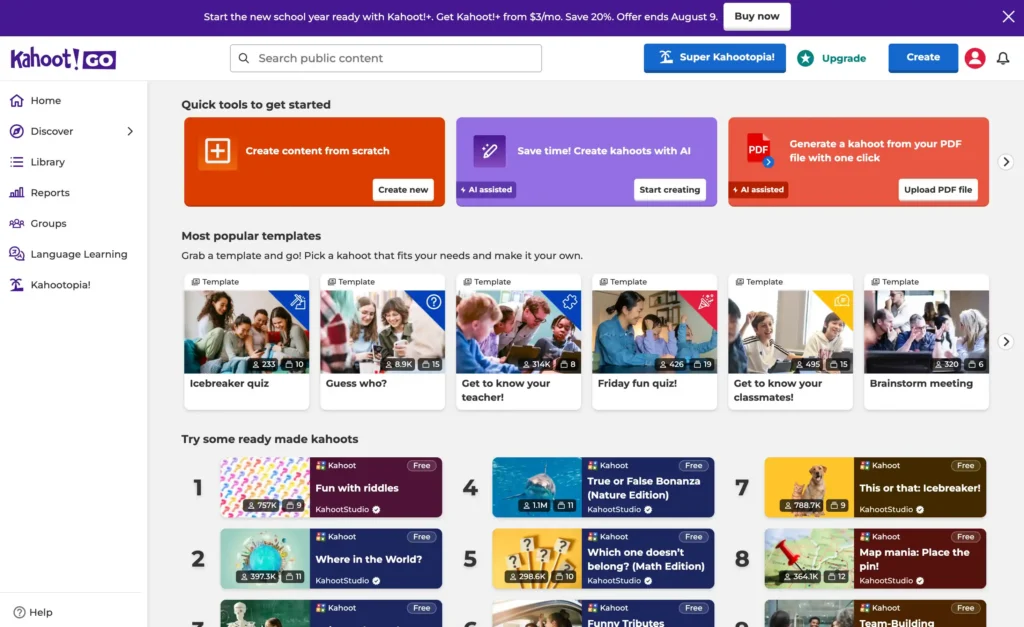
One point of confusion first, because the interface causes it. Kahoot! Go is a plan, not a separate product or a lighter app. The logo in the top-left corner reads “Kahoot! GO” only because that badge reflects whichever tier your account sits on, and it changes when you upgrade.
So there is no separate site, app, or login for it. You create at the same address, players still join at kahoot.it, and the games are identical — you simply have fewer players and fewer question types than a paid account.
| Account type chosen at signup | Players per session on Kahoot! Go |
|---|---|
| Personal or family | 10 |
| Student | 10 |
| Higher education teacher | 10 |
| K-12 school teacher | 40 |
| Business (free) | 3 for kahoots you create yourself |
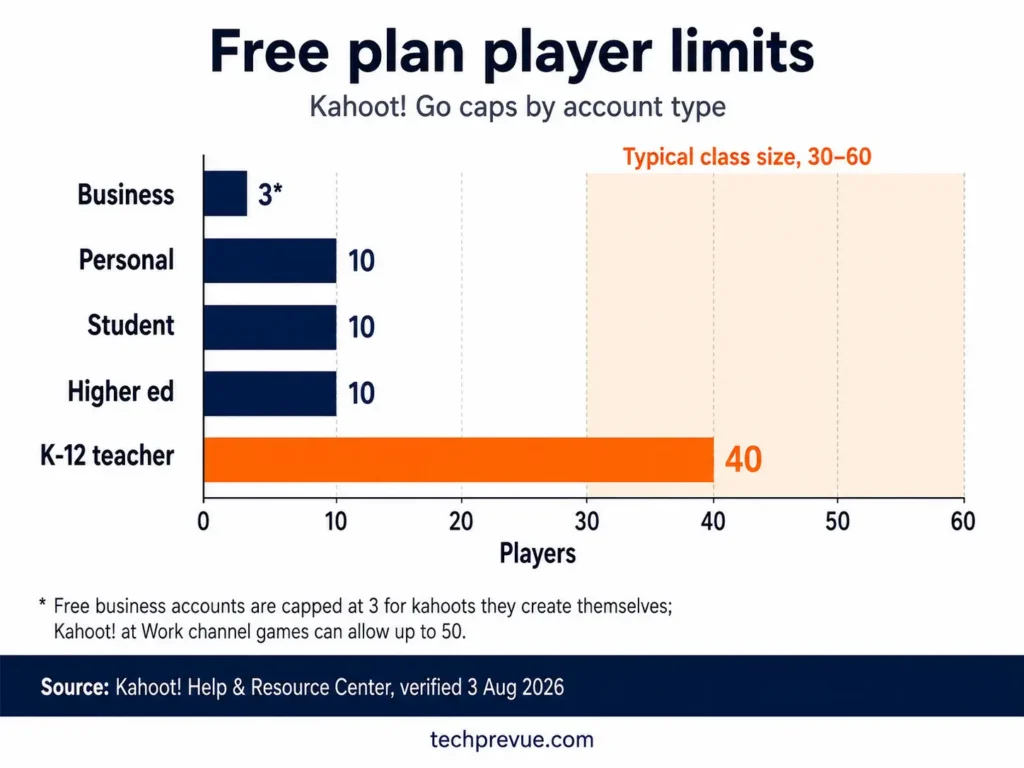
Those figures come from Kahoot’s official participant limit documentation. The company’s own summary puts free and basic plans in a range of 10 to 40 participants.
Warning: There is no soft overflow. Once a session hits its cap, the join screen simply blocks the next person, usually at the worst possible moment. If you are running a quiz for 35 students on a personal account, 25 of them will be locked out.
Two details catch people out. The account type you pick at signup determines your cap, and changing it afterwards is not straightforward. Free business accounts are capped at three players for their own kahoots, though ready-made games from the Kahoot at Work channel allow up to 50.
Paid plans compared: what is Kahoot Plus, One, and EDU?
Kahoot!+ is the entry subscription for one person, adding player headroom and better question types. Kahoot! One is the all-in-one option that bundles every feature, the learning apps, and premium content into a single subscription. Kahoot! EDU is the site licence for a school or district rather than an individual.
Player limits are the clearest way to tell the tiers apart:
| Plan | Live players per session | Best suited to |
|---|---|---|
| Kahoot! Plus Bronze | 50 | One classroom or a small team |
| Kahoot! Plus Silver | 100 | Two combined sections |
| Kahoot! Plus Gold | 200 | A year group or a department |
| Kahoot! One | 800 | Assemblies and large lectures |
| Kahoot! One Max | 2,000 | Whole-school or large events |
| Kahoot! One Ultra | 4,000 | Very large events |
| EDU Standard, School & District | 800 | Institution-wide licence |
| EDU Pro, School & District | 2,000 live, 10,000 assigned | Districts running remote assessment |
Prices move often and change by region, so verify the current figures on Kahoot’s official plan pages rather than trusting any third-party table, including recycled ones showing the retired Basic, Pro, and Premium+ names.
What is Kahoot 360?
Kahoot 360 is the business product line, priced per host rather than per learner. It runs on its own site, kahoot360.com, which is why searching kahoot.com for business pricing often turns up nothing useful.
Live participant caps run from 50 on the entry tier up to 5,000 on the top tier, with separate one-time event passes for conferences and town halls.
One tier is easy to misread. The 360 Express plan caps sessions at 15 players and 15 minutes, which makes it a trial rather than a working plan for a real team meeting.
Kahoot pricing in India
Kahoot serves India directly, and the site displays prices in local currency once you set your region. Personal plans are the cheapest entry point, while school and district licences are quoted per teacher with minimum licence counts that many individual Indian schools find steep.
For most Indian schools, the practical question is not price but the 40-player cap on a free K-12 teacher account. A section of 55 to 60 students, common in CBSE and state board schools, exceeds it.
The workaround costs nothing. Run the game in Team mode with two or three students per device, which also cuts the number of phones needed and reduces the mobile data load in schools without reliable Wi-Fi.
How to play Kahoot
To play Kahoot, go to kahoot.it or open the Kahoot app, enter the game PIN shown on the host’s screen, type a nickname, and tap the coloured shape that matches your answer before the timer runs out.
You do not need an account, a subscription, or a download. Here are the steps in full:
- Open kahoot.it in any browser on your phone, tablet, or laptop. Expected result: a single field asking for a game PIN.
- Type the PIN displayed on the host’s screen and tap Enter. Expected result: a nickname field appears.
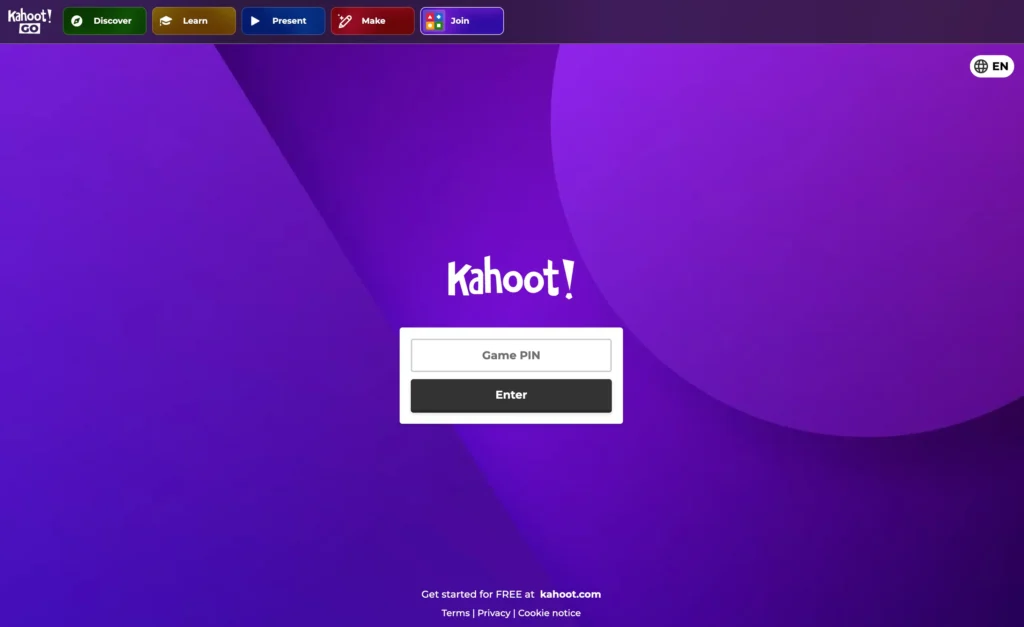
- Enter a nickname and tap OK, go. Expected result: your name appears on the host’s screen and you see a waiting message.
- Wait for the host to start. Do not refresh the page or you may lose your place.
- Answer each question by tapping the shape that matches your chosen option on the big screen. Faster correct answers score more points.
- Check the podium at the end, then look at the questions you missed rather than the ranking.
What to do when joining fails
| Problem | Most likely cause | Fix |
|---|---|---|
| PIN not accepted | The host has already started the game, or the lobby closed | Ask the host to relaunch or let you in |
| “That name isn’t allowed” | Nickname moderation is switched on | Use a clean name; see our list of funny Kahoot names that pass moderation |
| Stuck on the waiting screen | Weak connection or the host has not started yet | Stay on the tab; avoid switching apps |
| Kicked out mid-game | Session hit the host’s player cap, or you lost connection | Rejoin with the same PIN and nickname |
How to make a Kahoot
To make a Kahoot, sign in at kahoot.com, click Create, choose a blank kahoot or a template, add your questions and answer options, set a timer and point value for each, then save and either host it live or assign it.
The build itself takes about ten minutes for a ten-question quiz. The steps:
- Create a free account at kahoot.com, choosing the account type that matches your real use case. Expected result: you land on your dashboard. Note that this choice sets your player cap.
- Click Create in the top-right corner, or choose Create new on the “Create content from scratch” card. On kahoot.it the same action is labelled Make instead, which trips people up. Expected result: an empty question editor opens and saves itself to Your drafts.
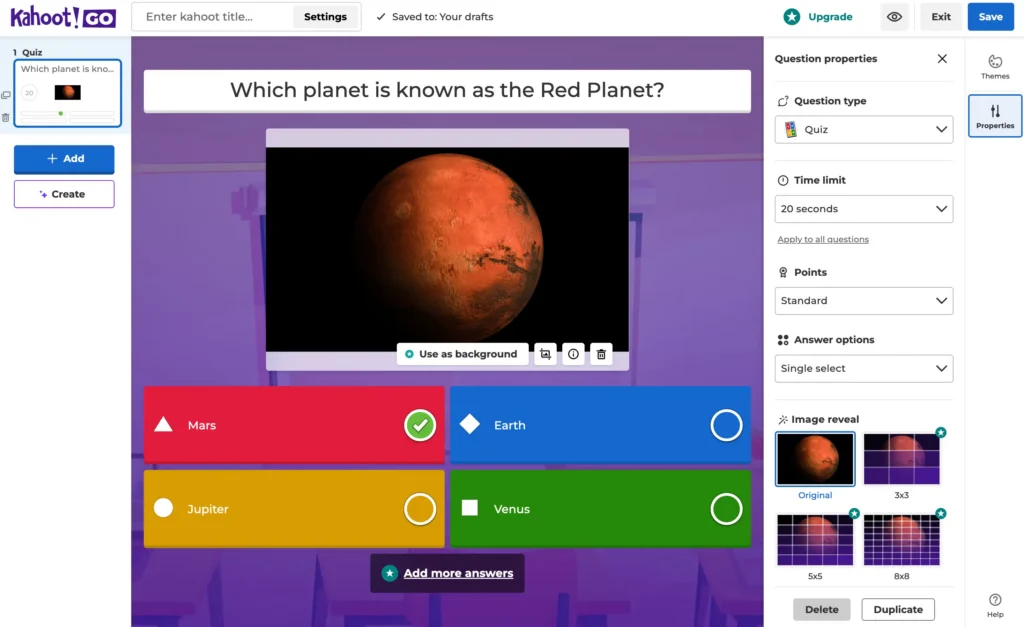
- Add your first question. Type the question text, fill in up to four answer options, and tick the correct one. Expected result: the four tiles show as a red triangle, blue diamond, yellow circle, and green square — the same shapes players will tap. Going beyond four answers is a paid feature.
- Set the time limit and points in the Question properties panel on the right. The default is 20 seconds and Standard points, and “Apply to all questions” pushes your choice across the whole quiz. Expected result: the timer value shows on the question thumbnail in the left rail.
- Add an image or a video clip where the visual carries meaning, not just decoration.
- Repeat for each question, then click Save and give the kahoot a title, description, and cover image.
- Click Play to host live, or Assign to send it out as a self-paced challenge. Expected result: a game PIN for live play, or a shareable challenge link for assigned play.
Before you press Play: check your player cap against your actual group size. This is the single most common reason a planned Kahoot session collapses in the first two minutes.
Two habits improve results more than any feature. Keep question text under about twelve words so it is readable from the back of the room, and write plausible wrong answers rather than obvious filler.
How to share a Kahoot
To share a Kahoot, open the kahoot from your library, click Share, and either send it to specific people by email or username, copy the link, or push it to a connected classroom tool.
There are four distinct sharing routes, and they do different things:
- Share with people — gives named colleagues access to view or edit the quiz itself.
- Copy link — anyone with the link can view and play the kahoot, subject to your visibility setting.
- Assign as a challenge — generates a link and deadline for self-paced play, which is what most teachers actually want for homework.
- Push to a classroom tool — sends it into Google Classroom or Microsoft Teams as an assignment.
One distinction saves confusion. Sharing a kahoot gives someone the quiz; it does not put them in your live game. Live games only work through the PIN, and that PIN is generated fresh each time you host.
Some collaboration and sharing options, including shared team spaces, sit on paid tiers.
Advantages of Kahoot
The platform earns its popularity for reasons that hold up under scrutiny, not just because students enjoy it.
- It forces retrieval, not rereading. Answering under time pressure is active recall, which teaching centres including Stanford’s IT teaching resources recommend for moving material into long-term memory.
- Quiet students participate. Nicknames give partial anonymity, so answering wrong costs far less socially than raising a hand and being wrong out loud.
- Setup cost for players is zero. No account, no app, no licence. That removes the friction that kills most classroom technology.
- You get instant formative data. The post-game report shows which questions the group failed, which tells you what to reteach tomorrow.
- It fits anywhere in a lesson. A pre-test to find gaps, a mid-lesson check, or a five-minute closer all work with the same tool.
The reporting point is the one most teachers underuse. The scoreboard is entertainment; the question-level accuracy data is the actual teaching value.
Disadvantages and limitations
An honest list matters more than a promotional one, and several commonly published drawbacks are simply out of date.
- The free player cap is severe. Ten players on a personal account is the binding constraint for almost every real classroom or team.
- Speed scoring rewards fast over careful. Students who think before answering are penalised. You can reduce this by lowering or switching off the points for a question.
- Multiple choice tests recognition, not reasoning. It suits vocabulary, dates, formulas, and definitions far better than analysis or writing.
- It needs connectivity and devices. One device per player, plus stable bandwidth for the host screen, is a real barrier in under-resourced schools.
- Competition raises anxiety for some students. The public leaderboard motivates most of a class and quietly discourages a few.
- Better question types cost money. Word clouds, open-ended answers, and polls sit behind paid tiers.
Note what is not on this list. Progress tracking is no longer difficult, despite older reviews saying so, because per-player and per-question reports are standard.
Is Kahoot safe for students?
Kahoot is broadly safe for classroom use, with stricter handling for younger children. The company applies age-based restrictions for students under 13 in the United States, under 14 in Korea, and under 16 elsewhere.
Young students on the free plan are limited to exactly 10 players in Classic mode under those protections. The details are set out in Kahoot’s age-based student restrictions documentation.
Four habits cover most of the practical risk:
- Keep your kahoots private rather than publishing them publicly.
- Never post or livestream a game PIN outside the room where the game is happening.
- Switch on nickname moderation before playing with a class.
- Keep personal details out of question text, including student names, photos, and locations.
Can students cheat in Kahoot, and how do hosts stop it?
Yes, students do try. The common routes are opening the quiz on a second device, copying a neighbour’s screen, or flooding the lobby with fake nicknames so the real game cannot start.
None of it requires a technical fix. Host settings and classroom habits handle almost all of it:
| Tactic | What it prevents |
|---|---|
| Randomise question and answer order | Second-device lookups and shared answer keys |
| Shorten the timer to 10–20 seconds | Searching for the answer mid-question |
| Switch on nickname moderation | Offensive and duplicate nicknames |
| Start promptly and keep the PIN off camera | Outsiders joining a lobby left open |
| Use Team mode with one device per group | Individual screen-copying |
| Review the report for impossible response times | Detecting automated entries after the fact |
| Treat scores as formative, never as a grade | Removes the incentive entirely |
That last row does most of the work. When a Kahoot score carries no academic weight, cheating stops being worth the effort.
Kahoot alternatives compared
Kahoot is not the only option, and it is not always the right one. What is Kahoot clearly better at than its rivals? Live, in-room energy with a shared screen.
The main contenders each pull in a different direction:
| Platform | Strongest at | Trade-off |
|---|---|---|
| Kahoot | High-energy live quizzes with a big shared screen | Tight free player cap; multiple choice dominates |
| Wayground (formerly Quizizz) | Self-paced homework and AI-generated activities | Less of a shared-room event |
| Blooket | Game variety that holds younger students’ attention | Game mechanics can overshadow the content |
| Gimkit | Repeated practice through earn-and-upgrade mechanics | Rewards persistence over accuracy |
| Mentimeter | Audience polling and word clouds in presentations | Built for presenting, not for quiz competition |
| Google Forms | Free, unlimited, and integrated with Classroom | No live game element at all |
One naming change is worth flagging, because it breaks a lot of older comparison articles. Quizizz rebranded to Wayground in mid-2025, and quizizz.com now redirects to wayground.com.
Free-tier limits across all of these change frequently. Check each vendor’s current pricing page before you commit a term’s lesson plans to any of them.
Kahoot in Indian classrooms
Kahoot works well against India’s shift toward experiential and activity-based teaching under NEP 2020, but three local constraints decide whether a session succeeds.
Class size versus the free cap. A free K-12 teacher account allows 40 players, and typical sections run larger. Team mode with two or three students per device solves this without a subscription.
Devices and data. Many students share a family phone rather than owning one. Team mode again reduces the device count, and running the host screen over Wi-Fi with players on mobile data spreads the load.
Language. Questions can be written in Hindi or any regional language, and the interface itself is available in several languages. A bilingual quiz, with the question in English and the options in the local language, works well for board exam vocabulary.
For schools mapping out a broader technology plan, our guide to ICT in education covers where quiz tools fit alongside other classroom systems, and our overview of the uses of computers in education sets the wider context.
Should you use Kahoot?
So what is Kahoot best at? Turning a room full of people into a group that is paying attention to the same question at the same moment.
Use it if you teach or train groups in one room, you need fast formative feedback, your material suits recall questions, and you either fit inside the free cap or can justify a paid tier.
Look elsewhere if your group is fully asynchronous, you need long-form or written answers, your learners lack devices, or your class exceeds 40 people and the budget is zero.
The platform is very good at one specific job. Problems almost always come from asking it to do a different one.
Frequently asked questions
What is Kahoot in simple words?
Kahoot is a quiz game you play in a group. One person shows the questions on a big screen, and everyone else answers on their own phone or laptop, scoring points for being right and fast.
Is Kahoot free for teachers?
Yes. A free K-12 teacher account allows up to 40 players per session, while personal, student, and higher education accounts are capped at 10. Larger classes need a paid plan.
What is Kahoot’s free player limit?
Ten players for personal, student, and higher education accounts, and 40 for K-12 school teacher accounts. Free business accounts are limited to three players for kahoots they create themselves.
Do students need an account to play Kahoot?
No. Players join at kahoot.it with just the game PIN and a nickname. Accounts are only needed to create and host kahoots.
When did Kahoot come out?
Kahoot came out publicly in September 2013, following a private beta shown at SXSWedu in March 2013. The company was founded in Oslo in 2012.
Who owns Kahoot?
A private consortium led by Goldman Sachs Asset Management, with General Atlantic, KIRKBI, and Kahoot’s management team. The company was delisted from the Oslo Stock Exchange in January 2024.
Can you play Kahoot alone?
Yes. Self-paced challenges let a single player work through a kahoot at their own speed, which makes it usable for solo revision.
What is Kahoot used for at work?
Onboarding, compliance refreshers, product training, and audience engagement at events. Business use runs on the Kahoot 360 plans, which are priced per host rather than per participant.
What is Kahoot One?
Kahoot! One is the all-in-one subscription that bundles every feature, the learning apps, and premium content into a single plan. It starts at a higher price than Kahoot!+ and is aimed at people who want the whole ecosystem rather than just bigger games.
Is Kahoot Go the same as Kahoot?
Kahoot! Go is the free plan on the Kahoot platform, not a different product. The “Kahoot! GO” badge you see beside the logo is a plan indicator, and it changes when you move to a paid tier.
What is Kahoot’s biggest limitation?
The free participant cap. Ten players on a personal account, or 40 on a K-12 teacher account, is below the size of most real classes and team meetings.
Does Kahoot work offline?
No. Both the host screen and every player device need an internet connection for live games and assigned challenges.
Player limits and plan names in this guide were verified against Kahoot’s official support documentation on 3 August 2026. Plans and pricing change; confirm current figures on the official site before purchasing.
