
The well-known social media platform Facebook has been tagged ‘SLOW.’ There are numerous reasons behind it. It’s been more than two years, and many of us do not know why Facebook is so slow, getting down, crashing, and having other bugs. It’s already 2024, and Facebook has not fixed this main issue yet. So, do you want to know why Facebook is loading slowly and how to fix Facebook being slow on your end? Let’s find out the main reasons behind it!
You can access Facebook in two ways:
- Through its official website www.facebook.com
- By installing the official Facebook app available for iOS and Android
People prefer to use the Facebook mobile app more because it’s said to be more convenient and enhance the user experience.
Why is Facebook so slow to load
Before moving on, we should know what makes Facebook so slow.
Many reasons make Facebook slow: expired browser cookies, cache, third-party toolbars, unnecessary browser extensions being installed, new updates, etc. It depends on what version of Facebook you use, an app or a website.
If the web version of Facebook is running slow, these may be the reasons-
- Third-party toolbars
- Browser extension conflict
- Outdated web browser
If you find your Facebook app slow, then these may be the reasons-
- New updates and features
- Not cleaning cache
Now, we shall discuss them in detail.
Top Reasons why Facebook is slow on Chrome (PC or Laptop)
Third-party toolbars
Third-party toolbars can hang your web browser. If you use such a laggy toolbar, it may seem Facebook takes forever to load. Sometimes, these unwanted third-party toolbars may be installed on your web browser without taking your concern. It can slow down your web browser and Facebook.
Unnecessary browser extension
Browser extensions add multiple extra features and functions to the Google Chrome web browser. It’s a software module for customizing web browsers for your personal and different types of needs, e.g., video downloading, ad blocking, free VPN, cookie manager, social sharing, grammar check, etc. However, adding them to your web browser might slow down your browser, and hence, everything you surf on it feels slow. So now you know why Facebook is slow to load.
Top Reasons why Facebook is so slow on every device
Outdated or unsupported web browser
One reason Facebook is running slow is that you are browsing it on an outdated or unsupported web browser. As a result, it doesn’t respond timely and may not function properly. So, keeping your browser up to date is a must if you don’t want your Facebook to be slow.
Server outage or downtime
Heavy load, glitches, or maintenance on data centers or servers may be a reason for Facebook downtime. When you have tried to do everything from your side, and Facebook is still loading slowly, you can check whether the Facebook servers are down by simply visiting these websites.
- https://downdetector.com
- https://www.isitdownrightnow.com
Internet issues
There can be a problem with your internet connection. For example, your internet speed is slow at a specific time or region, making Facebook slow. So, please make sure that you have high-speed internet broadband or Wi-Fi connectivity.
New updates and features
Another reason why is Facebook so slow is the latest updates and new features. When Facebook gets new updates and features, it needs more resources to run on your device. If your phone does not support the latest app, Facebook will not respond according to your need. Adding new features to the Facebook app isn’t any drawback, but it does put a load on servers and may not respond actively. So, it may feel that Facebook takes forever to load.
Third-party JavaScript
Nowadays, people use third-party JavaScript, such as auto-liker, auto followers, and auto commenting, to gain an advantage. So, if you have installed them on your web browser, we recommend you remove them.
Registry errors
The Windows registry is a database of settings and configurations for hardware, programs, and applications that run on your computer. One should never download programs, games, etc., from unauthorized websites. These might contain the Trojan virus in themselves, and they can install entries in your registry, which may corrupt it. Also, improperly uninstalled applications may result in registry errors. These registry errors cause problems while starting, running, and updating software applications.
So, from the issues mentioned earlier, some of these might be legitimate reasons if you are still worried about why Facebook is so laggy.
How to fix Facebook loading slow
Now that we know what makes your Facebook slow, we would be delighted to help you resolve your question: Why is my Facebook so slow?
Use a VPN
To answer your question – what is a VPN? It’s a virtual private network that ensures that no one can access your connection and data. It helps you stay hidden from your ISP, which might track you. There are so many other benefits to using a VPN.
Facebook has many servers worldwide. When your current location is far from the connected Facebook server, transferring and loading the required data can take longer. Therefore, connecting to a high-responding server that is much closer to where we live is good. It will also reduce the data transfer and loading time. For example, you can use a VPN to select the USA or UK location because the servers within these two countries may respond faster.
Recommended VPN services are:
- Hotspot Shield
- NordVPN
- Surfshark
- Private Internet Access
- ExpressVPN
Check the internet speed
Everyone needs an internet connection to access Facebook. First, you must check you have uninterrupted internet connectivity to use Facebook. If Facebook is loading slowly, then you must have faster internet.
Restarting your router or Wi-Fi can solve any problems related to your internet connection. Therefore, ensure you’re connected to the internet.
Clear cookies
It’s interesting to know that website servers store cookies on your computer through a web browser. Next time you access the same website, the web browser sends the cookie back to the web server. Cookies store a lot of information about you, and they can accumulate and act like junk, reducing the browser’s speed. So, clearing cookies can speed up Facebook.
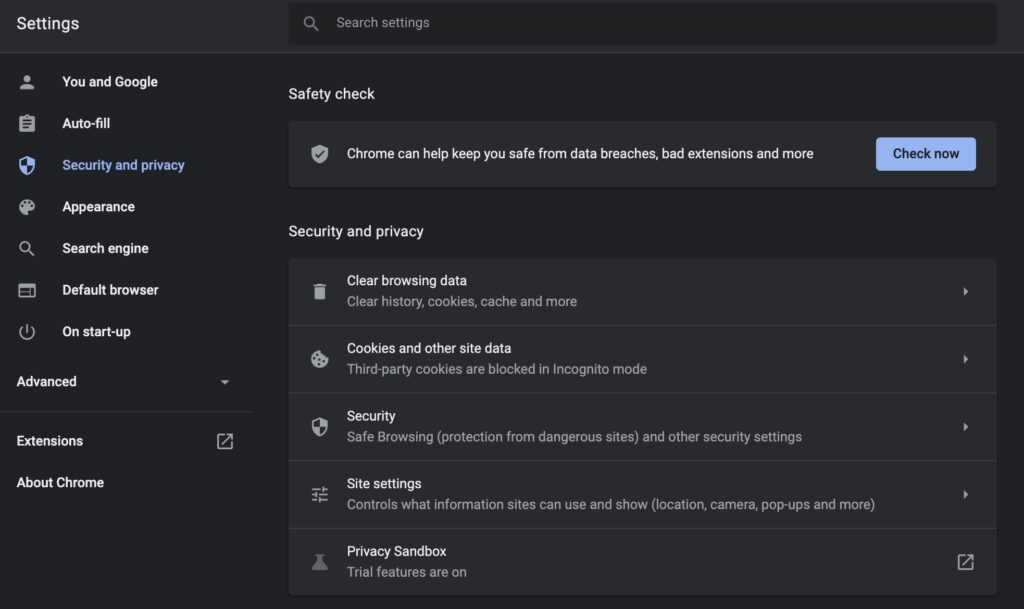
How to clean cookies on Chrome? Here’s how:
- Tap the three dots on the top right (menu button)
- Go to Settings
- Select Security and privacy
- Scroll to Cookies and other site data
- Click See all cookies and site data
- Click the Remove All button
Use the latest web browser
As mentioned earlier, using an outdated web browser can hinder your user experience. So, by using the latest web browser version, you will have the upper hand and might not face any issues like Facebook being slow.
Check Facebook downtime
Facebook’s data centers may be down for regular maintenance. You can check Facebook’s server activity online, whether the server is running or not, by visiting this website.
- https://downdetector.com
- https://www.isitdownrightnow.com
Another way is to check the official Twitter handle of Facebook @facebookapp. Facebook always keeps its users updated. Other users also tweet when Facebook faces server outages. The most used hashtag to check is the #facebookdown. Thus, server downtime may be a valid reason why is Facebook so slow.
Back in October 2021, when Facebook was down for more than 6 hours and lost around $100 million in income, they even tweeted why was Facebook down and owed an apology.
Disable extensions and toolbars
Disabling extensions and toolbars which are not in use can increase the loading speed of your browser. You can disable it by following these steps.
How to disable extensions on Google Chrome? Here’s how:
- Open the Chrome browser
- Then search for – chrome://extensions/
- Select click the Remove button to delete unused extensions
Try a different browser
Sometimes, the browser is the issue, not the app/website. For example, if your browser has some difficulties loading, you can use different browsers like Opera, Microsoft Edge, and Mozilla Firefox, which might help with your complication. Also, according to sources, we have heard that Mozilla Firefox runs Facebook smoother than Google Chrome. Be sure to try it out!
Clear cache/data or re-install the app
Regular use of an app builds up data and cache in your mobile phone. It takes up more and more space if you keep using them. If you ever run into trouble with your Facebook being slow, you can clear the data and a cache to bring it back to square one. However, having two different operating systems has two different ways.
Android OS
- Go to Settings
- Applications
- Find Facebook and click on it
- Go to Storage
- Tap on the Clear Data and Clear Cache buttons
Apple iOS
In iOS, we can only delete and reinstall the Facebook app because there is no option to clear the cache and data.
Clean cache and registry errors
CCleaner is a well-known app to clear cache and registry errors. It has been a trusted app for years. It is a very reliable application that can remove invalid path references from the system’s registry. Not only that, but it also helps you uninstall the software/delete the app from your personal computer or mobile device. There are many alternatives to CCleaner. You can use one of them.
How to clean registry errors using CCleaner? Here’s how-
- Download the CCleaner- https://www.ccleaner.com/ccleaner/download
- Click the Registry icon on the left side
- Select the items under registry clean that you want CCleaner to scan
- Then click scan for issues
- Click fix selected issues
- A prompt will appear. Click yes.
Wrap up
I hope you loved reading our article“ – “why is Facebook so slow” and enjoyed it to the fullest. If we helped your way out to fix Facebook being slow, we would be delighted to hear about that.