
Quick answer: WhatsApp read receipts are the two blue ticks that appear beside a message once the recipient opens the chat. One grey tick means sent, two grey ticks mean delivered, and two blue ticks mean read. You can switch them off under Settings → Privacy → Read receipts, but the setting works both ways, and it never applies to group chats or voice notes.
You sent the message four hours ago. Two grey ticks, nothing since. Were you read and ignored, or did the message never actually land on their phone?
That single question drives most of the confusion around WhatsApp’s tick system. And most guides answer only half of it.
This guide covers WhatsApp read receipts in full: what each tick confirms, what it can never tell you, the two places the privacy setting simply does not apply, and the side effect that almost nobody mentions — the same toggle quietly controls who you can see viewing your status. There’s also a section most readers in India will find genuinely useful, because Indian courts have already ruled on what a blue tick proves.
- What Are WhatsApp Read Receipts?
- Does WhatsApp Show Read Receipts on Everything?
- How to Turn Off Read Receipts on WhatsApp (Android, iPhone, and Web)
- What Changes When You Turn Off Read Receipts
- Read Receipts on WhatsApp Web and Desktop
- The Status Update Side Effect Nobody Mentions
- WhatsApp Read Receipts in Group Chats
- Why You See Two Grey Ticks but No Blue
- One Grey Tick for Hours: Blocked or Just Offline?
- Should You Turn Read Receipts Off? A Decision Guide
- Read Receipts for WhatsApp Business and the API
- Blue Ticks as Legal Proof in India
- Read Receipt Myths, Ranked by How Often They're Repeated
- Warning: Apps That Promise to Bypass Blue Ticks
- "Blue Tick" Means Two Different Things
- A Note on Color Accessibility
- Frequently Asked Questions
- The Short Version
What Are WhatsApp Read Receipts?
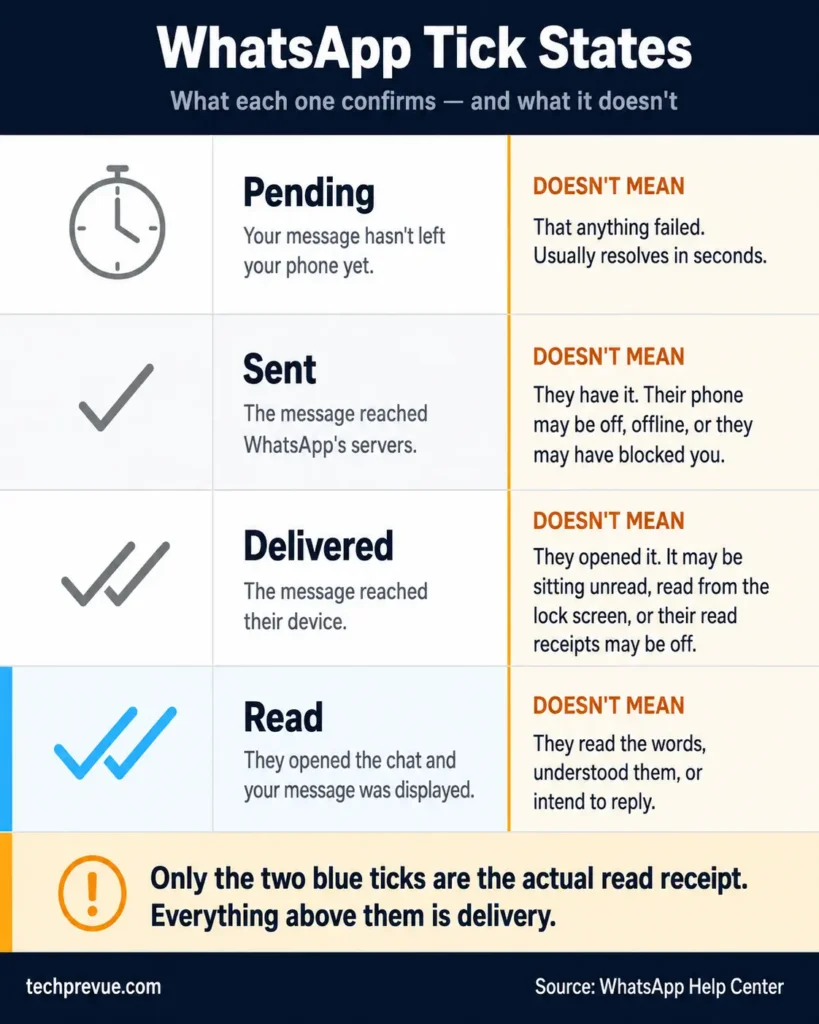
Read receipts on WhatsApp are the tick marks beside a sent message that report its progress. They tell you whether the message left your phone, reached the other person’s device, and was opened.
There are four states, not three. Most articles skip the first one.
| Indicator | State | What it confirms |
|---|---|---|
| Clock icon | Pending | The message hasn’t left your phone yet |
| One grey tick | Sent | It reached WhatsApp’s servers |
| Two grey ticks | Delivered | It reached their phone or any of their linked devices |
| Two blue ticks | Read | They opened the chat and it appeared on screen |
Only the last of these is the actual read receipt. Per the WhatsApp Help Center, everything before the blue ticks is a delivery signal, not a reading signal.
That distinction matters more than it sounds. Almost every “why hasn’t it turned blue” question resolves once you separate delivery from opening.
What each tick does not mean
This is where readers get burned, so it’s worth being blunt about the limits.
- A clock icon doesn’t mean failure. You’re offline or the connection stalled. It usually clears within seconds.
- One grey tick doesn’t mean they’re ignoring you. Their phone may be switched off, out of network, or in airplane mode.
- Two grey ticks don’t mean unread. The message may have been read in a notification banner, or their receipts may be switched off entirely.
- Two blue ticks don’t mean they read the words. The receipt fires the moment the message renders in an open chat. Someone can open a thread for an unrelated reason, scroll past your message, and trigger blue ticks without registering a single sentence.
WhatsApp read receipts are a display signal. They are not a comprehension signal, and it is certainly not an intent-to-reply signal.
Editing a message resets its read receipts
Read receipts reset when you edit a message. WhatsApp does this deliberately, so you can tell who has seen the corrected version rather than only the original.
This matters more than it sounds in group chats. Fix a typo in an announcement and the blue ticks start again from zero, which can look like nobody has read it.
Does WhatsApp Show Read Receipts on Everything?
No. Read receipts behave differently across message types, and two of them ignore your privacy setting completely.
This table is the part worth screenshotting.
| Message type | Receipt shown? | Privacy setting applies? | What triggers it |
|---|---|---|---|
| Text message | Yes | Yes | Opening the chat |
| Photo or video | Yes | Yes | Opening the chat |
| Document | Yes | Yes | Opening the chat |
| Voice note | Yes | No | Pressing play |
| View once media | Shows Opened | Yes | Opening the media |
| Disappearing message | Yes | Yes | Opening the chat |
| Group message | Yes | No | Every member reading it |
| Status update | Yes | Yes | Viewing the status |
| Channel post | No | — | Channels have no receipts |
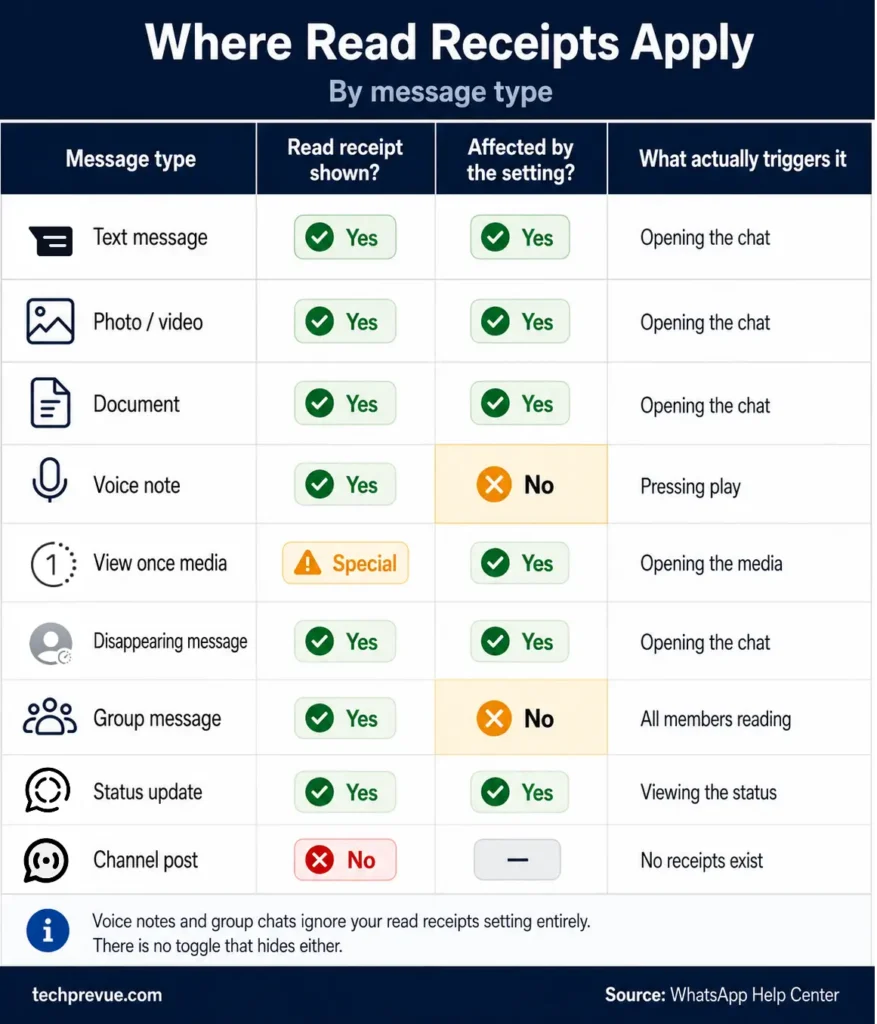
Voice notes deserve a note of their own. A sent voice message carries a microphone icon that turns blue when the recipient plays it, and WhatsApp records a separate “played” timestamp. Switching off read receipts does not hide it.
No setting anywhere in the app conceals a voice note play receipt, and switching WhatsApp read receipts off changes nothing here. If privacy on that specific point matters to you, ask the sender for text.
WhatsApp Channels sit at the opposite extreme. Channels are a broadcast format with view counts and reactions, so no per-person read receipt exists at all.
How to Turn Off Read Receipts on WhatsApp (Android, iPhone, and Web)
To turn off WhatsApp read receipts, open Settings → Privacy → Read receipts and switch the toggle off. WhatsApp read receipts settings live in the Privacy menu on every platform, and the change applies to your entire account rather than to one chat.
On Android:
- Open WhatsApp and tap the three-dot menu in the top right.
- Tap Settings.
- Tap Privacy.
- Scroll to Read receipts and toggle it off.
If your Settings screen still shows an Account entry, tap that first and you’ll find Privacy inside it. WhatsApp moved Privacy to the top level in newer builds, which is why older guides still send you through Account.
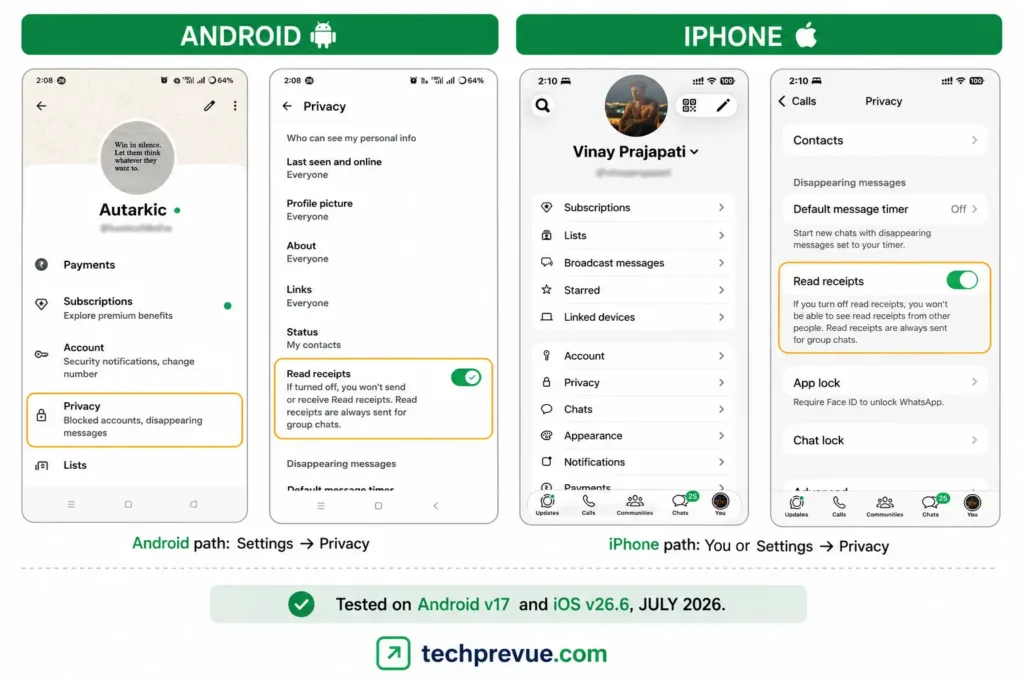
On iPhone:
- Open WhatsApp and tap You (your profile picture) or Settings in the bottom-right corner.
- Tap Privacy.
- Turn off Read receipts.
Tested on Android v17 and iOS v26.6, July 2026.
On WhatsApp Web and Desktop:
- Click the profile picture You or Settings.
- Select Privacy.
- Turn Read receipts off. Use toggle button on WhatsApp Web and untick on WhatsApp Desktop app (macOS).
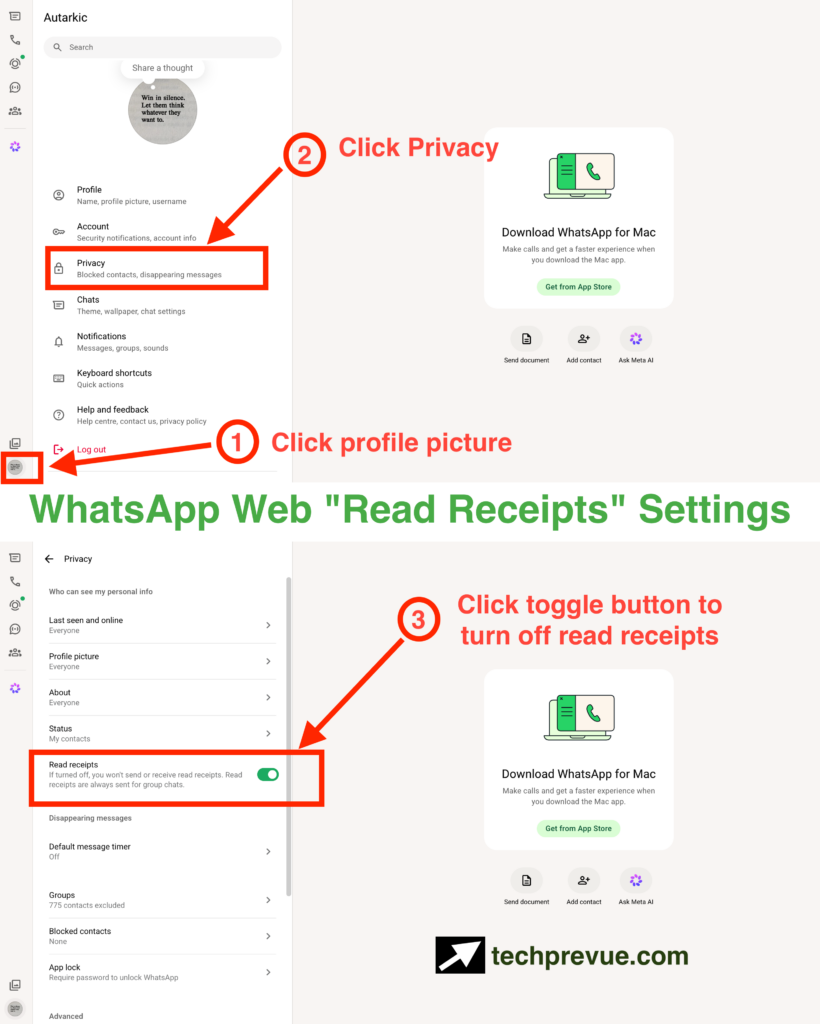
Plenty of guides claim the desktop client can only display this setting and that you have to change it on your phone. That was true of older builds, but it isn’t now — WhatsApp’s own Help Center gives the click-through path for changing read receipts on web and desktop directly.
The change applies instantly and syncs across every linked device, since the setting belongs to your account rather than to one phone.
What Changes When You Turn Off Read Receipts
Turning off read receipts stops your blue ticks appearing for other people in one-to-one chats. It also stops you seeing theirs. WhatsApp designed the setting as a mutual trade, and there is no way to keep one side without the other.
Here’s exactly what shifts the moment you flip it.
What it hides:
- Your blue ticks in individual chats
- Your blue ticks on photos, videos, and documents
- Whether you viewed someone’s status update
- Read receipts on messages you send — you lose these too
- Read timestamps inside the Message Info screen
What it does not hide:
- Read receipts in group chats
- Voice note play receipts
- Your last seen and online status, which is a separate setting
- Delivery ticks, which never stop
- Anything covered by Advanced Chat Privacy, which is a different feature entirely
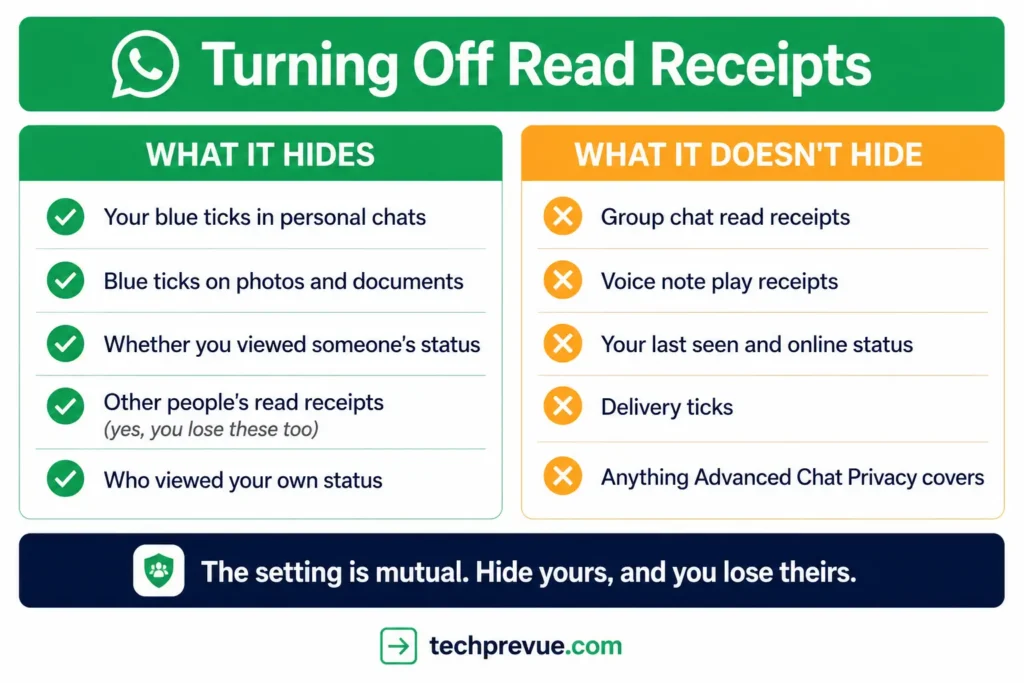
Most people leave the setting on for exactly this reason. You surrender your own visibility to gain privacy, and for anyone who relies on knowing their messages landed, that’s a poor exchange.
Can you turn off read receipts for one person only?
No. WhatsApp offers no per-contact control, so WhatsApp read receipts cannot be hidden selectively. The toggle is account-wide, so switching it off applies to every individual chat you have.
People often ask this hoping to hide from one specific contact while staying visible elsewhere. That option does not exist, and no legitimate setting produces it.
Does marking a chat as unread remove the blue ticks?
No. Marking a chat as unread only changes how the conversation appears in your chat list. The read receipt has already been sent, and the sender still sees blue ticks.
This is one of the most persistent misconceptions in the entire feature. The unread badge is a personal reminder tool, nothing more.
Does Advanced Chat Privacy hide read receipts?
No. Advanced Chat Privacy, which Meta introduced in April 2025, does three specific things and none of them touches your ticks.
When it’s on for a chat, the people in that chat can’t save its media to their gallery automatically, can’t ask Meta AI to answer questions or create images and summaries inside it, and can’t export the chat.
That’s the whole feature. It governs what leaves a conversation, not what’s visible inside one.
The two settings also work at different levels, which is the root of the confusion.
| Read receipts | Advanced Chat Privacy | |
|---|---|---|
| Scope | Your whole account | One chat at a time |
| Who controls it | You | Either participant, or a group admin |
| Where it lives | Settings → Privacy | Contact info, or Group permissions |
| Affects ticks | Yes | No |
Two limitations are worth knowing before you rely on it. Anyone in the chat running an older version of WhatsApp may still be able to share content out, and you won’t be told if someone is on an outdated build.
It also isn’t available in chats with businesses that use Meta to store messages and reply on their behalf.
One myth worth killing while we’re here: WhatsApp states that Meta AI cannot access your chats either way. It only reads messages people deliberately send to it, whether Advanced Chat Privacy is on or off.
Read Receipts on WhatsApp Web and Desktop
Read receipts behave the same way on WhatsApp Web and the desktop app as they do on your phone. The setting belongs to your account rather than to a device, so whatever you choose applies everywhere, and opening a chat on your laptop sends a read receipt exactly as opening it on your phone would.
That last point is the one that catches people out.
The open tab problem
The most common cause of read receipts you didn’t mean to send is a chat left open on a computer. WhatsApp Web reopens whichever conversation you had open last, and a message arriving in that conversation can register as read while you’re working in another window.
If your blue ticks appear at times you weren’t anywhere near your desk, this is usually why.
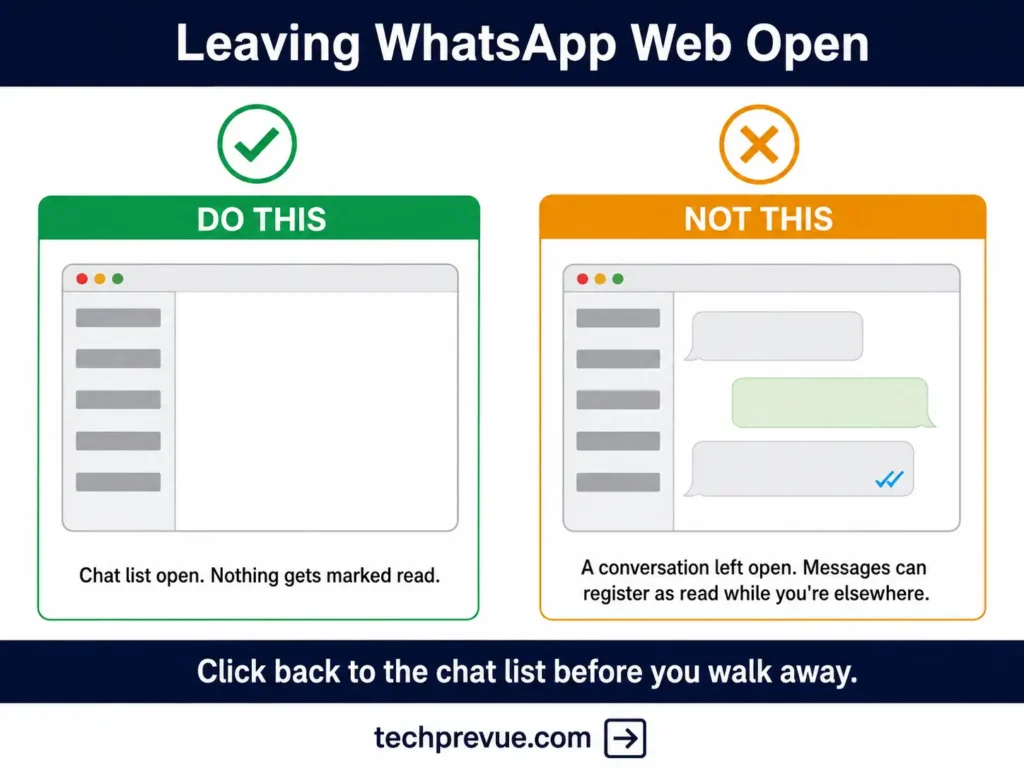
The fix is simple: click back to the chat list before you walk away, so no individual conversation is left open. On a shared or public computer, end the session properly instead.
How to see message info on WhatsApp Web and Desktop
There’s no long-press on a computer, so the route is different.
- Hover over the message you sent.
- Click the small arrow that appears at its top-right corner.
- Choose Message info. On the desktop app (macOS), it’s only Info.
You’ll get the same Read by and Delivered to lists with timestamps that the mobile app shows. There’s no shortcut key for it — the official shortcut list doesn’t include one.
What else changes on a computer
- Linked devices work independently. Since multi-device support arrived, your phone doesn’t need to be online for a read receipt sent from your laptop to reach the sender.
- Desktop notification popups follow the same rule as a phone’s lock screen. Reading the preview without opening the chat doesn’t send a receipt.
- The interface differs slightly. Mobile uses a toggle; the desktop client has historically used a checkbox, so don’t expect an identical-looking control.
The Status Update Side Effect Nobody Mentions
Turning off read receipts also blinds you to your own status viewers. WhatsApp’s own documentation on privacy settings confirms it: if a contact has read receipts switched off, you cannot see whether they viewed your status updates.
That rule runs in both directions. Switch your receipts off, and instead of a viewer list on your own status, WhatsApp shows a placeholder icon where the names would be.
This catches people out badly, and it rarely appears in guides to WhatsApp read receipts. Someone disables read receipts for a bit of breathing room in their chats, then wonders weeks later why their status views look strangely low.
If you post status updates regularly — for a small business, a reselling page, or just to stay visible with friends — this alone may be reason enough to leave the setting on. Weigh it before you flip the toggle, not after.
WhatsApp Read Receipts in Group Chats
Read receipts in WhatsApp group chats always show, no matter what anyone’s privacy setting says. The Help Center states this plainly: group receipts are always sent.
WhatsApp read receipts in a group also follow a stricter rule than most people expect.
- Two grey ticks appear once every participant has received the message
- Two blue ticks appear only once every participant has read it
That’s an “everyone” signal, not an “anyone” signal. In a 40-person office group, your message can sit on grey ticks for a full day because one member’s phone is switched off, even though 39 people read it within minutes.
How to see who read your group message
The Message Info screen gives you the per-person breakdown.
- Open the group chat.
- Long-press (or tap and hold) your sent message.
- Tap the info icon — the circled i. On some Android builds you’ll need to tap More options and then Info instead. On iPhone, tap Info.
You’ll get two lists, Read by and Delivered to, each with names and timestamps. In a large group, this is the only reliable way to tell partial delivery apart from partial reading.
What the Message info screen actually shows
Message info reports three states, not two, and the third one only applies to voice messages.
| State | Meaning |
|---|---|
| Delivered | It reached their phone or linked devices, but they haven’t seen it |
| Read or Seen | They read your message, or saw your photo, video, or audio file |
| Played | They played your voice message |
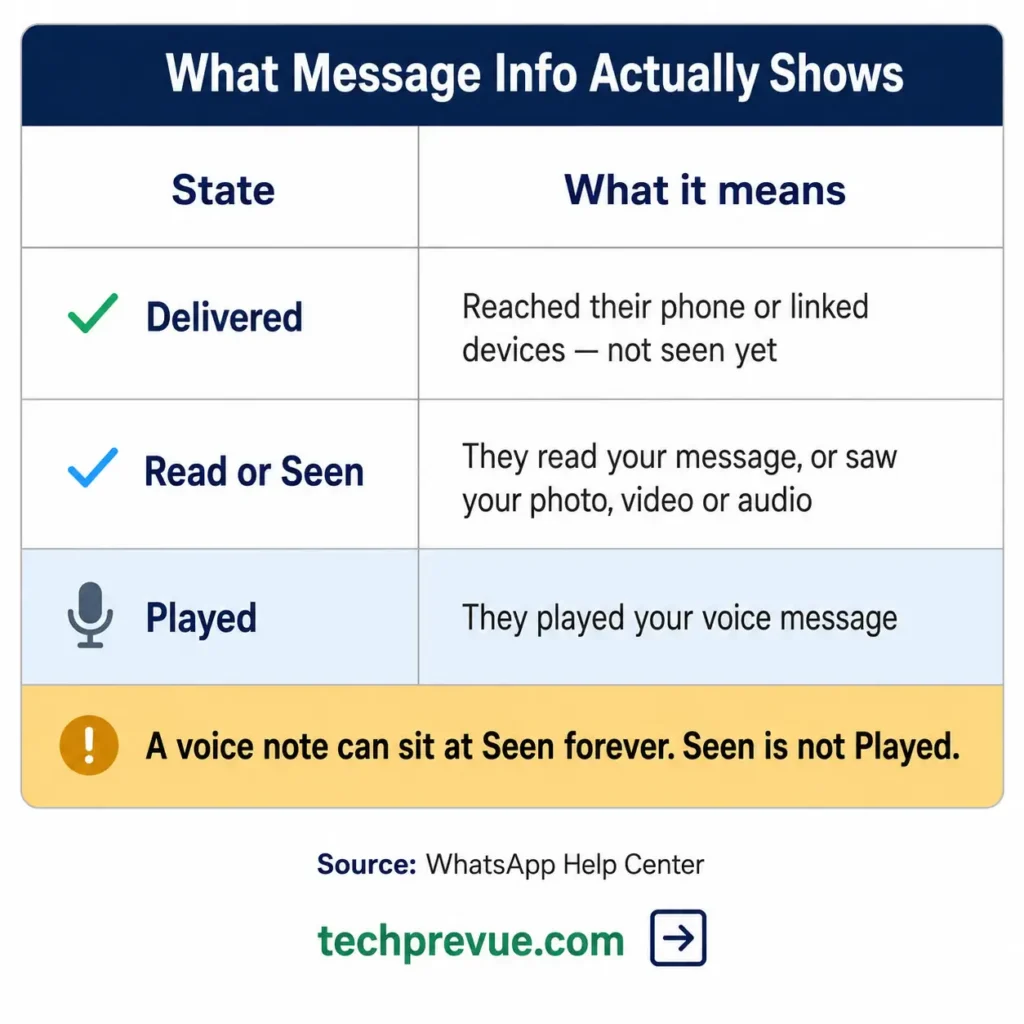
The gap between the middle and bottom rows is the useful part. A voice message can sit at Seen — meaning it appeared on their screen — without ever reaching Played.
So if someone tells you they haven’t listened to your voice note yet, Message info can confirm it. The screen works the same way in individual chats, not just groups.
One edge case worth knowing: if a member leaves the group, the Message Info screen still lists them with the original read and delivery data. The record doesn’t update retroactively.
Here’s the part that surprises people: someone who has switched read receipts off in their personal settings still appears in that Read by list. Groups are a receipts-always zone, and there is no opt-out.
Why You See Two Grey Ticks but No Blue
Two grey ticks with no blue means your message was delivered but the chat hasn’t registered as opened. Delivery is confirmed. What’s missing is the “opened” event.
Seven things cause it, roughly in order of likelihood.
- They haven’t opened the chat. Simple, and by far the most common.
- They read it from the notification. Both Android and iOS show message previews on the lock screen. Someone can read every word without opening WhatsApp, and the ticks stay grey.
- They have read receipts switched off. Then your ticks will never turn blue for them, no matter how carefully they read.
- They have you muted. Muting doesn’t block receipts, but a muted chat gets opened later, which produces long grey gaps.
- A linked-device sync gap. With multi-device support, a message delivered to a phone but opened on a poorly synced desktop can behave inconsistently. If the browser client is misbehaving generally, that’s a separate set of causes.
- The clock is wrong on one of the phones. WhatsApp lists incorrect date and time settings as a cause of tick problems, on either device.
- You’re not in their contacts and they haven’t replied yet. This one is genuinely obscure, and it’s covered next.
The unknown sender rule almost nobody knows
If you message someone who has never replied to you and hasn’t saved your number, WhatsApp may not report your read receipt at all. The recipient sees an in-app notice explaining that the sender won’t know they’ve read the message until they reply or save the contact.
This is a deliberate anti-spam and anti-harassment measure. It matters most for two groups: businesses messaging new customers, and anyone contacting a stranger for the first time.
If you run outreach and your read rates look inexplicably poor on cold contacts, this is often why. The messages are being read. The receipts just aren’t coming back.
One Grey Tick for Hours: Blocked or Just Offline?
You cannot confirm a block from the ticks alone. A message stuck on one grey tick might mean you’ve been blocked, but it might equally mean their phone is off, they’ve lost signal, or they’re in airplane mode.
WhatsApp built it this way on purpose. The blocked experience is designed to look identical to being offline, so that blocking stays private and safe for the person doing it.
What a stuck single tick can actually mean:
- Their phone is off and the message hasn’t reached any of their linked devices either — with multi-device support, a switched-off phone alone isn’t enough to stop delivery
- They’re in airplane mode or a dead zone
- They’ve deactivated the account or are moving between devices
- They’ve blocked you, which produces exactly the same single tick
People often try to stack other signals — a missing profile photo, a hidden last seen — but those can be switched off by privacy settings too. Circumstantial evidence is all you’ll ever get. WhatsApp will never confirm a block.
Should You Turn Read Receipts Off? A Decision Guide
There is no universally correct answer. Match WhatsApp read receipts to how you actually use the app.
| Your situation | Recommendation | Why |
|---|---|---|
| You need to know your messages were read | Keep them on | The setting is mutual; you’d lose that visibility entirely |
| You feel pressured to reply the second you open a chat | Turn them off | This is the one problem the setting genuinely solves |
| Most of your chats happen in groups | Little benefit | Group receipts stay on regardless of your setting |
| You post status updates regularly | Keep them on | You’d stop seeing who viewed your status |
| You run a business account | Keep them on | Read data is your only real engagement signal |
| You’re dealing with unwanted contact | Turn them off | It removes one signal a persistent sender can act on |
One honest note on the trade-off. Turning receipts off doesn’t stop people knowing you were online — that’s the last seen setting, which is separate.
And even that has a limit. WhatsApp states there is no way to hide when you are online or typing, so full invisibility isn’t something the app offers at all.
The airplane mode workaround, honestly assessed
You can read a single message without triggering a receipt by switching your phone to airplane mode before opening the chat. The read event is stored locally and reported once the connection returns.
The catch is what “once the connection returns” means in practice. You have to fully close WhatsApp before you disable airplane mode, otherwise the app syncs immediately and sends the receipt anyway.
It works, but it’s fragile. It breaks your notifications, it fails often on multi-device setups, and it’s not a habit worth building. If you find yourself doing this regularly, just switch the setting off.
Read Receipts for WhatsApp Business and the API
WhatsApp read receipts work the same way in the WhatsApp Business app as they do in the standard app. On the WhatsApp Business Platform (Cloud API), they surface as a read webhook status alongside sent and delivered.
For anyone measuring campaign performance, one detail changes how you should read your dashboard.
Messages sent to recipients who have read receipts switched off are recorded as delivered, even when the person has read them. Your reported read rate is therefore a floor, not a measurement. Real reach is always higher than the number, and no reliable public figure exists for the gap.
Three practical consequences:
- Never treat read rate as an open rate. It undercounts by an unknown margin.
- Compare read rates against your own baseline, not against benchmarks from other companies whose audience mix differs.
- Expect weak read data on first contact, because of the unknown-sender rule described earlier.
The API also lets a business mark incoming messages as read programmatically. That means a customer’s blue ticks may reflect an automated system rather than a human agent — worth remembering before you assume a business is ignoring you.
Blue Ticks as Legal Proof in India
Indian courts have treated the double blue tick as evidence that a legal notice was received and opened. This is one area where read receipts on WhatsApp carry consequences well beyond social etiquette.
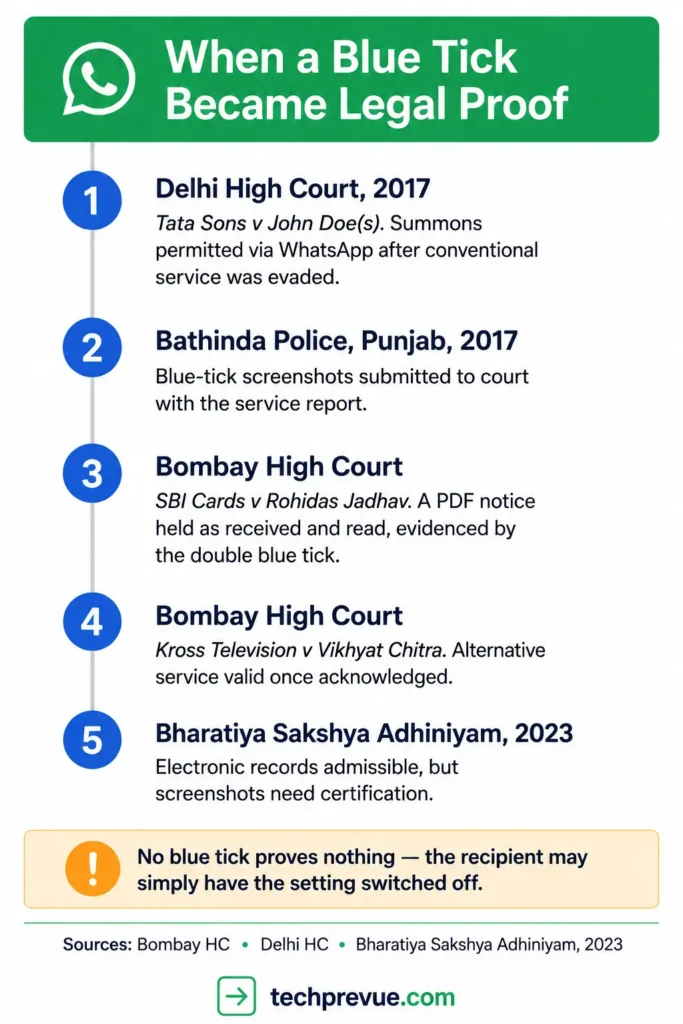
A few landmarks, in order:
Tata Sons Ltd v John Doe(s), Delhi High Court, 2017. The court permitted service of summons through WhatsApp, text message, and email after conventional service had been evaded.
Bathinda Police, Punjab, 2017. Officers began serving summons over WhatsApp, submitting color printouts of blue-tick screenshots to the court alongside the service report. Notably, officers were instructed not to switch the feature off.
SBI Cards & Payments Services Pvt Ltd v Rohidas Jadhav, Bombay High Court. Hearing an execution petition, the court observed that a notice served as a PDF over WhatsApp had been received, opened, and read — as evidenced by the double blue tick.
Kross Television India Pvt Ltd v Vikhyat Chitra Production, Bombay High Court. Justice G.S. Patel held that where an alternative mode of service is used and acknowledged, it cannot be argued that no notice was given, since the purpose of service is to put the other party on notice.
Bharatiya Sakshya Adhiniyam, 2023. Electronic records remain admissible, but screenshots require proper certification to carry evidentiary weight.
What this actually means for you
A blue tick is supporting evidence, not a complete case. Two limits matter.
First, a recipient with read receipts switched off produces no blue tick at all — so absence of a blue tick proves nothing about whether a notice was read. Second, a screenshot on its own is rarely sufficient; certification requirements under the current evidence law still apply.
This is general information, not legal advice. If you’re serving or receiving a notice over WhatsApp, speak to a lawyer about your specific situation.
Read Receipt Myths, Ranked by How Often They’re Repeated
Most bad advice about WhatsApp read receipts falls into one of these seven claims.
Myth 1: “Blue ticks mean they read your message.” They mean the chat was opened and the message rendered on screen. Nothing more.
Myth 2: “You can hide read receipts from one contact.” You cannot. The toggle is account-wide.
Myth 3: “Turning off read receipts hides your last seen.” Different setting. Turn both off if that’s the goal.
Myth 4: “One tick means you’ve been blocked.” One tick means the message hasn’t reached their device. A block is one of at least four explanations.
Myth 5: “Group blue ticks appear when someone reads your message.” They appear only when everyone has read it.
Myth 6: “Advanced Chat Privacy hides your ticks.” It blocks chat export, automatic media saving, and Meta AI use inside that chat. Receipts are unaffected, and it only applies to one chat at a time.
Myth 7: “Marking as unread undoes the blue ticks.” It changes your view only. The sender already has the receipt.
Warning: Apps That Promise to Bypass Blue Ticks
Search results in India are full of modified WhatsApp clients — GB WhatsApp, WhatsApp Plus, and similar — that advertise blue tick bypass and hidden online status. Avoid them.
Three concrete risks:
- Your account can be banned. Unofficial clients breach WhatsApp’s Terms of Service, and enforcement is routine.
- You lose any encryption guarantee. You cannot verify what a modified client does with your messages, because nobody audits it.
- The installer is an unvetted APK. These are distributed outside official app stores, with no security review and a long history of bundled malware. They’re one of the more common routes to a compromised account.
The official privacy toggle does almost everything these apps claim to do, safely and without risking the account you’ve spent years building. There is no legitimate version of this shortcut.
“Blue Tick” Means Two Different Things
Worth clearing up, because it causes real confusion in India. The blue tick discussed throughout this article is a read receipt on a message.
Separately, Meta issues a verification badge to businesses and public figures through Meta Verified. That badge is also commonly called a blue tick, and it appears beside an account name rather than beside a message.
They have nothing to do with each other. No privacy setting affects verification, and no verification status affects your ticks.
A Note on Color Accessibility
The entire system depends on distinguishing grey from blue at a very small size. For readers with color vision deficiency, that distinction can be genuinely difficult.
There is no setting to change it, either. WhatsApp states plainly that the color of the check marks and the clock icon cannot be altered.
The reliable workaround is the Message Info screen. Long-press any sent message and tap the info icon, and you’ll get Delivered and Read as written labels with timestamps — no color interpretation required.
Frequently Asked Questions
What is read receipts on WhatsApp in simple terms?
It’s the feature that turns your message ticks blue once the recipient opens the chat. One grey tick means sent, two grey means delivered, and two blue means read.
What is the difference between WhatsApp read receipts off and on?
With them on, your ticks turn blue when you open a chat and you can see other people’s blue ticks. With WhatsApp read receipts off, neither happens in individual chats, though groups and voice notes are unaffected.
Does WhatsApp have read receipts on by default?
Yes. WhatsApp’s default privacy settings let any user see your read receipts, your profile photo, and when you’re online, so you have to switch read receipts off manually in Privacy settings.
If someone turned off read receipts, will I ever see blue ticks?
No, not in individual chats. Your ticks will stop at two grey no matter how thoroughly they read your message. Group chats are the exception, where receipts always show.
Can I turn off read receipts and still see other people’s?
No. The setting is mutual by design. Switching off your own also stops you seeing receipts on messages you send.
Do voice notes have separate read receipts?
Yes. The microphone icon turns blue when the recipient plays the audio, and this is not affected by the read receipts setting at all.
Do WhatsApp read receipts work the same on WhatsApp Web?
Yes. The web and desktop clients show identical tick states, and the setting syncs across all your linked devices because it belongs to your account. Opening a chat on a computer sends a read receipt just as opening it on your phone does.
Why do my messages show as read when I wasn’t at my computer?
A chat left open in a WhatsApp Web tab is the usual cause. The client reopens your last conversation, so an incoming message in that chat can register as read while you’re elsewhere.
Does turning off read receipts hide who viewed my status?
It hides your status views from others, and it also stops you seeing who viewed yours. The toggle governs both directions.
Why do I have blue ticks but no reply?
The receipt only confirms the chat was opened and your message was displayed. It says nothing about whether the person read carefully, understood, or plans to respond.
Can I check who read my message in a group?
Yes. Long-press the message and tap the info icon to see Read by and Delivered to lists with per-person timestamps.
Does WhatsApp notify someone if I screenshot their chat?
No, not for regular messages. WhatsApp blocks screenshots of view once media, but ordinary chats produce no screenshot alert.
What happens to read receipts if I edit a message?
They reset. Editing a message clears the existing read receipts so you can see who has viewed the updated version, which means the blue ticks start over.
Do read receipts work with disappearing messages?
Yes. Disappearing messages follow the same tick behavior as regular messages until they expire.
Is there any way to read a message without sending a receipt?
Switching the setting off is the only reliable method. Reading from the notification preview also works, and airplane mode works if you close the app fully before reconnecting.
The Short Version
That is the whole WhatsApp read receipts meaning in one line: delivery and display. They cannot confirm attention, comprehension, or intent — and treating blue ticks as proof of any of those causes more friction between people than the feature ever prevents.
Switch them off if the reply pressure genuinely bothers you. Just go in knowing the full cost: you lose your own visibility, your status viewer list, and nothing at all changes in group chats or on voice notes.
