
Quick answer: Hover over the video in the chat and click the download icon then a menu pops with the download button, or open the video and use the download button in the viewer. The file saves to your browser’s default download folder. If clicking does nothing, an ad blocker or browser extension is the most likely cause.
Key takeaways
- The browser never downloads media automatically. Your phone does; WhatsApp Web does not.
- A download button that does nothing and a missing download button are different problems with different causes.
- Some videos cannot be saved at all, and that is by design rather than a fault.
- Third-party downloader tools ask for access that no video is worth handing over.
Which problem do you have?
| What is happening | Go to |
|---|---|
| You have not tried yet and want the steps | §2 – download videos for WhatsApp Web |
| You click download and nothing happens | §3 – unable to download videos |
| There is no download button at all | §4 – no option to download videos |
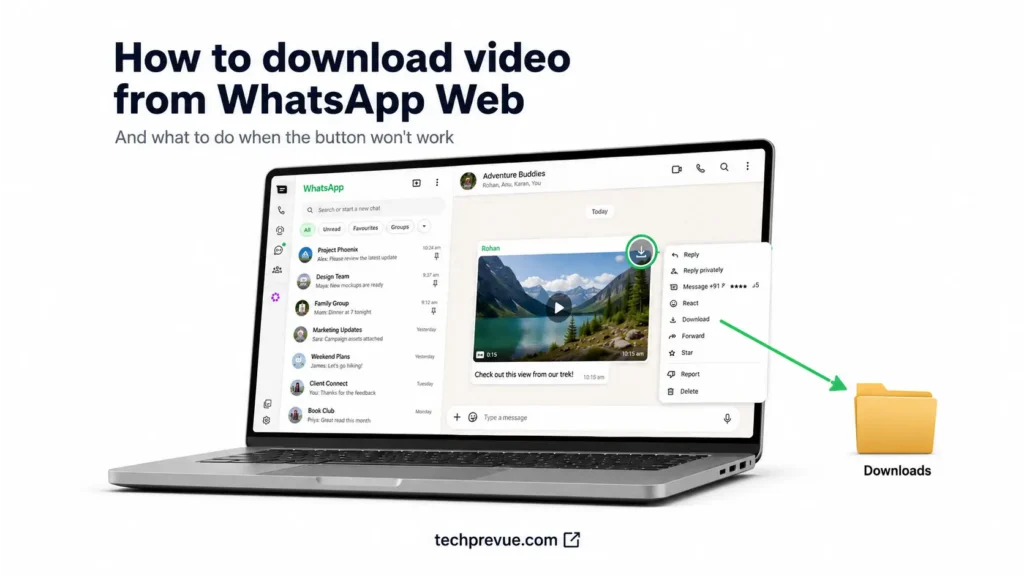
What follows covers how to download videos from WhatsApp Web in two ways, then works through every reason the download can fail — including the cases where the file was never savable to begin with.
- Why WhatsApp Web doesn't download videos automatically
- How to download videos from WhatsApp Web
- Unable to download videos from WhatsApp Web? Start here
- No option to download a video from WhatsApp Web
- Videos that genuinely cannot be saved
- Large files and format problems
- Why we don't recommend third-party downloaders
- The fallback that always works
- Frequently asked questions
Why WhatsApp Web doesn’t download videos automatically
This catches out more people than any technical fault, so it is worth clearing up first.
On your phone, WhatsApp downloads photos and videos in the background and files them into your gallery. Nothing equivalent happens in a browser.
In the browser, media is displayed but never written to your computer until you ask for it. There is no auto-download setting to switch on, because the feature does not exist there.
So if you have been waiting for videos to appear in a folder somewhere, they never will. Every file is a deliberate click.
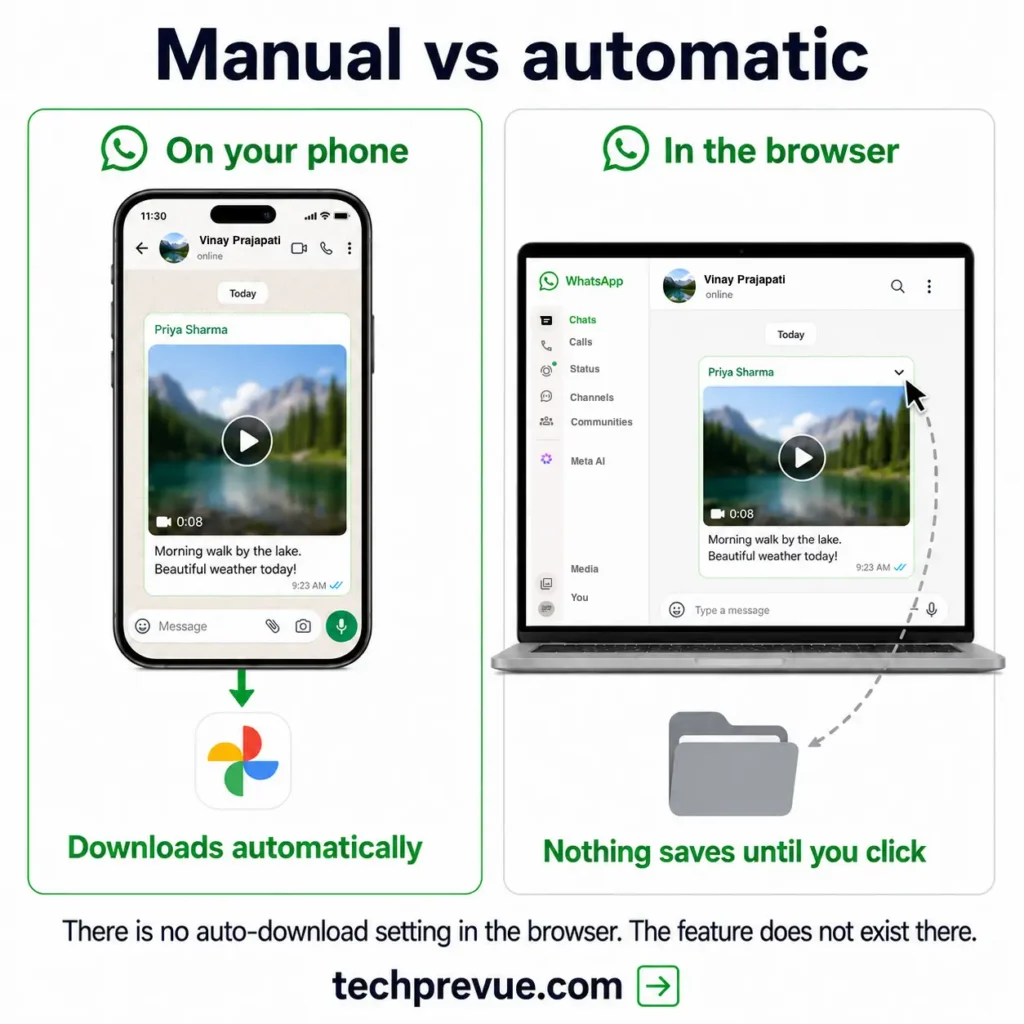
That design makes sense once you consider where WhatsApp Web usually runs — shared desks, work laptops, borrowed computers. Silently writing someone’s private videos to a machine they do not own would be a worse default. For the wider differences between the two, see how to use WhatsApp Web.
How to download videos from WhatsApp Web
Two routes, and the first is faster once you know it exists.
Downloading a single video
- Find the video in the chat.
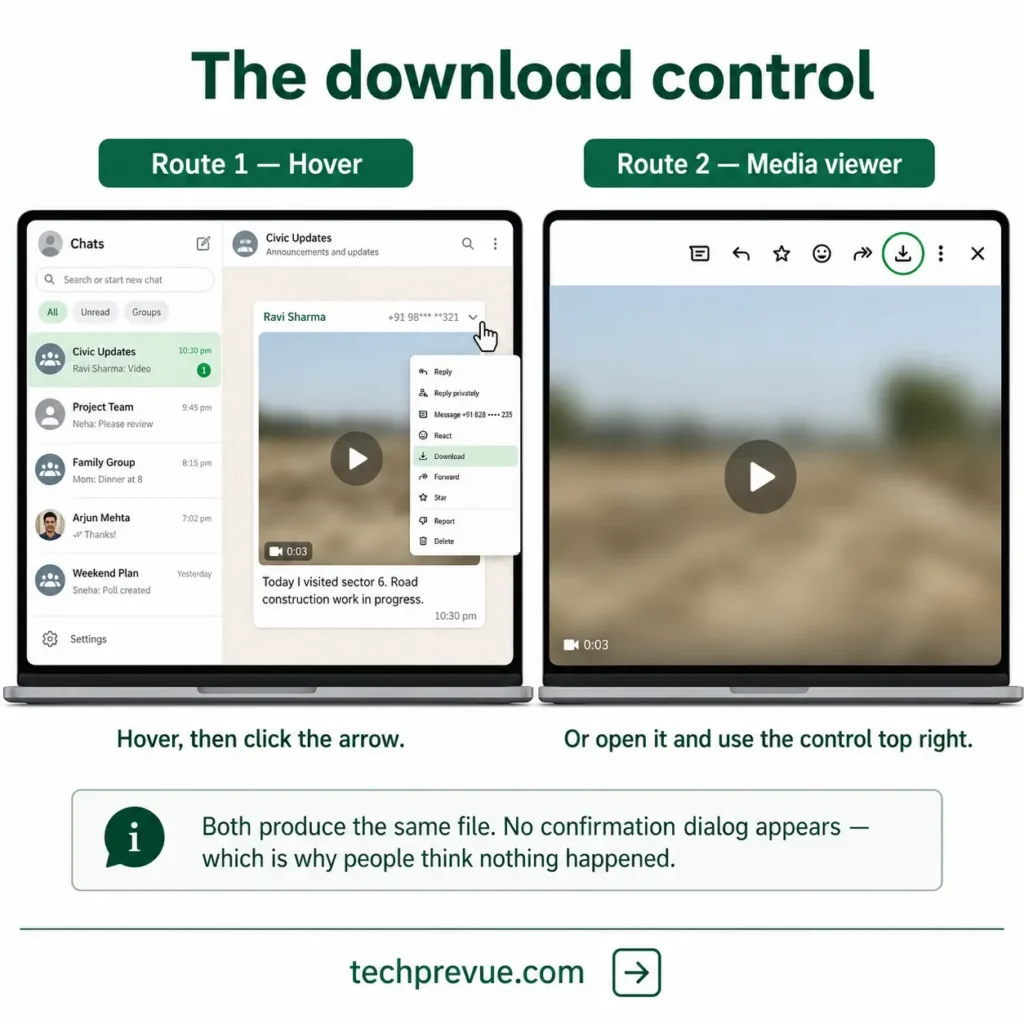
- Hover your cursor over it.
- Click the download arrow that appears in the corner.
The file saves immediately with no confirmation dialog, which is why people sometimes think nothing happened.
If the arrow does not appear on hover, click the video to open it in the media viewer instead. The download control sits in the top right of that view.
Either route produces the same file. The hover method is quicker; the viewer method is more reliable on a trackpad, where a precise hover over a small corner control is harder to land than it sounds.
Downloading several videos from one chat
There is no bulk download in the browser. Each file is an individual action, and no amount of multi-select changes that.
What helps is the media panel. Click the contact or group name to open their info, then open the media, links, and docs section. Every file shared in that conversation is gridded together, which is far faster than scrolling the chat.
For genuinely large batches — a whole holiday album, a year of a work group — the browser is the wrong tool. Export the chat from your phone with media included, and you get everything in one archive.
Where your downloads are saved
Files go to your browser’s default download location, which is usually a folder called Downloads.
In Chrome, check or change it under Settings → Downloads. Firefox, Edge, and Safari all keep an equivalent setting in their own preferences.
Turning on Ask where to save each file is worth considering. It adds a click per download, but it makes failures visible instead of silent, and it stops you hunting for a file you assumed had saved.
One naming quirk to expect. Files arrive with WhatsApp’s own identifiers rather than anything descriptive, so a video saved today looks nothing like a video saved last week.
Rename anything you intend to keep at the moment you download it. Nobody has ever gone back and done it later.
Unable to download videos from WhatsApp Web? Start here
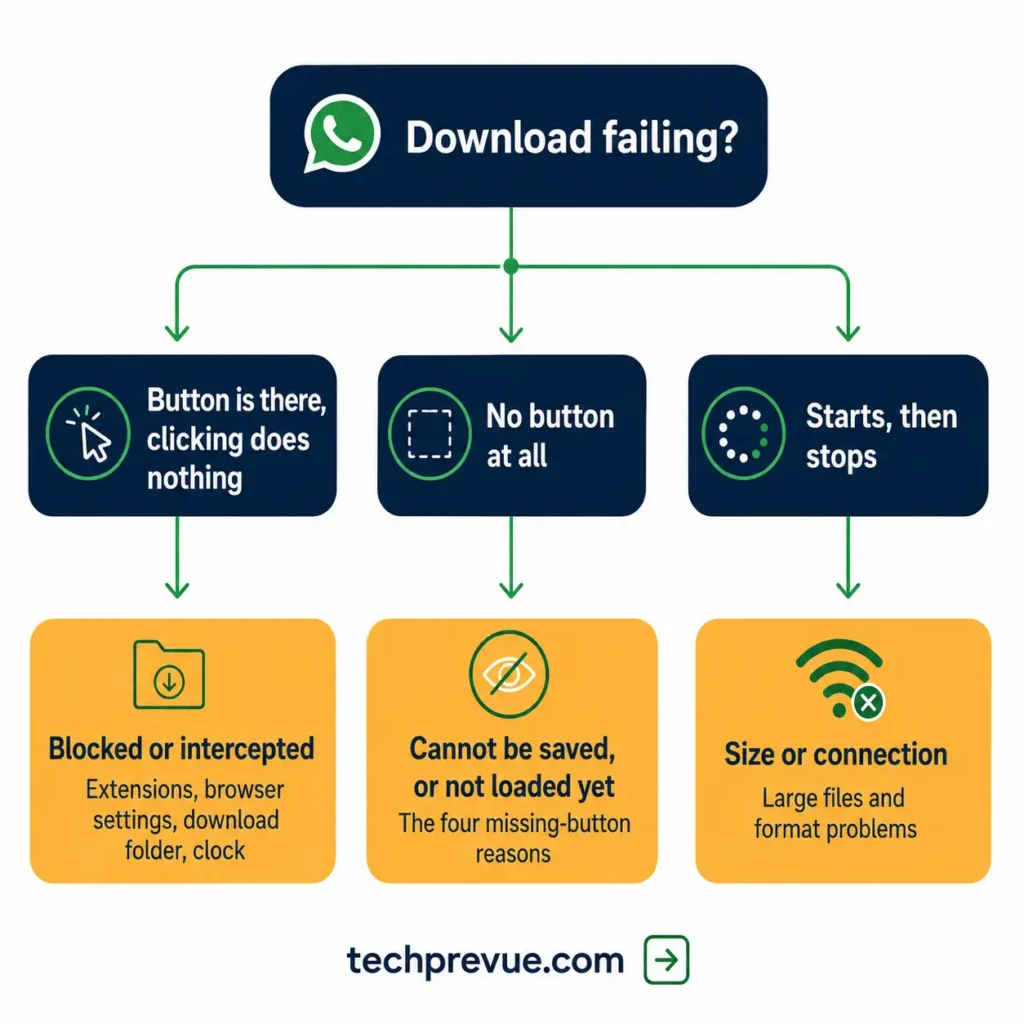
If the button is there and clicking it achieves nothing, work through these in order. The first two account for most cases.
| Cause | Quick test |
|---|---|
| Ad blocker or extension | Try a private window |
| Browser download settings | Check whether downloads are blocked for the site |
| Missing download folder | Look at the folder path in browser settings |
| Computer clock drift | Compare your clock against any other device |
| Stale session | Reload, then relink if needed |
Not able to download videos from WhatsApp Web at all, in any browser, on any file? That points to a session or clock problem rather than a browser setting. Skip to §3.4 – computer clock is out of sync.
Ad blockers and browser extensions
This is the most common cause on the browser side and the least suspected.
Ad blockers, privacy extensions, and script blockers intercept the download request before the page can act on it. Nothing appears to fail, because from the browser’s point of view nothing was attempted.
Test it in one step. Open a private or incognito window, log in, and try the same file. Extensions are disabled there by default, so success confirms the cause immediately.
If it works in private, allow the site in your ad blocker rather than turning the extension off entirely. Most have a whitelist that takes a few seconds to update.
Anything marketing itself as a WhatsApp enhancer deserves removal rather than whitelisting. Those extensions hold access to your chats, and §7 covers why that matters.
Browser download settings
Browsers can block downloads per site, and the setting is easy to trip accidentally.
In Chrome, click the padlock beside the address bar and check site permissions for anything related to automatic downloads. A blocked state here produces exactly the silent failure people describe.
Also look for a small download icon in the toolbar with a warning marker. Browsers sometimes hold a download rather than cancelling it, waiting for a confirmation nobody noticed.
A download folder that no longer exists
If your default download path points somewhere unreachable, downloads fail with no useful message.
This happens after a folder is renamed or deleted, or when the path sits on an external drive or network location that is not currently connected.
Open your browser’s download settings, read the path, and confirm it still exists. Setting it back to a local folder resolves it instantly.
Your computer clock is out of sync
Almost nobody checks this, and it breaks downloads while everything else appears healthy.
The connection between your browser and WhatsApp’s servers is time-sensitive. A clock that has drifted — usually because date and time are set manually — causes requests to fail validation.
Turn on automatic date, time, and time zone in your operating system settings, then reload the page. If messaging worked fine but media never would, this is a strong candidate.
Broader failures that go beyond downloads are covered in why WhatsApp Web is not working.
No option to download a video from WhatsApp Web
A missing button is a different problem from a button that does nothing, and it usually means the file cannot be saved rather than that something is broken.
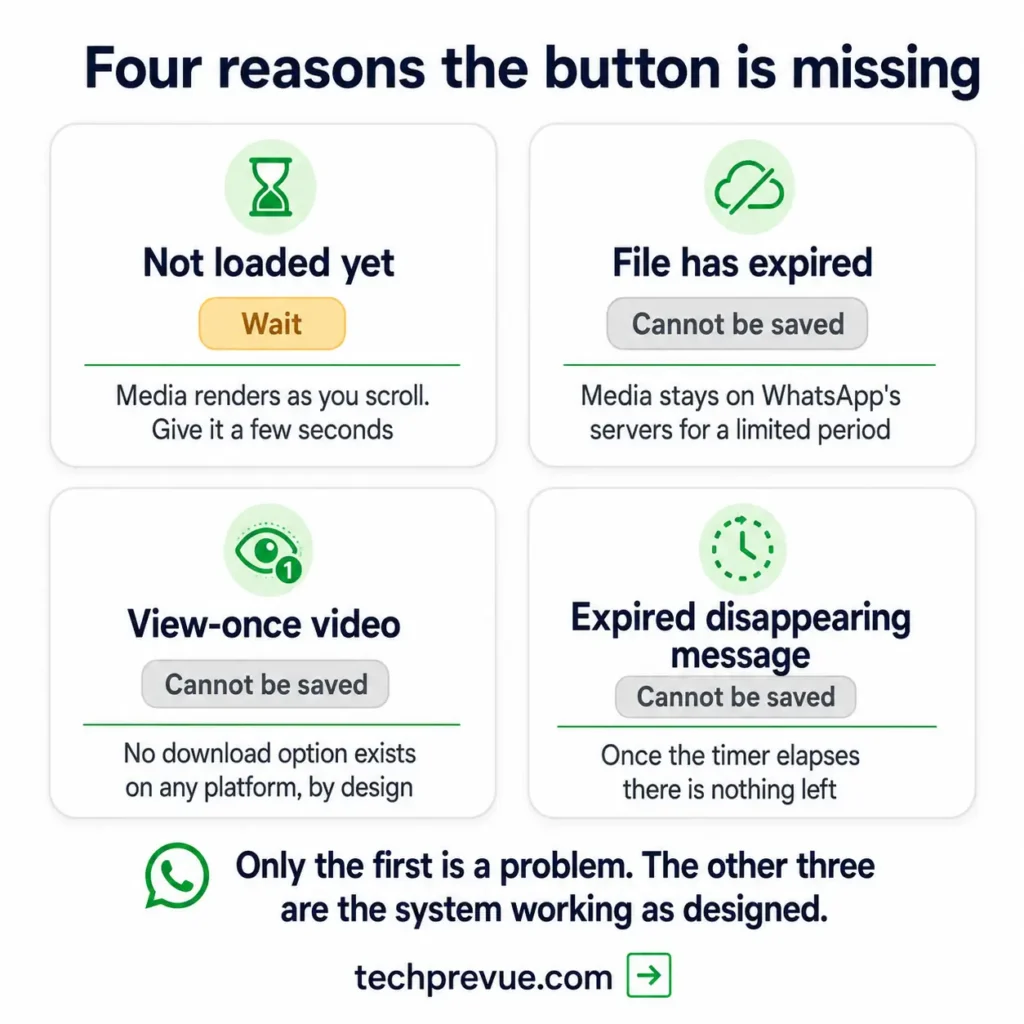
Four explanations cover almost every case:
The video has not loaded yet. Media renders as you scroll. A video that is still resolving shows no controls until it finishes. Wait a few seconds, or click into it.
The file has expired. Media stays on WhatsApp’s servers for a limited period. Once it ages off, a device that never received the original cannot fetch it, so the download control disappears. Opening it often produces a message about the file being missing.
It is a view-once video. These carry no download option anywhere, on any platform, deliberately.
It is a disappearing message that has already gone. Once the timer elapses, there is nothing left to download.
The first is a waiting problem. The other three are not problems at all — they are the system working as intended.
Videos that genuinely cannot be saved
Two categories are off limits, and no legitimate method changes that.
View-once videos. The sender chose a format that displays once and leaves nothing behind. That choice is the entire point of the feature, and WhatsApp does not provide a save option for it.
Expired disappearing messages. Once the timer runs out, the content is gone from the conversation. There is no archive to recover it from.
Third-party tools that claim to defeat either are covered in §7, and the short version is that we do not recommend them.
The legitimate route is straightforward and costs one message: ask the sender to send it again as a normal video. If they are willing, you have a downloadable file in seconds. If they are not, that is the answer to the question you were actually asking.
The same applies to Status videos. If you want to keep something a contact posted, ask them to send it to you directly rather than looking for a way around the format.
Large files and format problems
Very large videos fail differently from blocked ones — they start, then stop.
If a download stalls part-way, the usual causes are an unstable internet connection or a browser timing out on a long transfer. Retrying on a stable network resolves most of these, and a wired connection helps for anything substantial.
Storage is worth a glance too. A drive with almost nothing free will fail a large download without saying so clearly, and browsers are notoriously vague about this particular failure.
Check the free space on whichever drive your download folder sits on, not just your main one.
Format is rarely the issue for playback on a computer, since WhatsApp compresses video to widely supported formats. If a saved file will not play, try a different player before assuming the download was corrupted.
Quality is a separate disappointment worth setting expectations on. Video sent through WhatsApp is compressed on the way in, so what you download is the compressed version rather than the original.
If you need the full-quality file, the sender has to share it as a document rather than as a video, or send it another way entirely. No download method recovers detail that was discarded before the file reached you.
Why we don’t recommend third-party downloaders
Search results for this topic are full of browser extensions and websites promising to save anything, including view-once media. We are not going to link them, and the reason is worth understanding.
To do what they claim, these tools need access to the page where your conversations live. That means the ability to read your messages, see who you talk to, and in some cases act on your session.
You would be handing that access to an unknown developer in exchange for saving one video. It is a poor trade on any file, and a genuinely bad one on a work computer.
There is a second problem. Tools built to defeat view-once exist to override a choice the sender made about their own content. Using one is a decision about someone else’s privacy, not just your convenience.
If you want a sense of how session access gets abused in practice, the QR code scam that targets browser sessions covers the same attack surface from a different angle.
The fallback that always works
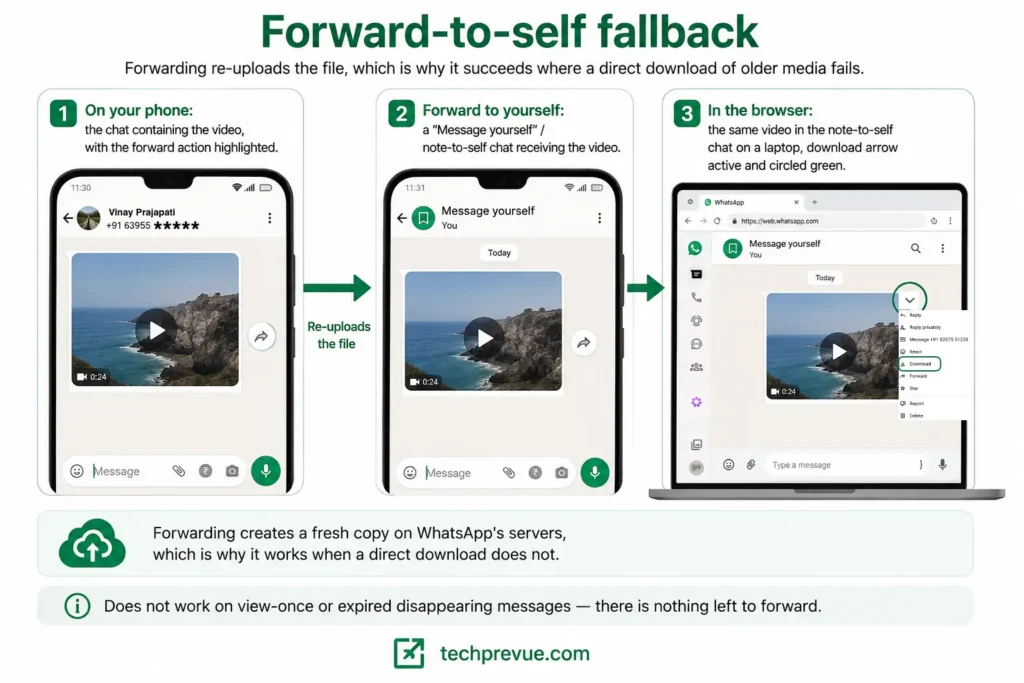
When a direct download refuses and the file is not view-once or expired, one method rarely fails.
Open the chat on your phone, forward the video to yourself in a note-to-self conversation, then download it in the browser from there.
Forwarding re-uploads the file, which makes it freshly available to every linked device. That is why it succeeds where a direct download on an older file does not.
It takes about fifteen seconds and needs no tools, no extensions, and no permissions.
The same trick rescues media in old group chats, where files are frequently past the point a direct download can reach. If someone in the group still has it on their phone, one forward makes it available to everyone again.
It does not work on view-once or expired disappearing messages, because there is nothing left on the phone to forward.
Frequently asked questions
Why can’t I download a video from WhatsApp Web?
Most often an ad blocker or browser extension is intercepting the request. Test in a private window first. If the download button is missing entirely rather than unresponsive, the file has likely expired or is view-once.
Where do WhatsApp Web downloads go?
To your browser’s default download folder, usually named Downloads. You can check or change the path in your browser’s download settings.
Can I download all videos from a chat at once?
Not from the browser — each file is an individual download. For large batches, export the chat with media from your phone instead.
Why does the download button disappear on older videos?
Media stays on WhatsApp’s servers for a limited period. Once it ages off, a device that never received the original file cannot retrieve it.
Can I save a view-once video?
No. There is no download option for view-once media on any platform, and we do not recommend tools that claim otherwise. Ask the sender to resend it as a normal message.
Does downloading a video notify the sender?
No. Downloading is a local action and produces no notification, with the exception of screenshot alerts on certain protected media types.
Tested on July 31, 2026 in Chrome Version 151.0.7922.72 on Windows 11 and Safari Version 26.0 on macOS, with WhatsApp Version 2.22.13.77 on Android.
