
Typing a game PIN takes about five seconds. This page exists for everything that happens when those five seconds don’t work.
Quick answer: To join Kahoot, open kahoot.it in any browser or launch the Kahoot app, type the game PIN from the host’s screen, then pick a nickname. No account is needed. If the host switched on 2-Step Join, you also copy a four-tile pattern from their screen before you get in.
Most guides stop at the PIN step. The questions people actually search are different — how many players a free game allows, whether latecomers can still get in, and why the same code keeps failing on school Wi-Fi.
Learning how to join Kahoot is the easy part. Everything below is checked against Kahoot’s own documentation as of August 2026, including two rules that most competing guides state incorrectly.
How to join Kahoot with a PIN, link, or QR code
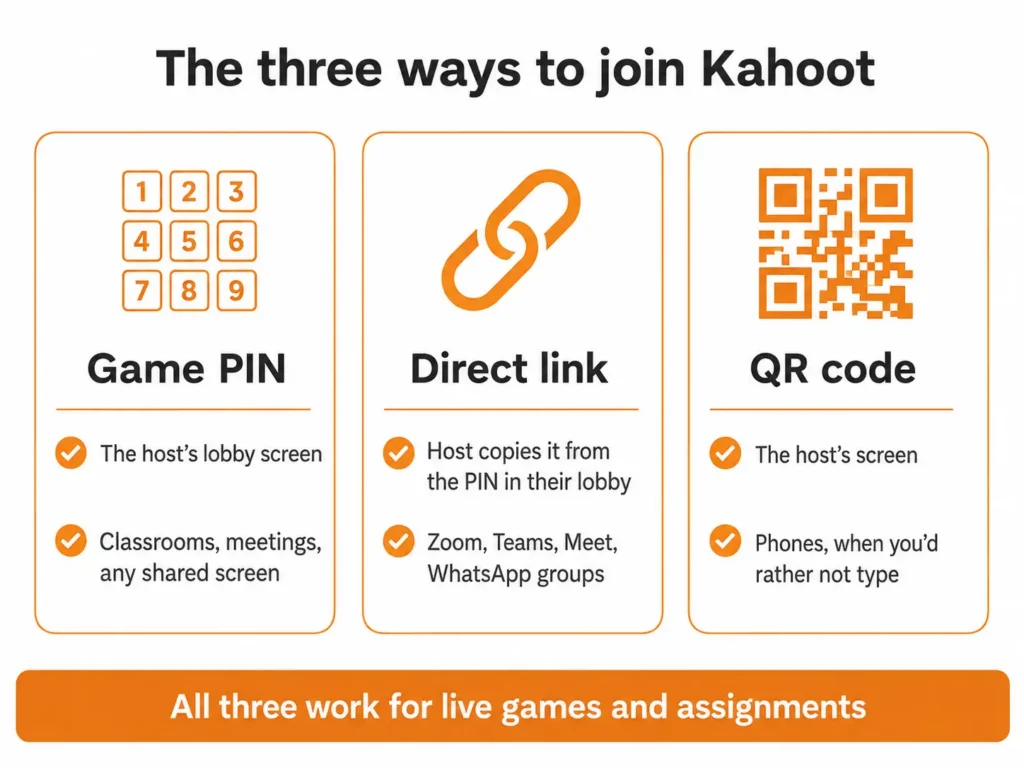
There are three ways in, and all three work for live games and self-paced assignments alike.
| Method | Where it comes from | Best for |
|---|---|---|
| Game PIN | The host’s lobby screen | Classrooms, meetings, any shared screen |
| Direct link | Host copies it from the PIN in their lobby | Zoom, Teams, Meet, WhatsApp groups |
| QR code | The host’s screen | Phones, when you’d rather not type |
Join with a game PIN or code
- Open kahoot.it in any browser, or launch the Kahoot app and tap Join.
- Type the Kahoot game PIN exactly as shown on the host’s screen. PINs run 6 to 10 digits.
- Enter a player identifier if you’re asked for one. Hosts turn this on when they need to know who scored what.
- Choose a nickname, or spin one if the host enabled the nickname generator.
Expected result: your nickname appears on the host’s lobby screen, and your device shows a waiting message until the host starts the game.
No Kahoot account is needed for any of this. An account only becomes necessary when the host has switched on the player identifier.
Stuck for a name? Our list of funny Kahoot names covers what actually passes the filter.
Join with a link or QR code
For a live game, the host clicks the PIN in their lobby to copy a direct join link. Anyone who taps that link lands straight in the game, in the browser or the app.
For an assignment, the host shares the link from the assignment’s report page instead.
To use a QR code, open the app, tap Join, then Scan QR code — or simply point your phone camera at the host’s screen. If the code is too small to scan, ask the host to enlarge it.
The extra step some hosts turn on: 2-Step Join
This is the part missing from almost every other guide. When a host enables 2-Step Join, entering the PIN alone won’t get you in.
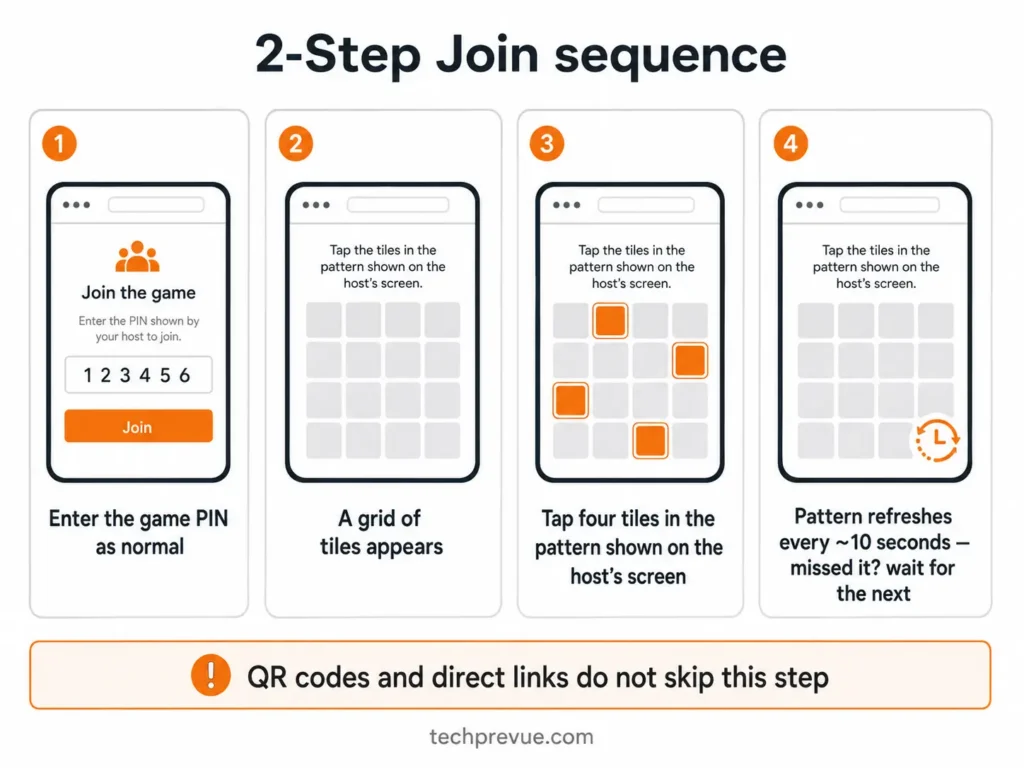
You then see a grid of tiles and must tap four of them in the exact pattern shown on the host’s screen. The pattern refreshes roughly every 10 seconds, so only people who can actually see that screen can complete it.
Missed it? Wait a few seconds and follow the next pattern. A QR code or direct link does not skip this step — when 2-Step Join is on, everyone does the pattern.
Note: 2-Step Join exists only in the live game lobby. It isn’t part of assignments or self-paced games, and you won’t find it in the kahoot editor.
Live game or assignment — which one are you joining?
The difference decides how long your PIN stays valid, and that single fact explains most failed join attempts.
| Live game | Assignment (challenge) | |
|---|---|---|
| Everyone plays | At the same time | At their own pace |
| PIN stays valid | Only while the game is running | Until the assignment deadline |
| Needs the host’s screen | Yes | No |
| 2-Step Join possible | Yes | No |
Why can’t I join Kahoot?
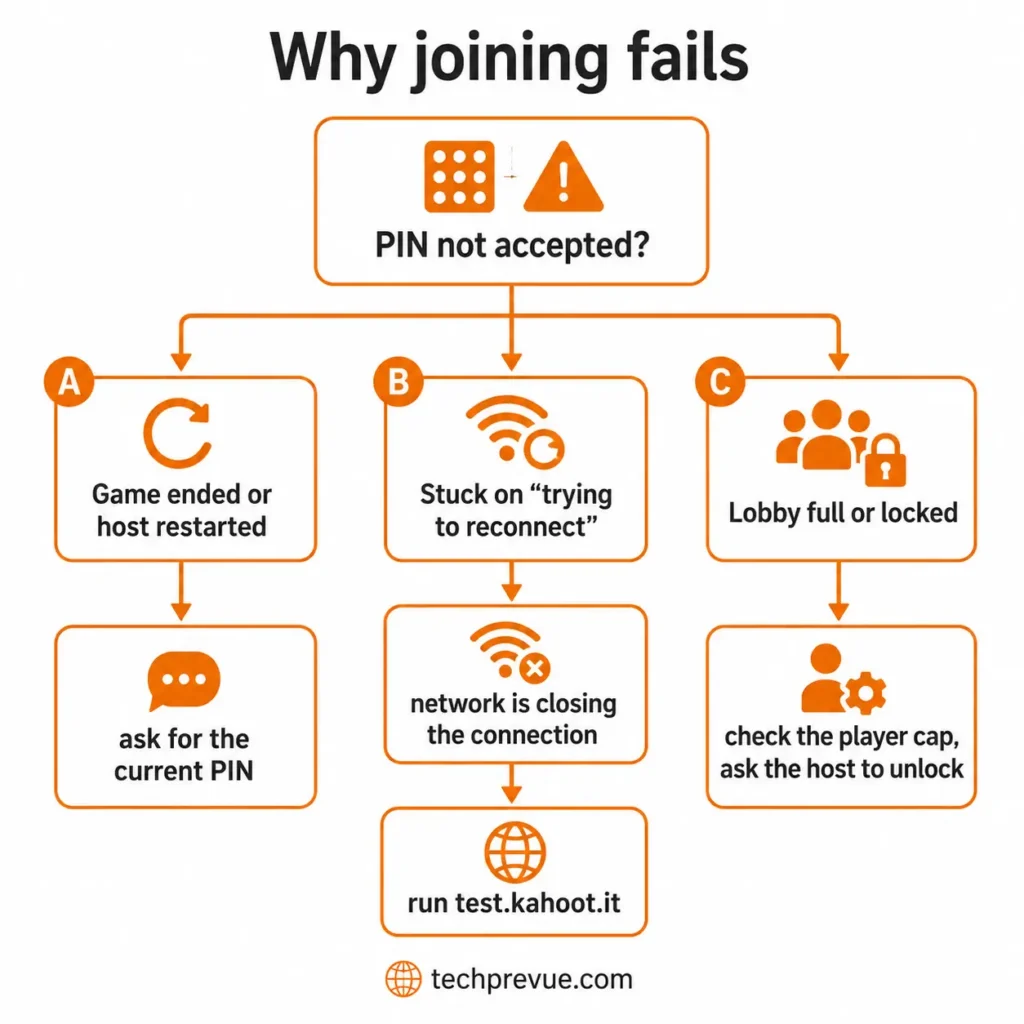
You know how to join Kahoot, the PIN looks right, and nothing happens. The short answer is that the PIN expired, your network is blocking live games, or the host locked the lobby.
Work through these in order.
Run Kahoot’s own connection test first
Kahoot ships a diagnostic tool that almost nobody uses. Go to test.kahoot.it and run the Can I play a kahoot? test.
It checks access to kahoot.it, whether the game server will hold an open connection for a full minute, your connection speed and type, proxy interference, and your browser version. A named failure beats guesswork every time.
Nine causes and what to do about each
| What you see | Likely cause | Fix |
|---|---|---|
| PIN not recognised | Game ended, so the PIN expired | Ask the host for the current PIN |
| PIN not recognised | Host restarted the session | Every restart generates a brand-new PIN |
| PIN not recognised | Typo, or a digit misread from a distance | PINs are 6–10 digits; re-enter carefully |
| Lobby won’t accept you | Host used Lock game joining | Ask the host to switch it off |
| Lobby won’t accept you | Session hit its player cap | See the limits table below |
| “Trying to reconnect” straight after your nickname | Network is closing the game connection | See the next section |
| Score reset to zero | You pressed back or refresh | Never refresh mid-game |
| Nickname rejected | Filter blocked it, or it’s already taken | Pick another |
| Page won’t load at all | Service outage | Check status.kahoot.com |
Warning: if you get disconnected and your screen says it’s reconnecting, leave it alone. Let it reconnect and you keep your points. Press back or refresh and you exit the game entirely, and rejoining puts you back at zero with a new nickname.
School, college, and office networks
This is the single biggest cause, and it isn’t your device’s fault.
Live games hold a connection open for the whole session so answers register instantly. Many school and corporate security tools close long-running connections automatically, which is exactly why players get in, enter a nickname, then immediately see a reconnect message.
Assignments don’t work that way, because gameplay is self-paced. So when live games fail on a locked-down campus network, the host can assign the same kahoot instead and everyone completes it.
For a permanent fix, IT needs to allow these:
wss://kahoot.it/cometd— participantswss://play.kahoot.it/cometd— hostshttps://apis.kahoot.it— supporting services including the nickname filter
Kahoot supports the two most recent versions of Chrome, Edge, Firefox, and Safari. An outdated browser on a shared lab machine fails for a different reason than the network does, and the connection test tells you which one you’re dealing with.
For students in India: on college Wi-Fi behind a proxy, switching your phone to mobile data is usually faster than getting the network reconfigured. The Android app on mobile data sidesteps the campus proxy entirely.
How many people can join a Kahoot?
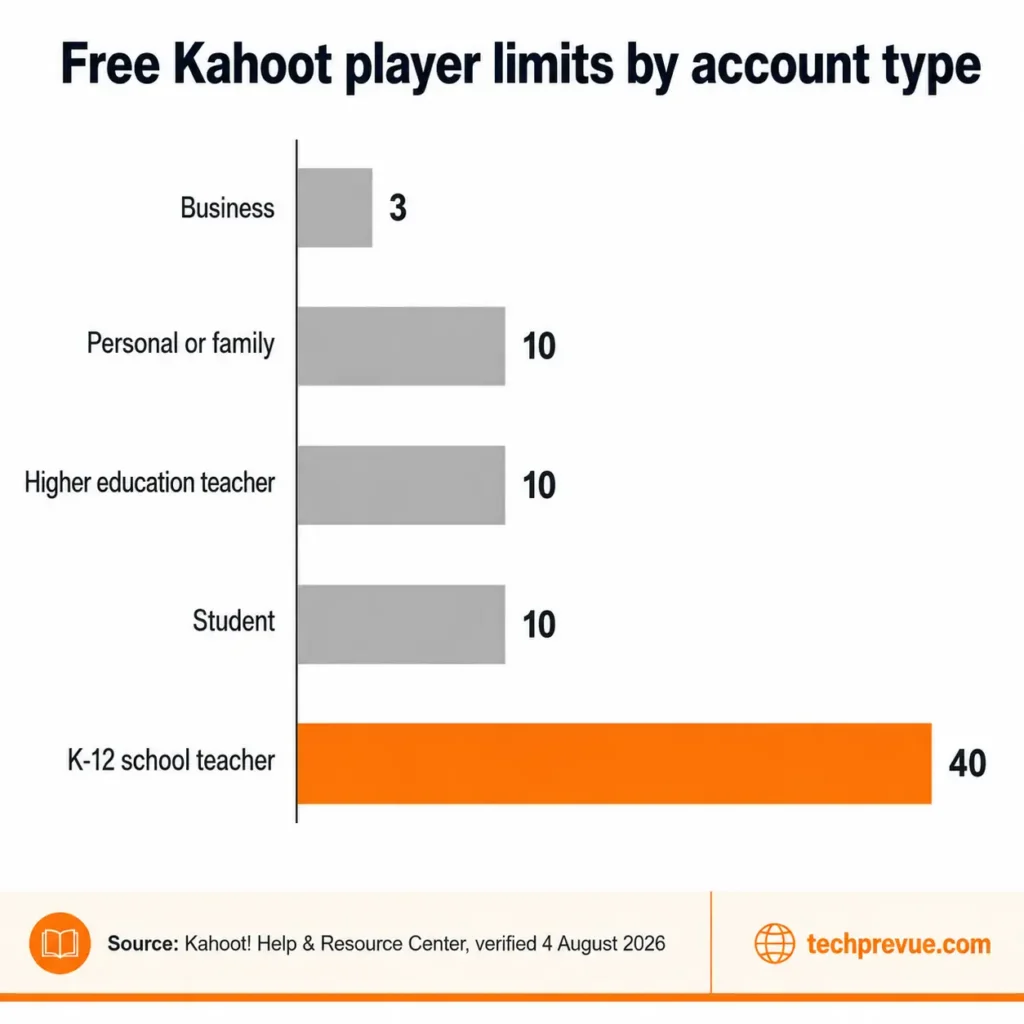
Ask how many people can join a free Kahoot and nearly every article answers 10. That’s true for some accounts only. The real cap depends on the account type the host registered with.
| Free account type (Kahoot! Go) | Players per game |
|---|---|
| Personal or family | 10 |
| K-12 school teacher | 40 |
| Higher education teacher | 10 |
| Student | 10 |
| Business | 3 |
Paid tiers scale from 50 players on Plus Bronze up to 4,000 on One Ultra, with business plans reaching 5,000. K-12 EDU Pro is the outlier: 2,000 in a live game, but up to 10,000 for an assignment.
Two details worth knowing. Young students — under 13 in the US, under 16 in most other countries — are held to exactly 10 players in Classic mode on a free plan.
Kahoot’s own help page also contradicts itself on business accounts. The body text says free business users get 3 players, while the FAQ on that same page says games from the Kahoot! at Work channel allow up to 50. If you’re hosting for work, test with one colleague before the session rather than trusting either figure.
What the 40-player cap means in practice
For K-12 teachers in the US and India, 40 is the number that matters, and it covers most single sections comfortably.
India’s NEP 2020 sets a benchmark pupil-teacher ratio of 30:1, and the UDISE+ 2024-25 report puts national ratios at 10, 13, 17, and 21 across the foundational, preparatory, middle, and secondary stages. Pupil-teacher ratio isn’t the same as class size, since it averages teachers against total enrolment. Treat it as a planning signal rather than a headcount.
If your section runs past 40, split it into two games or pair students on one device.
Can you join a Kahoot after it started?
Yes. Latecomers can join a Kahoot game already in progress, as long as the PIN is still visible on the host’s screen and the host hasn’t used Lock game joining.
This is worth knowing before you give up: if you arrive late and still see the PIN on screen, how to join Kahoot mid-game is no different from joining at the start.
The PIN stays on screen throughout the game for this exact reason, and the 2-Step Join pattern stays visible too. Players who dropped out use the same route back in.
What you can’t do is recover the questions you missed. You enter at whatever question is live, and your score builds from there.
Hosts who want a clean cut-off use Lock game joining once everyone’s in. That blocks new entries even if someone gets hold of the PIN afterwards.
How to join random Kahoot games
Kahoot has no random matchmaking. Its support team has said plainly that there’s no feature for playing with random people online — games are hosted by someone who shares a PIN with the people they want in the room.
That matters because of what fills the gap in search results. Pages listing “120+ Kahoot game PINs that always work” can’t work, and the reason is structural rather than a question of the list being out of date.
A live PIN exists only while that one session is running, then expires. A static list of codes is stale the moment it’s published. And any PIN that does happen to connect drops you into a stranger’s classroom or meeting uninvited.
What works instead:
- Discover — browse public kahoots on the web or in the app, then play solo or host your own
- Study modes — flashcards and practice runs in the app, no PIN required
- Host one yourself — share the PIN with people you actually know
That last option is the only reliable way to join a Kahoot game with strangers on purpose: create one, then post the PIN somewhere you control.
A note for hosts: don’t post a game PIN publicly on social media. Kahoot warns this invites bots and unwanted participants, and it’s the main reason 2-Step Join was built. For graded assessments, set the kahoot to private so services that scan public games for answers can’t find it.
New to the platform? Start with what Kahoot is and how it works for the full picture on plans, features, and hosting.
People Also Asked For
How do I join a Kahoot game without an account?
Go to kahoot.it, enter the PIN, pick a nickname. Joining is always free, and no sign-up is needed unless the host enabled the player identifier.
How to join Kahoot with a code?
The code and the PIN are the same thing — Kahoot calls it a game PIN, and people call it a join code, session code, or class code. Enter it at kahoot.it or in the app.
How many digits is a Kahoot PIN?
Between 6 and 10. Guides claiming every PIN is exactly six digits are wrong.
Can I rejoin with the same nickname and keep my score?
No. Once you leave a game you pick a new nickname and your score restarts at zero. The exception is an automatic reconnect, which preserves your points.
How to join Kahoot on a phone?
Either open kahoot.it in your mobile browser or install the Kahoot app and tap Join. The app also scans QR codes, which saves typing the PIN.
Why does my Kahoot PIN say invalid?
Usually the game ended or the host restarted it. Both actions retire the old PIN permanently.
Can two people join a Kahoot on one device?
Not as separate players in a live game — each player needs a device. Sharing one device is a common workaround when a class exceeds the player cap.
Do I need the app, or is the website enough?
The website handles live games and assignments perfectly well. The app adds QR scanning and study modes.
What happens if I join a Kahoot late?
You enter at the current question. Missed questions score nothing, and there’s no way to go back to them.
Key takeaways
Six things worth remembering about how to join Kahoot:
- kahoot.it plus a PIN and a nickname is all it takes; no account, no download
- PINs run 6–10 digits, and live PINs expire the moment the game ends
- 2-Step Join adds a four-tile pattern that links and QR codes don’t bypass
- Free player caps are 3, 10, or 40 depending on the host’s account type, not a flat 10
- Latecomers can join until the host locks the lobby
- Random matchmaking doesn’t exist, and published PIN lists can’t work
Last verified against Kahoot’s Help & Resource Center on August 4, 2026.
