
Quick answer: Type “#” plus your topic into YouTube search for live autosuggestions, check the hashtags on top-performing Shorts in your niche this week, and watch your own YouTube Analytics for search terms already sending you traffic. Any hashtag “trending” list goes stale within weeks — this method doesn’t.
Looking for a ready-to-copy list instead? Grab the current hashtag list here — this article is the method behind it, for when that list goes stale.
You’ve probably read that YouTube ignores your hashtags if you use more than 15. It’s repeated on dozens of YouTube trending hashtags guides for 2026, in bold text, right next to a checkmark emoji.
It’s wrong. YouTube’s own help documentation says the cutoff is 60 hashtags, not 15 — cross more than that and every hashtag on the video gets ignored. That single fact-check tells you most of what’s circulating online about YouTube hashtags right now: confident, copy-pasted, and never checked against the source.
This guide starts from the source. It covers what YouTube hashtags actually do in 2026, how to find ones worth using this week (not the stale “top 100” list you’ll see everywhere else), and how to avoid the mistakes that quietly cap your reach.
- What YouTube Hashtags Actually Do
- The 15-Hashtag Myth, Corrected
- Trending vs. Viral vs. Niche YouTube Hashtags: Use All Three, Differently
- How to find trending YouTube hashtags this week
- Should You Use a Hashtag Generator or Tool Like VidIQ? Here's What They Actually Do
- YouTube Hashtag Placement: Title vs. Description
- Shorts vs. Long-Form: Different Weight, Same Rules
- Trending YouTube Hashtags: A Quick Global Snapshot for 2026
- Common YouTube Hashtag Mistakes That Quietly Cap Your Reach
- FAQs
- Sources
What YouTube Hashtags Actually Do
A hashtag is a keyword with a “#” in front of it, placed in a video title or description. Two things happen when you add one:
- It becomes a clickable link. Viewers who tap it land on a results page of other videos and playlists using the same tag — a browsing path you don’t otherwise control.
- It feeds YouTube’s topic-classification signals. Alongside your title, description, and tags, hashtags help the system understand what your video is about and who might want to see it.
Of every hashtag you place in a description, YouTube automatically pulls up to three of “the most engaging” ones and displays them above your title as clickable text. That’s a direct incentive to put your strongest, most specific tags first — not your broadest ones.
What hashtags are not: a ranking hack. Multiple independent 2026 analyses of Shorts performance point the same direction — watch time, retention, and viewer-satisfaction signals (whether people stick around, return, or bail in the first few seconds) outweigh hashtags by a wide margin. Hashtags help categorize a video that’s already earning attention; they don’t manufacture attention on their own.
The 15-Hashtag Myth, Corrected
Here’s the fact-check, straight from YouTube’s help center:
- The real ignore-threshold is 60 hashtags, not 15. Cross it, and the platform disregards every hashtag on that upload.
- Hashtags can’t contain spaces — multi-word tags get written as one string (
#TravelVlog, not#Travel Vlog). - Misleading or unrelated hashtags can get a video’s metadata penalized or the video pulled from search, under YouTube’s misleading-metadata policy.
- Hashtags are also bound by ordinary Community Guidelines — no harassment, hate speech, sexual content, or vulgar-language tags.
So where did “15” come from? Most likely it’s a best-practice number (creators are told to stick to 3–5 relevant tags for quality reasons) that got mislabeled as a hard platform rule somewhere in the content-mill echo chamber, then repeated until it looked official. It isn’t. The 60-tag ceiling is the actual rule; 3–5 relevant tags is the actual strategy. Conflating the two is exactly the kind of unverified claim this guide is trying not to repeat.
Trending vs. Viral vs. Niche YouTube Hashtags: Use All Three, Differently
These three hashtag types get lumped together constantly, but they do different jobs:
| Type | What it does | Example |
|---|---|---|
| Viral / evergreen | Massive, stable volume; broad categorization | #shorts, #viral, #trending |
| Trending | Short-lived spike tied to a current event, song, or challenge; signals “active search demand right now” | Tags tied to a chart-topping song or a live sporting event |
| Niche | Smaller pool, higher relevance; connects you with viewers who actually watch to the end | #budgettravel instead of #travel |
A practical mix cited across several 2026 creator-strategy write-ups: mostly niche and evergreen tags for consistent reach, with one or two rotating trending tags layered on top for occasional bursts into new audiences. Trending tags typically have a shelf life of one to four weeks before the conversation moves on, so they need refreshing — a static list (like the ones flooding search results right now) is out of date almost as soon as it’s published.
How to find trending YouTube hashtags this week
Because any printed list of “trending hashtags” is stale by the time you read it, the more durable skill is knowing where to look:
- Type “#” into YouTube search followed by your topic — YouTube autosuggests currently popular tags for that keyword. Click into any suggested hashtag and YouTube shows you the actual results page for it: scroll a few rows to get a rough feel for how saturated it already is, and check whether the top videos look like yours in scale and style, not just topic — a tag dominated by million-subscriber channels behaves differently for a smaller channel than one with a more mixed field.
- Open a few Shorts in your niche that are visibly doing well right now and check which hashtags they’re running.
- Watch for calendar-anchored spikes. Major sporting events, award shows, and global moments reliably produce a burst of related tags — the 2026 FIFA World Cup, for instance, is driving heavy use of World Cup– and football-related hashtags across sports and reaction content.
- Check your own YouTube Analytics. It shows which search terms are already sending you traffic — often a better signal than any external “trending” list.
Should You Use a Hashtag Generator or Tool Like VidIQ? Here’s What They Actually Do
Free youtube hashtag generator tools are everywhere, and it’s worth knowing what’s actually happening behind the input box before trusting the output — most fall into one of three categories, and only one of them uses real data.
Keyword-Combiner Generators
These YouTube hashtag tools work like a thesaurus, not a trend tracker: type “cooking” and you get #cooking #foodie #recipe regardless of what’s actually performing right now. Several popular free generators fall here, and a few of them still state the wrong “hashtags are limited to 15” rule directly inside their own tool copy — proof the myth isn’t just circulating in blog posts, it’s built into the tools people are actively using to tag their videos. Fine as a quick brainstorm if you’re stuck for ideas; treat the word “trending” in their marketing skeptically.
Autocomplete-Based Generators
A smaller number of tools pull suggestions from Google’s or YouTube’s own autocomplete data rather than a fixed template — genuinely closer to real search behavior, and structurally similar to the manual “# + topic” search method above, just automated into a button. KeywordTool.io is a named example worth knowing: it mines YouTube’s autocomplete by appending letters of the alphabet to a seed keyword and capturing what actually gets suggested, and it has a dedicated hashtag-research output built specifically for video descriptions. This category is worth using as a time-saver specifically because the underlying data source is real, not because the tool is doing anything the manual method can’t.
YouTube Growth Suites: VidIQ and TubeBuddy
Worth naming directly, since these two come up constantly in creator conversations — but they solve a slightly different problem than “find me trending hashtags.” Both VidIQ and TubeBuddy are built primarily around the hidden tags field and keyword research (search volume, competition scoring, title/description optimization), not hashtag curation specifically. A few things worth knowing before reaching for either:
- Neither tool has access to YouTube’s actual internal search volume data — YouTube keeps that private — so both are estimating from autocomplete frequency and third-party signals, not ground-truth numbers.
- VidIQ leans toward ideation and AI-assisted content planning; TubeBuddy leans toward bulk optimization and A/B testing across an existing back catalog. Neither is the tool to reach for specifically for hashtags — that’s what makes the tags-vs-hashtags distinction earlier in this article worth remembering here.
- Both offer usable free tiers, which is enough to try the keyword/tag side of either without committing to a paid plan.
Paid Hashtag & Social-Listening Tools
Tools built for tracking hashtag reach, engagement, and sentiment across platforms do offer real volume metrics the free generators don’t. They’re built and priced for brands and agencies running multi-platform campaigns, not solo creators tagging one video — the cost only makes sense once hashtag performance across dozens of videos or several team members needs tracking in one dashboard.
The Verdict: Generator, Manual, or Both?
| Situation | Recommendation |
|---|---|
| Solo creator, occasional upload | Manual method above — free, accurate, takes under five minutes |
| Stuck for ideas in an unfamiliar niche | Keyword-combiner generator as a brainstorm starter, then verify each suggestion manually before using it |
| Want real autocomplete data without doing it by hand | Autocomplete-based generator (e.g., KeywordTool.io), since the data source is genuine |
| Already optimizing titles, descriptions, and tags seriously | VidIQ or TubeBuddy — but for the tags field and keyword research, not as a hashtag-specific tool |
| Agency or brand managing many channels/campaigns | Paid social-listening tool — the dashboard and cross-platform view earns its cost at that scale |
The manual method costs nothing but a few minutes and stays accurate regardless of which tool trends come and go — that’s the one approach on this list no generator update or pricing change can take away from you.
YouTube Hashtag Placement: Title vs. Description
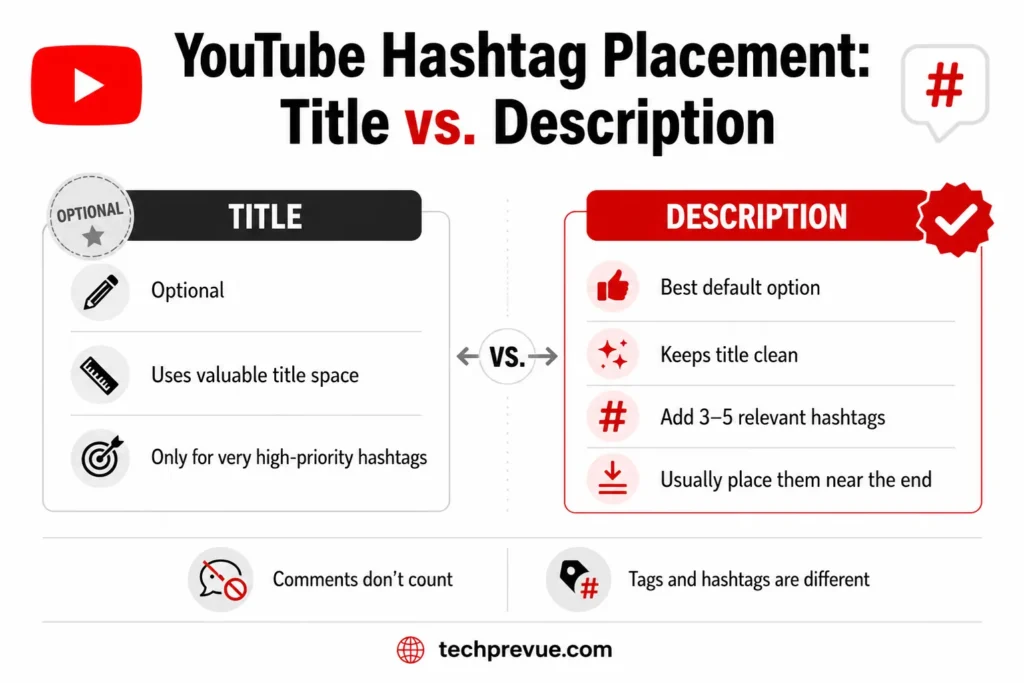
- Description is the default, safest location. Add your 3–5 most relevant hashtags, usually near the end of the description.
- Title placement is optional and costly. It can boost visibility for that one tag, but it eats into your 100-character title budget — arguably your single most valuable piece of on-page SEO real estate. Most creators are better off keeping the title clean and keyword-rich, and letting the description carry the hashtags.
- Comments don’t count. Hashtags placed in comments do nothing for discoverability — they only function in the title and description fields.
- Tags and hashtags are different systems. “Tags” are the hidden field in YouTube Studio (up to 500 characters, invisible to viewers) that help the recommendation engine understand your video. “Hashtags” are the visible, clickable
#textin your title or description. Both matter; they’re not interchangeable, and using one doesn’t replace the other.
Shorts vs. Long-Form: Different Weight, Same Rules
Hashtags carry a bit more practical weight on Shorts, since the Shorts feed leans heavily on topical matching to decide what to surface next. But there’s a specific myth worth retiring here too: you no longer need to manually add #Shorts to a Short. YouTube identifies Shorts by aspect ratio and duration — a vertical video under three minutes uploaded through the Shorts flow gets classified correctly with or without the tag.
On long-form video, hashtags play a smaller, supporting role behind title, thumbnail, and retention — they add incremental discoverability rather than driving it.
Trending YouTube Hashtags: A Quick Global Snapshot for 2026
Trending hashtags aren’t just a single global list — they split by region and moment:
- Global sporting events currently dominate cross-niche trending traffic, with World Cup–adjacent tags spiking across sports, commentary, and even unrelated reaction content that rides the conversation.
- Regional markets matter more than most guides admit. YouTube’s reach varies enormously by country — some Middle Eastern markets report among the highest per-capita YouTube usage globally, while India holds the largest raw user base. If a meaningful share of your audience sits outside the US, pairing one high-volume regional tag with a specific local-language niche tag outperforms a purely English, US-centric hashtag set.
Common YouTube Hashtag Mistakes That Quietly Cap Your Reach
- Tag-stuffing. More tags don’t mean more reach; past a small relevant set, you’re diluting relevance, not adding it.
- Irrelevant trending tags. Slapping
#gamingon a cooking video isn’t a shortcut — it’s a misleading-metadata violation that can get flagged. - Treating hashtags as the whole strategy. Time spent hunting for the “perfect” hashtag combination is often better spent tightening your title, thumbnail, and the first few seconds of the video — the things that actually decide whether the algorithm keeps distributing it.
- Never refreshing. A hashtag set that worked six months ago may be oversaturated today. Revisit it roughly every one to three months.
FAQs
Do YouTube hashtags still work in 2026?
Yes, but as a secondary signal. They help with topic classification and give viewers a way to browse related content — they don’t independently drive views the way strong titles, thumbnails, and retention do.
How many hashtags should I use?
Practically, 3–5 highly relevant ones. YouTube’s actual hard limit — after which every hashtag on the video is ignored — is 60, not the “15” figure that circulates widely.
Do I still need #Shorts on every Short?
No. YouTube detects Shorts automatically by format (vertical, under three minutes, uploaded via the Shorts flow), so the hashtag is no longer required for classification.
Should hashtags go in the title or the description?
Description, by default — it’s what YouTube itself points creators toward, and it doesn’t cost you title space. Reserve title placement for a genuinely high-priority, high-relevance trend.
Where can I find hashtags that are trending right now, not six months ago?
Type “#” plus your topic into YouTube search for live suggestions, check what’s working on top-performing Shorts in your niche this week, and watch your own Analytics for search terms already sending you traffic. Whatever YouTube hashtags trending today looks like, this manual check stays accurate long after any static list goes stale.
Should I use a YouTube hashtag generator?
As a brainstorm starter, sure — but verify every suggestion manually first. Most free generators are keyword-template tools, not real trend trackers, and several still repeat the incorrect 15-hashtag limit in their own tool copy. Tools like VidIQ and TubeBuddy are excellent for the hidden tags field and keyword research, but neither is built specifically for hashtag curation — and neither has access to YouTube’s actual internal search volume, since YouTube keeps that private.
Sources
- YouTube Help: Find playlists & videos using hashtags — official policy on hashtag limits, placement, and community guidelines
- YouTube Help: Add tags to your videos — hidden-tag field vs. visible hashtags
